
微信小程序-顶部下拉菜单实现
最近写的小程序里面需要实现顶部下拉菜单的效果,做一个过滤操作,但是没有找到相关组件,所以动手写了一个。
先看一下这拙劣的效果叭~
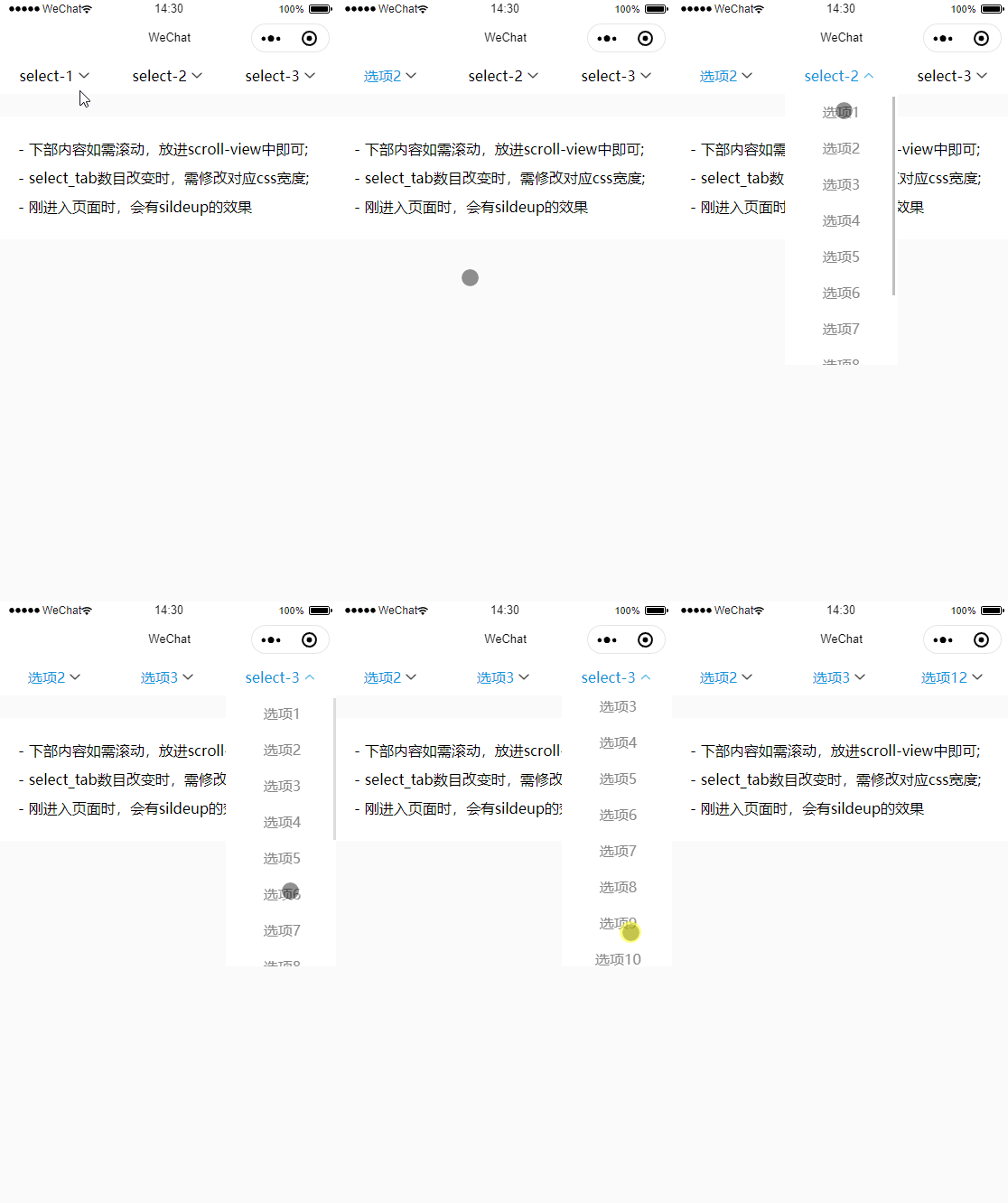
下面就直接看具体实现了嗷!
index.wxml
<view class="contain">

	<view class="select_box" wx:for="{{ selectList }}" wx:key="">

		<view class="select_tab {{ showIndex == index ? 'active' : '' }} {{item.active?'active':''}}" data-id="{{index}}" bindtap="chooseTab">

			<view>{{ item.active || item.name }}</view>

			<img src="../../images/arrow_down.png" class="arrow" wx:if="{{ showIndex != index }}">

			<img src="../../images/arrow_up.png" class="arrow" wx:if="{{ showIndex == index }}">

		</view>

		<scroll-view scroll-y="" class="option_list {{ showIndex == index ? 'slidedown' : 'slideup'}}">

			<view wx:for="{{ item.list }}" wx:for-item="val" wx:for-index="idx" wx:key="val.id" class="option_item {{item.active == val.content?'active_option':''}}" data-index="{{index}}" data-value="{{val.content}}" bindtap="chooseOption">{{ val.content }}</view>

		</scroll-view>

	</view>

</view>
index.wxss
page{

	background-color: #fafafa;

}

.contain{

	display: flex;

}

.select_box{

	line-height: 80rpx;

}

.select_tab{

	width: 250rpx;

	background-color: #fff;

	display: flex;

	justify-content: center;

	align-items: center;

	position: relative;

	z-index: 20;

}

.option_list{

	width: 250rpx;

	background-color: #fff;

	position: absolute;

	z-index: 10;

}

.option_item{

	color: #888;

	text-align: center;

}

.arrow{

	width: 45rpx;

	height: 45rpx;

}

.active{

	color: #1296db;

}

.active_option{

	color: #1296db;

	background-color: #e5f2ff;

}

.tips{

	line-height: 2;

	background-color: #fff;

	margin-top: 50rpx;

	padding: 40rpx;

}

/* 动画效果 */

@keyframes slideup {

 from {

	max-height: 600rpx;

 }

 to {

	max-height: 0;

 }

}

.slideup {

	animation: slideup 0.2s ease-in both;

}

@keyframes slidedown {

 from {

	max-height: 0;

 }

 to {

	max-height: 600rpx;

 }

}

.slidedown {

	animation: slidedown 0.2s ease-in both;

}
index.js
Page({

  /**

   * 页面的初始数据

   */

    data: {

		selectList: [

			{

				name: 'select-1',

				list: [

					{ id: 1, content: '选项1' },

					{ id: 1, content: '选项2' },

					{ id: 1, content: '选项3' },

					{ id: 1, content: '选项4' },

					{ id: 1, content: '选项5' },

					{ id: 1, content: '选项6' },

					{ id: 1, content: '选项7' },

					{ id: 1, content: '选项8' }

				],

			},

			{

				name: 'select-2',

				list: [

					{ id: 1, content: '选项1' },

					{ id: 1, content: '选项2' },

					{ id: 1, content: '选项3' },

					{ id: 1, content: '选项4' },

					{ id: 1, content: '选项5' },

					{ id: 1, content: '选项6' },

					{ id: 1, content: '选项7' },

					{ id: 1, content: '选项8' },

					{ id: 1, content: '选项9' },

					{ id: 1, content: '选项10' }

				]

			},

			{

				name: 'select-3',

				list: [

					{ id: 1, content: '选项1' },

					{ id: 1, content: '选项2' },

					{ id: 1, content: '选项3' },

					{ id: 1, content: '选项4' },

					{ id: 1, content: '选项5' },

					{ id: 1, content: '选项6' },

					{ id: 1, content: '选项7' },

					{ id: 1, content: '选项8' },

					{ id: 1, content: '选项9' },

					{ id: 1, content: '选项10' },

					{ id: 1, content: '选项11' },

					{ id: 1, content: '选项12' },

					{ id: 1, content: '选项13' },

					{ id: 1, content: '选项14' }

				]

			}

		],

		showIndex: -1,

	},

	// 选中select_tab

	chooseTab(e){

		let index = e.currentTarget.dataset.id;

		if(index !== this.data.showIndex){

			this.setData({

				showIndex: index

			})

		}else{

			// 再次点击应该收起

			this.setData({

				showIndex: -1

			})

		}

	},

	// 选中选项

	chooseOption(e){

		let val = e.currentTarget.dataset.value,

			idx = e.currentTarget.dataset.index;

		this.setData({

			[`selectList[${idx}].active`]: val,

			showIndex: -1

		});

	}

})
完毕!希望有帮助,有问题请多多指出,菜鸡将不胜感激~

微信小程序-顶部下拉菜单实现的更多相关文章
- 微信小程序禁止下拉_解决小程序下拉出现空白的情况
微信小程序禁止下拉 在微信小程序中,用力往下拉动,页面顶部会出现一段空白的地方. 产品的需求不太允许这么做,会影响用户体验,查看文档发现可以使用enablePullDownRefresh这属性来实现, ...
- 微信小程序的下拉刷新
微信小程序的下拉刷新:在page的js文件中有监听用户下拉刷新的处理函数onPullDownRefresh:function(){} //js文件中自带的处理函数,在onUnload下面,注意不要重复 ...
- 小程序多级下拉菜单demo
小程序多级下拉菜单demo - CSDN博客 https://blog.csdn.net/github_39371177/article/details/80251211
- 微信小程序-自定义下拉刷新
最近给别个公司做技术支持,要实现微信小程序上拉刷新与下拉加载更多 微信给出的接口不怎么友好,最终想实现效果类似QQ手机版 ,一共3种下拉刷新状态变化,文字+图片+背景颜色 最终实现后的效果(这里提示有 ...
- 微信小程序-页面下拉
微信小程序当滑动到最顶部和最底部时,继续下拉,会将整个页面拉下去或者拉上去,本来以为是客户端自有的特性,就没去管他,直到我的禅道出现了这个记录... 其实这个问题是可以解决的,只需要在你不想出现在此情 ...
- 微信小程序开发之下拉菜单
实现功能:点击维保人员,调出下拉菜单.选择子菜单时,显示右边的图标表示选中,并进行赋值并进行搜索筛选 Wxml: <view class="dtclass" bindtap= ...
- 微信小程序iOS下拉白屏晃动,坑坑坑
感觉ios的小程序每个页面都可以下拉出现白屏 有时页面带有滑动的属性会跟着晃动,体验不是很好 解决办法: 先禁止页面下拉 <config> { navigationBarTitleText ...
- 微信小程序:下拉刷新
下拉刷新 1.需要在json文件中,设置"enablePullDownRefresh": true,表示该页面使用下拉刷新 2.在微信内置函数onPullDownRefresh中进 ...
- 【微信小程序】下拉刷新真机测试无效
根据文档的描述,做上拉加载时直接实现页面的onReachBottom()函数即可.但是要做下拉刷新时,除了实现onPullDownRefresh()函数外,还必须要在app.json中配置开启enab ...
- 微信小程序picker下拉绑定数据
页面部分 <picker mode = "selector" bindchange="bindPickerChange" value="{{pr ...
随机推荐
- zabbix(历史数据保留时长和趋势存储时间的区别)
zabbix(历史数据保留时长和趋势存储时间的区别)? zabbix(历史数据保留时长和趋势存储时间分别影响着哪里)? 001.影响grafana 数据展示的是历史数据还是趋势数据? 等把<历史 ...
- golang中自带base64编码和解码
package main import ( "encoding/base64" "fmt" "log" ) func main() { in ...
- pgsql给表重命名
alter table "pavement_damage_dtl_temp" rename to "pavement_damage_dtl"; 搜索 复制
- lnmp 修改MySQL默认密码
wget http://soft.vpser.net/lnmp/ext/reset_mysql_root_password.sh;sh reset_mysql_root_password.sh 执行命 ...
- lua中定义变量用and和or连接
原文链接 最近在写代码中看到lua定义变量有local a = value1 and value2的操作,有些疑问,在此记录一下:当连接两个操作数时,1.对于运算符and,假设它的第一个操作数为假,就 ...
- 20191317Exp3-免杀原理与实践
20191317Exp3-免杀原理与实践 基础问题回答 1.1 杀软是如何检测出恶意代码的? 基于特征码进行检测:杀毒软件的病毒库记录了一些恶意软件的特征码,一段特征码就是一段或多段数据.如果一个可执 ...
- python菜鸟学习: 2.列表操作
# -*- coding: utf-8 -*-# 列表操作names = ["LiSi", "ZhangSan", "WangWu"]pri ...
- 使用端口排查解决启动Tomcat端口被占问题
有时候在eclipse中启动Tomcat或启动纯净版的Tomcat会出现端口被占的问题,下面菜鸟小编带大家进行端口排查解决问题.(下面假设是我的80端口被占了,如果你不知道你的Tomcat端口是多少就 ...
- Dapper修改
<table class="table table-bordered"> <tr> <td>商品名称:</td> <td> ...
- Idea提交文件时,添加不需要提交的文件至.gitignore文件中
1.在Idea中,依次打开File ---->Setting ---> Editor --->File Types 2.在当前编辑栏下方找到Ignore files and fold ...