
Python-tomorrow应用于UI自动化的简单使用
一、简介
tomorrow属于第三方的一个模块,使用threads方法作为装饰器去修饰一个普通的函数,使其可以达到并发效果。使用起来非常简单。
二、安装
- pip install tomorrow
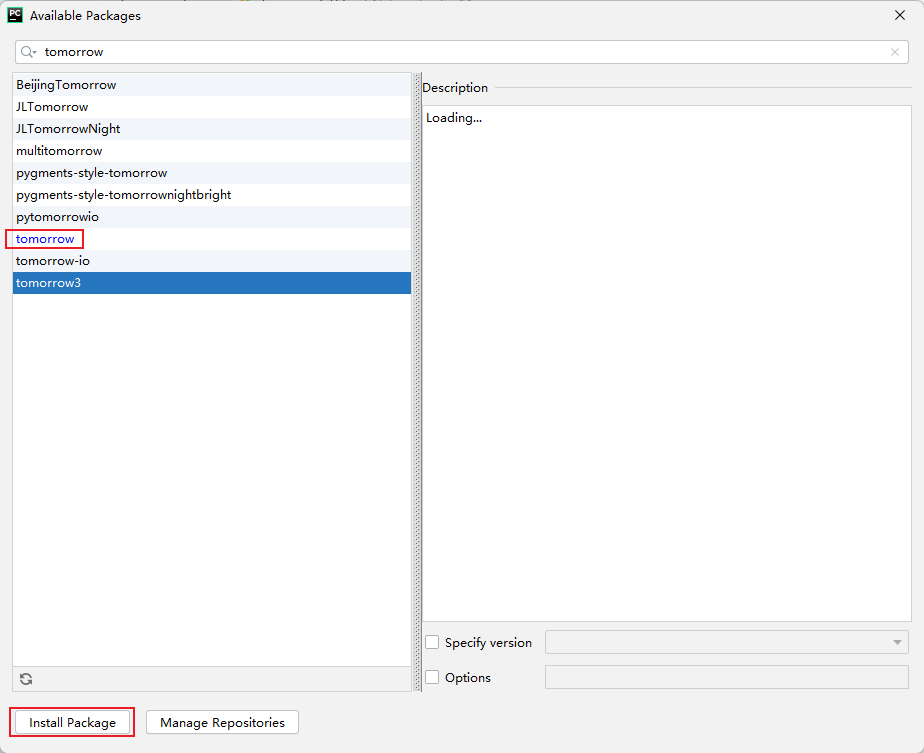
- 使用Pycharm安装
三、使用
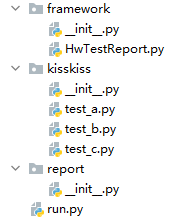
1、项目结构
2、test_a.py
# -*- coding:UTF-8 -*-

import unittest

from selenium import webdriver

from time import sleep

'''

A 用例

'''

class Test_aa(unittest.TestCase):

    """AA"""

    @classmethod

    def setUpClass(self):

        global driver

        driver = webdriver.Chrome()

        driver.get("https://www.cnblogs.com/TSmagic/")

    def test_a_openurl(self):

        print("我是a")

        driver.quit()
其余两个用例与此相同,复制即可
3、run.py
# coding=utf-8

import unittest

from framework.HwTestReport import HTMLTestReport

from BeautifulReport import BeautifulReport

from tomorrow import threads

import datetime

import time

import os

# 定义测试报告名称

now_time = str(datetime.datetime.now().strftime('%Y%m%d%H%M'))

report_name = "report_" + now_time

def test_suits():

    # 加载所有测试用例

    discover = unittest.defaultTestLoader.discover("kisskiss", pattern="test_*.py")

    return discover

# 普通执行

def run_inorder():

    suite = unittest.defaultTestLoader.discover("kisskiss", pattern="test_*.py")

    report_abspath = os.path.join("report", f"{report_name}.html")

    with open(report_abspath, 'wb') as f:  # 改为with open 格式

        HTMLTestReport(stream=f, verbosity=2, images=True, title='UI自动化-测试报告', description='tomorrow',

                        tester='莲(Lit)').run(suite)

# 线程数

@threads(3)

def run(test_suit):

    result = BeautifulReport(test_suit)

    result.report(filename=f'{report_name}.html', description='tomorrow', log_path='report')

if __name__ == "__main__":

    t_bg = time.time()

    run_inorder()  # 普通执行

    # cases = test_suits()

    # for i in cases:

    #     run(i)  # 执行测试用例,生成报告

    t_fs = time.time()

    print("耗时:%.2f秒" %(t_fs - t_bg))
四、测试结果
自行测试比较,O(∩_∩)O哈哈~

Python-tomorrow应用于UI自动化的简单使用的更多相关文章
- airtest自动化中的poco+python连接手机实现ui自动化
airtest:http://airtest.netease.com/docs/docs_AirtestIDE-zh_CN/index.html官网地址 AirtestIDE:跨平台的UI自动化测试编 ...
- ATOMac - 基于Python的Mac应用Ui自动化库
ATOMacTest 一.缘 起 近期工作需要对一款Mac端应用实现常用功能的自动化操作,同事推荐ATOMac这款工具,这几天简单研究了下,同时也发现现网介绍ATOMac的资料非常有限,故在此记录下A ...
- Python Selenium 搭建Web UI自动化
Python搭建UI自动化环境 下载Python3 Python官网 PyCharm 环境配置 安装Python 勾选Add Python to PATH,一直下一步. 验证:CMD输入Python ...
- [python]pytest实现WEB UI自动化
前言:其实这篇写的是pytest的测试框架运用,实现自动化和https://www.cnblogs.com/Jack-cx/p/9357658.html 原理一致 1.为啥不用unittest Pyt ...
- Python—UI自动化完整实战
实战项目 均来源于互联网 测试报告2017年11月29日优化后的测试报告:https://github.com/defnngj/HTMLTestRunner 1.项目概述: 本实战已126邮箱为例子进 ...
- uiautomator +python 安卓UI自动化尝试
使用方法基本说明:https://www.cnblogs.com/mliangchen/p/5114149.html,https://blog.csdn.net/Eugene_3972/article ...
- (appium+python)UI自动化_09_unittest批量运行测试用例&生成测试报告
前言 上篇文章[(appium+python)UI自动化_08_unittest编写测试用例]讲到如何使用unittets编写测试用例,并执行测试文件.接下来讲解下unittest如何批量执行测试文件 ...
- Python结合Pywinauto 进行 Windows UI 自动化
转:Python结合Pywinauto 进行 Windows UI 自动化 https://blog.csdn.net/z_johnny/article/details/52778064 说明:Pyw ...
- Python UI自动化
Python3--Uiautomator2--Pytest--Alure使用 官方源码GitHub地址:https://github.com/openatx/uiautomator2 介绍 uiaut ...
- 完成一段简单的Python程序,用于实现一个简单的加减乘除计算器功能
#!/bin/usr/env python#coding=utf-8'''完成一段简单的Python程序,用于实现一个简单的加减乘除计算器功能'''try: a=int(raw_input(" ...
随机推荐
- 中国移动光猫(吉比特h2-3S)超级用户名与密码
超级用户名 CMCCAdmin 密码 aDm8H%MdA
- The Ultimate Guide to Dynamics 365 Pricing and Licensing
Microsoft Dynamics 365 integrates powerful ERP and CRM capabilities in the cloud to provide busi ...
- element表格样式修改
HTML代码: <el-table :data="tableData" style="width: 100%" border :row-class-nam ...
- Unity安卓端文件写在外部设置
- pytorch CrossEntropyLoss() 默认转换one-hot编码
import torchpredict = torch.randn((4,3))predict = torch.nn.functional.softmax(predict,dim = 1)target ...
- Matlab笔记--Matlab概述(初登场)
Matlab概述 安装MATLAB教程 可以参考这里:https://www.cnblogs.com/sixuwuxian/p/15858196.html Matlab的启动 右键图标,选择属性,可以 ...
- 对于jsp页面中内嵌Java代码失败的解决方法(总是报出jsp类无法编译的错误)
准备好接收奥!解决方法来啦! 在我这几天查看了好几遍内嵌的Java代码之后,没有发现什么语法上面的错误,看来错误应该就是出现在环境上面了,或者是有什么我没有注意到的小细节.还好,终于将"罪魁 ...
- Linux & 标准C语言学习 <DAY8_2>
一.函数 Function 一段具有某一项功能的代码集合,是C语言管理代码的最小单位 把代码封装成一个个函数,方便管理和调用函数 1.函数分类 标准库函数: ...
- Goravel ORM 新增模型关联,用 Golang 写关联也可以跟 Laravel 一样简单
关于 Goravel Goravel 是一个功能完备.具有良好扩展能力的 Web 应用程序框架.作为一个起始脚手架帮助 Golang 开发者快速构建自己的应用.框架风格与 Laravel 保持一致,让 ...
- java多线程--6 死锁问题 锁Lock
java多线程--6 死锁问题 锁Lock 死锁问题 多个线程互相抱着对方需要的资源,然后形成僵持 死锁状态 package com.ssl.demo05; public class DeadLock ...