
SAP Easy tree
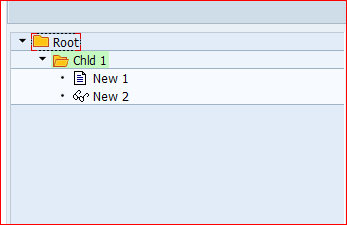
*&---------------------------------------------------------------------*


*& Include SIMPLE_TREE_CONTROL_DEMOTOP                                 *

*&                                                                     *

*&---------------------------------------------------------------------*

REPORT SAPSIMPLE_TREE_CONTROL_DEMO MESSAGE-ID TREE_CONTROL_MSG.

  CLASS LCL_APPLICATION DEFINITION DEFERRED.

  CLASS CL_GUI_CFW DEFINITION LOAD.

  TYPES: NODE_TABLE_TYPE LIKE STANDARD TABLE OF MTREESNODE

           WITH DEFAULT KEY.

* CAUTION: MTREESNODE is the name of the node structure which must

* be defined by the programmer. DO NOT USE MTREESNODE!

  DATA: G_APPLICATION TYPE REF TO LCL_APPLICATION,

        G_CUSTOM_CONTAINER TYPE REF TO CL_GUI_CUSTOM_CONTAINER,

        G_TREE TYPE REF TO CL_GUI_SIMPLE_TREE,

        G_OK_CODE TYPE SY-UCOMM.

* Fields on Dynpro 100

  DATA: G_EVENT(30),

        G_NODE_KEY TYPE TV_NODEKEY.

CONSTANTS:

  BEGIN OF c_nodekey,

    root   type tv_nodekey value 'Root',                    "#EC NOTEXT

    child1 TYPE tv_nodekey VALUE 'Child1',                  "#EC NOTEXT

*    child2 type tv_nodekey value 'Child2',                  "#EC NOTEXT

    new1   TYPE tv_nodekey VALUE 'New1',                    "#EC NOTEXT

    new2   TYPE tv_nodekey VALUE 'New2',                    "#EC NOTEXT

*    new3   type tv_nodekey value 'New3',                    "#EC NOTEXT

*    new4   type tv_nodekey value 'New4',                    "#EC NOTEXT

  END OF c_nodekey.

*** INCLUDE SIMPLE_TREE_CONTROL_DEMOTOP
*----------------------------------------------------------------------*

*   INCLUDE SIMPLE_TREE_CONTROL_DEMOCL1                                *

*----------------------------------------------------------------------*

CLASS LCL_APPLICATION DEFINITION.

  PUBLIC SECTION.

    METHODS:

      HANDLE_NODE_DOUBLE_CLICK

        FOR EVENT NODE_DOUBLE_CLICK

        OF CL_GUI_SIMPLE_TREE

        IMPORTING NODE_KEY,

      HANDLE_EXPAND_NO_CHILDREN

        FOR EVENT EXPAND_NO_CHILDREN

        OF CL_GUI_SIMPLE_TREE

        IMPORTING NODE_KEY.

ENDCLASS.

CLASS LCL_APPLICATION IMPLEMENTATION.

  METHOD  HANDLE_NODE_DOUBLE_CLICK.

    " this method handles the node double click event of the tree

                                       " control instance

    " show the key of the double clicked node in a dynpro field

    G_EVENT = 'NODE_DOUBLE_CLICK'.

    G_NODE_KEY = NODE_KEY.

  ENDMETHOD.

  METHOD HANDLE_EXPAND_NO_CHILDREN.

    " this method handles the expand no children event of the tree

                                       " control instance

    DATA: NODE_TABLE TYPE NODE_TABLE_TYPE,

          NODE TYPE MTREESNODE.

    " show the key of the double clicked node in a dynpro field

    G_EVENT = 'EXPAND_NO_CHILDREN'.

    G_NODE_KEY = NODE_KEY.

    if node_key = 'Child1'.

* add two nodes to the tree control (the children of 'Child1')

* Node with key 'New1'

      CLEAR NODE.

      NODE-NODE_KEY = c_nodekey-New1.

      NODE-RELATKEY = c_nodekey-Child1.

      NODE-RELATSHIP = CL_GUI_SIMPLE_TREE=>RELAT_LAST_CHILD.

      NODE-ISFOLDER = ' '.

      NODE-TEXT = 'New1'(ne1).

      APPEND NODE TO NODE_TABLE.

* Node with key 'New2'

      CLEAR NODE.

      NODE-NODE_KEY = c_nodekey-New2.

      NODE-RELATKEY = c_nodekey-Child1.

      NODE-RELATSHIP = CL_GUI_SIMPLE_TREE=>RELAT_LAST_CHILD.

      NODE-N_IMAGE = '@10@'.

      NODE-EXPANDER = ' '.

      NODE-TEXT = 'New2'(ne2).

      APPEND NODE TO NODE_TABLE.

      CALL METHOD G_TREE->ADD_NODES

        EXPORTING

          TABLE_STRUCTURE_NAME = 'MTREESNODE'

          NODE_TABLE           = NODE_TABLE

        EXCEPTIONS

          FAILED                         = 1

          ERROR_IN_NODE_TABLE            = 2

          DP_ERROR                       = 3

          TABLE_STRUCTURE_NAME_NOT_FOUND = 4

          OTHERS                         = 5.

      IF SY-SUBRC <> 0.

        MESSAGE A000.

      ENDIF.

    endif.

  ENDMETHOD.

ENDCLASS.
*-------------------------------------------------------------------

***INCLUDE simple_tree_control_demoO01 .

*-------------------------------------------------------------------

*&---------------------------------------------------------------------*

*&      Module  PBO_0400  OUTPUT

*&---------------------------------------------------------------------*

*       text

*----------------------------------------------------------------------*

MODULE PBO_100 OUTPUT.

  SET PF-STATUS 'MAIN'.

  IF G_TREE IS INITIAL.

    " The Tree Control has not been created yet.

    " Create a Tree Control and insert nodes into it.

    PERFORM CREATE_AND_INIT_TREE.

  ENDIF.

ENDMODULE.                 " PBO_0100  OUTPUT

*** INCLUDE simple_tree_control_demoO01
*-------------------------------------------------------------------

***INCLUDE simple_tree_control_demoI01 .

*-------------------------------------------------------------------

*&---------------------------------------------------------------------*

*&      Module  PAI_0400  INPUT

*&---------------------------------------------------------------------*

*       text

*----------------------------------------------------------------------*

MODULE PAI_100 INPUT.

  data: return_code type i.

* CL_GUI_CFW=>DISPATCH must be called if events are registered

* that trigger PAI

* this method calls the event handler method of an event

  CALL METHOD CL_GUI_CFW=>DISPATCH

    importing return_code = return_code.

  if return_code <> cl_gui_cfw=>rc_noevent.

    " a control event occured => exit PAI

    clear g_ok_code.

    exit.

  endif.

  CASE G_OK_CODE.

    when 'TEST'. call method g_tree->expand_node

      exporting node_key = c_nodekey-New1.

    WHEN 'BACK'. " Finish program

      IF NOT G_CUSTOM_CONTAINER IS INITIAL.

        " destroy tree container (detroys contained tree control, too)

        CALL METHOD G_CUSTOM_CONTAINER->FREE

          EXCEPTIONS

            CNTL_SYSTEM_ERROR = 1

            CNTL_ERROR        = 2.

        IF SY-SUBRC <> 0.

          MESSAGE A000.

        ENDIF.

        CLEAR G_CUSTOM_CONTAINER.

        CLEAR G_TREE.

      ENDIF.

      LEAVE PROGRAM.

  ENDCASE.

* CAUTION: clear ok code!

  CLEAR G_OK_CODE.

ENDMODULE.                 " PAI_0100  INPUT

*** INCLUDE simple_tree_control_demoI01
*-------------------------------------------------------------------

***INCLUDE simple_tree_control_demoF01 .

*-------------------------------------------------------------------

*&---------------------------------------------------------------------*

*&      Form  CREATE_AND_INIT_TREE

*&---------------------------------------------------------------------*

*       text

*----------------------------------------------------------------------*

*  -->  p1        text

*  <--  p2        text

*----------------------------------------------------------------------*

FORM CREATE_AND_INIT_TREE.

  DATA: NODE_TABLE TYPE NODE_TABLE_TYPE,

        EVENTS TYPE CNTL_SIMPLE_EVENTS,

        event type cntl_simple_event.

* create a container for the tree control

  CREATE OBJECT G_CUSTOM_CONTAINER

    EXPORTING

      " the container is linked to the custom control with the

      " name 'TREE_CONTAINER' on the dynpro

      CONTAINER_NAME = 'TREE_CONTAINER'

    EXCEPTIONS

      CNTL_ERROR = 1

      CNTL_SYSTEM_ERROR = 2

      CREATE_ERROR = 3

      LIFETIME_ERROR = 4

      LIFETIME_DYNPRO_DYNPRO_LINK = 5.

  IF SY-SUBRC <> 0.

    MESSAGE A000.

  ENDIF.

* create a tree control

  CREATE OBJECT G_TREE

    EXPORTING

      PARENT              = G_CUSTOM_CONTAINER

      " single node selection is used

      NODE_SELECTION_MODE = CL_GUI_SIMPLE_TREE=>NODE_SEL_MODE_SINGLE

    EXCEPTIONS

      LIFETIME_ERROR              = 1

      CNTL_SYSTEM_ERROR           = 2

      CREATE_ERROR                = 3

      FAILED                      = 4

      ILLEGAL_NODE_SELECTION_MODE = 5.

  IF SY-SUBRC <> 0.

    MESSAGE A000.

  ENDIF.

* define the events which will be passed to the backend

  " node double click

  event-eventid = CL_GUI_SIMPLE_TREE=>EVENTID_NODE_DOUBLE_CLICK.

  event-appl_event = 'X'. " process PAI if event occurs

  APPEND event to events.

  " expand no children

  event-eventid = CL_GUI_SIMPLE_TREE=>EVENTID_EXPAND_NO_CHILDREN.

  event-appl_event = 'X'.

  APPEND event to events.

  CALL METHOD G_TREE->SET_REGISTERED_EVENTS

    EXPORTING

      EVENTS = EVENTS

    EXCEPTIONS

      CNTL_ERROR                = 1

      CNTL_SYSTEM_ERROR         = 2

      ILLEGAL_EVENT_COMBINATION = 3.

  IF SY-SUBRC <> 0.

    MESSAGE A000.

  ENDIF.

* assign event handlers in the application class to each desired event

  SET HANDLER G_APPLICATION->HANDLE_NODE_DOUBLE_CLICK FOR G_TREE.

  SET HANDLER G_APPLICATION->HANDLE_EXPAND_NO_CHILDREN FOR G_TREE.

* add some nodes to the tree control

* NOTE: the tree control does not store data at the backend. If an

* application wants to access tree data later, it must store the

* tree data itself.

  PERFORM BUILD_NODE_TABLE USING NODE_TABLE.

* node_table_structure_name     = 'MTREESNODE'

*   A programmer using the tree control must create a structure in the

*   dictionary. This structure must include the structure TREEV_NODE

*   and must contain a character field with the name 'TEXT'.

  CALL METHOD G_TREE->ADD_NODES

    EXPORTING

      TABLE_STRUCTURE_NAME = 'MTREESNODE'

      NODE_TABLE           = NODE_TABLE

    EXCEPTIONS

      FAILED                         = 1

      ERROR_IN_NODE_TABLE            = 2

      DP_ERROR                       = 3

      TABLE_STRUCTURE_NAME_NOT_FOUND = 4

      OTHERS                         = 5.

  IF SY-SUBRC <> 0.

    MESSAGE A000.

  ENDIF.

ENDFORM.                    " CREATE_AND_INIT_TREE

*&---------------------------------------------------------------------*

*&      Form  build_node_table

*&---------------------------------------------------------------------*

*       text

*----------------------------------------------------------------------*

*  -->  p1        text

*  <--  p2        text

*----------------------------------------------------------------------*

FORM BUILD_NODE_TABLE

  USING

    NODE_TABLE TYPE NODE_TABLE_TYPE.

  DATA: NODE LIKE MTREESNODE.

* Build the node table.

* Caution: The nodes are inserted into the tree according to the order

* in which they occur in the table. In consequence, a node must not

* occur in the node table before its parent node.

* Node with key 'Root'

  NODE-NODE_KEY = c_nodekey-Root.

                            " Key of the node

  CLEAR NODE-RELATKEY.      " Special case: A root node has no parent

  CLEAR NODE-RELATSHIP.     " node.

  NODE-HIDDEN = ' '.        " The node is visible,

  NODE-DISABLED = ' '.      " selectable,

  NODE-ISFOLDER = 'X'.      " a folder.

  CLEAR NODE-N_IMAGE.       " Folder-/ Leaf-Symbol in state "closed":

                            " use default.

  CLEAR NODE-EXP_IMAGE.     " Folder-/ Leaf-Symbol in state "open":

                            " use default

  CLEAR NODE-EXPANDER.      " see below.

  NODE-TEXT = 'Root'(roo).

  APPEND NODE TO NODE_TABLE.

* Node with key 'Child1'

  NODE-NODE_KEY = c_nodekey-Child1.

                            " Key of the node

  " Node is inserted as child of the node with key 'Root'.

  NODE-RELATKEY = c_nodekey-Root.

  NODE-RELATSHIP = CL_GUI_SIMPLE_TREE=>RELAT_LAST_CHILD.

  NODE-HIDDEN = ' '.

  NODE-DISABLED = ' '.

  NODE-ISFOLDER = 'X'.

  CLEAR NODE-N_IMAGE.

  CLEAR NODE-EXP_IMAGE.

  NODE-EXPANDER = 'X'. " The node is marked with a '+', although

                       " it has no children. When the user clicks on the

                       " + to open the node, the event

                       " expand_no_children is fired. The programmer can

                       " add the children of the

                       " node within the event handler of the

                       " expand_no_children event

                       " (see method handle_expand_no_children

                       " of class lcl_application)

  NODE-TEXT = 'Child1'(ch1).

  NODE-STYLE = CL_GUI_SIMPLE_TREE=>STYLE_EMPHASIZED_POSITIVE.

  APPEND NODE TO NODE_TABLE.

ENDFORM.                    " build_node_table

*** INCLUDE simple_tree_control_demoF01
  START-OF-SELECTION.

* create the application object

* this object is needed to handle the ABAP Objects Events of

* Controls

  CREATE OBJECT G_APPLICATION.

  SET SCREEN 100.
SAP Easy tree的更多相关文章
- HDU 4359——Easy Tree DP?——————【dp+组合计数】
Easy Tree DP? Time Limit: 10000/5000 MS (Java/Others) Memory Limit: 65536/32768 K (Java/Others)To ...
- HDU 4359 Easy Tree DP?
Easy Tree DP? Time Limit: 10000/5000 MS (Java/Others) Memory Limit: 65536/32768 K (Java/Others)To ...
- SAP Column tree
code as bellow *&---------------------------------------------------------------------* *& I ...
- HDU 4359 Easy Tree DP? 带权二叉树的构造方法 dp
题意: 给定n deep 1.构造一个n个节点的带权树,且最大深度为deep,每一个节点最多仅仅能有2个儿子 2.每一个节点的值为2^0, 2^1 ··· 2^(n-1) 随意两个节点值不能同样 3 ...
- HDU 4359 Easy Tree DP? 组合数学+动归
题意:定义一种树,每个节点的权值都是20到2n-1,每个权值出现一次,每个节点的左子树的权值和小于右子树,除非只有一个子树.给你n和d,问有n个节点且恰好深度是d的这种树有多少种. 比赛的时候我没有做 ...
- SAP Tree editor(树形结构)
SAP List Tree 效果 源代码 *&---------------------------------------------------------------------* *& ...
- 更改SAP GUI 登陆背景
您也可以定制初始屏幕(SAP Easy Access): 所有用户的全局设置:o 更改位于初始屏幕右侧的登录 - 如果希望将登录放置在初始屏幕右侧,请按如下处理: 使用事务 SW ...
- SAP事务码 一
SE80 -- edit source code. SE24 -- class create or display. SFP -- created and maintained independent ...
- 2 Configuring SAP ERP Sales and Distribution -introduction to SAP
First Steps in SAPWe’ll now discuss some of the basic menus, screens, and transactions that you need ...
随机推荐
- mysql查询 if判断、case语句的使用等
一. 查询的数字转换为中文返回前端 1. 如果是0或1表状态等,可用: IF(字段 = 0, '否', '是') AS xxx 2. 如果是多个值,比如1,2,3可用: ELT(字段, '计划治理', ...
- Python 报错 ValueError list.remove(x) x not in list 解决办法
平时开发 Python 代码过程中,经常会遇到这个报错: ValueError: list.remove(x): x not in list 错误提示信息也很明确,就是移除的元素不在列表之中. 比如: ...
- 2021.11.16 P2375 [NOI2014] 动物园(EXKMP+差分)
2021.11.16 P2375 [NOI2014] 动物园(EXKMP+差分) https://www.luogu.com.cn/problem/P2375 题意: PS:这道神题的背景让人疑惑,重 ...
- 2021.11.02 eleveni的水省选题的记录
2021.11.02 eleveni的水省选题的记录 因为eleveni比较菜,所以eleveni决定从绿题开始水 --实际上菜菜的eleveni连绿题都不一定能水过/忍不住哭了 [P2217 HAO ...
- pgpool-II 4.3 中文手册-前言
什么是 Pgpool-II? Pgpool II 管理一个 PostgreSQL 服务器池,以实现单个 PostgreSQL 安装无法实现的一些功能.这些功能包括: 高可用 Pgpool-II 通过使 ...
- XCTF练习题---WEB---simple_js
XCTF练习题---WEB---simple_js flag:Cyberpeace{786OsErtk12} 解题步骤: 1.观察题目,打开场景 2.打开该场景后发现是一个登录界面,随便输入一个密码, ...
- cookie、sessionStorage、localStorage的区别?
数据存储位置 三者都是存储在游览器本地的 区别在于cookie是服务器端写入的,而sessionStorage.localStorage是由前端写入的 生命周期 cookie的生命周期是由服务器端写入 ...
- 小干货:Linux 系统的备份恢复
点击上方"开源Linux",选择"设为星标" 回复"学习"获取独家整理的学习资料! tar 命令 副本(本机备份整个系统,以后还原还是还原到 ...
- JavaScript 数据结构与算法2(队列和双端队列)
学习数据结构的 git 代码地址: https://gitee.com/zhangning187/js-data-structure-study 1.队列和双端队列 队列和栈非常类似,但是使用了与 后 ...
- linux的简介与安装
linux简介: https://www.cnblogs.com/pyyu/p/9277153.html Linux就是个操作系统:它和Windows XP.Windows7.8.10什么的一样就是一 ...