
SQL逻辑查询语句执行顺序—练习题
在做练习题之前要重点熟悉select 的执行顺序
1.SELECT语句关键字的定义顺序
SELECT DISTINCT <select_list>

FROM <left_table>

<join_type> JOIN <right_table>

ON <join_condition>

WHERE <where_condition>

GROUP BY <group_by_list>

HAVING <having_condition>

ORDER BY <order_by_condition>

LIMIT <limit_number>
2.SELECT语句关键字的执行顺序
(7)     SELECT

(8)     DISTINCT <select_list>

(1)     FROM <left_table>

(3)     <join_type> JOIN <right_table>

(2)     ON <join_condition>

(4)     WHERE <where_condition>

(5)     GROUP BY <group_by_list>

(6)     HAVING <having_condition>

(9)     ORDER BY <order_by_condition>

(10)    LIMIT <limit_number>
1.先从库,表里找
2.on 后面加两表连接的限制条件
3.将两表连接起来(内左右全等)
4.从约束条件where里过滤出数据
5.然后交给group by 进行分组,
6.分完组后 用having 过滤
7.之后才是运行select 后面的语句,
8.distinct进行去重
9.接着轮到order by 排序
10.limit 最后运行
练习题
题目
1、查询所有的课程的名称以及对应的任课老师姓名

2、查询学生表中男女生各有多少人

3、查询物理成绩等于100的学生的姓名

4、查询平均成绩大于八十分的同学的姓名和平均成绩

5、查询所有学生的学号,姓名,选课数,总成绩

6、 查询姓李老师的个数

7、 查询没有报李平老师课的学生姓名

8、 查询物理课程比生物课程高的学生的学号

9、 查询没有同时选修物理课程和体育课程的学生姓名

10、查询挂科超过两门(包括两门)的学生姓名和班级

、查询选修了所有课程的学生姓名

12、查询李平老师教的课程的所有成绩记录

13、查询全部学生都选修了的课程号和课程名

14、查询每门课程被选修的次数

15、查询之选修了一门课程的学生姓名和学号

16、查询所有学生考出的成绩并按从高到低排序(成绩去重)

17、查询平均成绩大于85的学生姓名和平均成绩

18、查询生物成绩不及格的学生姓名和对应生物分数

19、查询在所有选修了李平老师课程的学生中,这些课程(李平老师的课程,不是所有课程)平均成绩最高的学生姓名

20、查询每门课程成绩最好的前两名学生姓名

21、查询不同课程但成绩相同的学号,课程号,成绩

22、查询没学过“叶平”老师课程的学生姓名以及选修的课程名称;

23、查询所有选修了学号为1的同学选修过的一门或者多门课程的同学学号和姓名;

24、任课最多的老师中学生单科成绩最高的学生姓名

题目
建立表
#建立表

/*

 数据导入:

 Navicat Premium Data Transfer

 Source Server         : localhost

 Source Server Type    : MySQL

 Source Server Version : 50624

 Source Host           : localhost

 Source Database       : sqlexam

 Target Server Type    : MySQL

 Target Server Version : 50624

 File Encoding         : utf-8

 Date: 10/21/2016 06:46:46 AM

*/

SET NAMES utf8;

SET FOREIGN_KEY_CHECKS = 0;

-- ----------------------------

--  Table structure for `class`

-- ----------------------------

DROP TABLE IF EXISTS `class`;

CREATE TABLE `class` (

  `cid` int(11) NOT NULL AUTO_INCREMENT,

  `caption` varchar(32) NOT NULL,

  PRIMARY KEY (`cid`)

) ENGINE=InnoDB AUTO_INCREMENT=5 DEFAULT CHARSET=utf8;

-- ----------------------------

--  Records of `class`

-- ----------------------------

BEGIN;

INSERT INTO `class` VALUES ('1', '三年二班'), ('2', '三年三班'), ('3', '一年二班'), ('4', '二年九班');

COMMIT;

-- ----------------------------

--  Table structure for `course`

-- ----------------------------

DROP TABLE IF EXISTS `course`;

CREATE TABLE `course` (

  `cid` int(11) NOT NULL AUTO_INCREMENT,

  `cname` varchar(32) NOT NULL,

  `teacher_id` int(11) NOT NULL,

  PRIMARY KEY (`cid`),

  KEY `fk_course_teacher` (`teacher_id`),

  CONSTRAINT `fk_course_teacher` FOREIGN KEY (`teacher_id`) REFERENCES `teacher` (`tid`)

) ENGINE=InnoDB AUTO_INCREMENT=5 DEFAULT CHARSET=utf8;

-- ----------------------------

--  Records of `course`

-- ----------------------------

BEGIN;

INSERT INTO `course` VALUES ('1', '生物', '1'), ('2', '物理', '2'), ('3', '体育', '3'), ('4', '美术', '2');

COMMIT;

-- ----------------------------

--  Table structure for `score`

-- ----------------------------

DROP TABLE IF EXISTS `score`;

CREATE TABLE `score` (

  `sid` int(11) NOT NULL AUTO_INCREMENT,

  `student_id` int(11) NOT NULL,

  `course_id` int(11) NOT NULL,

  `num` int(11) NOT NULL,

  PRIMARY KEY (`sid`),

  KEY `fk_score_student` (`student_id`),

  KEY `fk_score_course` (`course_id`),

  CONSTRAINT `fk_score_course` FOREIGN KEY (`course_id`) REFERENCES `course` (`cid`),

  CONSTRAINT `fk_score_student` FOREIGN KEY (`student_id`) REFERENCES `student` (`sid`)

) ENGINE=InnoDB AUTO_INCREMENT=53 DEFAULT CHARSET=utf8;

-- ----------------------------

--  Records of `score`

-- ----------------------------

BEGIN;

INSERT INTO `score` VALUES ('1', '1', '1', '10'), ('2', '1', '2', '9'), ('5', '1', '4', '66'), ('6', '2', '1', '8'), ('8', '2', '3', '68'), ('9', '2', '4', '99'), ('10', '3', '1', '77'), ('11', '3', '2', '66'), ('12', '3', '3', '87'), ('13', '3', '4', '99'), ('14', '4', '1', '79'), ('15', '4', '2', '11'), ('16', '4', '3', '67'), ('17', '4', '4', '100'), ('18', '5', '1', '79'), ('19', '5', '2', '11'), ('20', '5', '3', '67'), ('21', '5', '4', '100'), ('22', '6', '1', '9'), ('23', '6', '2', '100'), ('24', '6', '3', '67'), ('25', '6', '4', '100'), ('26', '7', '1', '9'), ('27', '7', '2', '100'), ('28', '7', '3', '67'), ('29', '7', '4', '88'), ('30', '8', '1', '9'), ('31', '8', '2', '100'), ('32', '8', '3', '67'), ('33', '8', '4', '88'), ('34', '9', '1', '91'), ('35', '9', '2', '88'), ('36', '9', '3', '67'), ('37', '9', '4', '22'), ('38', '10', '1', '90'), ('39', '10', '2', '77'), ('40', '10', '3', '43'), ('41', '10', '4', '87'), ('42', '11', '1', '90'), ('43', '11', '2', '77'), ('44', '11', '3', '43'), ('45', '11', '4', '87'), ('46', '12', '1', '90'), ('47', '12', '2', '77'), ('48', '12', '3', '43'), ('49', '12', '4', '87'), ('52', '13', '3', '87');

COMMIT;

-- ----------------------------

--  Table structure for `student`

-- ----------------------------

DROP TABLE IF EXISTS `student`;

CREATE TABLE `student` (

  `sid` int(11) NOT NULL AUTO_INCREMENT,

  `gender` char(1) NOT NULL,

  `class_id` int(11) NOT NULL,

  `sname` varchar(32) NOT NULL,

  PRIMARY KEY (`sid`),

  KEY `fk_class` (`class_id`),

  CONSTRAINT `fk_class` FOREIGN KEY (`class_id`) REFERENCES `class` (`cid`)

) ENGINE=InnoDB AUTO_INCREMENT=17 DEFAULT CHARSET=utf8;

-- ----------------------------

--  Records of `student`

-- ----------------------------

BEGIN;

INSERT INTO `student` VALUES ('1', '男', '1', '理解'), ('2', '女', '1', '钢蛋'), ('3', '男', '1', '张三'), ('4', '男', '1', '张一'), ('5', '女', '1', '张二'), ('6', '男', '1', '张四'), ('7', '女', '2', '铁锤'), ('8', '男', '2', '李三'), ('9', '男', '2', '李一'), ('10', '女', '2', '李二'), ('11', '男', '2', '李四'), ('12', '女', '3', '如花'), ('13', '男', '3', '刘三'), ('14', '男', '3', '刘一'), ('15', '女', '3', '刘二'), ('16', '男', '3', '刘四');

COMMIT;

-- ----------------------------

--  Table structure for `teacher`

-- ----------------------------

DROP TABLE IF EXISTS `teacher`;

CREATE TABLE `teacher` (

  `tid` int(11) NOT NULL AUTO_INCREMENT,

  `tname` varchar(32) NOT NULL,

  PRIMARY KEY (`tid`)

) ENGINE=InnoDB AUTO_INCREMENT=6 DEFAULT CHARSET=utf8;

-- ----------------------------

--  Records of `teacher`

-- ----------------------------

BEGIN;

INSERT INTO `teacher` VALUES ('1', '张磊老师'), ('2', '李平老师'), ('3', '刘海燕老师'), ('4', '朱云海老师'), ('5', '李杰老师');

COMMIT;

SET FOREIGN_KEY_CHECKS = 1;
答案
1、查询所有的课程的名称以及对应的任课老师姓名
select course.cname,teacher.tname

from course

inner join teacher

on course.teacher_id= teacher.tid
2、查询学生表中男女生各有多少人
select gender,count(sid)

from student

group by gender
3、查询物理成绩等于100的学生的姓名
select sname

from student

where sid in

    (   select student_id

        from score

        where num=100 and course_id=2);
select student.sname

from student

where sid in

(select score.student_id

from score

inner join course

on course.cid =score.course_id

where score.num =100 and course.cname="物理");
4、查询平均成绩大于八十分的同学的姓名和平均成绩
select student.sname ,t1.avg_num from student inner join

(select student_id,avg(num)as avg_num from score

group by student_id

having avg(num)>80)as t1 on t1.student_id=student.sid;
5、查询所有学生的学号,姓名,选课数,总成绩
select t1.sid,t1.sname,t2.count_id,t2.sum_num from student as t1 inner join

(select student_id,count(course_id)as count_id,sum(num)as sum_num from score

group by student_id)as t2 on t1.sid= t2.student_id;
6、查询姓李老师的个数
select count(tid) from teacher

where tname regexp "^李.*老师$";
7、 查询没有报李平老师课的学生姓名
select sname from student where sid not in

(select student_id from score

where course_id=2 or course_id=4);
8、 查询物理课程比生物课程高的学生的学号
select t1.student_id from

(select student_id,num from score

where course_id=1)as t1 inner join

(select student_id,num from score

where course_id=2)as t2 on t1.student_id=t2.student_id

where t1.num >t2.num;
9、 查询没有同时选修物理课程和体育课程的学生姓名
select sname from student where sid not in

(select student_id from  score

where course_id =2 or course_id=3

group by student_id

having count(student_id)=2);
10、查询挂科超过两门(包括两门)的学生姓名和班级
select sname,caption from

(select * from student inner join class on student.class_id= class.cid)as t1

where t1.sid in

(select student_id from score

where num<60

group by student_id

having count(student_id)>=2);
11 、查询选修了所有课程的学生姓名
select sname from student where sid in

(select student_id from score

group by student_id

having count(student_id)>=4);
12、查询李平老师教的课程的所有成绩记录
select * from score

where course_id=2 or course_id=4;
#13、查询全部学生都选修了的课程号和课程名
select cid ,cname from course where cid in(

select course_id from score

group by course_id

having count(student_id)=

(select count(sid) from student));
14、查询每门课程被选修的次数
select count(course_id) from score

group by course_id
15、查询只选修了一门课程的学生姓名和学号
select sname,sid from student where sid in

(select student_id from score

group by student_id

having count(student_id)=1);
16、查询所有学生考出的成绩并按从高到低排序(成绩去重)
select distinct(num),student_id from score

group by student_id

order by num DESC;
#17、查询平均成绩大于85的学生姓名和平均成绩
select student.sname,t2.avg_num from student inner join

(select student_id,avg(num)as avg_num from score

group by student_id

having avg(num)>85)as t2 on student.sid= t2.student_id;
18、查询生物成绩不及格的学生姓名和对应生物分数
select student.sname,t2.num from student inner join

(select student_id,num from score

where course_id =1 and num<60)as t2 on student.sid=t2.student_id;
#19、查询在所有选修了李平老师课程的学生中,这些课程(李平老师的课程,不是所有课程)平均成绩最高的学生姓名
select student.sname,max(avg_num) from student inner join

(select student_id,avg(num)as avg_num from score

where course_id=2 or course_id =4

group by student_id

order by avg(num) DESC)as t2 on student.sid=t2.student_id;
20、查询每门课程成绩最好的前两名学生姓名
SELECT

    score.student_id,

    t3.course_id,

    t3.first_num,

    t3.second_num

FROM

    score

INNER JOIN (

    SELECT

        t1.course_id,

        t1.first_num,

        t2.second_num

    FROM

        (

            SELECT

                course_id,

                max(num) first_num

            FROM

                score

            GROUP BY

                course_id

        ) AS t1

    INNER JOIN (

        SELECT

            score.course_id,

            max(num) second_num

        FROM

            score

        INNER JOIN (

            SELECT

                course_id,

                max(num) first_num

            FROM

                score

            GROUP BY

                course_id

        ) AS t ON score.course_id = t.course_id

        WHERE

            score.num < t.first_num

        GROUP BY

            course_id

    ) AS t2 ON t1.course_id = t2.course_id

) AS t3 ON score.course_id = t3.course_id

WHERE

    score.num >= t3.second_num

AND score.num <= t3.first_num

ORDER BY

    course_id;
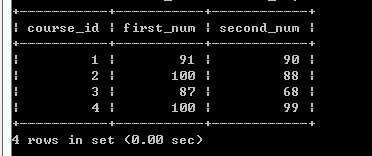
中间过程
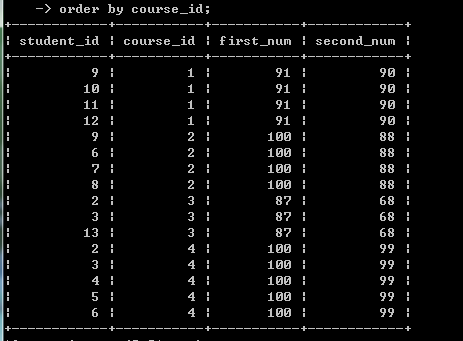
最后查询的结果。说实话这个是看了别人的答案的,抄的,最后的查询的结果有点无语,
总感觉并不是想要的查询,只是在凑表合表
如果真的要查询
select * from score

order by course_id,num DESC;
上面也能看的出来的。绕的头疼
贴上egon老师的链接
http://www.cnblogs.com/linhaifeng/articles/7895711.html
可能我自己写的答案,格式不漂亮,也不完美,可以看看上面的,作业这个还是要自己操手,实在想不出来再看
感谢观看,如有不对,一定要指出。小木在这里谢谢了
SQL逻辑查询语句执行顺序—练习题的更多相关文章
- SQL逻辑查询语句执行顺序 需要重新整理
一.SQL语句定义顺序 1 2 3 4 5 6 7 8 9 10 SELECT DISTINCT <select_list> FROM <left_table> <joi ...
- python 3 mysql sql逻辑查询语句执行顺序
python 3 mysql sql逻辑查询语句执行顺序 一 .SELECT语句关键字的定义顺序 SELECT DISTINCT <select_list> FROM <left_t ...
- mysql第四篇--SQL逻辑查询语句执行顺序
mysql第四篇--SQL逻辑查询语句执行顺序 一.SQL语句定义顺序 SELECT DISTINCT <select_list> FROM <left_table> < ...
- 45、SQL逻辑查询语句执行顺序
一 SELECT语句关键字的定义顺序 SELECT DISTINCT <select_list> FROM <left_table> <join_type> JOI ...
- 第四篇:记录相关操作 SQL逻辑查询语句执行顺序
http://www.cnblogs.com/linhaifeng/articles/7372774.html 一 SELECT语句关键字的定义顺序 SELECT DISTINCT <selec ...
- 9、SQL逻辑查询语句执行顺序
本篇导航: SELECT语句关键字的定义顺序 SELECT语句关键字的执行顺序 准备表和数据 准备SQL逻辑查询测试语句 执行顺序分析 一.SELECT语句关键字的定义顺序 SELECT DISTIN ...
- SQL学习笔记四(补充-1-1)之MySQL单表查询补充部分:SQL逻辑查询语句执行顺序
阅读目录 一 SELECT语句关键字的定义顺序 二 SELECT语句关键字的执行顺序 三 准备表和数据 四 准备SQL逻辑查询测试语句 五 执行顺序分析 一 SELECT语句关键字的定义顺序 SELE ...
- mysql五补充部分:SQL逻辑查询语句执行顺序
一 SELECT语句关键字的定义顺序 SELECT DISTINCT <select_list> FROM <left_table> <join_type> JOI ...
- DAY11-MYSQL补充之SQL逻辑查询语句执行顺序
一 SELECT语句关键字的定义顺序 SELECT DISTINCT <select_list> FROM <left_table> <join_type> JOI ...
- Mysql补充部分:SQL逻辑查询语句执行顺序
一 SELECT语句关键字的定义顺序 SELECT DISTINCT <select_list> FROM <left_table> <join_type> JOI ...
随机推荐
- 开源免费3D CAD软件:FreeCAD
推荐:将 NSDT场景编辑器 加入你的3D开发工具链. FreeCAD是来自法国Matra Datavision公司的一款开源**3D CAD软件, 基于CAD / CAM / CAE几何模型核心,是 ...
- DIV 阴影
<div class="div">111</div> .div { width:200px; height:200px; box-shadow: 0 0 1 ...
- IDEA插件Apifox,一键自动生成接口文档!
有关Apifox软件之前写过一篇文章: 接口测试神器Apifox,亲测好用! 如何一键自动生成数据库文档之前也写过一篇文章: 数据库界的Swagger:一键生成数据库文档! 一.Apifox插件的优势 ...
- C#/.net程序调用python
C#/.net程序调用python C#的优势在于window下的开发,不仅功能强大而且开发周期短.而python则有众多的第三方库,可以避免自己造轮子,利用C#来做界面,而具体实现使用python来 ...
- Solon v2.2.1 发布。向 Graalvm Native 友好靠近
本次更新最重要的是增加了 Solon APT 项目,为更简单的完成 Graalvm Native 打包提供了帮助:其次是增加了 @ProxyComponent 和 @SolonMain 注解:以及优化 ...
- ThreadLocal最终版本
ThreadLocal工作原理 目录 ThreadLocal工作原理 一.官方文档描述 二.为什么使用ThreadLocal 2.1.案例 三.ThreadLocal和syncronized关键字区别 ...
- Python算法教程_中文版书籍 程序员必备 免费下载
Python算法教程_中文版免费下载地址 提取码:55kh 内容简介 · · · · · · 本书用Python语言来讲解算法的分析和设计.本书主要关注经典的算法,但同时会为读者理解基本算法问题和解 ...
- vue 状态类展示使用红绿圆点
vue 状态类展示使用红绿圆点通常对于一些在线.离线类的展示使用图标展示比使用文字描述会更加清晰直观.项目中使用的代码如下: HTML <el-table-column prop="s ...
- 解决CORS跨域问题
首先创建一个实现Filter的cors过滤器 import lombok.extern.slf4j.Slf4j; import org.springframework.context.Applicat ...
- js把一个数组的数据平均到几个数组里面
arr 原始数组数据 count 每个数组里面元素个数 function splitIpLit(arr,count) { let i = 0; let newArr = []; while(i &l ...