
java WebService简单使用案例
首先,建立一个WebService:
package garfield;

import javax.jws.WebService;

import javax.xml.ws.Endpoint;

@WebService

public class MyJ6WebService {

        public String SayHello(String strName) {

                return "Hello ,"+strName+"!";

        }

        public static void main(String[] args) {

                //发布WebService,注意如果提示:Exception in thread "main" com.sun.xml.internal.ws.server.ServerRtException: Server Runtime Error: java.net.BindException: Address already in use: bind

                //则需要修改一下发布端口

                Endpoint.publish("http://localhost:8030/garfield.MyJ6WebService", new MyJ6WebService());

                System.out.println("WebService was published success !");

        }

}
启动Tomcat,然后运行,系统会输出:WebService was published success !,表示WebService已启动。
可以在浏览器中输入地址:http://localhost:8030/garfield.MyJ6WebService?wsdl
显示WebService信息:
<?xml version="1.0" encoding="UTF-8" ?>

- <!--  Published by JAX-WS RI at http://jax-ws.dev.java.net. RI's version is JAX-WS RI 2.2.4-b01.

  -->

- <!--  Generated by JAX-WS RI at http://jax-ws.dev.java.net. RI's version is JAX-WS RI 2.2.4-b01.

  -->

- <definitions xmlns:wsu="http://docs.oasis-open.org/wss/2004/01/oasis-200401-wss-wssecurity-utility-1.0.xsd" xmlns:wsp="http://www.w3.org/ns/ws-policy" xmlns:wsp1_2="http://schemas.xmlsoap.org/ws/2004/09/policy" xmlns:wsam="http://www.w3.org/2007/05/addressing/metadata" xmlns:soap="http://schemas.xmlsoap.org/wsdl/soap/" xmlns:tns="http://garfield/" xmlns:xsd="http://www.w3.org/2001/XMLSchema" xmlns="http://schemas.xmlsoap.org/wsdl/" targetNamespace="http://garfield/" name="MyJ6WebServiceService">

- <types>

- <xsd:schema>

  <xsd:import namespace="http://garfield/" schemaLocation="http://localhost:8030/garfield.MyJ6WebService?xsd=1" />

  </xsd:schema>

  </types>

- <message name="SayHello">

  <part name="parameters" element="tns:SayHello" />

  </message>

+ <message name="SayHelloResponse">

  <part name="parameters" element="tns:SayHelloResponse" />

  </message>

- <portType name="MyJ6WebService">

- <operation name="SayHello">

  <input wsam:Action="http://garfield/MyJ6WebService/SayHelloRequest" message="tns:SayHello" />

  <output wsam:Action="http://garfield/MyJ6WebService/SayHelloResponse" message="tns:SayHelloResponse" />

  </operation>

  </portType>

- <binding name="MyJ6WebServicePortBinding" type="tns:MyJ6WebService">

  <soap:binding transport="http://schemas.xmlsoap.org/soap/http" style="document" />

- <operation name="SayHello">

  <soap:operation soapAction="" />

- <input>

  <soap:body use="literal" />

  </input>

- <output>

  <soap:body use="literal" />

  </output>

  </operation>

  </binding>

- <service name="MyJ6WebServiceService">

- <port name="MyJ6WebServicePort" binding="tns:MyJ6WebServicePortBinding">

  <soap:address location="http://localhost:8030/garfield.MyJ6WebService" />

  </port>

  </service>

  </definitions>
在WebService启动的状态下,在命令行中输入:
E:\Temp>wsimport -p garfield.garfieldj6wsclient -keep http://localhost:8030/garf

ield.MyJ6WebService?wsdl

parsing WSDL...

generating code...

compiling code...

E:\Temp>
注意,一定要对应你发布的WebService信息!
然后系统会自动生成相关的接口文件,如下:
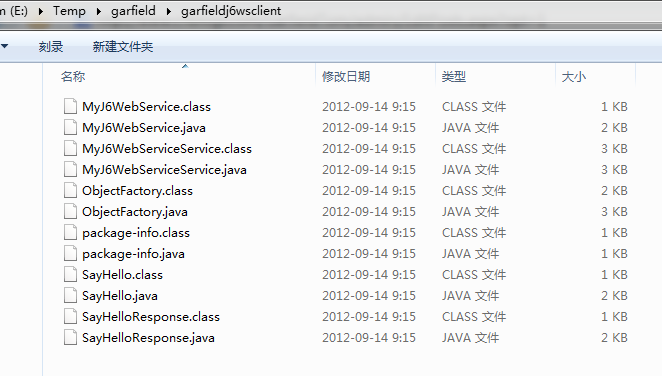
新建Java工程,将输出文件引入,然后建立测试类:
package xxh;

import garfield.garfieldj6wsclient.*;

public class WebClient {

        /**

         * @param args

         */

        public static void main(String[] args) {

             //创建一个客户端服务对象

            MyJ6WebService myJ6WS = new MyJ6WebServiceService().getMyJ6WebServicePort();

            //调用服务方法,并得到方法返回值

            String strTest = myJ6WS.sayHello("Garfield");

            //打印服务的返回值

            System.out.println(strTest);

        }

}
在WebService运行情况下,运行客户端测试程序,输出:
Hello ,Garfield!
java WebService简单使用案例的更多相关文章
- 主题:Java WebService 简单实例
链接地址:主题:Java WebService 简单实例 http://www.iteye.com/topic/1135747 前言:朋友们开始以下教程前,请先看第五大点的注意事项,以避免不必要 ...
- Java WebService简单使用
一直在写java但从来没有使用webservice,在网上查了下资料写个简单的使用放这里做备份 具体步骤: 1.新建一个java工程在里面写一个类(服务端)如下: package com.webser ...
- java webservice简单的例子
开发环境:eclipse .jdk 创建服务端 demo-webservice 创建类 HelloService.java package com.hundsun.ws.service; import ...
- Java WebService 简单实例使用JDK
原文地址:http://www.cnblogs.com/jasoncc/archive/2011/12/22/2296052.html 什么是WebServices? 它是一种构建应用程序的普 ...
- Java WebService 简单实例
前言:朋友们开始以下教程前,请先看第五大点的注意事项,以避免不必要的重复操作. 一.准备工作(以下为本实例使用工具) 1.MyEclipse10.7.1 2.JDK 1.6.0_22 二.创建服务端 ...
- Java WebService 简单实例[转]
http://www.cnblogs.com/yisheng163/p/4524808.html?utm_source=tuicool 前言:朋友们开始以下教程前,请先看第五大点的注意事项,以避免不必 ...
- Java WebService简单实例
一.准备工作(以下为本实例使用工具) 1.MyEclipse10.7.1 2.JDK 1.6.0_22 二.创建服务端 1.创建[Web Service Project],命名为[TheService ...
- Java WebService 简单实例[转载]
[注意,本文转载自 http://hyan.iteye.com/ ] 一.准备工作(以下为本实例使用工具) 1.MyEclipse10.7.1 2.JDK 1.6.0_22 二.创建服务端 1 ...
- Java WebService 简单实例(转
一.准备工作(以下为本实例使用工具) 1.MyEclipse10.7.1 2.JDK 1.6.0_22 二.创建服务端 1.创建[Web Service Project],命名为[TheService ...
随机推荐
- modelsim打开.wlf文件的方法(原创)
运行vsim -c -l vsim.log -wlf vsim.wlf work.tb work.glbl之后,会在不启动modelsim的情况下完成仿真,并且会把仿真波形记录下来(以.wlf文件格式 ...
- Linux操作系统安装Nvidia显卡驱动
一直以来,Linux分支系统使用过程中都有驱动适配麻烦,完全适配的驱动也不多.对于Nvidia显卡而言,一般Linux各分支操作系统虽然提供了N卡开源驱动工程Nouveau,但是性能上还是有待提高.下 ...
- Oracle在表上建立自增字段的方法
本方法为使用SEQUENCE(序列) 例如有表temp_test结构为: create table TEMP_TEST ( id number, nm varchar(10), primary k ...
- IOS_视图实现圆角效果的三种方法及比较
通过代码,至少有三种方法可以为视图加上圆角效果.附例子:https://github.com/weipin/RoundedCorner 方法一.layer.cornerRadius 第一种方法最简单, ...
- Xcode中需要熟悉的常用快捷键
因为工作需要,笔者最近开始接触Xcode这款Mac系统下的强大的编程软件.因为个人习惯,每当接触新的软件的时候总会先去了解它的一些常用快捷键.经过多方查阅总结出以下内容,希望对刚刚接触Xcode的初学 ...
- c#对象初始化
class test:IEquatable<test> { public int aa { get; set; } public string bb { get; set; } publi ...
- C#基础整理
元旦整理书架发现一本小册子——<C#精髓>中国出版社2001年出版的,粗略翻了下关于C#的知识点挺全的虽然内容谈得很浅也有很多过时的内容(话说这本书是我在旧书店花5块钱淘的)我保留原有章节 ...
- 获取键盘输入或者USB扫描枪数据
/// <summary> /// 获取键盘输入或者USB扫描枪数据 可以是没有焦点 应为使用的是全局钩子 /// USB扫描枪 是模拟键盘按下 /// 这里主要处理扫描枪的值,手动输入的 ...
- dapper的一个小扩展以支持dataset
废话不多,直接上方法 public static DataSet ExecuteDataSet(this IDbConnection cnn, IDbDataAdapter adapter, stri ...
- 下载youku视频(python3)
https://github.com/chenfengyuan/download-youku-video 用tornado写的下载脚本, 从flvcd.com得到下载地址. 因为我这边连youku的速 ...