
连接远程数据库时出现 SSH: expected key exchange group packet from server / 2003 - Can't connect to MySQL server on 'XXX' (10038) / 1130 - Host 'XXX' is not allowed to connect to this MySQL server
昨天在自己的远程服务器上玩,把系统重装了。新装了MySQL,在本地用navicat连接的时候出了几个小问题。
问题一:SSH: expected key exchange group packet from server

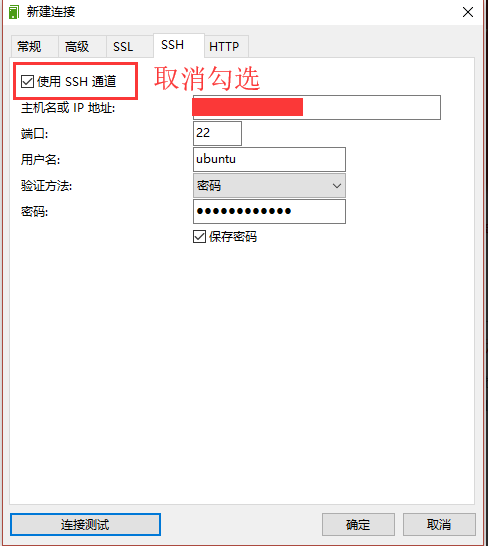
这个问题在网上查了查说是navicat自己的问题,升级版本就好了。没管那么多,在SSH选项卡里把使用ssh通道取消了,使用常规连接。
问题二:2003 - Can't connect to MySQL server on 'XXX' (10038)
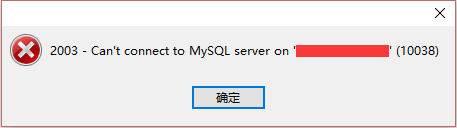
第一个问题刚解决,但是第二个问题又出来了,这个问题是我忘了设置MySQL允许远程访问
解决方法是将bind-address = 127.0.0.1注释掉
sudo vim /etc/mysql/mysql.conf.d/mysqld.cnf

在bind-address = 127.0.0.1这句的前面加上#
问题三:1130 - Host 'XXX' is not allowed to connect to this MySQL server
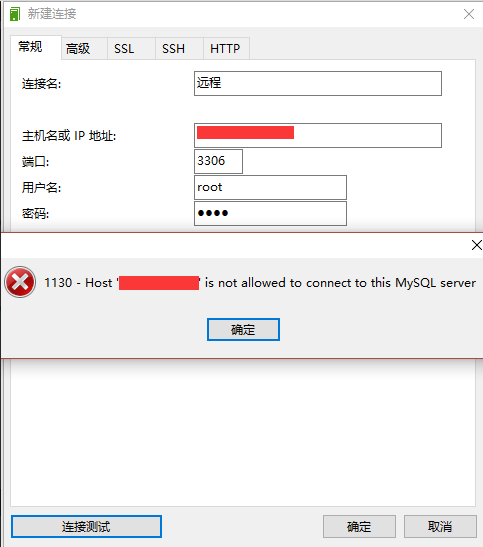
前面两个问题本以为这就好了,结果又报了个这,看意思是我的IP没有权限。在网上查了查,找到了一个解决办法:修改MySQL的用户表
1、登录mysql
mysql -u root -p

2、查看一下用户表
use mysql

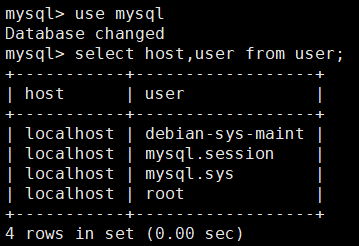
select host,user from user;
3、修改host字段
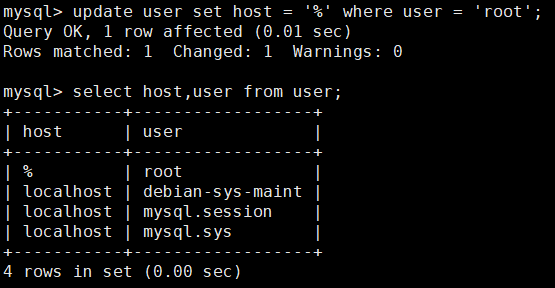
根据查到的结果可以发现只有本机可以访问,我的做法是把host字段改成%
update user set host = '%' where user = 'root';
4、刷新MySQL的系统权限相关表
flush privileges;

再次远程连接数据库成功
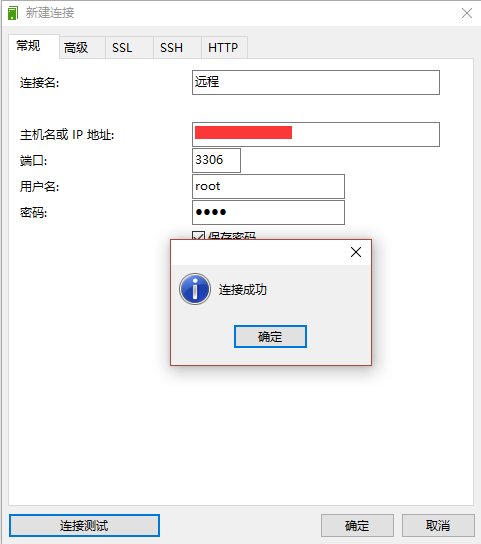
几经转折,才连接上(╯‵□′)╯︵┴─┴
IAL[{`V5VN.png)
连接远程数据库时出现 SSH: expected key exchange group packet from server / 2003 - Can't connect to MySQL server on 'XXX' (10038) / 1130 - Host 'XXX' is not allowed to connect to this MySQL server的更多相关文章
- Navicat 用ssh通道连接时总是报错 (报错信息:SSH:expected key exchange group packet form serve
转:https://blog.csdn.net/qq_27463323/article/details/76830731 之前下了一个Navicat 11.0 版本 用ssh通道连接时总是报错 (报错 ...
- 数据库连接出错 expected key exchange group packet form server
数据库连接出错 expected key exchange group packet form server SSH: expected key exchange group packet form ...
- 使用 PuTTY 时遇到错误:“expected key exchange group packet from server”
情况 使用 PuTTY 通过 SSH 访问 ProxySG 或 Advanced Secure Gateway (ASG) 时,您会看到如下错误:"expected key exchange ...
- navicat使用ssh登录mysql报错:expected key exchange group packet from server
转载自:https://blog.csdn.net/enweitech/article/details/80677374 解决方法: vim /etc/ssh/sshd_config shift+g ...
- 远程连接mysql报错【1130 -host 'localhost' is not allowed to connect to this mysql server】
远程连接mysql时包如下错误: 1130 -host 'localhost' is not allowed to connect to this mysql server 解决办法 本地用root账 ...
- mysql报错:1130 -host 'localhost' is not allowed to connect to this mysql server
错误提示:1130 -host 'localhost' is not allowed to connect to this mysql server 原因:手贱把mysql数据库系统中mysql数据库 ...
- 通过mysql 连接远程数据库时,输入密码后,提示10060错误
能提示输入密码,说明网络能够连接,而且能连到服务器.输入密码后提示错误,说明应该是权限问题 解决方法: 一.进入mysql数据库命令行 二.输入use mysql; 三.设置root账号密码为1 ...
- python settings :RROR 1130: Host 'XXXXXX' is not allowed to connect to this MySQL server
pymysql.err.InternalError: (1130, u"Host '127.0.0.1' is not allowed to connect to this MySQL se ...
- 用Navicat Premium 连接mysql数据库时报错 -- 1130 Host xxxx is not allowed to connect to this MySQL server
用Navicat Premium 连接mysql数据库时报错 报错原因:此时的MySQL默认不能远程连接. 解决方案:修改MySQL配置 具体步骤: 1.登陆服务器,进入数据库 mysql -uroo ...
随机推荐
- CF865D Buy Low Sell High 贪心
正解:贪心 解题报告: 传送门! 这题首先有个很显然的dp,太基础了不说QAQ 然后考虑dp是n2的,显然过不去,所以换一个角度 然后发现这题和普通的dp的题有什么不同呢?就它这儿是一天只能买一支股, ...
- 理解Hbase和BigTable(转)
add by zhj: 这篇文章写的通俗易懂,介绍了HBase最重要的几点特性. 英文原文:https://dzone.com/articles/understanding-hbase-and-big ...
- BTM学习小记
BTM的原理跟LDA很像,下面是该模型的概率图: 由该图可以看出来,与LDA的区别在于确定主题分布和词分布后相应地取两个词(而LDA只取一个,即类比常见的骰子说法:先投掷K面的骰子得到主题z,再根据相 ...
- FFmpeg 裁剪——音频解码
配置ffmpeg,只留下某些音频的配置: ./configure --enable-shared --disable-yasm --enable-memalign-hack --enable-gpl ...
- Ubuntu如何修改默认python版本为python3
修改默认python版本 Ubuntu系统内置python2.7版本,默认运行python就是运行python2.7.现在很多人都是用python3作为开发语言,我们需要修改python的默认版本为p ...
- 火币网API文档——WebSocket API Reference
订阅 KLine 数据 market.$symbol.kline.$period 成功建立和 WebSocket API 的连接之后,向 Server 发送如下格式的数据来订阅数据: { " ...
- 数字转换大写人民币的delphi实现
function TForm1.changeRmb(const strRmb:string):string; var txt,strhighlevel:string; i,n,m,ilen,ipos: ...
- 【Java】-NO.16.EBook.4.Java.1.007-【疯狂Java讲义第3版 李刚】- Java基础类
1.0.0 Summary Tittle:[Java]-NO.16.EBook.4.Java.1.007-[疯狂Java讲义第3版 李刚]- Java基础类 Style:EBook Series:J ...
- web应用的乱码解决
用get方式请求,不同的浏览器对参数的编码不一样,导致在服务器的编码处理麻烦. 解决方案: 利用javascript中的方法encodeURI对其进行编码(默认为"UTF-8") ...
- Spring MVC 简介及入门小例子
说明:文章内容全部截选自实验楼教程[Spring MVC 简易教程] 一.什么是 Spring MVC Spring MVC 属于 SpringFrameWork 的后续产品,已经融合在 Spring ...