
JavaMail发送邮件、带附件邮件(完整版)
工程目录如下:
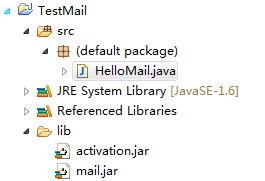
1、准备javaMail需要的两个Jar包:mail.jar、activation.jar,然后add to build path
2、QQ邮箱开启SMTP服务,开启后,它会给你一串授权码

完整代码如下所示:
import java.security.GeneralSecurityException;

import java.util.Properties;

import javax.mail.Authenticator;

import javax.mail.Message;

import javax.mail.MessagingException;

import javax.mail.PasswordAuthentication;

import javax.mail.Session;

import javax.mail.Transport;

import javax.mail.internet.InternetAddress;

import javax.mail.internet.MimeMessage;

import com.sun.mail.util.MailSSLSocketFactory;

public class HelloMail {

    public static void main(String[] args) throws GeneralSecurityException {

          // 收件人电子邮箱

          String to = "xxxxx@qq.com";

          // 发件人电子邮箱

          String from = "xxxxx@qq.com";

          // 获取系统属性

          Properties properties = new Properties();

          //发送邮件协议

          properties.setProperty("mail.transport.protocol", "SMTP");

          // 设置邮件服务器

          properties.setProperty("mail.host", "smtp.qq.com");

          // 设置邮件服务器端口

          properties.setProperty("mail.smtp.port", "");

          //开启SSL加密:QQ邮箱需要

          MailSSLSocketFactory sf = new MailSSLSocketFactory();

          sf.setTrustAllHosts(true);

          properties.put("mail.smtp.ssl.enable", "true");

          properties.put("mail.smtp.ssl.socketFactory", sf);

          // 设置邮件服务器是否需要登录认证

          properties.setProperty("mail.smtp.auth", "true");

          // 验证账号及密码,密码需要是第三方授权码

          Authenticator auth = new Authenticator() {

          public PasswordAuthentication getPasswordAuthentication(){

             return new PasswordAuthentication("xxxxx@qq.com", "这里添授权码");

                     }

                 };

          // 获取默认session对象

          Session session = Session.getInstance(properties,auth);

          try{

             // 创建默认的 MimeMessage 对象

             MimeMessage message = new MimeMessage(session);

             // Set From: 头部头字段

             message.setFrom(new InternetAddress(from));

             // Set To: 邮件接收人

             message.addRecipient(Message.RecipientType.TO,

                                      new InternetAddress(to));

             // Set Subject: 头部头字段

             message.setSubject("This is the Subject Line!");

             // 设置消息体

             message.setText("This is actual message");

             // 发送消息

             Transport.send(message);

             System.out.println("Sent message successfully....");

          }catch (MessagingException mex) {

             mex.printStackTrace();

          }

    }

}
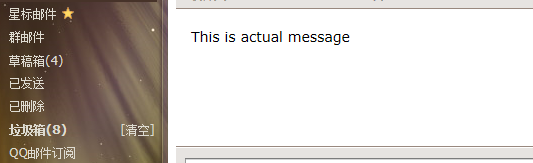
运行成功,然后qq邮箱就收到了邮件
带附件发送:
import java.io.File;

import java.security.GeneralSecurityException;

import java.util.Properties;

import javax.activation.DataHandler;

import javax.activation.DataSource;

import javax.activation.FileDataSource;

import javax.mail.Authenticator;

import javax.mail.BodyPart;

import javax.mail.Message;

import javax.mail.MessagingException;

import javax.mail.Multipart;

import javax.mail.PasswordAuthentication;

import javax.mail.Session;

import javax.mail.Transport;

import javax.mail.internet.InternetAddress;

import javax.mail.internet.MimeBodyPart;

import javax.mail.internet.MimeMessage;

import javax.mail.internet.MimeMultipart;

import com.sun.mail.util.MailSSLSocketFactory;

/*

 * 带附件的邮件

 */

public class MailAttach {

    public static void main(String[] args) throws GeneralSecurityException {

          // 收件人电子邮箱

          String to = "XXXXXXX";    //也可以的

          // 发件人电子邮箱

          String from = "XXXXXXX@qq.com";

          // 获取系统属性

          Properties properties = new Properties();

          //发送邮件协议

          properties.setProperty("mail.transport.protocol", "SMTP");

          // 设置邮件服务器

          properties.setProperty("mail.host", "smtp.qq.com");

          // 设置邮件服务器端口

          properties.setProperty("mail.smtp.port", "");

          //开启SSL加密:QQ邮箱需要

          MailSSLSocketFactory sf = new MailSSLSocketFactory();

          sf.setTrustAllHosts(true);

          properties.put("mail.smtp.ssl.enable", "true");

          properties.put("mail.smtp.ssl.socketFactory", sf);

          // 设置邮件服务器是否需要登录认证

          properties.setProperty("mail.smtp.auth", "true");

          // 验证账号及密码,密码需要是第三方授权码

          Authenticator auth = new Authenticator() {

          public PasswordAuthentication getPasswordAuthentication(){

             return new PasswordAuthentication("XXXXXXX@qq.com", "授权码");

                     }

                 };

          // 获取默认session对象

          Session session = Session.getInstance(properties,auth);

          try{

             // 创建默认的 MimeMessage 对象

             MimeMessage message = new MimeMessage(session);

             // Set From: 头部头字段

             message.setFrom(new InternetAddress(from));

             // Set To: 邮件接收人

             message.addRecipient(Message.RecipientType.TO,

                                      new InternetAddress(to));

             // Set Subject: 主题名称

             message.setSubject("This is the Subject Line!");

            // 创建消息部分

             BodyPart messageBodyPart = new MimeBodyPart();

             // 消息内容

             messageBodyPart.setText("TEST/TEST");

             // 创建多重消息

             Multipart multipart = new MimeMultipart();

             // 设置文本消息部分

             multipart.addBodyPart(messageBodyPart);

             // 附件部分

             messageBodyPart = new MimeBodyPart();

             //把文件,添加到附件1中

             //数据源

             DataSource source = new FileDataSource(new File("附件路径,比如:D:/test.zip"));

             //设置第一个附件的数据

             messageBodyPart.setDataHandler(new DataHandler(source));

             //设置附件的文件名

             messageBodyPart.setFileName("file1.zip");

             multipart.addBodyPart(messageBodyPart);

             message.setContent(multipart);

             // 发送消息

             Transport.send(message);

             System.out.println("Sent message successfully....");

          }catch (MessagingException mex) {

             mex.printStackTrace();

          }

    }

}
JavaMail发送邮件、带附件邮件(完整版)的更多相关文章
- JavaMail实现带附件的收发邮件
一.前言 参考博客: http://blog.csdn.net/xietansheng/article/details/51722660 http://www.cnblogs.com/HigginCu ...
- 利用springframework+javax.mail发邮件(普通邮件、带附件邮件、HTML格式邮件)
Spring提供了发送电子邮件的支持,可以发送普通邮件.带附件邮件.HTML格式邮件,甚至还可以使用Velocity模板定制化邮件内容. 一.引入相关的库 1 2 3 4 5 6 7 8 9 10 1 ...
- ORACLE发送带附件邮件的二三事之一
在oracle使用过程中,我们可以通过pl/sql生成数据文件,也可以通过spool on spool off生成,但某些环境下,我们需要通过存储过程处理数据,数据处理完,需要自动生成数据文件,手工导 ...
- 使用JavaMail发送带附件的邮件
所需jar包 链接:http://pan.baidu.com/s/1dFo4cDz 密码:akap 工具类: package com.javamail.utils; import java.util. ...
- Java发送邮件(带附件)
实现java发送邮件的过程大体有以下几步: 准备一个properties文件,该文件中存放SMTP服务器地址等参数. 利用properties创建一个Session对象 利用Session创建Mess ...
- centos 使用mutt发送邮件带附件
1.安装mutt工具 yum install -y mutt 2.使用mutt发邮件并带附件echo "统计日志" | /usr/bin/mutt -s "统计日志&qu ...
- 【Mail】JavaMail发送带附件的邮件(二)
上一篇讲了使用JavaMail发送普通邮件([Mail]JavaMail介绍及发送邮件(一)),本例讲发送复杂的邮件(带有附件的邮件) 生成一封复杂的邮件 新建一个JavaWeb的Maven工程,引入 ...
- (转)用javamail发送带附件的邮件
本文转载自:http://redleaf.iteye.com/blog/78217 mail.java 代码 package mail; import java.util.* ; import jav ...
- 使用JavaMail发送邮件和接受邮件
转载:http://blog.csdn.net/zdp072/article/details/30977213 一. 为什么要学习JavaMail 为什么要学习JavaMail开发? 现在很多WEB应 ...
随机推荐
- IAR编译器
1.在Build输出框中单击鼠标右键可以选择查看的信息,包括每个文件代码大小,数据大小,以及整个工程代码与数据大小等. 2.在IDE Options的key bingdings功能下可以查看和设置需要 ...
- English Voice of <<City of stars>>
City of stars 星光之城啊 Are you shining just for me? 你是否只愿为我闪耀 City of stars 星光之城啊 There's so much that ...
- Practical Node.js (2018版) 第3章:测试/Mocha.js, Chai.js, Expect.js
TDD and BDD for Node.js with Mocha TDD测试驱动开发.自动测试代码. BDD: behavior-driven development行为驱动开发,基于TDD.一种 ...
- 网络管理命令ping和arping
ping ping 向目标主机发送icmp请求包 常用来测试当前主机与目标主机网络连接状况 常见选项 -c 设置发包的个数 -s 设 ...
- java骰子求和算法
//扔 n 个骰子,向上面的数字之和为 S.给定 Given n,请列出所有可能的 S 值及其相应的概率public class Solution { /** * @param n an intege ...
- Wannafly挑战赛29-A/B
链接:https://ac.nowcoder.com/acm/contest/271/A来源:牛客网 御坂美琴 时间限制:C/C++ 1秒,其他语言2秒 空间限制:C/C++ 131072K,其他语言 ...
- hpu_newoj_1028-exgcd
The Elevator 描述 全是电梯. Philo正处于高度为0的一个平台上,在他面前的一个平面,全是上上下下的电梯. Philo想要离开这里,请你帮帮他. 电梯世界规则:这里的电梯所能到达的 ...
- json2.js 序列化 和反序列化 转
http://www.cnblogs.com/youring2/archive/2013/03/01/2938850.html json2.js的源码地址: https://github.com/do ...
- python 小练习 8
砝码问题1有一组砝码,重量互不相等,分别为m1.m2.m3……mn:它们可取的最大数量分别为x1.x2.x3……xn. 现要用这些砝码去称物体的重量,问能称出多少种不同的重量. 现在给你两个正整数列表 ...
- 本地仓库有jar包maven依然报错的原因
本地Maven仓库有所需jar包依然报错,missing……………… 既然有这个jar包为什么还会报错呢? 找到本地仓库后发现里面有一个_remote.repositories文件 问题在_remot ...