
【Selenium2】【HTMLTestRunner】
在拜读虫师大神的Selenium2+Python2.7时,发现生成HTMLTestRunner的测试报告使用的HTMLTestRunner的模块是用的Python2的语法。而我本人比较习惯与Python3。而且自己也是用的Python3.4的环境,在网上找了很多资料,修改了下HTMLTestRunner.py
参考:http://bbs.chinaunix.net/thread-4154743-1-1.html
下载地址:http://tungwaiyip.info/software/HTMLTestRunner.html
修改后下载地址:http://pan.baidu.com/s/1tp3Ts
修改汇总:
第94行,将import StringIO修改成import io
第539行,将self.outputBuffer = StringIO.StringIO()修改成self.outputBuffer = io.StringIO()
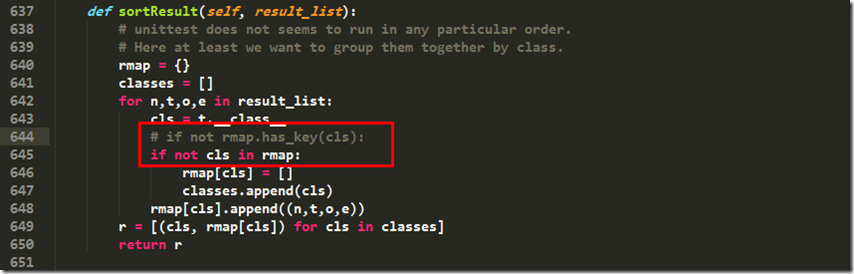
第642行,将if not rmap.has_key(cls):修改成if not cls in rmap:
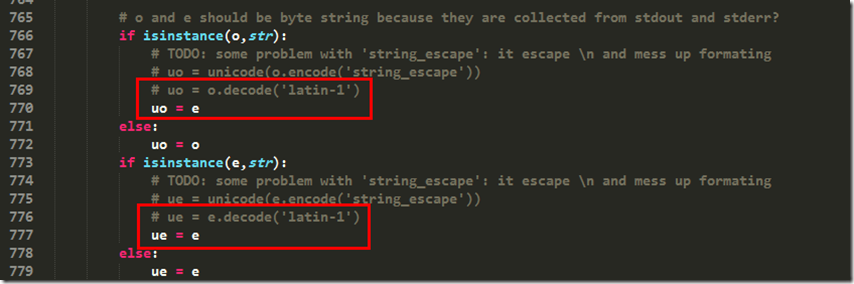
第766行,将uo = o.decode('latin-1')修改成uo = e
第775行,将ue = e.decode('latin-1')修改成ue = e
第631行,将print >> sys.stderr, '\nTime Elapsed: %s' % (self.stopTime-self.startTime)修改成print(sys.stderr, '\nTime Elapsed: %s' % (self.stopTime-self.startTime))
在Python3.4下使用HTMLTestRunner,开始时,引入HTMLTestRunner模块报错。
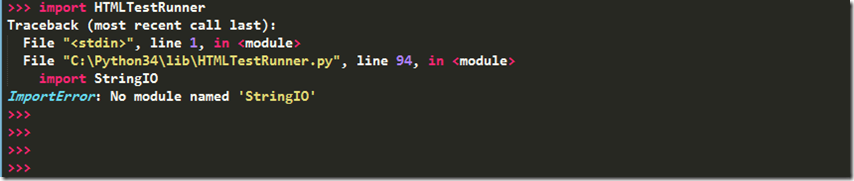
在HTMLTestRunner的94行中,是使用的StringIO,但是Python3中,已经没有StringIO了。取而代之的是io.StringIO。所以将此行修改成import io

在HTMLTestRunner的539行中,self.outputBuffer = StringIO.StringIO()修改成self.outputBuffer = io.StringIO()
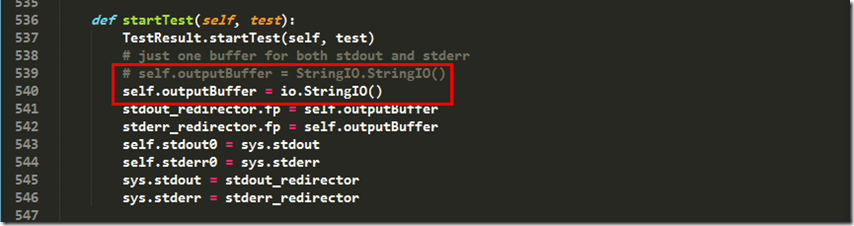
修改以后,成功引入模块了

执行脚本代码:

# -*- coding: utf-8 -*-

#引入webdriver和unittest所需要的包

from selenium import webdriver

from selenium.webdriver.common.by import By

from selenium.webdriver.common.keys import Keys

from selenium.webdriver.support.ui import Select

from selenium.common.exceptions import NoSuchElementException

from selenium.common.exceptions import NoAlertPresentException

import unittest, time, re

#引入HTMLTestRunner包

import HTMLTestRunner

class Baidu(unittest.TestCase):

    #初始化设置

    def setUp(self):

        self.driver = webdriver.Firefox()

        self.driver.implicitly_wait(30)

        self.base_url = "http://www.baidu.com/"

        self.verificationErrors = []

        self.accept_next_alert = True

    #百度搜索用例

    def test_baidu(self):

        driver = self.driver

        driver.get(self.base_url)

        driver.find_element_by_id("kw").click()

        driver.find_element_by_id("kw").clear()

        driver.find_element_by_id("kw").send_keys("Selenium Webdriver")

        driver.find_element_by_id("su").click()

        time.sleep(2)

        driver.close()

    def tearDown(self):

        self.driver.quit()

        self.assertEqual([], self.verificationErrors)

if __name__ == "__main__":

    #定义一个测试容器

    test = unittest.TestSuite()

    #将测试用例,加入到测试容器中

    test.addTest(Baidu("test_baidu"))

    #定义个报告存放的路径,支持相对路径

    file_path = "F:\\RobotTest\\result.html"

    file_result= open(file_path, 'wb')

    #定义测试报告

    runner = HTMLTestRunner.HTMLTestRunner(stream = file_result, title = u"百度搜索测试报告", description = u"用例执行情况")

    #运行测试用例

    runner.run(test)

    file_result.close()
运行测试脚本后,发现报错:
File "C:\Python34\lib\HTMLTestRunner.py", line 642, in sortResult
if not rmap.has_key(cls):
所以前往642行修改代码:
运行后继续报错:
AttributeError: 'str' object has no attribute 'decode'
前往766, 772行继续修改(注意:766行是uo而772行是ue,当时眼瞎,没有注意到这些,以为是一样的,导致报了一些莫名其妙的错误,折腾的半天):
修改后运行,发现又报错:
File "C:\Python34\lib\HTMLTestRunner.py", line 631, in run
print >> sys.stderr, '\nTime Elapsed: %s' % (self.stopTime-self.startTime)
TypeError: unsupported operand type(s) for >>: 'builtin_function_or_method' and '_io.TextIOWrapper'
前往631查看,发现整个程序中,唯一一个print:
print >> sys.stderr, '\nTime Elapsed: %s' % (self.stopTime-self.startTime
这个是2.x的写法,咱们修改成3.x的print,修改如下:
print(sys.stderr, '\nTime Elapsed: %s' % (self.stopTime-self.startTime))
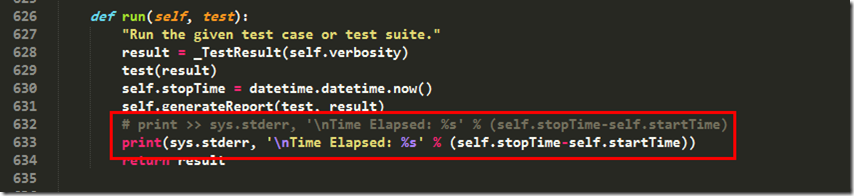
继续运行脚本,OK运行成功

查看指定的目录生成了result.html
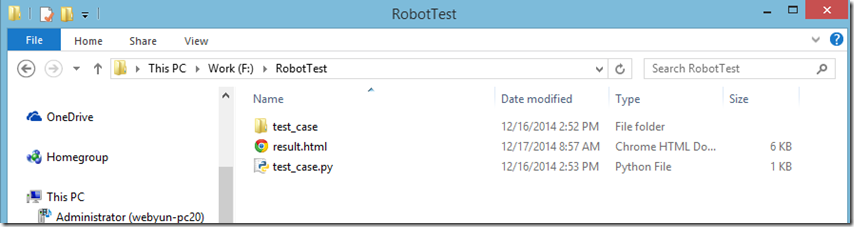
点击打开报告:

【常见问题】
1. 不生成测试报告
解决办法:
使用Python ,HTMLTestRunner 生成测试报告时,遇到很奇怪的问题,明明运行的结果,没有任何报错,就是不生成测试报告,纠结好久。google+baidu搜索结果也不满意,最后终于解决,先总结下。
代码示例
Login.py
"""

OS:W7 64位

IDE:Pycharm

Py:Python2.7.11

"""

# -*- coding: utf-8 -*-

__Author__ = "xiewm"

import time

from selenium import webdriver

import HTMLTestRunner

import unittest

from PO_login import LoginPage

class Login(unittest.TestCase):

    def setUp(self):

        self.driver = webdriver.Firefox()

        self.username = 'xxxxx'

        self.password = 'xxxxx'

    def test_user_login(self):

        driver = self.driver

        username = self.username

        password = self.password

        login_page = LoginPage(driver)

        login_page.open()

        login_page.type_username(username)

        login_page.type_password(password)

        login_page.submit()

        time.sleep(3)

    def tearDown(self):

        self.driver.quit()

if __name__ == '__main__':

    suite = unittest.TestSuite()

    suite.addTest(Login('test_user_login'))

    filename = 'E:\\testresult.html'

    with open(filename, 'wb') as fp:

        runner = HTMLTestRunner.HTMLTestRunner(stream=fp, title=u'测试报告', description=u'用例执行详情:')

        runner.run(suite)
解决方法
1: filename = ‘E:\testresult.html’,如果是在windows环境,文件名要使用以下几种格式。
 ①filename = 'E:\\testresult.html’

 ②filename = r'E:\testresult.html'

③filename = 'E:/testresult.html' 2:若不是使用with做文件的上下文管理,记得要fp.close() 关闭打开的文件,才可以保存。
fp = open(filename, 'wb')

fp.close()
3:第三种就奇葩了,看截图(截图为同一代码)(Pycharm IDE)
图一

图二

如果是以图一方式运行,就不会有报告生成,至于原因,可能是因为if name == ‘main‘。的原因
2016年11月25日09:01:08,大概知道什么原因了,因为Pycharm 自带测试框架,在右上角,
点击Edit Configurations→Python tests→选中你要删除的项目
删除,这样就不会自动执行unittest。
4:又遇到一种情况,按照以上3个方法都不行,使用快捷键:Ctrl+shift+F10 还是无法生成report,最后在pycharm的右上角,发现了一个按钮(shift + F9)如图 
这样就可以运行了,⊙﹏⊙b汗。(前提是必须在Edit Configurations 中配置好,你需要运行的.py Script Path 的文件路径)
如下图配置。

5:又遇到无法生成测试报告的问题了,按照之前总结的各种方法还是不行,最后,原来就仅仅修改一行代码就可以 了,在此记录下。
#原 if __name__ == '__main__':

if __name__ == 'interface_demo':

# 把main修改成自己的文件夹名就可以了

至于if__name__ == '__main__'  的作用,google下。
6: 如果还是不行的话,换个IDE(例如Atom Eclipse ) or 直接在cmd 中运行
python Login.py
就总结这么多。以上几种方法应该可以解决大部分的问题,如果有遇到其他的情况,也会继续总结
【我的栗子】
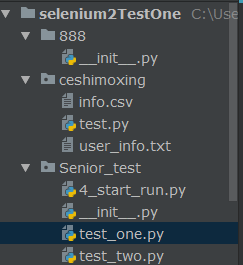
#栗子 生成测试报告:test_one.py
import HTMLTestRunner
from selenium.webdriver.common.by import  By
from selenium import webdriver
import unittest,time,os,sys

class Baidu(unittest.TestCase):
    def setUp(self):
        self.driver = webdriver.Chrome()
        self.driver.implicitly_wait(10)
        self.base_url = 'http://www.baidu.com/'
        self.verificationsErrors = []

    def test_baidu_search(self):
        '''百度搜索测试用例'''
        driver = self.driver
        driver.get(self.base_url)
        driver.find_element(By.ID,'kw').send_keys('HTMLTestRunner')
        driver.find_element(By.ID,'su').click()

    def tearDown(self):
        self.driver.quit()
        self.assertEqual([],self.verificationsErrors)

"""

if __name__ == '__main__':

    date = time.strftime("%Y%m%d")
    time = time.strftime('%Y%m%d%H%M%S')
    path = 'E:/Python/' + date + '/login/' + time + '/'
    report_path = path + 'report.html'
    if not os.path.exists(path):
        os.makedirs(path)
    else:
        pass

    # 测试套件
    testunit = unittest.TestSuite()
    #添加测试用例到测试套件中
    testunit.addTest(Baidu('test_baidu_search'))
    #定义测试报告存放路径

    #定义测试报告
    with open(report_path,'wb') as report:
        runner = HTMLTestRunner.HTMLTestRunner(stream=report, title='百度搜索测试报告', description='用例执行情况:')
        runner.run(testunit)
"""

栗子:加入testSuite的测试报告:__init__.py
import unittest
import sys,time,os
import HTMLTestRunner
sys.path.append('C:/Users/wangxue1/PycharmProjects/selenium2TestOne/Senior_test')
import test_one

#构造测试集
def creatsuite():
    testunit = unittest.TestSuite()
    #定义测试文件查找的目录
    test_dir = 'C:/Users/wangxue1/PycharmProjects/selenium2TestOne/Senior_test'
    #定义discover方法的参数
    discover = unittest.defaultTestLoader.discover(test_dir,pattern='test*.py',top_level_dir=None)
    #discover方法筛选出来的用例,循环添加到测试套件中
    for test_case in discover:
        print(test_case)
        testunit.addTest(test_case)
    return testunit

if __name__ == '__main__':
    now = time.strftime('%Y-%m-%d %H_%M_%S')
    path = 'E:\\selenium\\report\\' + now + '\\'
    report_path = path + 'result.html'
    if not os.path.exists(path):
        os.makedirs(path)
    else:
        pass
    with open(report_path,'wb') as report:
        runner = HTMLTestRunner.HTMLTestRunner(stream=report, title='百度搜索测试报告', description='用例执行情况:')
        alltestnames = creatsuite()
        runner.run(alltestnames)
        report.close()

# 栗子 定时任务
import os,time

k=1
while k<2:
    now_time = time.strftime('%H_%M')
    if now_time == '16_54':
        print('开始运行脚本')
        os.chdir('C:/Users/wangxue1/PycharmProjects/selenium2TestOne/Senior_test')
        os.system('python __init__.py')
        print('运行完成退出')
        break
    else:
        time.sleep(10)
        print(now_time)

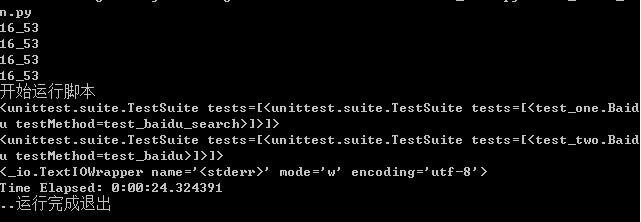
#cmd 运行这个脚本
#【结果】
# 栗子 不带附件的
from smtplib import SMTP
from email.mime.text import MIMEText
from email.header import Header

def send_email(SMTP_host, from_addr, password, to_addrs, subject, content):
    email_client = SMTP(SMTP_host)
    email_client.login(from_addr, password)
    # create msg
    #msg = MIMEText(content,'plain','utf-8')
    msg = MIMEText('<html><h1>你好!</h1></html>', 'html', 'utf-8')
    msg['Subject'] = Header(subject, 'utf-8')#subject
    msg['From'] = from_addr
    msg['To'] = to_addrs
    email_client.sendmail(from_addr, to_addrs, msg.as_string())

    email_client.quit()

if __name__ == "__main__":
    send_email("smtp.163.com","###@163.com","#######","#######@162.com","etty","etty")

#栗子  带附件
from email.mime.multipart import MIMEMultipart
from smtplib import SMTP
from email.mime.text import MIMEText
from email.mime.application import MIMEApplication

def send_email(SMTP_host, from_addr, password, to_addrs,subject,content):
    email_client = SMTP(SMTP_host)
    email_client.login(from_addr, password)
    msgtext = MIMEText(content, 'plain', 'utf-8')
    msg = MIMEMultipart('related')
    msg['Subject'] = subject
    msg.attach(msgtext)
    msg['From'] = from_addr
    msg['To'] = to_addrs
    att = MIMEApplication(open('C:\\Users\\wangxue1\\PycharmProjects\\selenium2TestOne\\Senior_test\\34.txt', 'rb').read())
    att.add_header('Content-Disposition', 'attachment', filename='C:\\Users\\wangxue1\\PycharmProjects\\selenium2TestOne\\Senior_test\\34.txt')
    msg.attach(att)
    email_client.sendmail(from_addr, to_addrs, msg.as_string())
    email_client.quit()

if __name__ == "__main__":
    send_email("############","公司邮箱","####",','.join(['########@qq.com']),'ettywxue','ettywxue')
【备注】163邮箱总是被当作垃圾邮件 554  详情参见 http://help.163.com/09/1224/17/5RAJ4LMH00753VB8.html

# 栗子  综合  all_test.py
import unittest
import sys,time,os
import HTMLTestRunner
sys.path.append('C:/Users/wangxue1/PycharmProjects/selenium2TestOne')
import unittestTest.public.login as login
import Senior_test.test_one
import smtplib
from email.mime.multipart import MIMEMultipart
from email.mime.text import MIMEText
from email.mime.application import  MIMEApplication

#发送邮件
def send_mail(file_new):
    # 发送邮箱
    mail_from = '#########'
    # 收信邮箱
    mail_to = ','.join(['#########'])
    # 定义正文
    f = open(file_new,'rb')
    mail_body = f.read()
    f.close()
    msg = MIMEMultipart('related')
    msg['Subject'] = u'自动化测试报告'
    msg['date'] = time.strftime('%a, %d %b %Y %H:%M:%S %z')
    msgText = MIMEText(mail_body, 'html', 'utf-8')
    msg.attach(msgText)
    att = MIMEApplication(open('C:\\Users\\wangxue1\\PycharmProjects\\selenium2TestOne\\Senior_test\\34.txt', 'rb').read())
    att.add_header('Content-Disposition','attachment',filename='C:\\Users\\wangxue1\\PycharmProjects\\selenium2TestOne\\Senior_test\\34.txt')
    msg.attach(att)
    smtp=smtplib.SMTP()
    smtp.connect('smtp.##########.net')
    #用户名、密码
    smtp.login('###########','########')
    smtp.sendmail(mail_from,mail_to,msg.as_string())
    smtp.quit()
    print('email has send out!')

#===========================查找测试报告目录,找到最新生成的测试报告文件======================
def send_report(testreport):
    result_dir = testreport
    lists = os.listdir(result_dir)
    lists.sort(key=lambda fn:os.path.getmtime(result_dir + '\\' + fn))
    #找到最新生成的文件
    file_new = os.path.join(result_dir,lists[-1])
    print(file_new)
    #调用发邮件模块
    send_mail(file_new)

#=============================添加用例到测试套件=======================================
def creatsuite():
    testunit = unittest.TestSuite()
    #定义测试文件查找的目录
    test_dir = 'C:/Users/wangxue1/PycharmProjects/selenium2TestOne/unittestTest'
    #定义discover方法的参数
    discover = unittest.defaultTestLoader.discover(test_dir,pattern='test*.py',top_level_dir=None)
    for test_case in discover:
        print(test_case)
        testunit.addTests(test_case)
    return testunit

if __name__ == '__main__':
    now = time.strftime('%Y-%m-%d %H_%M_%S')
    testreport = 'E:\\selenium2\\report\\' + now + '\\'
    filename = testreport + 'report.html'
    if not os.path.exists(testreport):
        os.makedirs(testreport)
    else:
        pass
    with open(filename,'wb') as report:
        runner = HTMLTestRunner.HTMLTestRunner(stream=report,title=u'自动化测试报告',description=u'用例执行情况: ')
        alltestnames = creatsuite()
        runner.run(alltestnames)
    send_report(testreport)
【Selenium2】【HTMLTestRunner】的更多相关文章
- Python&Selenium 数据驱动【unittest+ddt+json+HTMLTestRunner】
一.摘要 本博文将介绍Python和Selenium做自动化测试的时候,基于unittest框架,借助ddt模块使用json文件作为数据文件作为测试输入,最后借助著名的HTMLTestRunner.p ...
- 【python-HTMLTestRunner】生成HTMLTestRunner报告报错ERROR 'ascii' codec can't decode byte 0xe5 in position 0: ordinal not in range(128)
[python-HTMLTestRunner]生成HTMLTestRunner报告报错:ERROR 'ascii' codec can't decode byte 0xe5 in position 0 ...
- 【selenium2】【selenium基础语法】
#栗子 设置浏览器窗口大小 driver.set_window_size(480,800) #栗子 设置浏览器大小为最大maximize_window() 控制浏览器前进.后退 #栗子from sel ...
- 【疯狂造轮子-iOS】JSON转Model系列之二
[疯狂造轮子-iOS]JSON转Model系列之二 本文转载请注明出处 —— polobymulberry-博客园 1. 前言 上一篇<[疯狂造轮子-iOS]JSON转Model系列之一> ...
- 【疯狂造轮子-iOS】JSON转Model系列之一
[疯狂造轮子-iOS]JSON转Model系列之一 本文转载请注明出处 —— polobymulberry-博客园 1. 前言 之前一直看别人的源码,虽然对自己提升比较大,但毕竟不是自己写的,很容易遗 ...
- 【原创分享·支付宝支付】HBuilder打包APP调用支付宝客户端支付
前言 最近有点空余时间,所以,就研究了一下APP支付.前面很早就搞完APP的微信支付了,但是由于时间上和应用上的情况,支付宝一直没空去研究.然后等我空了的时候,发现支付宝居然升级了支付逻辑,虽然目前还 ...
- 【AutoMapper官方文档】DTO与Domin Model相互转换(上)
写在前面 AutoMapper目录: [AutoMapper官方文档]DTO与Domin Model相互转换(上) [AutoMapper官方文档]DTO与Domin Model相互转换(中) [Au ...
- 【Win 10 应用开发】应用预启动
所谓预启动,其实你一看那名字就知道是啥意思了,这是直接译,也找不到比这个叫法更简练的词了.在系统资源允许的情况下(比如电池电量充足,有足够的内存空间),系统会把用户常用的应用程序在后台启动,但不会显示 ...
- 【Win 10 应用开发】启动远程设备上的应用
这个功能必须在“红石-1”(build 14393)以上的系统版中才能使用,运行在一台设备上的应用,可以通过URI来启动另一台设备上的应用.激活远程应用需要以下前提: 系统必须是build 14393 ...
- 【开源】分享2011-2015年全国城市历史天气数据库【Sqlite+C#访问程序】
由于个人研究需要,需要采集天气历史数据,前一篇文章:C#+HtmlAgilityPack+XPath带你采集数据(以采集天气数据为例子),介绍了基本的采集思路和核心代码,经过1个星期的采集,历史数据库 ...
随机推荐
- ul点击li,增加样式
用户首次绑定后,需要选择一款头像 <!--imgList头像列表--><el-row class="regModel1"> <el-col :span ...
- GoldenGate实时投递数据到大数据平台(5) - Kafka
Oracle GoldenGate是Oracle公司的实时数据复制软件,支持关系型数据库和多种大数据平台.从GoldenGate 12.2开始,GoldenGate支持直接投递数据到Kafka等平台, ...
- The Little Prince-12/09
The Little Prince-12/09 今天中文书评+自述奥! 也许世界上也有五千朵和你一模一样的花,但只有你是我独一无二的玫瑰. ————喵喵喵,多么美妙的一句表白词呀! 时间会缓和所有的悲 ...
- PID控制器开发笔记(转)
源: PID控制器开发笔记
- Django模板系统 运算
记下来,省得每次google 过滤器,变量的显示形式的改变 一.形式:小写 {{ name | lower }} 二.串联:先转义文本到HTML,再转换每行到 <p> 标签 {{ my_t ...
- linux 文件 md5校验
为解决官方发布的软件包被别人更改或者软件在传输过程中出现传输错误等问题,软件官方在提供软件包的同时,还提供一个保存MD5校验码的文件. Linux/unix中可以使用命令 # md5sum 文件名 方 ...
- linux有趣的命令screen
screen类似一个容器, 可以把当前前台运行的应用shell窗口关闭而不影响运行, 跟后后nohup有点相似, 不过我觉得比nohup还好用 用法1: screen 然后会弹出一个新的shell窗口 ...
- 《大话处理器》Cache一致性协议之MESI (转)
原文链接:http://blog.csdn.net/muxiqingyang/article/details/6615199 Cache一致性协议之MESI 处理器上有一套完整的协议,来保证Cache ...
- 集合框架-Map集合
* Map集合和Collection集合的区别? * Map集合存储元素是成对出现的,Map集合的键是唯一的,值是可重复的.可以把这个理解为:夫妻对 * Collection集合存储元素是单独出现的, ...
- 【python009--循环】
1.for循环语法: for 目标 in 表达式: 循环体 2.range() 语法:range([start] stop [, step = 1]) --这个bif有三个参数,其中用中括号括起来 ...