
python date time
//test.py
import time
ticks = time.time()
print ticks
localtime = time.localtime(time.time())
print localtime
print time.asctime(localtime)
print time.strftime("%Y-%m-%d %H:%M:%S", time.localtime())
t = time.strftime('%a %b %d %H:%M:%S %Y', time.localtime())
print t
print time.mktime(time.strptime(t, '%a %b %d %H:%M:%S %Y'))
print 'altzone:',time.altzone
t1 = time.clock()
print 't1', t1
#time.sleep(1)
t2 = time.clock()
print 't2', t2
print 'ctime',time.ctime()
print 'gmtime', time.gmtime()
print 'localtime', time.localtime()
print 'timezone',time.timezone
print time.tzname
import calendar
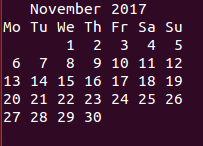
cal = calendar.month(2017, 11)
print cal
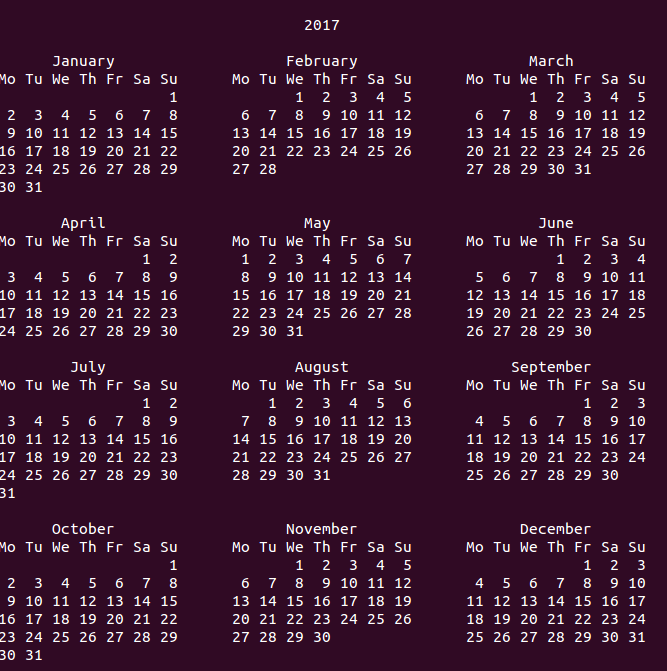
print calendar.calendar(2017, w=2,l=1,c=6)
print calendar.firstweekday()
print calendar.isleap(2017)
print calendar.leapdays(2017, 2022)
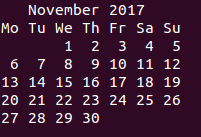
print calendar.month(2017,11, w=2,l=1)
print calendar.monthcalendar(2017, 11)
print calendar.monthrange(2017, 11)
calendar.setfirstweekday(6)
print 'firstweekday',calendar.firstweekday()
print calendar.timegm(time.localtime())
print calendar.weekday(2017,11,6)
//result
# python test.py
1509959417.55
time.struct_time(tm_year=2017, tm_mon=11, tm_mday=6, tm_hour=1, tm_min=10, tm_sec=17, tm_wday=0, tm_yday=310, tm_isdst=0)
Mon Nov 6 01:10:17 2017
2017-11-06 01:10:17
Mon Nov 06 01:10:17 2017
1509959417.0
altzone: 25200
t1 0.010813
t2 0.010816
ctime Mon Nov 6 01:10:17 2017
gmtime time.struct_time(tm_year=2017, tm_mon=11, tm_mday=6, tm_hour=9, tm_min=10, tm_sec=17, tm_wday=0, tm_yday=310, tm_isdst=0)
localtime time.struct_time(tm_year=2017, tm_mon=11, tm_mday=6, tm_hour=1, tm_min=10, tm_sec=17, tm_wday=0, tm_yday=310, tm_isdst=0)
timezone 28800
('PST', 'PDT')
0
False
1
[[0, 0, 1, 2, 3, 4, 5], [6, 7, 8, 9, 10, 11, 12], [13, 14, 15, 16, 17, 18, 19], [20, 21, 22, 23, 24, 25, 26], [27, 28, 29, 30, 0, 0, 0]]
(2, 30)
firstweekday 6
1509930617
0
python date time的更多相关文章
- Python date,datetime,time等相关操作总结
date,datetime,time等相关操作总结 by:授客 QQ:1033553122 测试环境: Python版本:Python 3.3.2 代码实践: __author__ = '授客' ...
- Python Date 1–Hello world print
对比学习Python与C str1 = 'hello python 2'# 字符串i = 3.1415926535 print(str1)print("hello python\n" ...
- python date,datetime 和time的区别
这是三个不同类型的数据,例如 2015-11-21 10:51:20: date是日期,表示的是 2015-11-21: datetime是日期时间,表示的是 2015-11-21 10:51:20: ...
- python date
三天前 datetime.datetime.now() - datetime.timedelta(days=3)
- python画柱状图并且输出到html文件
import matplotlibmatplotlib.use('Agg')import matplotlib.pyplot as pltfrom Cstring import StringIO y ...
- Python面试题汇总
原文:http://blog.csdn.net/jerry_1126/article/details/44023949 拿网络上关于Python的面试题汇总了,给出了自认为合理的答案,有些题目不错,可 ...
- python基础学习05(核心编程第二版)部分
# -*- coding: utf-8 -*- # ==================== #File: python #Author: python #Date: 2014 #========== ...
- 树莓派3b添加python时间同步脚本
树莓派没有电池,因此断电后系统时间会停止,直到你开机后又继续计时,所以会造成系统时间和实际时间有很大的误差. 因为项目需要用到本地时间,精度要求不高不想折腾(如果需要高精度,需要安装ntp),所以考虑 ...
- selenium+python—实现自动化测试基本思路
测试是一个贯穿于整个开发过程的连续过程,测试最基本的原理就是比较预期结果是否与实际执行结果相同,如果相同则测试成功,否则测试失败. 为了让单元测试代码能够被测试和维护人员更容易地理解,最好的解决办法是 ...
随机推荐
- easyui---editgrid
on 点击新增用户,不是弹出一个一个dialog,而是直接在表格下面增加一行可编辑的,然后点击保存就可以新增 第一步:加一个toolbar,在handler中当点击新增用户,会调用datagrid的a ...
- API(三)之Class-based Views
使用基于类的视图重写API 我们首先将根视图重写为基于类的视图.所有这一切都涉及到重构views.py. from snippets.models import Snippet from snippe ...
- poj3376 Finding Palindromes【exKMP】【Trie】
Finding Palindromes Time Limit: 10000MS Memory Limit: 262144K Total Submissions:4710 Accepted: 8 ...
- .NET Core开发日志——RequestDelegate
本文主要是对.NET Core开发日志--Middleware的补遗,但是会从看起来平平无奇的RequestDelegate开始叙述,所以以其作为标题,也是合情合理. RequestDelegate是 ...
- Python的符号、对齐和用0填充
# 用0填充 print("用0填充:{0:010.2f}".format(math.pi)) # 用1填充(事实上,你无法实现“用1填充”,因为即使实现了,那也是另外一个数字) ...
- React 入门实例
React 入门实例教程 一.安装 React 的安装包,可以到官网下载. $ git clone git@github.com:ruanyf/react-demos.git 如果你没安装 git, ...
- 【每日一题】 uva-232 模拟+输出要求很严格
https://cn.vjudge.net/problem/UVA-232 uva的题,结尾不能多\n,空格什么的 反正就是个中型模拟,题目多读就行 #define _CRT_SECURE_NO_WA ...
- Python:random模块
近排练习代码时候经常会用到random模块,以防后面忘记还是需要记录一下. 首先导入模块: import random random.random():用于生成一个0到1的随机浮点数: 0 <= ...
- 一个DRAM的存储单元存储的是0还是1取决于电容是否有电荷,有电荷代表1,无电荷代表0。
小结: 1.一个DRAM的存储单元存储的是0还是1取决于电容是否有电荷,有电荷代表1,无电荷代表0. https://baike.baidu.com/item/随机存取存储器/4099402?fr=a ...
- Fmod使用总结
1.查询相关文档的地址 http://www.fmod.org/forum/viewtopic.php?f=7&t=15762