
Linux计划任务Crontab实例详解教程
说明:Crontab是Linux系统中在固定时间执行某一个程序的工具,类似于Windows系统中的任务计划程序
下面通过详细实例来说明在Linux系统中如何使用Crontab
操作系统:CentOS
一、安装crontab
yum install vixie-cron #安装
chkconfig crond on #设为开机启动,先要安装chkconfig(yum install chkconfig)
service crond start #启动
service crond stop #停止
/etc/rc.d/init.d/crond restart #重启
/etc/rc.d/init.d/crond reload #不中断服务,重新载入配置
二、设置任务计划
/home/www.osyunwei.com/osyunwei.sh #要自动执行的脚本程序路径
chmod +x /home/www.osyunwei.com/osyunwei.sh #对脚本文件添加执行权限,否则不能执行
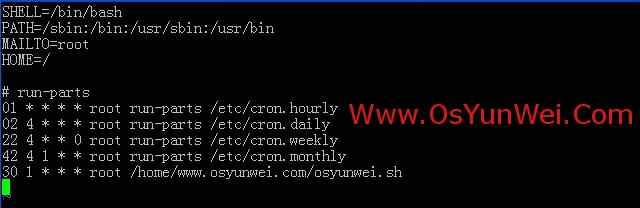
vi /etc/crontab #编辑配置文件,在最后一行添加内容
30 1 * * * root /home/www.osyunwei.com/osyunwei.sh #表示每天凌晨1点30执行备份
:wq! #保存退出
系统运维 www.osyunwei.com 温馨提醒:qihang01原创内容版权所有,转载请注明出处及原文链接
/etc/rc.d/init.d/crond restart #重启
备注:
系统运维 www.osyunwei.com 温馨提醒:qihang01原创内容版权所有,转载请注明出处及原文链接
crontab文件的格式:
minute hour day month weekday username command
minute:分,值为0-59
hour:小时,值为1-23
day:天,值为1-31
month:月,值为1-12
weekday:星期,值为0-6(0代表星期天,1代表星期一,以此类推)
username:要执行程序的用户,一般设置为root
command:要执行的程序路径(设置为绝对路径)例如:/home/www.osyunwei.com/osyunwei.sh
附:crontab规则详细实例
1、每天6:00执行
0 6 * * * root /home/www.osyunwei.com/osyunwei.sh
2、每周六凌晨4:00执行
0 4 * * 6 root /home/www.osyunwei.com/osyunwei.sh
3、每周六凌晨4:05执行
5 4 * * 6 root /home/www.osyunwei.com/osyunwei.sh
4、每周六凌晨4:15执行
15 4 * * 6 root /home/www.osyunwei.com/osyunwei.sh
5、每周六凌晨4:25执行
25 4 * * 6 root /home/www.osyunwei.com/osyunwei.sh
6、每周六凌晨4:35执行
35 4 * * 6 root /home/www.osyunwei.com/osyunwei.sh
7、每周六凌晨5:00执行
5 * * 6 root /home/www.osyunwei.com/osyunwei.sh
8、每天8:40执行
40 8 * * * root /home/www.osyunwei.com/osyunwei.sh
9、每天8:30执行
30 8 * * * root /home/www.osyunwei.com/osyunwei.sh
10、每周一到周五的11:41开始,每隔10分钟执行一次
41,51 11 * * 1-5 root /home/www.osyunwei.com/osyunwei.sh
1-59/10 12-23 * * 1-5 root /home/www.osyunwei.com/osyunwei.sh
11、在每天的10:31开始,每隔2小时重复一次
31 10-23/2 * * * root /home/www.osyunwei.com/osyunwei.sh
12、每天15:00执行
0 15 * * * root /home/www.osyunwei.com/osyunwei.sh
13、每天的10:30开始,每隔2小时重复一次
30 10-23/2 * * * root /home/www.osyunwei.com/osyunwei.sh
14、每天15:30执行
30 15 * * * root /home/www.osyunwei.com/osyunwei.sh
15、每天17:50执行
50 17 * * * root /home/www.osyunwei.com/osyunwei.sh
16、每天8:00执行
0 8 * * * root /home/www.osyunwei.com/osyunwei.sh
17、每天18:00执行
0 18 * * * root /home/www.osyunwei.com/osyunwei.sh
18、每天8:30执行
系统运维 www.osyunwei.com 温馨提醒:qihang01原创内容版权所有,转载请注明出处及原文链接
30 8 * * * root /home/www.osyunwei.com/osyunwei.sh
19、每天20:30
30 20 * * * root /home/www.osyunwei.com/osyunwei.sh
20、每周一到周五2:00
0 2 * * 1-5 root /home/www.osyunwei.com/osyunwei.sh
21、每周一到周五9:30
30 9 * * 1-5 root /home/www.osyunwei.com/osyunwei.sh
22、每周一到周五8:00,每周一到周五9:00
0 8,9 * * 1-5 root /home/www.osyunwei.com/osyunwei.sh
23、每天23:59
59 23 * * * root /home/www.osyunwei.com/osyunwei.sh
24、每周六23:59
59 23 * * 6 root /home/www.osyunwei.com/osyunwei.sh
25、每天0:30
30 0 * * * root /home/www.osyunwei.com/osyunwei.sh
26、每周一到周五9:25到11:35之间、13:00到15:00之间,每隔10分钟运行一次
25,35,45,55 9 * * 1-5 root /home/www.osyunwei.com/osyunwei.sh
5-59/10 10 * * 1-5 root /home/www.osyunwei.com/osyunwei.sh
5,15,25,35 11 * * 1-5 root /home/www.osyunwei.com/osyunwei.sh
*/10 13-15 * * 1-5 root /home/www.osyunwei.com/osyunwei.sh
27、每周一到周五8:30、8:50、9:30、10:00、10:30、11:00、11:30、13:30、14:00、14:30、5:00分别执行一次
30,50 8 * * 1-5 root /home/www.osyunwei.com/osyunwei.sh
30 9 * * 1-5 root /home/www.osyunwei.com/osyunwei.sh
*/30 10-11 * * 1-5 root /home/www.osyunwei.com/osyunwei.sh
30 13 * * 1-5 root /home/www.osyunwei.com/osyunwei.sh
0,30 14-15 * * 1-5 root /home/www.osyunwei.com/osyunwei.sh
28、每天23:50执行
50 23 * * * root /home/www.osyunwei.com/osyunwei.sh
29、每天10:00、16:00执行
0 10,16 * * * root /home/www.osyunwei.com/osyunwei.sh
30、每天5:30执行
30 5 * * * root /home/www.osyunwei.com/osyunwei.sh
31、每周一到周五9:30执行
30 9 * * 1-5 root /home/www.osyunwei.com/osyunwei.sh
32、每周一到周五13:00执行
0 13 * * 1-5 root /home/www.osyunwei.com/osyunwei.sh
33、每天7:51执行
51 7 * * * root /home/www.osyunwei.com/osyunwei.sh
34、每天7:53、12:40分别执行一次
53 7 * * * root /home/www.osyunwei.com/osyunwei.sh
40 12 * * * root /home/www.osyunwei.com/osyunwei.sh
35、每天7:55执行
55 7 * * * root /home/www.osyunwei.com/osyunwei.sh
36、每天8:10、16:00、20:00分别执行一次
10 8 * * * root /home/www.osyunwei.com/osyunwei.sh
0 16 * * * root /home/www.osyunwei.com/osyunwei.sh
0 20 * * * root /home/www.osyunwei.com/osyunwei.sh
37、每天7:57、8:00分别执行一次
57 7 * * * root /home/www.osyunwei.com/osyunwei.sh
0 8 * * * root /home/www.osyunwei.com/osyunwei.sh
至此,Linux计划任务Crontab实例详解教程完成
转自 http://www.osyunwei.com/archives/5039.html
Linux计划任务Crontab实例详解教程的更多相关文章
- Linux计划任务crontab设置详解
crontab文件的格式: minute hour day month weekday username command minute:分,值为0-59 hour:小时,值为1-23 day:天,值为 ...
- 【python3+request】python3+requests接口自动化测试框架实例详解教程
转自:https://my.oschina.net/u/3041656/blog/820023 [python3+request]python3+requests接口自动化测试框架实例详解教程 前段时 ...
- linux基础-磁盘阵列(RAID)实例详解
磁盘阵列(RAID)实例详解 raid技术分类 软raid技术 硬raid技术 Raid和lvm的区别 为什么选择用raid RAID详解 RAID-0 RAID-1 RAID-5 Raid-10 R ...
- Linux的find命令实例详解和mtime ctime atime
这次解释一下三个Linux文件显示的三个时间,然后展示一下find命令的各个功能 在linux操作系统中,每个文件都有很多的时间参数,其中有三个比较主要,分别是ctime,atime,mtime mo ...
- Linux 三剑客之 awk 实战详解教程
我们知道 Linux 三剑客,它们分别是:grep.sed.awk.在前边已经讲过 grep 和 sed,没看过的同学可以直接点击阅读,今天要分享的是更为强大的 awk. sed 可以实现非交互式的字 ...
- Linux 定时任务命令Crontab参数详解
http://xshell.net/linux/crontab.html 实战: * */1 * * * /usr/local/etc/rc.d/lighttpd restart 每一小时重启 ...
- [转载]查看Linux系统硬件信息实例详解
linux查看系统的硬件信息,并不像windows那么直观,这里我罗列了查看系统信息的实用命令,并做了分类,实例解说. cpu lscpu命令,查看的是cpu的统计信息. blue@blue-pc:~ ...
- python+requests接口自动化测试框架实例详解教程
1.首先,我们先来理一下思路. 正常的接口测试流程是什么? 脑海里的反应是不是这样的: 确定测试接口的工具 —> 配置需要的接口参数 —> 进行测试 —> 检查测试结果(有的需要数据 ...
- Linux系统安装IonCube的方法详解教程
ioncube是业内优秀的php加密解密解决方案.和zend guard相比,ioncube具有如下优势: 1. 安全:zend guard的版本不是非常安全,网络上有破解使用zend,下面我们来看I ...
随机推荐
- Android invalidate() 和 postInvalidate()的区别
Android提供了Invalidate方法实现界面刷新,但是Invalidate不能直接在线程中调用,因为他是违背了单线程模型:Android UI操作并不是线程安全的,并且这些操作必须在UI线程中 ...
- C Looooops(扩展欧几里得)
C Looooops Time Limit: 1000MS Memory Limit: 65536K Total Submissions: 20128 Accepted: 5405 Descripti ...
- 二叉搜索树的后序遍历路径(《剑指offer》面试题24)
题目:输入一个整数数组,判断该数组是不是二叉搜索树的后序遍历序列的结果,如果是,则返回true,如果不是则返回false.假设输入的数组的任意两个数字都互不相同. 分析:在后序遍历得到的序列中,最后一 ...
- noi 2971 抓住那头牛
2971:抓住那头牛 查看 提交 统计 提问 总时间限制: 2000ms 内存限制: 65536kB 描述 农夫知道一头牛的位置,想要抓住它.农夫和牛都位于数轴上,农夫起始位于点N(0<=N ...
- Poj(2135),MCMF,模板
题目链接:http://poj.org/problem?id=2135 Farm Tour Time Limit: 1000MS Memory Limit: 65536K Total Submis ...
- shell脚本判断文件类型
转自:http://www.cnblogs.com/sunyubo/archive/2011/10/17/2282047.html 1. shell判断文件,目录是否存在或者具有权限 2. #!/bi ...
- zoj Gao The Sequence
Gao The Sequence Time Limit: 2 Seconds Memory Limit: 65536 KB You are given a sequence of integ ...
- CentOS 安装ftp
Linux安装ftp组件 1 安装vsftpd组件 安装完后,有/etc/vsftpd/vsftpd.conf 文件,是vsftp的配置文件. [root@bogon ~]# yum -y insta ...
- 循环,range,continue 和 break
1.for循环 用户按照顺序循环可迭代对象中的内容, PS:break.continue li = [11,22,33,44] for item in li: print item 2.enu ...
- ruby学习总结01
1.ruby的两种运行方式:ruby方式咋(在命令行中输入ruby xxx.rb)和irb方式(在命令行中输入 irb) 注意:可以在命令后添加 -E UTF-8 指定编码格式 例:ruby -E U ...