
搭建高性能计算环境(七)、应用软件的安装之MS
1,上传软件包MaterialsStudio70.tgz、msi_7.lic到服务器上。
2,安装ms一般会创建一个普通用户msi,软件安装在msi账号下。
创建用户msi:     useradd msi

切换到msi用户:   su – msi
tar xvf /opt/MaterialsStudio70.tgz

cd MaterialsStudio70/
[msi@hpc MaterialsStudio70]$ ./install

Performing per-user installation of Materials Studio 7.0. Restart this

installation as root if you wish to perform an RPM-based installation.

Please enter the location in which to install Materials Studio 7.0

The location where Materials Studio will be installed is <install location>/MaterialsStudio7.

[/home/msi/Accelrys] 默认回车

The Accelrys License Pack is required in order to run Materials Studio 7.0.

Please enter the location of a License Pack installation, or an empty directory

into which the License Pack will be installed.

[/home/msi/Accelrys] 默认回车

/home/msi/Accelrys does not appear to contain a supported License Pack installation. Would you like to

install it to that location? [Y/n]

[Y]  默认回车

Do you wish to start the Gateway service after installation? Answer no here if

you wish to configure security settings before starting. (Y/n)

[Y]  默认回车
Running LicensePack installation...
-------------------------------------------------------------------------------
Accelrys License Pack 7.6. - InstallShield Wizard

Welcome to the InstallShield Wizard for Accelrys License Pack 7.6.

The InstallShield Wizard will install Accelrys License Pack 7.6. on your

computer.

To continue, choose Next.

Accelrys License Pack 7.6.

Accelrys Software Inc.

http://www.accelrys.com

Press 1 for Next, 3 to Cancel or 5 to Redisplay [1]  默认回车

-------------------------------------------------------------------------------

Accelrys License Pack 7.6. - InstallShield Wizard

Accelrys License Pack 7.6. Install Location

Please specify a directory or press Enter to accept the default directory.

Destination Directory [/home/msi/Accelrys]   默认回车

Press 1 for Next, 2 for Previous, 3 to Cancel or 5 to Redisplay [1]   默认回车

Accelrys License Pack 7.6. - InstallShield Wizard

Select the features for "Accelrys License Pack 7.6.9" you would like to

install:

   Accelrys License Pack 7.6.

   To select/deselect a feature or to view its children, type its number:

     .  [x] LicensePack

     .  [ ] Compatibility LicensePack

   The Compatibility LicensePack is required for supporting Accelrys software

   shipped with License Packs .x or lower and to support IRIX and Solaris

   platforms. See License Pack documentation for complete list of Accelrys

   software supported by this License Pack.

   Other options:

     . Continue installing

   Enter command []  默认回车

Press 1 for Next, 2 for Previous, 3 to Cancel or 5 to Redisplay [1]   默认回车

Accelrys License Pack 7.6. - InstallShield Wizard

Accelrys License Pack 7.6. will be installed in the following location:

/home/msi/Accelrys/LicensePack

with the following features:

LicensePack

for a total size:

157.7 MB

Press 1 for Next, 2 for Previous, 3 to Cancel or 5 to Redisplay [1]  默认回车

Accelrys License Pack 7.6. - InstallShield Wizard

Installing Accelrys License Pack 7.6.. Please wait...

|-----------|-----------|-----------|------------|

%         %         %         %        %

||||||||||||||||||||||||||||||||||||||||||||||||||

Creating uninstaller...

Finalizing the Vital Product Data Registry. Please wait...

Configuring License Pack

-------------------------------------------------------------------------------

Accelrys License Pack 7.6. - InstallShield Wizard

The InstallShield Wizard has successfully installed Accelrys License Pack

7.6.. Choose Finish to exit the wizard.

Press 3 to Finish or 5 to Redisplay [3]   默认回车

Running ConfigureMaterialsStudio.pl

Gateway configuration...

Port  appears to be available right now...

Starting gateway at:

http://hpc:18888/

/home/msi/Accelrys/MaterialsStudio7./etc/Gateway/root_default/httpd/bin/apachectl start: httpd started

Gateway start succeeded - running as process .

Testing gateway installation for script u/dsd_test.pl

Running GET for url http://hpc:18888/dsd/commands/u/dsd_test.pl

It works! ...

This is the simple cgi test output ...

Test succeeded, it appears!

) Enter temporary license password

) Set connection to license server

) List command line license administration tools

) Finished with license configuration

Choose one of the above options: 99   完成退出

Exiting program
3,激活
使用yum安装缺少的软件包
yum install libstdc++-4.4.-.el6.i686
将license文件复制到当前目录,如msi_7.lic
修改msi_7.lic中第一行的this_host为主机名,如:
SERVER hpc ANY 27000
使用下面命令激活:
~/Accelrys/LicensePack/linux/bin/lp_install msi_7.lic
4,设置GateWay开机自动启动(如果使用windows下的ms客户端连接到linux上使用需要开启Gateway,如果使用命令行则不需要启动)
切换到root用户:
复制gateway启动文件
cp ~msi/Accelrys/MaterialsStudio7./etc/Gateway/msgateway_control_18888 /etc/init.d/

设置开机启动

chkconfig msgateway_control_18888 on

重启服务

service  msgateway_control_18888 restart
5,验证gateway
打开浏览器,输入http://服务器IP地址:18888,如果能打开界面则成功。
6,使用Windows客户端连接到Linux计算
在MS软件windows下的客户端中添加服务器的Gateway,计算的时候选择Linux的Gateway就可以从windows直接调用linux计算,
完成后将计算返回到windows下,且如果计算中windows客户端软件关闭或关机均不影响计算。
添加Gateway的步骤如下:
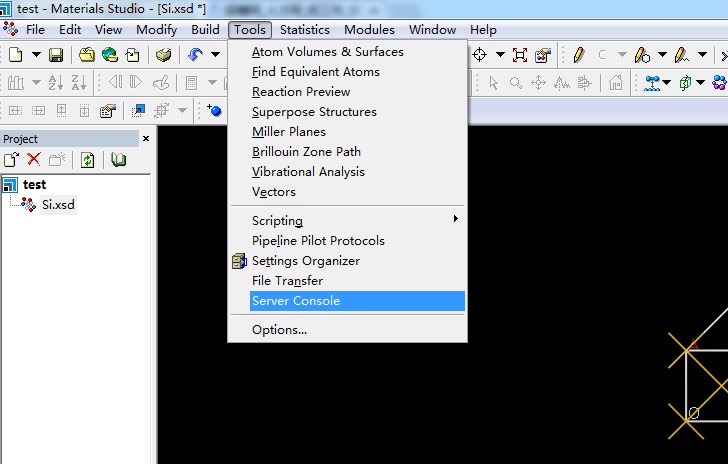
1)打开菜单Tools->Server Console,进入配置界面
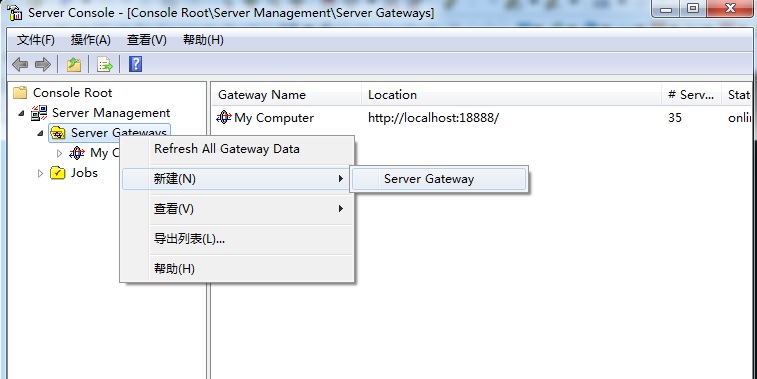
2)右键选择Server Gateway新建一个Gateway
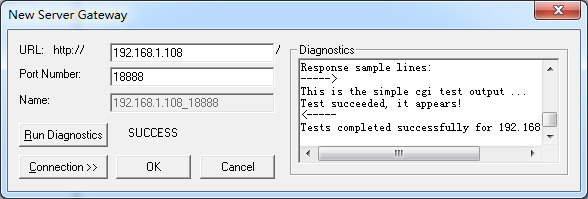
3)输入Linux服务器的ip地址,默认端口18888,点Run Diagnostics测试Gateway是否正常,如图所示验证成功,点OK关闭窗口
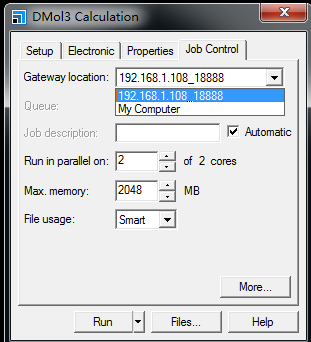
4)计算的时候选择Gateway为Linux服务器就可以了,其他的与本地计算相同。
搭建高性能计算环境(七)、应用软件的安装之MS的更多相关文章
- 搭建高性能计算环境(五)、应用软件的安装之Amber12
应用软件通常安装在/opt目录下,这样系统中的各个用户都能方便使用,下面的软件都将安装到/opt目录. 1,上传需要的软件包Amber12.tar.gz.AmberTools13.tar.bz2.Am ...
- ubuntu通过apt-get方式搭建lnmp环境以及php扩展安装
v 一直是在用的lnmp的集成安装包搭建lnmp环境,因为工作需要需要安装ldap扩展,在网上怎么都找不到源码安装包,只能卸载掉原来的lnmp环境,用ubuntu的php5-ldap扩展, 在安装中遇 ...
- 搭建高性能计算环境(九)、应用软件的安装之gaussian 09
高斯软件一般使用的都是编译好的二进制版,所以解压缩后设置一下环境变量就可以用了. cd /opt tar xvf g09.tar.gz 设置环境变量,添加到/etc/profile文件中,重新登录后生 ...
- 搭建高性能计算环境(八)、应用软件的安装之gromacs
1,下载安装新版本的gcc(高版本的gcc只是推荐使用的,系统自带的gcc4.4照样能正常编译.运行) wget http://ftp.tsukuba.wide.ad.jp/software/gcc/ ...
- 搭建高性能计算环境(六)、应用软件的安装之lammps
1,上传需要的软件包lammps-stable.tar.gz. 2,解压缩并进入安装目录 tar xvf lammps-stable.tar.gz cd lammps-30Oct14 3,如果需要re ...
- 搭建高性能计算环境(四)、应用软件的安装之VASP
1,将需要的软件包上传vasp.5.2.12.tar.gz.vasp.5.lib.tar.gz.benchmark.Hg.tar.gz. 2,创建vasp目录并解压软件包. mkdir /opt/va ...
- 搭建高性能计算环境(十)、应用软件的安装之Wien2k
1,首先安装fftw .tar.gz cd fftw- ./configure --prefix=/opt/fftw- --enable-shared --enable-float --enable- ...
- 搭建高性能计算环境(一)、Linux操作系统的安装和配置
一般课题组刚开始做计算,往往没有专门的集群,主要用自己的PC机.工作站或者买几台服务器来跑跑:小伙伴们摸索Linux的使用.编译一些开源软件.甚至写点Shell脚本需要耗费很多时间,耽搁了读文献.码论 ...
- 搭建MHA环境【2】安装mysql-5.6 + mysql复制
本例中mysql的安装方式选用了二进制包安装方案.mysql复制用半同步复制方案 [1]安装mysql-5.6.31 要在所有的数据节点上都安装上mysql,安装方式大致相同,所以我这里就不重复写多次 ...
随机推荐
- iPhone开发之UIScrollView初步
来源:http://blog.csdn.net/htttw/article/details/7891396 iPhone开发之UIScrollView初步 今天我们初步介绍以一下iPhone开发中的U ...
- 初始化ArrayList的两种方法
方式一: ArrayList<String> list = new ArrayList<String>(); String str01 = String("str ...
- C++学习41 exception类
C++语言本身或者标准库抛出的异常都是 exception 的子类,称为标准异常(Standard Exception).你可以通过下面的语句来匹配所有标准异常: try{ //可能抛出异常的语句 } ...
- gc 辅助打印信息
cat xx.xml|grep GC <jvm-arg>-XX:+PrintGCDetails</jvm-arg> <jvm-arg>-XX:+PrintGCDat ...
- dropdownlist 控件的判断
问题: 三个级联 下拉框.在不点击第一级别直接点击第二级别时,弹出提示窗口."请先选择XXX"之类的,理想的结果是想要下图 这样的: 由于使用的微信公众号的内置浏览器,所以问题来了 ...
- c# list排序的三种实现方式
用了一段时间的gridview,对gridview实现的排序功能比较好奇,而且利用C#自带的排序方法只能对某一个字段进行排序,今天demo了一下,总结了三种对list排序的方法,并实现动态传递字段名对 ...
- (Array) 一个 N*N 的矩阵,每一行从左到右有序,每一列从上到下有序,都是递增,写个程序,判断一个数是否在矩阵中。
int search(int d[N][N], int key) { int i1, i2, j1, j2; i1 = j1 = 0; i2 = j2 = N-1; while(i1 < i2 ...
- GroupId和ArtifactId
<!-- https://mvnrepository.com/artifact/org.springframework/spring-webmvc --><dependency> ...
- Android——状态栏通知栏Notification
1.AndroidManifest.xml注意要同时注册Notification02Activity <!-- 状态通知栏 Notification --> <acti ...
- The Ninth Hunan Collegiate Programming Contest (2013) Problem I
Problem I Interesting Calculator There is an interesting calculator. It has 3 rows of button. Row 1: ...