
git如何从远程非master分支更新到本地对应分支
git如何从远程非master分支更新到本地对应分支
自己实例
正确步骤
如果本地有分支,那就删除本地分支
删除本地分支::git branch -d 2018_4_18_second
切换分支: git checkout master
将远程分支 上的东西拉下来: git checkout -b 2018_4_18_second origin/2018_4_18_second
# 列出所有本地分支$ git branch
# 列出所有远程分支$ git branch -r
# 列出所有本地分支和远程分支$ git branch -a
# 新建一个分支,并切换到该分支$ git checkout -b [branch]
拉文件下来的话
git pull https://github.com/fry404006308/m_Orchestrate.git 2018_4_18_second
或者试试
git pull
善于使用帮助命令,特别好用
从帮助命令知道怎么弄,超级快
git help pull
然后你会看到这样的示例用法:
 EXAMPLES

 Update the remote-tracking branches for the repository you cloned from, then merge one of them into your current branch:

 $ git pull

 $ git pull origin

 Normally the branch merged in is the HEAD of the remote repository, but the choice is determined by the branch.<name>.remote and branch.<name>.merge options; see git-config() for details.

 Merge into the current branch the remote branch next:

 $ git pull origin next

 This leaves a copy of next temporarily in FETCH_HEAD, but does not update any remote-tracking branches. Using remote-tracking branches, the same can be done by invoking fetch and merge:

 $ git fetch origin

 $ git merge origin/next

 If you tried a pull which resulted in complex conflicts and would want to start over, you can recover with git reset.
所以就知道怎么弄了
将远程git仓库里的指定分支拉取到本地(本地不存在的分支)
当我想从远程仓库里拉取一条本地不存在的分支时:
git checkout -b 本地分支名 origin/远程分支名
这个将会自动创建一个新的本地分支,并与指定的远程分支关联起来。
例如远程仓库里有个分支dev2,我本地没有该分支,我要把dev2拉到我本地:

若成功,将会在本地创建新分支dev2,并自动切到dev2上。
如果出现提示:
fatal: Cannot update paths and switch to branch 'dev2' at the same time.

Did you intend to checkout 'origin/dev2' which can not be resolved as commit?
表示拉取不成功。我们需要先执行
git fetch
然后再执行
git checkout -b 本地分支名 origin/远程分支名
即可。
git checkout -b 2018_4_18_second
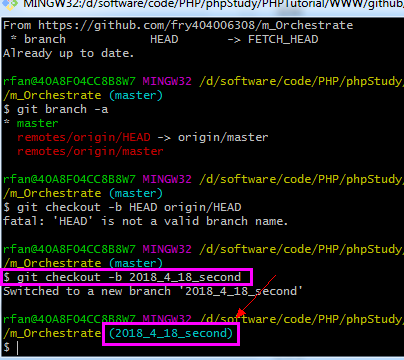
忘记 pull up了 远程建立分支后,要pull up更新一下本地,就可以显示出来了,新手,弄了几个小时,才弄出来。。

git pull之后,才显示远程分支
别人实例
git一般有很多分支,我们clone到本地的时候一般都是master分支,那么如何切换到其他分支呢?主要命令如下:
1. 查看远程分支
$ git branch -a
我在mxnet根目录下运行以上命令:
~/mxnet$ git branch -a

* master

  remotes/origin/HEAD -> origin/master

  remotes/origin/master

  remotes/origin/nnvm

  remotes/origin/piiswrong-patch-1

  remotes/origin/v0.9rc1
可以看到,我们现在在master分支下
2. 查看本地分支
~/mxnet$ git branch

* master
3. 切换分支
$ git checkout -b v0.9rc1 origin/v0.9rc1

Branch v0.9rc1 set up to track remote branch v0.9rc1 from origin.

Switched to a new branch 'v0.9rc1'

#已经切换到v0.9rc1分支了

$ git branch

  master

* v0.9rc1

#切换回master分支

$ git checkout master

Switched to branch 'master'

Your branch is up-to-date with 'origin/master'.
git如何从远程非master分支更新到本地对应分支的更多相关文章
- git拉取远程分支到本地分支或者创建本地新分支
git fetch origin branchname:branchname 可以把远程某各分支拉去到本地的branchname下,如果没有branchname,则会在本地新建branchname g ...
- git使用 从远程库克隆和更新到本地
从远程库克隆到本地. git clone git@github.com:kingbook/Framework.git 或 git clone http://github.com/kingBook/Fr ...
- git删除远程分支和本地分支以及更改本地和分支名字
问题描述: 当我们集体进行项目时,将自定义分支push到主分支master之后,如何删除远程的自定义分支呢 问题解决: (1)使用命令git branch -a 查看所有分支 注: 其中,remote ...
- 将远程UI分支克隆到本地UI分支
git checkout -b UI git remote add origin <url> git fetch origin git branch --track UI origin/U ...
- git clone新项目后如何拉取分支代码到本地
1.git clone git@git.n.xxx.com:xxx/xxx.git 2.git fetch origin dev 命令来把远程dev分支拉到本地 3.checkout -b de ...
- git clone新项目后如何拉取其他分支代码到本地
1.git clone git@git.n.xxx.com:xxx/xxx.git 2.git fetch origin dev 命令来把远程dev分支拉到本地 - - 解读:git fetch命令用 ...
- git 操作 :从远程仓库gitLab上拉取指定分支到本地仓库;git如何利用分支进行多人开发 ;多人合作代码提交实践
例如:将gitLab 上的dev分支拉取到本地 git checkout -b dev origin/dev 在本地创建分支dev并切换到该分支 git pull origin dev 就可以把git ...
- Git拉取远程仓库代码并更新本地仓库
1.git pull:获取最新代码到本地,并自动合并到当前分支 //查询当前远程分支 $ git remote -v //直接拉取并合并最新代码 $ git pull origin master [示 ...
- git与eclipse集成之创建及切换个人本地分支
创建个人本地特性分支,并进行编码 弹出选择分支的窗口,选择要切换的个人特性分支(备注:根据远程个人特性分支创建本地个人特性分支) 点击OK,Branch name:分支名称与远程分支名称相同,不需要修 ...
随机推荐
- 【jQuery04】折叠树
<!DOCTYPE html PUBLIC "-//W3C//DTD XHTML 1.0 Transitional//EN" "http://www.w3.org/ ...
- 紫书 例题8-5 UVa11054(等价转换)
这道题用到了等价转换的思想 所有要运到a1的酒, 都要经过a2, 所以不如把a2的值改成a1+a2,然后依次以此类推. #include<cstdio> #include<cmath ...
- maven的setting设置
maven的setting设置,settings.xml文件,多写了几个仓库的地址: <?xml version="1.0" encoding="UTF-8&quo ...
- thinkphp5.0的验证码安装和相关错误
thinkphp5.0的验证码安装和相关错误 问题 只要是之前使用thinkphp5框架搭建网站的时候发现不管如何调用验证码都无法使用,按照官网要求,使用composer安装验证码出现报错Fatal ...
- Numpy科学计算工具
Numpy初探 Numpy基础数据结构 Numpy数组是一个多维数组,称为ndarray.其由两部分组成: 实际的数据 描述这些数据的原数据 导入该库: import numpy as np 多维数组 ...
- 2.安装 CLI和CLI的工作原理
转自:https://www.gruntjs.net/getting-started 还在使用 Grunt 0.3 版本吗?请查看 Grunt 0.3 注意事项 在继续学习前,你需要先将Grunt命令 ...
- [poj 2480] Longge's problem 解题报告 (欧拉函数)
题目链接:http://poj.org/problem?id=2480 题目大意: 题解: 我一直很欣赏数学题完美的复杂度 #include<cstring> #include<al ...
- 机器学习规则:ML工程最佳实践----rules_of_ml section 1【翻译】
作者:黄永刚 机器学习规则:ML工程最佳实践 本文旨在指引具有机器学习基础知识的工程师等人,更好的从机器学习的实践中收益.介绍一些应用机器学习需要遵循的规则,类似于Google C++ 风格指南等流行 ...
- js parseFloat 精度问题
<script type="text/javascript"> //parseFloat function actionoftext(){var price = 10. ...
- Futures and promises
In computer science, future, promise, delay, and deferred refer to constructs used for synchronizing ...