
[TFS4]TFS git地址,分支概念
1)上传本地代码到TFS
a.Generate Git Credentials,即创建git账户密码
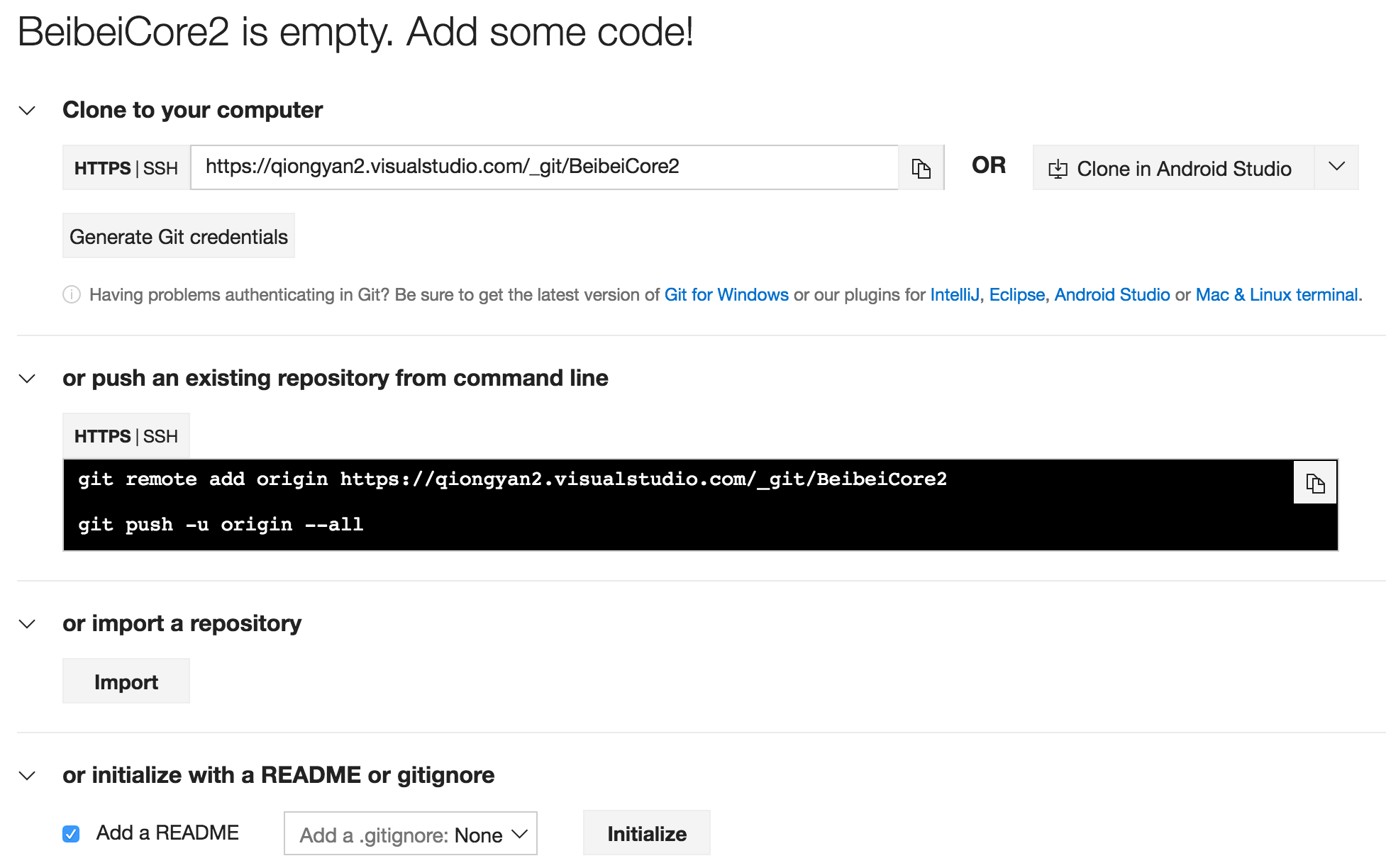
b)上传本地代码
git add *
git commit -m "纳入管理"

git remote add origin https://qiongyan2.visualstudio.com/_git/BeibeiCore2
git push -u origin --all
{{-u参考链接:https://www.zhihu.com/question/20019419/answer/83091592}}
git remote rm origin
Username for 'https://qiongyan2.visualstudio.com': qiongyan2@126.com
Password for 'https://qiongyan2@126.com@qiongyan2.visualstudio.com':
2)git 分支
也可以参考此文:Git 在团队中的最佳实践--如何正确使用Git Flow
链接:https://www.zhihu.com/question/21995370/answer/33172036
来源:知乎
著作权归作者所有,转载请联系作者获得授权。
1. 建议使用source tree或者其他的gui工具。
2. 安装oh-my-zsh
开始回答问题:
最近在看git关于分支的管理,发现可以用git-flow来管理分支。先贴上项目地址nvie/gitflow · GitHub
git-flow主要有5中分支:master、hotfix、release、develop、feature。

当完成一定数量feature分支以后,从develop再开一个release分支出来,这些特性将被更新到下一个发布的版本中,之后的feature将不会被合并到release中。
之后在release分支中,只修改bug,然后完成release分支。完成release分支会完成以下三个操作:1、合并release分支到master;2、给master打上版本的标签;3、release回归到develop分支。
当发现master上有bug时,开一个hotfix,完成后合并到master分支。
基本的开发流程就是这样,不清楚的可以看看文档Gitflow Workflow
PS:source tree中已经集成了git-flow使用感受良好
3) Git Flow代码示例
a. 创建develop分支

git branch develop

git push -u origin develop

b. 开始新Feature开发

git checkout -b some-feature develop

# Optionally, push branch to origin:

git push -u origin some-feature

# 做一些改动

git status

git add some-file

git commit

c. 完成Feature

git pull origin develop

git checkout develop

git merge --no-ff some-feature

git push origin develop

git branch -d some-feature

# If you pushed branch to origin:

git push origin --delete some-feature

d. 开始Relase

git checkout -b release-0.1.0 develop

# Optional: Bump version number, commit

# Prepare release, commit

e. 完成Release

git checkout master

git merge --no-ff release-0.1.0

git push

git checkout develop

git merge --no-ff release-0.1.0

git push

git branch -d release-0.1.0

# If you pushed branch to origin:

git push origin --delete release-0.1.0

git tag -a v0.1.0 master

git push --tags

f. 开始Hotfix

git checkout -b hotfix-0.1.1 master

g. 完成Hotfix

git checkout master

git merge --no-ff hotfix-0.1.1

git push

git checkout develop

git merge --no-ff hotfix-0.1.1

git push

git branch -d hotfix-0.1.1

git tag -a v0.1.1 master

git push --tags
4)本地测试git flow
书本目录:https://git-scm.com/book/zh/v2
qiongyazhudembp:BeibeiCore qiongyanzhu$ git branch --all

* master

  remotes/origin/master

qiongyazhudembp:BeibeiCore qiongyanzhu$
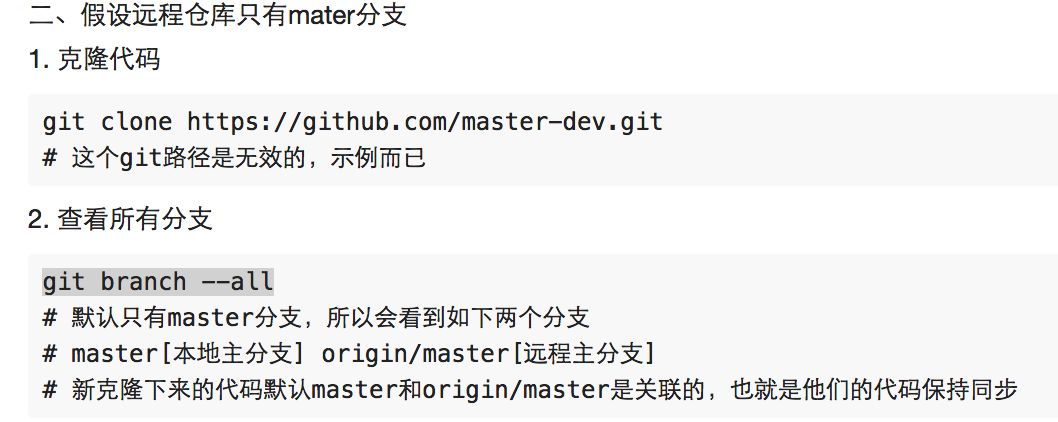
$ git branch develop

$ git branch --all

  develop

* master

  remotes/origin/master
 然也可以同步
$ git push -u origin develop:develop

Total 0 (delta 0), reused 0 (delta 0)

To https://qiongyan2.visualstudio.com/_git/BeibeiCore2

 * [new branch]      develop -> develop

Branch develop set up to track remote branch develop from origin.

$ git branch --all

  develop

* master

  remotes/origin/develop

  remotes/origin/master

$ cat .git/refs/heads/master

54b20f4c9f793ad1fc59f4e4b03867c93ad2bca7

$ git checkout develop

Switched to branch 'develop'

Your branch is up-to-date with 'origin/develop'.

$ git branch --all

* develop

  master

  remotes/origin/develop

  remotes/origin/master


远程如果已经有develop分支

5) 代码编写有误,放弃工作区的修改
$ git diff 工作区与暂存区(提交暂存区,stage)相比的差异
$ git checkout bootstrap.js
[TFS4]TFS git地址,分支概念的更多相关文章
- git 利用分支概念实现一个仓库管理两个项目
需求描述:开发了一个网站,上线之际,突然另一个客户说也想要个一样的网站,但网站的logo和内部展示图片需要替换一下,也就是说大部分的后台业务逻辑代码都是一致的,以后升级时功能也要保持一致:刚开始想反正 ...
- [Notice]博客地址转移 vitostack.com
个人博客地址转移至vitostack.com 这里可能不会经常更新. 欢迎访问新地址.
- Git之(一)Git是什么[转]
为什么使用Git 孔子曾经曰过的,名正则言顺 言顺则事成. 我们在学习一项新技术之前,弄清楚为什么要学它至关重要,至于为什么要学习Git,我用一段if-else语句告诉你原因: if(你相信我){ 我 ...
- [转]Git入门与实践(一)
git入门与实践(一) · March 10th, 2010 · Posted in UNIX环境编程 · By ghosTM55 Write comment ...
- 你真的了解git的分支管理跟其他概念吗?
现在前端要学的只是太多了,你是不是有时会有这个想法,如果我有两个大脑.一个学Vue,一个学React,然后到最后把两个大脑学的知识再合并在一起,这样就能省时间了. 哈哈,这个好像不能实现.现实点吧!年 ...
- 使用TFS+GIT实现分布式项目管理
前言 GIT是近来很流行的一种版本控制系统,是Linux内核之父Linus Torvalds为了管理Linux内核的开发而开发的一种开源的版本控制工具. GIT相比传统的版本控制工具最大的优点是实现了 ...
- Git 入门:概念、原理、使用
出处: git入门:概念.原理.使用 git和Github 概念 Git --- 版本控制工具(命令). git是一个开源的分布式版本控制系统,用以有效.高速的处理从很小到非常大的项目版本管理.git ...
- [caffe]linux下安装caffe(无cuda)以及python接口
昨天在mac上折腾了一天都没有安装成功,晚上在mac上装了一个ParallelDesktop虚拟机,然后装了linux,十分钟就安装好了,我也是醉了=.= 主要过程稍微记录一下: 1.安装BLAS s ...
- Git 的核心概念解读
本文不是Git使用教学篇,而是偏向理论方面,旨在更加深刻的理解Git,这样才能更好的使用它,让工具成为我们得力的助手. 版本控制系统 Git 是目前世界上最优秀的分布式版本控制系统.版本控制系统是能够 ...
随机推荐
- linux下加入用户并赋予root权限
1.加入用户.首先用adduser命令加入一个普通用户,命令例如以下: #adduser tommy //加入一个名为tommy的用户 #passwd tommy //改动password Cha ...
- Xcode7 的两个小坑
Xcode7 还在 beta.时不时崩一下什么的倒也是预料之中的事.没料到的是之前用着好好的,今天升完 El Capitan 之后,模拟器竟然不见了,设备倒是在 schema 栏右边里能看到.只是注明 ...
- xcode6.3 模版位置
/Applications/Xcode.app/Contents/Developer/Platforms/iPhoneOS.platform/Developer/Library/Xcode/Templ ...
- 好玩的 emoji
emoji 就是表情符号,来自日语词汇"絵文字"(假名为"えもじ",读音即emoji).emoji 表情符号大全,都在这里(手机/电脑都可以复制):www.fu ...
- python3中让程序暂停运行的语句
https://blog.csdn.net/zmz971751504/article/details/78288988
- nodejs连接mysql突然中断问题解决方案
db/index.js数据库配置文件 一.在数据库连接失败的情况下,回调函数,再次发起连接,直到连接成功为止. handleDisconnect(){ this.connection.connect( ...
- [置顶]
WebService学习总结(3)——使用java JDK开发WebService
一.WebService的开发手段 使用Java开发WebService时可以使用以下两种开发手段 1. 使用JDK开发(1.6及以上版本) 2.使用CXF框架开发(工作中) 二.使用JDK开发Web ...
- logback--How do I configure an AsyncAppender with code? 转载
原文地址:https://github.com/tony19/logback-android/issues/54 Please provide an example of how to configu ...
- JDBC 专题
digest: getFetchSize()方法不是获得记录数,而是获得每次抓取的记录数,默认是0,也就是说不限制.可以用setFetchSize()来设置,而getFetchSize()是用来读出那 ...
- vue中监听路由参数变化
今天遇到一个这样的业务场景:在同一个路由下,只改变路由后面的参数值, 比如在这个页面 /aaa?id=1 ,在这个页面中点击一个按钮后 跳转到 /aaa?id=2 , 但从“/aaa?id=1”到“ ...