
Flume Source官网剖析(博主推荐)
不多说,直接上干货!

一切来源于flume官网
http://flume.apache.org/FlumeUserGuide.html

- Avro Source
- Thrift Source
- Exec Source
- JMS Source
- Spooling Directory Source
- Taildir Source
- Twitter 1% firehose Source (experimental)
- Kafka Source
- NetCat Source
- Sequence Generator Source
- Syslog Sources
- HTTP Source
- Stress Source
- Legacy Sources
- Custom Source
- Scribe Source
Avro Source

官网给的例子是
a1.sources = r1

a1.channels = c1

a1.sources.r1.type = avro

a1.sources.r1.channels = c1

a1.sources.r1.bind = 0.0.0.0

a1.sources.r1.port =
而我们常用的一般是,
agent1.sources = avro-source1

agent1.channels = ch1

#Define and configure an Spool directory source

agent1.sources.avro-source1.channels=ch1

agent1.sources.avro-source1.type=avro

agent1.sources.avro-source1.bind=0.0.0.0

agent1.sources.avro-source1.port=4141
a1.sources.r1.interceptors = i1
a1.sources.r1.interceptors.i1.type = com.djt.flume.interceptor.BehaviorIterceptor$BehaviorIterceptorBuilder
Thrift Source

Exec Source

JMS Source

Spooling Directory Source(常用)
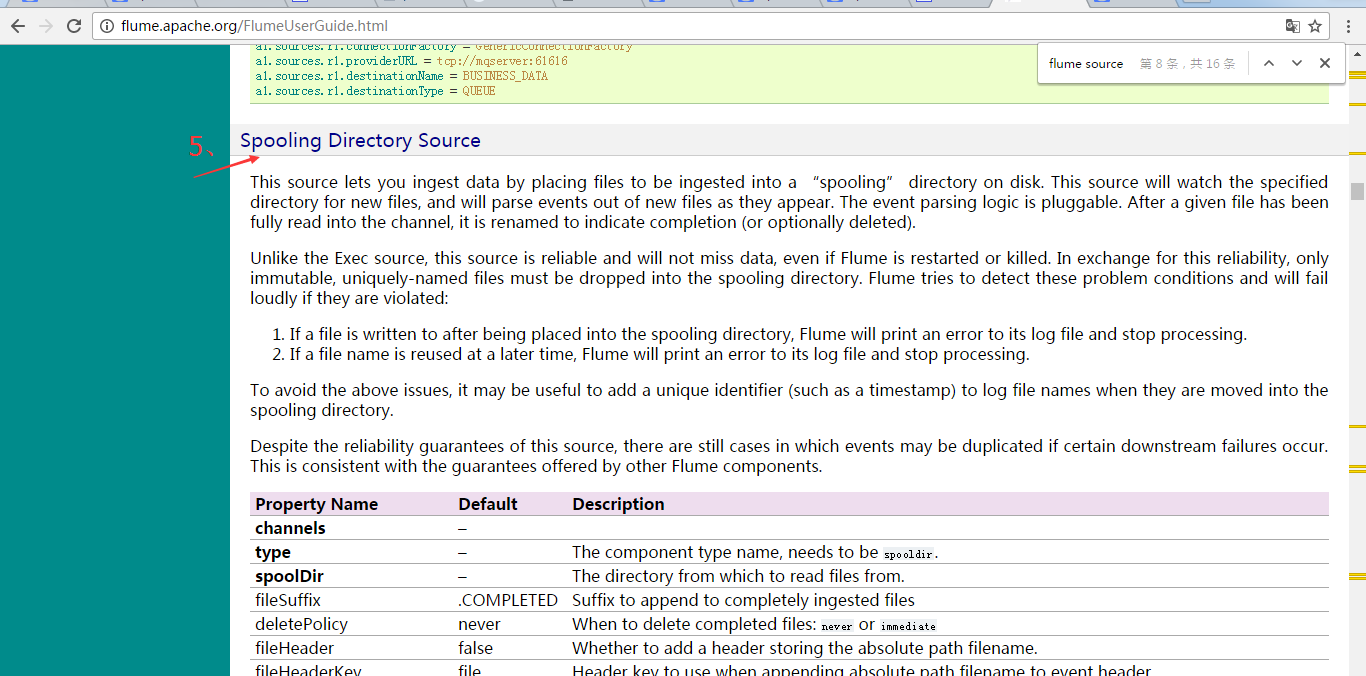
官网上给的参考例子是
a1.channels = ch-

a1.sources = src-

a1.sources.src-.type = spooldir

a1.sources.src-.channels = ch-

a1.sources.src-.spoolDir = /var/log/apache/flumeSpool

a1.sources.src-.fileHeader = true
而我们常用的一般是,
agent1.sources = spool-source1

agent1.channels = ch1

#Define and configure an Spool directory source

agent1.sources.spool-source1.channels=ch1

agent1.sources.spool-source1.type=spooldir

agent1.sources.spool-source1.spoolDir=/home/hadoop/data/flume/sqooldir

agent1.sources.spool-source1.ignorePattern=event(_\d{}\-d{}\-d{}\_d{}\_d{})?\.log(\.COMPLETED)?

agent1.sources.spool-source1.deserializer.maxLineLength=
Taildir Source

Twitter 1% firehose Source

Kafka Source(常用)

官网给的例子是
Example for topic subscription by comma-separated topic list.
tier1.sources.source1.type = org.apache.flume.source.kafka.KafkaSource

tier1.sources.source1.channels = channel1

tier1.sources.source1.batchSize =

tier1.sources.source1.batchDurationMillis =

tier1.sources.source1.kafka.bootstrap.servers = localhost:

tier1.sources.source1.kafka.topics = test1, test2

tier1.sources.source1.kafka.consumer.group.id = custom.g.id
Example for topic subscription by regex
tier1.sources.source1.type = org.apache.flume.source.kafka.KafkaSource

tier1.sources.source1.channels = channel1

tier1.sources.source1.kafka.bootstrap.servers = localhost:

tier1.sources.source1.kafka.topics.regex = ^topic[-]$

# the default kafka.consumer.group.id=flume is used
具体官网里,还给了Security and Kafka Source、TLS and Kafka Source、Kerberos and Kafka Source。自行去看吧
NetCat Source

Sequence Generator Source

Syslog Sources

Syslog TCP Source

Multiport Syslog TCP Source

Syslog UDP Source

HTTP Source

官网还提供了JSONHandler、BlobHandler。这里不多说,自行去看吧
Stress Source

Legacy Sources

Avro Legacy Source

Thrift Legacy Source

Custom Source

Scribe Source

大家自己去看,罗列出来,是让大家,不要局限于博客本身,眼光要放宽和多看官网,一切来源于官网。
对于大数据无论是各种开源项目,看官网是学习的最好办法,再加上他人的中文博客。不要觉得英文恐惧,专业英语也就那样!变成高手和大牛,加油吧,zhouls!
Flume Source官网剖析(博主推荐)的更多相关文章
- Flume Channels官网剖析(博主推荐)
不多说,直接上干货! Flume Sources官网剖析(博主推荐) 一切来源于flume官网 http://flume.apache.org/FlumeUserGuide.html Flume Ch ...
- Flume Channel Selectors官网剖析(博主推荐)
不多说,直接上干货! Flume Sources官网剖析(博主推荐) Flume Channels官网剖析(博主推荐) 一切来源于flume官网 http://flume.apache.org/Flu ...
- Flume Interceptors官网剖析(博主推荐)
不多说,直接上干货! Flume Sources官网剖析(博主推荐) Flume Channels官网剖析(博主推荐) Flume Channel Selectors官网剖析(博主推荐) Flume ...
- Flume Sinks官网剖析(博主推荐)
不多说,直接上干货! Flume Sources官网剖析(博主推荐) Flume Channels官网剖析(博主推荐) Flume Channel Selectors官网剖析(博主推荐) 一切来源于f ...
- Flume Sink Processors官网剖析(博主推荐)
不多说,直接上干货! Flume Sources官网剖析(博主推荐) Flume Channels官网剖析(博主推荐) Flume Channel Selectors官网剖析(博主推荐) Flume ...
- Event Serializers官网剖析(博主推荐)
不多说,直接上干货! Flume Sources官网剖析(博主推荐) Flume Channels官网剖析(博主推荐) Flume Channel Selectors官网剖析(博主推荐) Flume ...
- Ubuntu16.04下Neo4j图数据库官网安装部署步骤(图文详解)(博主推荐)
不多说,直接上干货! 说在前面的话 首先,查看下你的操作系统的版本. root@zhouls-virtual-machine:~# cat /etc/issue Ubuntu LTS \n \l r ...
- Ubuntu14.04下Neo4j图数据库官网安装部署步骤(图文详解)(博主推荐)
不多说,直接上干货! 说在前面的话 首先,查看下你的操作系统的版本. root@zhouls-virtual-machine:~# cat /etc/issue Ubuntu 14.04.4 LTS ...
- Ubuntu14.04下Mongodb官网卸载部署步骤(图文详解)(博主推荐)
不多说,直接上干货! 前期博客 Ubuntu14.04下Mongodb官网安装部署步骤(图文详解)(博主推荐) https://docs.mongodb.com/manual/tutorial/ins ...
随机推荐
- P2617 Dynamic Ranking
题目描述 给定一个含有n个数的序列a[1],a[2],a[3]……a[n],程序必须回答这样的询问:对于给定的i,j,k,在a[i],a[i+1],a[i+2]……a[j]中第k小的数是多少(1≤k≤ ...
- axure母版使用实例之百度门户
1.首先构建页面基本结构 2.新建母板 3.将母板应用于各个页面 4.在母板中隐藏聚焦背景及下拉二级菜单 5.在母板中添加事件:打开相应界面.显示/隐藏二级菜单 5.设置页面加载效果:给点击的一级菜单 ...
- Codefroces D2. Magic Powder - 2(二分)
http://codeforces.com/problemset/problem/670/D2 http://codeforces.com/problemset/problem/670/D1 time ...
- xcode 条件调试
添加条件 有时候我们可能会在某个循环中创建断点,但一次又一次地点击 continue 直到我们想要的条件出现,显然是一种非常低效的方式.好在 Xcode 为我们提供了条件断点. 首先在下列代码中插入一 ...
- Linux桌面词典 星际译王(StarDict)
星际译王(StarDict)是利用GTK(GIMP TOOLKIT)开发的国际化的.跨平台的自由的桌面字典软件.它并不包含字典档,使用者须自行下载配合使用.它可以运行于多种不同的平台,如Linux, ...
- zip---解压缩文件
zip命令可以用来解压缩文件,或者对文件进行打包操作.zip是个使用广泛的压缩程序,文件经它压缩后会另外产生具有“.zip”扩展名的压缩文件. 语法 zip(选项)(参数) 选项 -A:调整可执行的自 ...
- C++ lambda表达式 (一)
为什么要lambda函数 匿名函数是许多编程语言都支持的概念,有函数体,没有函数名.1958年,lisp首先采用匿名函数,匿名函数最常用的是作为回调函数的值.正因为有这样的需求,c++引入了lambd ...
- Android Retrofit+RxJava 优雅的处理服务器返回异常、错误
标签: 开始本博客之前,请先阅读: Retrofit请求数据对错误以及网络异常的处理 异常&错误 实际开发经常有这种情况,比如登录请求,接口返回的 信息包括请求返回的状态:失败还是成功,错误码 ...
- Vectorized implementation
Vectorization Vectorization refers to a powerful way to speed up your algorithms. Numerical computin ...
- 博弈论 SG函数(模板) HDU 1848 Fibonacci again and again
Fibonacci again and again Time Limit: 1000/1000 MS (Java/Others) Memory Limit: 32768/32768 K (Jav ...