
kali源
apt源:
#中科大

deb http://mirrors.ustc.edu.cn/kali kali-rolling main non-free contrib

deb-src http://mirrors.ustc.edu.cn/kali kali-rolling main non-free contrib

#阿里云

deb http://mirrors.aliyun.com/kali kali-rolling main non-free contrib

deb-src http://mirrors.aliyun.com/kali kali-rolling main non-free contrib

#清华大学

deb http://mirrors.tuna.tsinghua.edu.cn/kali kali-rolling main contrib non-free

deb-src https://mirrors.tuna.tsinghua.edu.cn/kali kali-rolling main contrib non-free

#浙大

deb http://mirrors.zju.edu.cn/kali kali-rolling main contrib non-free

deb-src http://mirrors.zju.edu.cn/kali kali-rolling main contrib non-free

#东软大学

deb http://mirrors.neusoft.edu.cn/kali kali-rolling/main non-free contrib

deb-src http://mirrors.neusoft.edu.cn/kali kali-rolling/main non-free contrib

#官方源

deb http://http.kali.org/kali kali-rolling main non-free contrib

deb-src http://http.kali.org/kali kali-rolling main non-free contrib
故障解决:
故障现象:
[root@host01 ~]# ssh 10.105.139.144

no hostkey alg
查看详细信息:
[root@host01 ssh]# ssh -v 10.105.139.144

OpenSSH_5.3p1, OpenSSL 1.0.1e-fips 11 Feb 2013

debug1: Reading configuration data /etc/ssh/ssh_config

debug1: Applying options for *

debug1: Connecting to 10.105.139.144 [10.105.139.144] port 22.

debug1: Connection established.

debug1: permanently_set_uid: 0/0

debug1: identity file /root/.ssh/identity type -1

debug1: identity file /root/.ssh/identity-cert type -1

debug1: identity file /root/.ssh/id_rsa type 1

debug1: identity file /root/.ssh/id_rsa-cert type -1

debug1: identity file /root/.ssh/id_dsa type -1

debug1: identity file /root/.ssh/id_dsa-cert type -1

debug1: identity file /root/.ssh/id_ecdsa type -1

debug1: identity file /root/.ssh/id_ecdsa-cert type -1

debug1: Remote protocol version 2.0, remote software version OpenSSH_7.8p1 Debian-1

debug1: match: OpenSSH_7.8p1 Debian-1 pat OpenSSH*

debug1: Enabling compatibility mode for protocol 2.0

debug1: Local version string SSH-2.0-OpenSSH_5.3

debug1: SSH2_MSG_KEXINIT sent

debug1: SSH2_MSG_KEXINIT received

debug1: kex: server->client aes128-ctr hmac-sha1 none

debug1: kex: client->server aes128-ctr hmac-sha1 none

no hostkey alg
解决方法:
在服务端执行以下命令:
ssh-keygen -t rsa -f /etc/ssh/ssh_host_rsa_key

ssh-keygen -t dsa -f /etc/ssh/ssh_host_dsa_key
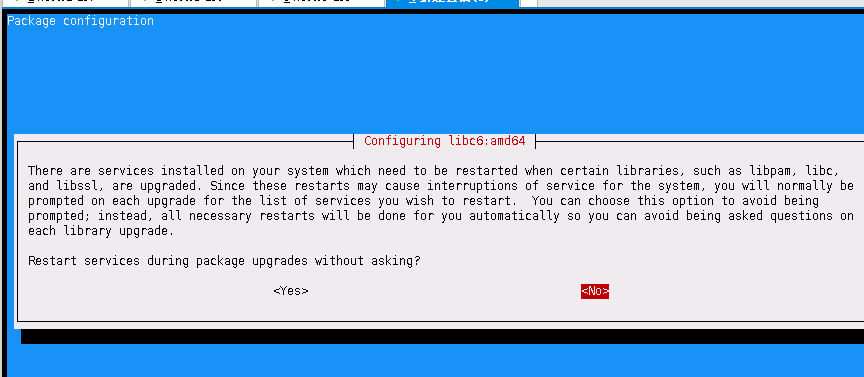
There are services installed on your system which need to be restarted when certain libraries, such as libpam, libc, x
and libssl, are upgraded. Since these restarts may cause interruptions of service for the system, you will normally be x
prompted on each upgrade for the list of services you wish to restart. You can choose this option to avoid being x
prompted; instead, all necessary restarts will be done for you automatically so you can avoid being asked questions on x
each library upgrade. x
Restart services during package upgrades without asking?
kali关闭iptables
安装
apt-get install ufw关闭
ufw disable # To disable the firewall开启
ufw enable # To enable the firewall下面简单讲一下这个问题的原理和比较长久的解决方案。
1、ssh会把你每个你访问过计算机的公钥(public key)都记录在~/.ssh/known_hosts。当下次访问相同计算机时,OpenSSH会核对公钥。如果公钥不同,OpenSSH会发出警告, 避免你受到DNS Hijack之类的攻击。
2、SSH对主机的public_key的检查等级是根据StrictHostKeyChecking变量来配置的。默认情况下,StrictHostKeyChecking=ask。
1.StrictHostKeyChecking=no

#最不安全的级别。如果连接server的key在本地不存在,那么就自动添加到文件中(默认是known_hosts),并且给出一个警告。

2.StrictHostKeyChecking=ask  #默认的级别,就是出现刚才的提示了。如果连接和key不匹配,给出提示,并拒绝登录。

3.StrictHostKeyChecking=yes  #最安全的级别,如果连接与key不匹配,就拒绝连接,不会提示详细信息。
ask状态:

vim /etc/ssh/ssh_config
StrictHostKeyChecking no

UserKnownHostsFile /dev/null
(注:这里为了简便,将knownhostfile设为/dev/null,就不保存在known_hosts中了)
SSH 登录失败:Host key verification failed 的处理方法
问题1:
SSH 登录失败:Host key verification failed
######################################
由于公钥不一样了,所以无法登录,提示信息是 KEY 验证失败。
解决方法是:
在 /root/.ssh/known_hosts 文件里面将原来的公钥信息删除即可。
SSH 报 “Host key verification failed.”。一般来说,出现该错误有这么几种可能:
1. .ssh/known_hosts 裡面记录的目标主机 key 值不正确。这是最普遍的情况,只要删除对应的主机记录就能恢复正常。
运行命令: sudo rm /home/yourname/.ssh/known_hosts
2. .ssh 目录或者 .ssh/known_hosts 对当前用户的权限设置不正确。这种情况比较少,一般正确设置读写权限以后也能恢复正常。
3. /dev/tty 对 other 用户没有放开读写权限。这种情况极为罕见。出现的现象是,只有 root 用户能够使用 ssh client,而所有其他的普通用户都会出现错误。
我今天遇到的就是第三种情况,修改 /dev/tty 的权限后,一切正常。为了避免以后忘记解决方法,记录在这里。
问题2:
ssh_exchange_identification: Connection closed by remote host
##################################################
解决办法:
修改/etc/hosts.allow文件,加入 sshd:ALL。
符相关配制说明: vi /etc/ssh/ssh_config
-------------------------------------------------
下面逐行说明上面的选项设置:
Host * :选项“Host”只对能够匹配后面字串的计算机有效。“*”表示所有的计算机。
ForwardAgent no :“ForwardAgent”设置连接是否经过验证代理(如果存在)转发给远程计算机。
ForwardX11 no :“ForwardX11”设置X11连接是否被自动重定向到安全的通道和显示集(DISPLAY set)。
RhostsAuthentication no :“RhostsAuthentication”设置是否使用基于rhosts的安全验证。
RhostsRSAAuthentication no :“RhostsRSAAuthentication”设置是否使用用RSA算法的基于rhosts的安全验证。
RSAAuthentication yes :RSAAuthentication”设置是否使用RSA算法进行安全验证。
PasswordAuthentication yes :“PasswordAuthentication”设置是否使用口令验证。
FallBackToRsh no:“FallBackToRsh”设置如果用ssh连接出现错误是否自动使用rsh。
UseRsh no :“UseRsh”设置是否在这台计算机上使用“rlogin/rsh”。
BatchMode no :“BatchMode”如果设为“yes”,passphrase/password(交互式输入口令)的提示将被禁止。当不能交互式输入口令的时候,这个选项对脚本文件和批处理任务十分有用。
CheckHostIP yes :“CheckHostIP”设置ssh是否查看连接到服务器的主机的IP地址以防止DNS欺骗。建议设置为“yes”。
StrictHostKeyChecking no :“StrictHostKeyChecking”如果设置成“yes”,ssh就不会自动把计算机 的密匙加入“$HOME/.ssh/known_hosts”文件,并且一旦计算机的密匙发生了变化,就拒绝连接。
IdentityFile ~/.ssh/identity :“IdentityFile”设置从哪个文件读取用户的RSA安全验证标识。
Port 22 :“Port”设置连接到远程主机的端口。
Cipher blowfish :“Cipher”设置加密用的密码。
EscapeChar ~ :“EscapeChar”设置escape字符。
https://blog.csdn.net/qq_42103479/article/details/90111365

kali源的更多相关文章
- 更换Kali源让你更新更快
在2016.1版本kali-linux(也就是kali滚动更新版)更新慢解决办法: (此源为2.0版本)中科大kali滚动更新版源(即kali2.0源) #kali官方源 deb http://htt ...
- ubuntu 1806 添加 kali 源
最近需要使用 kali 源安装一些软件: 配置 sources.list,根据如下链接:http://mirrors.ustc.edu.cn/help/kali.html 获取 公钥:apt-key ...
- ubuntu下导入kali源
Kali-Linux之前的渗透神器BackTrack是基于Ubuntu的,界面比较友好,字体渲染看起来也比较舒服(也可能是本人用惯了 Ubuntu的缘故).后来官方终止BackTrack,开发Kali ...
- kali 源
#阿里云 deb http://mirrors.aliyun.com/kali kali-rolling main non-free contrib deb-src http://mirrors.al ...
- kali源更新
对于新装kali的同学一点存在着更新源的问题 这是对初次安装,进行系统更新的教程 首先需要有gpg_key wget -q -O - https://archive.kali.org/archive- ...
- kali 源设置sources.list
由于阿里源有些问题,可能我设置的问题,所以就去掉了,163的很快 # deb cdrom:[Debian GNU/Linux 2016.1 _Kali-rolling_ - Official Snap ...
- 4.修改更新源sources.list,提高软件下载安装速度(提供Kali 2.0 更新源)
1.切换到root用户(如果已经是root用户就直接看第二步) dnt@HackerKali:~$ su 密码: 2.用文本编辑器打开sources.list,手动添加下面的更新源 root@Hack ...
- 修改更新源sources.list,提高软件下载安装速度(提供Kali 2.0 更新源)
1.切换到root用户(如果已经是root用户就直接看第二步) dnt@HackerKali:~$ su 密码: 2.用文本编辑器打开sources.list,手动添加下面的更新源 root@Hack ...
- kali 更新源
个人收集的kali 更新源: 修改更新源: vim /etc/apt/sources.list 更新源列表包: #apt-get update 更新系统软件: #apt-get upgrade #官方 ...
随机推荐
- bzoj3224Treap
Splay版本的会补... 在学了2个小时Splay之后深感Treap的优越 特地又花了20分钟打了个Treap 至于这些平衡树的优缺点 可以用平衡方式来直观的感受到 现在平衡树们面对着这样的一个问题 ...
- android SDK manager 无法获取更新版本列表【转载】
http://mirrors.neusoft.edu.cn/eclipse/releases/luna/打开这个网址就可以看到adt的详细信息: http://developer.android.c ...
- bzoj 2594: 水管局长数据加强版 Link-Cut-Tree
题目: Description SC省MY市有着庞大的地下水管网络,嘟嘟是MY市的水管局长(就是管水管的啦),嘟嘟作为水管局长的工作就是:每天供水公司可能要将一定量的水从x处送往y处,嘟嘟需要为供水公 ...
- Android的Notification相关设置
Android手机:三星Galaxy S6 Android版本:Android 7.0 Android系统自带的本地通知会从顶部Pop下来,用来提示用户有新的消息,然后在Notification栏中停 ...
- [转]前端网络(性能)监测工具berserkJS
berserkJS 是基于 Qt (C++跨平台库)开发的前端网络(性能)监测工具. 它的核心功能是通过内置 webkit 收集由页面实际网络请求相关数据. 偏重于页面上线前检测与评估. 页面性能分析 ...
- 洛谷【P1898】缘分计算
我对模拟的理解:http://www.cnblogs.com/AKMer/p/9064018.html 题目传送门:https://www.luogu.org/problemnew/show/P189 ...
- js检测对象属性
In:(检测自身及原型属性) var o={x:1}; "x" in o; //true,自有属性存在 "y" in o; //false "toSt ...
- ES6学习之Proxy
定义:“代理器”,用于修改某些操作的默认行为,等同于在语言层面做出修改,所以属于一种“元编程”(meta programming),即对编程语言进行编程.可以对外界的访问进行过滤和改写. 语法: va ...
- TS学习之枚举
使用枚举可以定义一些有名字的数字常量 enum Test{ one = 1, two, three, four } console.log(Test); /*{ '1': 'one', '2': 't ...
- C#自定义控件 绘制框
上几张测试的 效果 虽然全是用.net 的绘图库画的,但是手动双缓冲,不会闪烁,感觉还不错,源码开放了,喜欢的拿去扩展吧; 用于撤销的存放图像的数据结构我设置为10个,怕是内存崩了,我看mspaint ...