
生成.m文件的python代码中出现的错误
错误代码
import tempfile

import subprocess

import shlex

import os

import numpy as np

import scipy.io

script_dirname = os.path.abspath(os.path.dirname(__file__))

def get_windows(image_fnames, cmd='selective_search_rcnn',image_tag):

    """

    Run MATLAB Selective Search code on the given image filenames to

    generate window proposals.

    Parameters

    ----------

    image_filenames: strings

        Paths to images to run on.

    cmd: string

        selective search function to call:

            - 'selective_search' for a few quick proposals

            - 'selective_seach_rcnn' for R-CNN configuration for more coverage.

    """

    # Form the MATLAB script command that processes images and write to

    # temporary results file.

    f, output_filename = tempfile.mkstemp(prefix = '{}'.format(image_tag),suffix='.mat',dir='/home/bnrc/formatm')

    os.close(f)

    fnames_cell = '{' + ','.join("'{}'".format(x) for x in image_fnames) + '}'

    command = "{}({}, '{}')".format(cmd, fnames_cell, output_filename)

    print(command)

    # Execute command in MATLAB.

    mc = "matlab -nojvm -r \"try; {}; catch; exit; end; exit\"".format(command)

    pid = subprocess.Popen(

        shlex.split(mc), stdout=open('/dev/null', 'w'), cwd=script_dirname)

    retcode = pid.wait()

    if retcode != 0:

        raise Exception("Matlab script did not exit successfully!")

    # Read the results and undo Matlab's 1-based indexing.

    all_boxes = list(scipy.io.loadmat(output_filename)['all_boxes'][0])

    subtractor = np.array((1, 1, 0, 0))[np.newaxis, :]

    all_boxes = [boxes - subtractor for boxes in all_boxes]

    # Remove temporary file, and return.

    #os.remove(output_filename)

    if len(all_boxes) != len(image_fnames):

        raise Exception("Something went wrong computing the windows!")

    return all_boxes

if __name__ == '__main__':

    """

    Run a demo.

    """

    import time

    image_tag = '/000015.jpg'

    image_filenames = [

        script_dirname + '/000015.jpg',

        script_dirname + '/cat.jpg'

    ]

    t = time.time()

    #boxes = get_windows(image_filenames)

    boxes = get_windows(image_filenames,cmd='selective_search_rcnn',image_tag)

    print(boxes[:2])

    print("Processed {} images in {:.3f} s".format(

        len(image_filenames), time.time() - t))
报的错误:

非默认的参数在默认参数之后。image_tag这个参数在cmd之后,但cmd是默认参数的,image_tag不是默认的。
修改代码
import tempfile

import subprocess

import shlex

import os

import numpy as np

import scipy.io

script_dirname = os.path.abspath(os.path.dirname(__file__))

def get_windows(image_fnames, image_tag,cmd='selective_search_rcnn'):

    """

    Run MATLAB Selective Search code on the given image filenames to

    generate window proposals.

    Parameters

    ----------

    image_filenames: strings

        Paths to images to run on.

    cmd: string

        selective search function to call:

            - 'selective_search' for a few quick proposals

            - 'selective_seach_rcnn' for R-CNN configuration for more coverage.

    """

    # Form the MATLAB script command that processes images and write to

    # temporary results file.

    f, output_filename = tempfile.mkstemp(prefix = '{}'.format(image_tag),suffix='.mat',dir='/home/bnrc/formatm')

    os.close(f)

    fnames_cell = '{' + ','.join("'{}'".format(x) for x in image_fnames) + '}'

    command = "{}({}, '{}')".format(cmd, fnames_cell, output_filename)

    print(command)

    # Execute command in MATLAB.

    mc = "matlab -nojvm -r \"try; {}; catch; exit; end; exit\"".format(command)

    pid = subprocess.Popen(

        shlex.split(mc), stdout=open('/dev/null', 'w'), cwd=script_dirname)

    retcode = pid.wait()

    if retcode != 0:

        raise Exception("Matlab script did not exit successfully!")

    # Read the results and undo Matlab's 1-based indexing.

    all_boxes = list(scipy.io.loadmat(output_filename)['all_boxes'][0])

    subtractor = np.array((1, 1, 0, 0))[np.newaxis, :]

    all_boxes = [boxes - subtractor for boxes in all_boxes]

    # Remove temporary file, and return.

    #os.remove(output_filename)

    if len(all_boxes) != len(image_fnames):

        raise Exception("Something went wrong computing the windows!")

    return all_boxes

if __name__ == '__main__':

    """

    Run a demo.

    """

    import time

    image_tag = '/000015.jpg'

    image_filenames = [

        script_dirname + '/000015.jpg',

        script_dirname + '/cat.jpg'

    ]

    t = time.time()

    #boxes = get_windows(image_filenames)

    boxes = get_windows(image_filenames,image_tag)

    print(boxes[:2])

    print("Processed {} images in {:.3f} s".format(

        len(image_filenames), time.time() - t))
之后又报错:
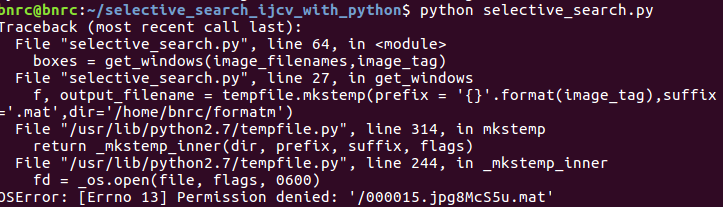
这个把image_tag里的/删除掉就好了
生成.m文件的python代码中出现的错误的更多相关文章
- webservice 服务端例子+客户端例子+CXF整合spring服务端测试+生成wsdl文件 +cxf客户端代码自动生成
首先到CXF官网及spring官网下载相关jar架包,这个不多说.webservice是干嘛用的也不多说. 入门例子 模拟新增一个用户,并返回新增结果,成功还是失败. 大概的目录如上,很简单. Res ...
- Kivy A to Z -- 怎样从python代码中直接訪问Android的Service
在Kivy中,通过pyjnius扩展能够间接调用Java代码,而pyjnius利用的是Java的反射机制.可是在Python对象和Java对象中转来转去总让人感觉到十分别扭.好在android提供了b ...
- Android color(颜色) 在XML文件和java代码中
Android color(颜色) 在XML文件和java代码中,有需要的朋友可以参考下. 1.使用Color类的常量,如: int color = Color.BLUE;//创建一个蓝色 是使用An ...
- pycharm运行Pytest,有没有将Pytest写入Python代码中的区别
初学pytest. 将pytest写进Python代码中 不同运行方式都可正常运行 =======================**********************========= ...
- python代码中判断版本
在python代码中判断python版本: if sys.version_info < (3, 0): lib.make_flows.argtypes = [c_char_p, c_char_p ...
- C语言初学者代码中的常见错误与瑕疵(23)
见:C语言初学者代码中的常见错误与瑕疵(23)
- 一个超复杂的间接递归——C语言初学者代码中的常见错误与瑕疵(6)
问题: 问题出处见 C语言初学者代码中的常见错误与瑕疵(5) . 在该文的最后,曾提到完成的代码还有进一步改进的余地.本文完成了这个改进.所以本文讨论的并不是初学者代码中的常见错误与瑕疵,而是对我自己 ...
- C语言初学者代码中的常见错误与瑕疵(5)
问题: 素数 在世博园某信息通信馆中,游客可利用手机等终端参与互动小游戏,与虚拟人物Kr. Kong 进行猜数比赛. 当屏幕出现一个整数X时,若你能比Kr. Kong更快的发出最接近它的素数答案,你将 ...
- C语言初学者代码中的常见错误与瑕疵(19)
见:C语言初学者代码中的常见错误与瑕疵(19)
随机推荐
- poj2689(素数区间筛法模板)
题目链接: http://poj.org/problem?id=2689 题意: 给出一个区间 [l, r] 求其中相邻的距离最近和最远的素数对 . 其中 1 <= l < r < ...
- loj#6517. 「雅礼集训 2018 Day11」字符串(回滚莫队)
传送门 模拟赛的时候纯暴力竟然骗了\(70\)分-- 首先对于一堆\(g\)怎么计算概率应该很好想,用总的区间数减去不合法的区间数就行了,简而言之对\(g\)排个序,每一段长为\(d\)的连续序列的区 ...
- centos 基础设置
centos 6 关闭防火墙 查看防火墙是否开启 service iptables status 停止防火墙 service iptables stop 禁止开机自启动防火墙 chkconfig ip ...
- jdk的卸载
问题描述: win10环境安装了jdk1.7&jdk1.8&jdk1.9 jdk1.9安装后,设置jdk1.9安装目录为JAVA_HOME.后来JAVA_HOME切换jdk1.8环境变 ...
- linux下ssh key秘钥登陆远程服务器设置
本地的用户名需要和ssh服务器的用户名一致 1.在Server服务器上加载私钥文件ssh-add wang_rsa 2.如果系统提示:could not open a connection to yo ...
- P4135 作诗
传送门 分块 设sum[ i ] [ j ] 存从左边到第 i 块时,数字 j 的出现次数 f [ i ] [ j ] 存从第 i 块,到第 j 块的一整段的答案 那么最后答案就是一段区间中几块整段的 ...
- maven参数
mvn clean package -DskipTests mvn -T 2 clean install/mvn -T 2C clean install: maven支持并行构建,-T 2表示使用2个 ...
- postgresql实现插入数据返回当前的主键ID
<insert id="addUser" parameterType="com.liupan.user"> <selectKey keyPro ...
- 2016年5月8日 GDCPC省赛总结
入坑ACM半年多了,从开始的a+b,到现在,懵懵懂懂地去参加了省赛......成绩虽然不是特别好,但希望自己能坚持下去吧,肯付出不一定有收获,但是不付出就一定没有收获啦!而且我也挺喜欢ACM的,最起码 ...
- Cucumber 步骤中传Data Table作为参数
引用链接:http://cukes.info/step-definitions.html Data Tables Data Tables are handy for specifying a larg ...