
SQLite支持的并发访问数
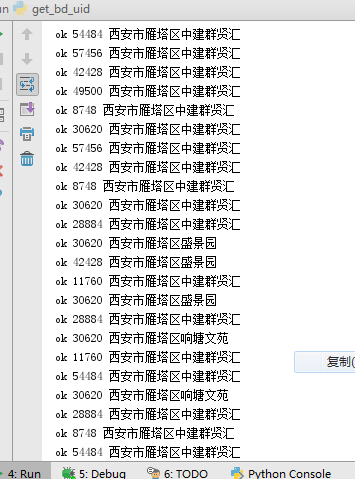
SQLite objects created in a thread can only be used in that same thread.The object was created in thread id 62332 and this is thread id 53032
sqlite支持的并发访问数??
import xlrd
import time
import sys
import os
import requests
import sqlite3
import threading curPath = os.path.abspath(os.path.dirname(__file__))
rootPath = os.path.split(curPath)[0]
sys.path.append(rootPath) MAX_USED_TIMES, overrun_str, DB_KEY_EXHAUST = 1980, '天配额超限,限制访问', 'DB_KEY_EXHAUST' db = 'py_bdspider_status.db' def db_init_key_table():
conn = sqlite3.connect(db)
c = conn.cursor()
sql = 'DELETE FROM baidu_map_key_used'
c.execute(sql)
conn.commit()
pcity_file = '%s\\%s' % (curPath, 'bdmap_key.txt')
with open(pcity_file, 'r', encoding='utf-8') as pf:
c_ = 0
for i in pf:
if len(i) < 4:
continue
author, key = i.replace('\n', '').split('\t')
localtime_ = time.strftime("%y%m%d%H%M%S", time.localtime())
sql = 'INSERT INTO baidu_map_key_used (author,key,update_time,today_used) VALUES ("%s","%s","%s",%s) ' % (
author, key, localtime_, 0)
c.execute(sql)
conn.commit()
conn.close() # db_init_key_table() def db_get_one_effective():
conn = sqlite3.connect(db)
c = conn.cursor()
sql = 'SELECT key FROM baidu_map_key_used WHERE today_used<=%s ' % (MAX_USED_TIMES)
res = c.execute(sql).fetchone()
if res is None:
return DB_KEY_EXHAUST
else:
return res[0]
conn.close def db_update_one_today_used(key):
conn = sqlite3.connect(db)
c = conn.cursor()
localtime_ = time.strftime("%y%m%d%H%M%S", time.localtime())
sql = 'UPDATE baidu_map_key_used SET today_used = today_used+1 ,update_time=%s WHERE key="%s" ' % (
localtime_, key)
c.execute(sql)
conn.commit()
conn.close() dir_, dir_exception = 'baidu_map_uid', 'baidu_map_uid_exception'
requested_file_list = []
requested_file_dir_str, requested_file_dir_exception_str = '%s\\%s\\' % (curPath, dir_), '%s\\%s\\' % (
curPath, dir_exception)
requested_file_dir = os.listdir(requested_file_dir_str) def chk_if_requested_file():
for f in requested_file_dir:
to_in = f.split('.txt')[0]
if to_in not in requested_file_list:
requested_file_list.append(to_in) def write_requested_res(request_name, str_, type_='.txt'):
fname = '%s%s%s' % (requested_file_dir_str, request_name, type_)
with open(fname, 'w', encoding='utf-8') as ft:
ft.write(str_)
print('ok', threading.get_ident(), request_name) def write_requested_exception_res(request_name, str_, type_='.txt'):
fname = '%s%s%s' % (requested_file_dir_exception_str, request_name, type_)
with open(fname, 'w', encoding='utf-8') as ft:
ft.write(str_) fname_source = '官方上传任务.csv_py170829093808-BD_request_name-REDUCTION170829142821' def fun_():
fname_open = '%s\\%s' % (curPath, fname_source)
FEXCEL = '%s%s' % (fname_open, '.xlsx')
data = xlrd.open_workbook(FEXCEL)
table = data.sheets()[0]
nrows, ncols = table.nrows, table.ncols
# http://api.map.baidu.com/place/v2/suggestion?query=瀛嘉天下®ion=重庆市&city_limit=true&output=json&ak=oy2Q7IluhhwTGlz6l8pXYv6a0m6hXxr1
base_url = 'http://api.map.baidu.com/place/v2/suggestion?query=R-QUERY®ion=R-CITY&city_limit=true&output=json&ak=R-AK'
for i in range(1, nrows):
l = table.row_values(i)
dbid, area_code, name_, request_name, type_, city, district, addr, street = l
request_name_chk = '%s%s%s' % (city, district, request_name)
chk_if_requested_file()
if request_name_chk in requested_file_list:
continue
ak = db_get_one_effective()
if ak == DB_KEY_EXHAUST:
print(DB_KEY_EXHAUST)
break
else:
url_ = base_url.replace('R-QUERY', request_name).replace('R-CITY', city).replace('R-AK', ak)
try:
bd_res_json_str = requests.get(url_).text
db_update_one_today_used(ak)
write_requested_res(request_name_chk, bd_res_json_str)
except Exception:
bd_res_json_str = '请求百度-异常'
write_requested_exception_res(request_name_chk, bd_res_json_str)
print(bd_res_json_str) class MyThread(threading.Thread):
def __init__(self, func):
threading.Thread.__init__(self)
self.func = func def run(self):
self.func() thread_sum = 16 def main():
threads_list = []
for nloop in range(0, thread_sum, 1):
thread_instance = MyThread(fun_)
threads_list.append(thread_instance)
for t in threads_list:
t.setDaemon = False
t.start()
for t in threads_list:
t.join() if __name__ == '__main__':
main()


import xlrd
import time
import sys
import os
import requests
import sqlite3
import threading curPath = os.path.abspath(os.path.dirname(__file__))
rootPath = os.path.split(curPath)[0]
sys.path.append(rootPath) MAX_USED_TIMES, overrun_str, DB_KEY_EXHAUST = 1980, '天配额超限,限制访问', 'DB_KEY_EXHAUST' db = 'py_bdspider_status.db' def db_init_key_table():
conn = sqlite3.connect(db)
c = conn.cursor()
sql = 'DELETE FROM baidu_map_key_used'
c.execute(sql)
conn.commit()
pcity_file = '%s\\%s' % (curPath, 'bdmap_key.txt')
with open(pcity_file, 'r', encoding='utf-8') as pf:
c_ = 0
for i in pf:
if len(i) < 4:
continue
author, key = i.replace('\n', '').split('\t')
localtime_ = time.strftime("%y%m%d%H%M%S", time.localtime())
sql = 'INSERT INTO baidu_map_key_used (author,key,update_time,today_used) VALUES ("%s","%s","%s",%s) ' % (
author, key, localtime_, 0)
c.execute(sql)
conn.commit()
conn.close() # db_init_key_table() def db_get_one_effective():
conn = sqlite3.connect(db)
c = conn.cursor()
sql = 'SELECT key FROM baidu_map_key_used WHERE today_used<=%s ' % (MAX_USED_TIMES)
res = c.execute(sql).fetchone()
if res is None:
return DB_KEY_EXHAUST
else:
return res[0]
conn.close def db_update_one_today_used(key):
conn = sqlite3.connect(db)
c = conn.cursor()
localtime_ = time.strftime("%y%m%d%H%M%S", time.localtime())
sql = 'UPDATE baidu_map_key_used SET today_used = today_used+1 ,update_time=%s WHERE key="%s" ' % (
localtime_, key)
c.execute(sql)
conn.commit()
conn.close() dir_, dir_exception = 'baidu_map_uid', 'baidu_map_uid_exception'
requested_file_list = []
requested_file_dir_str, requested_file_dir_exception_str = '%s\\%s\\' % (curPath, dir_), '%s\\%s\\' % (
curPath, dir_exception)
requested_file_dir = os.listdir(requested_file_dir_str) def chk_if_requested_file():
for f in requested_file_dir:
to_in = f.split('.txt')[0]
if to_in not in requested_file_list:
requested_file_list.append(to_in) def write_requested_res(request_name, str_, type_='.txt'):
fname = '%s%s%s' % (requested_file_dir_str, request_name, type_)
with open(fname, 'w', encoding='utf-8') as ft:
ft.write(str_)
print('ok', threading.get_ident(), request_name) def write_requested_exception_res(request_name, str_, type_='.txt'):
fname = '%s%s%s' % (requested_file_dir_exception_str, request_name, type_)
with open(fname, 'w', encoding='utf-8') as ft:
ft.write(str_) fname_source = '官方上传任务.csv_py170829093808-BD_request_name-REDUCTION170829142821' def fun_():
fname_open = '%s\\%s' % (curPath, fname_source)
FEXCEL = '%s%s' % (fname_open, '.xlsx')
data = xlrd.open_workbook(FEXCEL)
table = data.sheets()[0]
nrows, ncols = table.nrows, table.ncols
# http://api.map.baidu.com/place/v2/suggestion?query=瀛嘉天下®ion=重庆市&city_limit=true&output=json&ak=oy2Q7IluhhwTGlz6l8pXYv6a0m6hXxr1
base_url = 'http://api.map.baidu.com/place/v2/suggestion?query=R-QUERY®ion=R-CITY&city_limit=true&output=json&ak=R-AK'
i_counter = 0
for i in range(1, nrows):
l = table.row_values(i)
i_counter += 1
dbid, area_code, name_, request_name, type_, city, district, addr, street = l
request_name_chk = '%s%s%s' % (city, district, request_name)
chk_if_requested_file()
if request_name_chk in requested_file_list:
continue
ak = db_get_one_effective()
if ak == DB_KEY_EXHAUST:
print(DB_KEY_EXHAUST)
break
else:
url_ = base_url.replace('R-QUERY', request_name).replace('R-CITY', city).replace('R-AK', ak)
try:
bd_res_json_str = requests.get(url_).text
db_update_one_today_used(ak)
write_requested_res(request_name_chk, bd_res_json_str)
except Exception:
bd_res_json_str = '请求百度-异常'
write_requested_exception_res(request_name_chk, bd_res_json_str)
print(bd_res_json_str) class MyThread(threading.Thread):
def __init__(self, func):
threading.Thread.__init__(self)
self.func = func def run(self):
self.func() thread_sum = 100 def main():
threads_list = []
for nloop in range(0, thread_sum, 1):
thread_instance = MyThread(fun_)
threads_list.append(thread_instance)
for t in threads_list:
t.setDaemon = False
t.start()
for t in threads_list:
t.join() if __name__ == '__main__':
main()
import xlrd
import time
import sys
import os
import requests
import sqlite3
import threading curPath = os.path.abspath(os.path.dirname(__file__))
rootPath = os.path.split(curPath)[0]
sys.path.append(rootPath) db = 'py_bdspider_status.db'
conn = sqlite3.connect(db)
c = conn.cursor()
MAX_USED_TIMES, overrun_str, DB_KEY_EXHAUST = 1980, '天配额超限,限制访问', 'DB_KEY_EXHAUST' def db_init_key_table():
sql = 'DELETE FROM baidu_map_key_used'
c.execute(sql)
conn.commit()
pcity_file = '%s\\%s' % (curPath, 'bdmap_key.txt')
with open(pcity_file, 'r', encoding='utf-8') as pf:
c_ = 0
for i in pf:
if len(i) < 4:
continue
author, key = i.replace('\n', '').split('\t')
localtime_ = time.strftime("%y%m%d%H%M%S", time.localtime())
sql = 'INSERT INTO baidu_map_key_used (author,key,update_time,today_used) VALUES ("%s","%s","%s",%s) ' % (
author, key, localtime_, 0)
c.execute(sql)
conn.commit() # db_init_key_table() def db_get_one_effective():
sql = 'SELECT key FROM baidu_map_key_used WHERE today_used<=%s ' % (MAX_USED_TIMES)
res = c.execute(sql).fetchone()
if res is None:
return DB_KEY_EXHAUST
else:
return res[0] def db_update_one_today_used(key):
localtime_ = time.strftime("%y%m%d%H%M%S", time.localtime())
sql = 'UPDATE baidu_map_key_used SET today_used = today_used+1 ,update_time=%s WHERE key="%s" ' % (
localtime_, key)
c.execute(sql)
conn.commit() dir_, dir_exception = 'baidu_map_uid', 'baidu_map_uid_exception'
requested_file_list = []
requested_file_dir_str, requested_file_dir_exception_str = '%s\\%s\\' % (curPath, dir_), '%s\\%s\\' % (
curPath, dir_exception)
requested_file_dir = os.listdir(requested_file_dir_str) def chk_if_requested_file():
for f in requested_file_dir:
to_in = f.split('.txt')[0]
if to_in not in requested_file_list:
requested_file_list.append(to_in) def write_requested_res(request_name, str_, type_='.txt'):
fname = '%s%s%s' % (requested_file_dir_str, request_name, type_)
with open(fname, 'w', encoding='utf-8') as ft:
ft.write(str_)
print('ok', threading.get_ident(), request_name) def write_requested_exception_res(request_name, str_, type_='.txt'):
fname = '%s%s%s' % (requested_file_dir_exception_str, request_name, type_)
with open(fname, 'w', encoding='utf-8') as ft:
ft.write(str_) fname_source = '官方上传任务.csv_py170829093808-BD_request_name-REDUCTION170829142821' def fun_():
fname_open = '%s\\%s' % (curPath, fname_source)
FEXCEL = '%s%s' % (fname_open, '.xlsx')
data = xlrd.open_workbook(FEXCEL)
table = data.sheets()[0]
nrows, ncols = table.nrows, table.ncols
# http://api.map.baidu.com/place/v2/suggestion?query=瀛嘉天下®ion=重庆市&city_limit=true&output=json&ak=oy2Q7IluhhwTGlz6l8pXYv6a0m6hXxr1
base_url = 'http://api.map.baidu.com/place/v2/suggestion?query=R-QUERY®ion=R-CITY&city_limit=true&output=json&ak=R-AK'
i_counter = 0
for i in range(1, nrows):
l = table.row_values(i)
i_counter += 1
print(i_counter)
if i_counter > 60:
break
dbid, area_code, name_, request_name, type_, city, district, addr, street = l
request_name_chk = '%s%s%s' % (city, district, request_name)
chk_if_requested_file()
if request_name_chk in requested_file_list:
continue
ak = db_get_one_effective()
if ak == DB_KEY_EXHAUST:
print(DB_KEY_EXHAUST)
break
else:
url_ = base_url.replace('R-QUERY', request_name).replace('R-CITY', city).replace('R-AK', ak)
print(url_)
try:
bd_res_json_str = requests.get(url_).text
db_update_one_today_used(ak)
write_requested_res(request_name_chk, bd_res_json_str)
except Exception:
bd_res_json_str = '请求百度-异常'
write_requested_exception_res(request_name_chk, bd_res_json_str)
print(bd_res_json_str) class MyThread(threading.Thread):
def __init__(self, func):
threading.Thread.__init__(self)
self.func = func def run(self):
self.func() thread_sum = 4 def main():
threads_list = []
for nloop in range(0, thread_sum, 1):
thread_instance = MyThread(fun_)
threads_list.append(thread_instance)
for t in threads_list:
t.setDaemon = False
t.start()
for t in threads_list:
t.join() conn.close() if __name__ == '__main__':
main()
SQLite支持的并发访问数的更多相关文章
- 查看apache当前并发访问数和进程数
1.查看apache当前并发访问数: netstat -an | grep ESTABLISHED | wc -l 对比httpd.conf中MaxClients的数字差距多少. 2.查看有多少个进程 ...
- 高效解决「SQLite」数据库并发访问安全问题,只这一篇就够了
Concurrent database access 本文译自:https://dmytrodanylyk.com/articles/concurrent-database/ 对于 Android D ...
- Socket支持多用户并发访问的解决办法
//创建线程池,池中具有(cpu个数*50)条线程 ExecutorService executorService = Executors.newFixedThreadPool(Runtime.get ...
- 查看 Apache并发请求数及其TCP连接状态
查看 Apache并发请求数及其TCP连接状态 (2011-06-27 15:08:36) 服务器上的一些统计数据: 1)统计80端口连接数 netstat -nat|grep -i "80 ...
- 查看 并发请求数及其TCP连接状态【转】
服务器上的一些统计数据: 1)统计80端口连接数netstat -nat|grep -i "80"|wc -l 2)统计httpd协议连接数ps -ef|grep httpd|wc ...
- 查看 并发请求数及其TCP连接状态
服务器上的一些统计数据: 1)统计80端口连接数netstat -nat|grep -i "80"|wc -l 2)统计httpd协议连接数ps -ef|grep httpd|wc ...
- 查看 Apache并发请求数及其TCP连接状态【转】
查看 Apache并发请求数及其TCP连接状态 (2011-06-27 15:08:36) 服务器上的一些统计数据: 1)统计80端口连接数netstat -nat|grep -i "80& ...
- Java并发工具类(三):控制并发线程数的Semaphore
作用 Semaphore(信号量)是用来控制同时访问特定资源的线程数量,它通过协调各个线程,以保证合理的使用公共资源. 简介 Semaphore也是一个线程同步的辅助类,可以维护当前访问自身的线程个数 ...
- 查看http的并发请求数及其TCP连接状态
统计80端口的连接数据 netstat -nat | grep -i "80" | wc -l 统计httpd协议连接数 ps -ef | grep httpd | wc -l 统 ...
随机推荐
- 2017.9.15 postgres使用postgres_fdw实现跨库查询
postgres_fdw的使用参考来自:https://my.oschina.net/Kenyon/blog/214953 postgres跨库查询可以通过dblink或者postgres_fdw来完 ...
- mysql 存储过程 演示样例代码
drop procedure if exists P_SEQUENCE; /** 暂省略包 @AUTO LIANGRUI 2014/6/27 T_PRO_PRODUCT 表 排序 对整个表进行按序号排 ...
- 【JavaScript】【PPT】继承的本质
※文件引自OneDrive,有些人可能看不到
- STL学习笔记(string)
动机 C++标准程序库中的string class使我们可以将string当做一个一般型别.我们可以像对待基本型别那样地复制.赋值和比较string, 再也不必但系内存是否足够.占用的内存实际长度等问 ...
- Bmob实现android云端存储
代码地址如下:http://www.demodashi.com/demo/12547.html 前言 一直很困惑,android到底能不能将本地数据传到一个公共的云端,让云端实现数据库功能,这样的话, ...
- 基于Android的rgb七彩环颜色采集器
代码地址如下:http://www.demodashi.com/demo/11892.html 一.前言. 在大学期间,看到这个rgb灯,蛮好奇的,这么漂亮的颜色采集,并且可以同步到设备rbg灯颜色, ...
- win10 microsoft edge 浏览器收藏夹位置
1.打开文件夹,找到(注意 用户名 改为你自己的用户名) C:\Users\用户名\AppData\Local\Packages\Microsoft.MicrosoftEdge_8wekyb3d8bb ...
- ios 缩放图片(平铺)
//缩放图片(平铺) - (UIImage *)resizeImage:(NSString *)imgName { UIImage *bgImage = [UIImage imageNamed:im ...
- 自动测试工具agitarOne 初体验之-MockingBird的使用
大名鼎鼎的AgitarOne就不用解释了,在昨天的随笔中有一些解释,今天主要说说Agitar 中Mockingbird的使用. 为了提高测试代 码的Coverage,仅仅靠Agita ...
- iOS 渐变色实现,渐变色圆环,圆环进度条
CAGradientLayer图层可以通过设置mask来给视图添加渐变效果 CAGradientLayer主要需要设置一下几个参数 colors:传入需要渐变的颜色 例如 self.gradientL ...