
Android TextView实现跑马灯
TextView实现跑马灯的效果:
例子一:
这个例子可以解决给一个TextView实现跑马灯的效果,但是不能解决给所有的TextView实现跑马灯的效果。
<TextView

        android:layout_width="wrap_content"

        android:layout_height="wrap_content"

        android:singleLine="true"

        android:ellipsize="marquee"

        android:focusable="true"

        android:focusableInTouchMode="true"

        android:text="这个项目的作用就是让这个单行的很长很长的单独一行的TextView实现跑马灯的效果。。。。。。" />
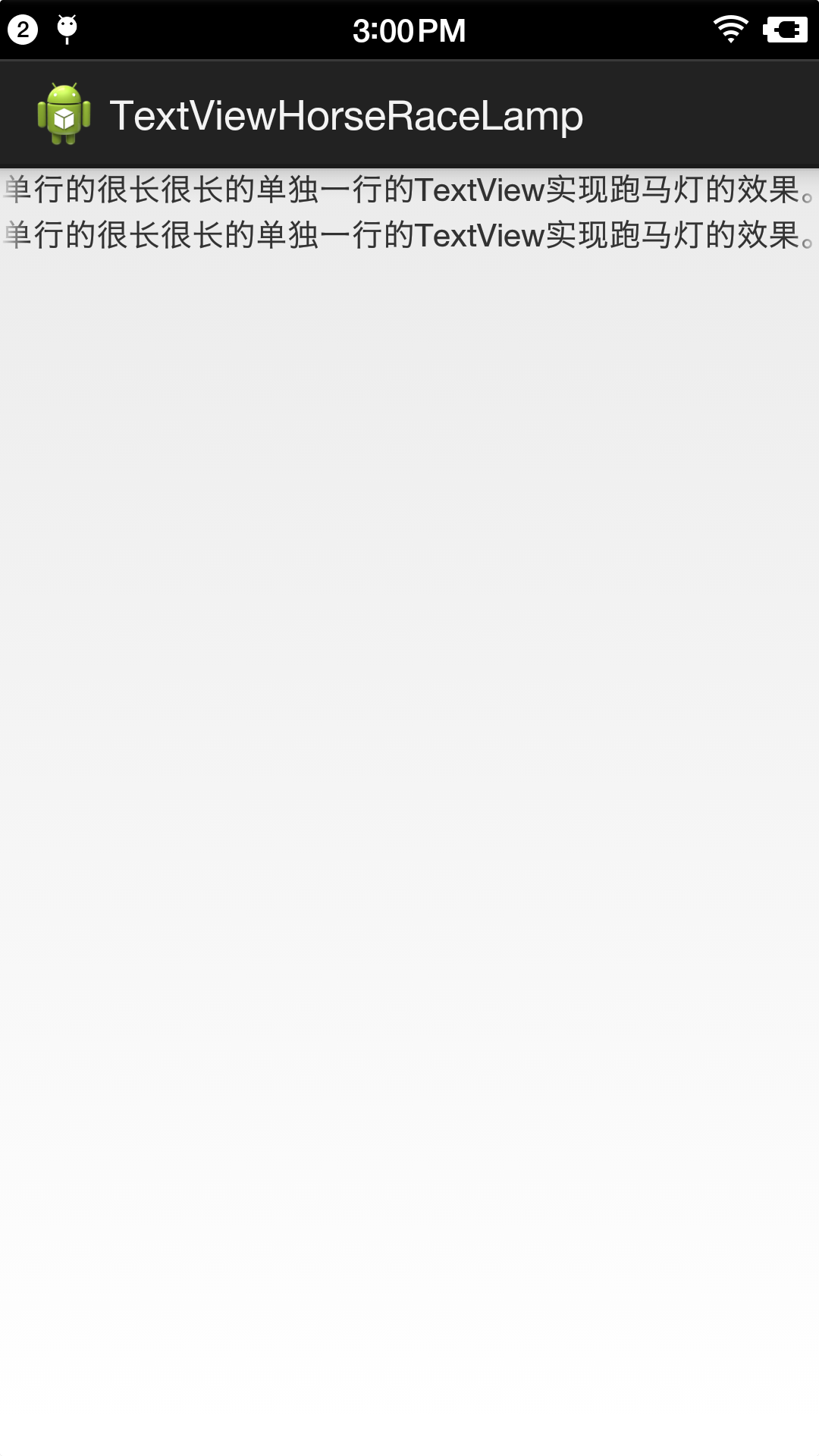
但是这种方法在有两个TextView的时候不能给两个TextView同时实现跑马灯的效果。
原因是:TextView默认的isFocused()方法默认只能给一个对象实现focused。
解决的办法是新建一个类MarqueeTextView继承TextView,让他的isFocused()方法返回true。(注意:子类MarqueeTextView需要实现父类的所有3个构造函数,不然会有问题)。
package com.example.textviewhorseracelamp;

import android.content.Context;

import android.util.AttributeSet;

import android.widget.TextView;

public class MarqueeTextView extends TextView {

    public MarqueeTextView(Context context) {

        super(context);

        // TODO Auto-generated constructor stub

    }

    public MarqueeTextView(Context context, AttributeSet attrs, int defStyle) {

        super(context, attrs, defStyle);

        // TODO Auto-generated constructor stub

    }

    public MarqueeTextView(Context context, AttributeSet attrs) {

        super(context, attrs);

        // TODO Auto-generated constructor stub

    }

    @Override

    public boolean isFocused() {

        return true;

    }

}
MarqueeTextView.java
<RelativeLayout xmlns:android="http://schemas.android.com/apk/res/android"

    xmlns:tools="http://schemas.android.com/tools"

    android:layout_width="match_parent"

    android:layout_height="match_parent"

    >

    <com.example.textviewhorseracelamp.MarqueeTextView

        android:id="@+id/textView1"

        android:layout_width="wrap_content"

        android:layout_height="wrap_content"

        android:singleLine="true"

        android:ellipsize="marquee"

        android:focusable="true"

        android:focusableInTouchMode="true"

        android:text="这个项目的作用就是让这个单行的很长很长的单独一行的TextView实现跑马灯的效果。。。。。。" />

    <com.example.textviewhorseracelamp.MarqueeTextView

        android:id="@+id/textView2"

        android:layout_width="wrap_content"

        android:layout_height="wrap_content"

        android:layout_marginTop="20dp"

        android:singleLine="true"

        android:ellipsize="marquee"

        android:focusable="true"

        android:focusableInTouchMode="true"

        android:text="这个项目的作用就是让这个单行的很长很长的单独一行的TextView实现跑马灯的效果。。。。。。" />

</RelativeLayout>
activity_main.xml
效果:
补充:像素
px不能根据分辨率进行缩放
dp,sp,dip可以根据分辨率进行缩放显示(现在以dp作为标准)
sp更多的用在文字的缩放
Android TextView实现跑马灯的更多相关文章
- Android:TextView文字跑马灯的效果实现
解决TextView文字显示不全的问题. 简单设置跑马灯的效果: <TextView android:id="@+id/textView" android:layout_wi ...
- Android开发之TextView实现跑马灯效果
TextView及其子类,当字符内容太长显示不下时可以省略号代替未显示的字符:省略号可以在显示区域的起始,中间,结束位置,或者以跑马灯的方式显示文字(textview的状态为被选中). 其实现只需在x ...
- Android 高级UI设计笔记05:使用TextView实现跑马灯的效果
1. 使用TextView属性实现跑马灯的效果: (1). 新建一个Android工程,命名为"MarqueeTextViewDemo",如下: (2). 来到activity_m ...
- android使用TextView实现跑马灯的效果(1)
android使用TextView实现跑马灯的效果 1.activity_main.xml <?xml version="1.0" encoding="utf-8& ...
- Android界面(1) 使用TextView实现跑马灯效果
方法一:(只能实现单个TextView的跑马灯效果)在TextView添加以下控件 android:singleLine="true"只能单行,超出的文字显示为"...& ...
- Android使用TextView实现跑马灯效果(自定义控件)
对于一个长的TetxView 折行显示是一个很好的办法,另一种方法就是跑马灯显示(单行滚动) 1.折行显示的长TextView <LinearLayout xmlns:android=" ...
- TextView: android:ellipsize="marquee" 跑马灯效果无效的问题
今天练习的时候想实现一个文字的跑马灯效果,本来想自己手动实现的,不过突然想起来android里的TextView属性似乎自带了这个效果,叫: android:ellipsize ,平时都是把它的属性值 ...
- android中实现跑马灯效果以及AutoCompleteTestView与MultiAutoCompleteTextView的学习
跑马灯效果 1.用过属性的方式实现跑马灯效果 属性: android:singleLine="true" 这个属性是设置TextView文本中文字 ...
- android:ellipsize实现跑马灯效果总结(转)
最近无意间看到了涉及到跑马灯效果的代码,于是在网上查阅了很多资料,在这里对自己看的一些文章进行一下总结,顺便加上自己的一些体会. 让我们一步步逐渐向下. 首先我们要实现走马灯这样一个效果,通常来说 ...
随机推荐
- QT安装在VS2008中的方法
(一)工欲善其事,必先利其器,废话不多讲. 原文:http://www.cnblogs.com/zwq194/archive/2011/02/19/1958713.html 总结起来网上流行的VS20 ...
- WPF 冒泡路由事件
在WPF中,例如,可以构建一个包含图形的按钮,创建一个具有文本和图片混合内容的标签,或者为了实现滚动或折叠的显示效果在一个特定的容器中放置内容.甚至可以多此重复嵌套,直到达到您所希望的层次深度. 这种 ...
- 【WPF】退出应用时的提示弹窗
需求:按MainWindow右上角的[X]想要退出软件时,弹窗提示是否确定要退出. 主界面(ShellWindow)的前台给主界面窗体添加两个事件:Closing和Closed <Window ...
- R语言两种方式求指定日期所在月的天数
R语言两种方式求指定日期所在月的天数 days_monthday<-function(date){ m<-format(date,format="%m& ...
- 推断iframe里的页面载入完毕
//推断iframe是否载入完毕,RMid为iframe的ID document.getElementById("RMid").onload = function () { ale ...
- namp命令详解
我将用两个不同的部分来涵盖大部分NMAP的使用方法,这是nmap关键的第一部分.在下面的设置中,我使用两台已关闭防火墙的服务器来测试Nmap命令的工作情况. 192.168.0.100 – serve ...
- thymeleaf+bootstrap,onclick传参实现模态框中遇到的错误
一个困扰了N久的问题... 网上大多帖子是这么写的 onclick调javascript函数时,不能直接使用onclick=“editUser(${prod.id})”,这样会报错,需要修改成如下的格 ...
- 01 Developing Successful Oracle Application
本章提要-------------------------------本章是概述性章节1. 介绍了了解数据库内部结构对于开发的重要性2. 介绍了如何才能开发好的数据库应用程序------------- ...
- variable `xxx' has initializer but incomplete type
错误:variable `xxx' has initializer but incomplete type 原因:xxx对应的类型没有找到,只把xxx声明了但是没给出定义.编译器无从确认你调用的构造函 ...
- tensorflow中slim模块api介绍
tensorflow中slim模块api介绍 翻译 2017年08月29日 20:13:35 http://blog.csdn.net/guvcolie/article/details/77686 ...