
Springboot第五篇:结合myBatis进行SQL操作
前提:和之前同样的,本篇会从前端和后台一起讲述关于SQL的select操作(其他操作原理大致类似,不多做解释了)。
大致流程:前端通过AJAX将数据发送到后台的路由,后台路由会根据发送的数据进行SQL操作,并返回对应数据。
1:DB的table表建立
我们这边只建立一个简单的table表,建表的语句大致如下(本地为mysql):
CREATE TABLE `user_info` (

  `id` int(11) NOT NULL AUTO_INCREMENT,

  `name` varchar(100) NOT NULL,

  PRIMARY KEY (`id`)

)
建立好table以后,我们插入一条记录,执行语句:INSERT INTO `user_info`(`id`,`name`)VALUES(1,‘zhuyt');
2:前端fetch
fetch与剧中的url需要根据自己的后台设置,对应后台执行的是select操作,代码如下:
fetch("http://localhost:8080/index/userInfo",{

    method:'post', // or 'PUT'

    headers:{

        "Content-Type":"application/x-www-form-urlencoded;charset=UTF-8"

    },

    body:"id=1", // data can be `string` or {object}!

}).then(res => res.json()).then(data => {

    console.log(data);

}).catch(error => console.error('Error:', error));
3:后台
首先关于pom,我们要加入两个依赖模块,第一个模块是关于mybatis与mysql的,第二个模块是关于JSON格式相关的内容:
<dependency>

    <groupId>mysql</groupId>

    <artifactId>mysql-connector-java</artifactId>

    <version>8.0.15</version>

</dependency>

<dependency>

    <groupId>net.sf.json-lib</groupId>

    <artifactId>json-lib</artifactId>

    <version>2.4</version>

    <classifier>jdk15</classifier>

</dependency>
关于controller模块,代码如下:
package maven.example.controller;

import org.springframework.beans.factory.annotation.Autowired;

import org.springframework.web.bind.annotation.RequestMapping;

import org.springframework.web.bind.annotation.RequestParam;

import org.springframework.web.bind.annotation.RestController;

import maven.example.service.UserService;

import net.sf.json.JSONArray;

@RestController

@RequestMapping(value = "/index")

public class IndexController {

    @Autowired

    private UserService userService;

    @RequestMapping("/userInfo")

    public JSONArray userInfo(@RequestParam("id") String id) {

        return userService.getUserInfo(Integer.valueOf(id));

    }

}
关于service模块,代码如下:
package maven.example.service;

import java.util.List;

import org.springframework.beans.factory.annotation.Autowired;

import org.springframework.stereotype.Service;

import maven.example.entity.UserEntity;

import maven.example.mapper.UserMapper;

import net.sf.json.JSONArray;

@Service

public class UserService {

    @Autowired

    private UserMapper userMapper;

    public JSONArray getUserInfo(Integer id){

        List<UserEntity>li = userMapper.getUserInfo(id);

        JSONArray listArray = JSONArray.fromObject(li);

        return listArray;

    }

}
关于UserMapper接口模块,代码如下:
package maven.example.mapper;

import java.util.List;

import org.apache.ibatis.annotations.Mapper;

import org.apache.ibatis.annotations.Param;

import org.apache.ibatis.annotations.Result;

import org.apache.ibatis.annotations.Results;

import org.apache.ibatis.annotations.Select;

import maven.example.entity.UserEntity;

@Mapper

public interface UserMapper {

    @Select("SELECT * FROM USER_INFO WHERE ID=#{id}")

    @Results({

        @Result(property = "id", column = "id"),

        @Result(property = "name", column = "name")

    })

    List<UserEntity>getUserInfo(@Param("id") Integer id);

}
关于model模块,代码如下:
package maven.example.entity;

public class UserEntity {

    private Integer id;

    private String name;

    public Integer getId() {

        return id;

    }

    public void setId(Integer id) {

        this.id = id;

    }

    public String getName() {

        return name;

    }

    public void setName(String name) {

        this.name = name;

    }

}
完整的后台代码可以去以下地址拉取,https://github.com/nnnnnjjjjj/springboot.git
4:执行
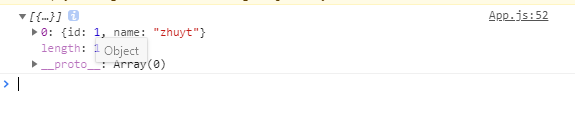
我们打开浏览器,输入对应的地址,并点击F12键,可以看到确实打印出了DB查询到的数据。
Springboot第五篇:结合myBatis进行SQL操作的更多相关文章
- SpringBoot第五篇:整合Mybatis
作者:追梦1819 原文:https://www.cnblogs.com/yanfei1819/p/10869315.html 版权声明:本文为博主原创文章,转载请附上博文链接! 引言 ORM框架 ...
- SpringBoot(五)Springmvc+Mybatis+mysql
为了整合这个花了,好长时间,因为上几个连在一起,在pom文件中有没注释的配置,导致我找这个问题找了好久.下面开始 1,先new project 时选择spring initializr,新建好一个空项 ...
- 第五篇、常用的SQL语句和函数介绍
简介: 在使用到sqlite3的时候,常常需要写一些SQL语句,现将常用到的部分语句稍微总结以下,由于个人习惯,关键字用大写. 附: /*简单约束*/ CREATE TABLE IF NOT EXIS ...
- Mybatis第五篇【Mybatis与Spring整合】
Mybatis与Spring整合 既然我们已经学了Mybatis的基本开发了,接下来就是Mybatis与Spring的整合了! 以下使用的是Oracle数据库来进行测试 导入jar包 aopallia ...
- mybatis入门篇:mybatis动态SQL
1.if用法 <select id="selectUser" resultType="com.forest.owl.entity.User"> se ...
- Mybatis相关SQL操作总结
1.resultMap和resultType等参数以及结果集 <select id="getApplicationByRoleCode" resultType="p ...
- SpringBoot第五集:整合Druid和MyBatis(2020最新最易懂)
SpringBoot第五集:整合Druid和MyBatis(2020最新最易懂) 1.SpringBoot整合Druid Druid是阿里巴巴的一个开源项目,是一个数据库连接池的实现,结合了C3P0. ...
- 第五篇 SQL Server安全架构和安全
本篇文章是SQL Server安全系列的第五篇,详细内容请参考原文. 架构本质上是一个数据库对象,其他对象的一个容器,在复杂的数据库中它能够很容易的管理各组对象.架构具有重要的安全功能.在这一篇你会学 ...
- 第五篇 SQL Server代理理解代理错误日志
本篇文章是SQL Server代理系列的第五篇,详细内容请参考原文. 正如这一系列的前几篇所述,SQL Server代理作业是由一系列的作业步骤组成,每个步骤由一个独立的类型去执行.在第四篇中我们看到 ...
随机推荐
- Zookeeper 源码(五)Leader 选举
Zookeeper 源码(五)Leader 选举 前面学习了 Zookeeper 服务端的相关细节,其中对于集群启动而言,很重要的一部分就是 Leader 选举,接着就开始深入学习 Leader 选举 ...
- eclipse两种注释的快捷键
方法一:使用Ctrl+/快捷键 1 第1步:在Eclipse中拖动鼠标,选中需要注释的代码,通常为连续多行代码. 2 第2步:按住Ctrl+/快捷键,如图所示. 3 第3步:会发现所选代码被“// ...
- swift学习之-- UIAlertVIewController - uiactionsheet
// // ViewController.swift // actionsheet // // Created by su on 15/12/7. // Copyright © 2015年 t ...
- Deep learning for visual understanding: A review
https://www.sciencedirect.com/science/article/pii/S0924271618301291?dgcid=raven_sd_recommender_email ...
- Appium之打开应用时提示框处理
当打开一个应用时,会有一个无关紧要的提示框,如果要继续操作,需要先关闭提示框,如下图(如新用户福利提示): 此时,如果你直接用Appium inspector或者Android uiautomator ...
- 企业搜索引擎开发之连接器connector(二十五)
下面开始具体分析连接器是怎么与连接器实例交互的,这里主要是分析连接器怎么从连接器实例获取数据的(前面文章有涉及基于http协议与连接器的xml格式的交互,连接器对连接器实例的设置都是通过配置文件操作的 ...
- 试题 E: 迷宫 第十届蓝桥杯
[问题描述]下图给出了一个迷宫的平面图,其中标记为 1 的为障碍,标记为 0 的为可以通行的地方.010000000100001001110000迷宫的入口为左上角,出口为右下角,在迷宫中,只能从一个 ...
- 咏南中间件+开发框架支持最新的DELPHI 10.2 TOKYO
咏南中间件+开发框架支持最新的DELPHI 10.2 TOKYO 价格十分优惠.有意者请向本人索取演示程序! 你只需花一套中间件的价格,就可获得:中间件,CS开发框架一套(赠送),BS开发框架一套(赠 ...
- ASP.NET MVC Core的TagHelper (高级特性)
这篇博文ASP.NET MVC Core的TagHelper(基础篇)介绍了TagHelper的基本概念和创建自定义TagHelper的方式,接着继续介绍一些新的看起来比较高级的特性.(示例代码紧接着 ...
- urlrewrite重写url(转)
环境: Maven 3.0.4 Urlrewrite 2.5.2 Myeclipse 8.6.1 借此机会顺便提一下 Maven Project 的创建,会了的朋友或还不想了解 Maven 的朋友,可 ...