
pythonNet day07
线程
线程是一种多任务编程的方式,可以使用计算机多核资源。线程又被称为轻量级的进程
线程特征
* 线程是计算机核心分配的最小单位
* 一个进程可以包含多个线程
* 线程也是一个运行过程,也要消耗计算机资源。多个线程共享其进程的资源和空间
* 线程也拥有自己特有的资源属性,比如指令集,TID等
* 线程无论创建还是删除还是运行资源消耗都小于进程
* 多个线程之间并行执行,互不干扰
threading线程模块
from threading import Thread
t = Thread(target, [, args], [kwargs])
创建线程对象
- target 绑定线程函数
- args 元组 给线程函数位置传参
- kwargs 字典 给线程函数键值传参
t.start() 启动线程
t.join([timeout]) 回收线程
import threading

import os

a = 1

# 线程函数

def music():

  print("进程pid号", os.getpid())

  global a

  print("a = ",a)

  a = 10000

t = threading.Thread(target=music)    # 创建线程对象

t.start()                               # 启动线程

print("进程pid号", os.getpid())

t.join()                                # 回收线程

print("Main a:",a)

# 进程pid号 12549

# 进程pid号 12549

# a =  1

# Main a: 10000
os.getpid获取的是进程的pid号,线程是进程中的一个成员.
线程中改的变量,是进程中的变量.并没有新开辟一个空间.
线程属性
t.is_alive() 查看线程状态
t.name 线程名称 默认Thread-1
t.setName() 设置线程名称
threading.currentThread() 获取当前线程对象
 from threading import Thread,currentThread

 from time import sleep

 #线程函数

 def fun(sec):

     print("线程属性测试")

     sleep(sec)

     #获取线程对象 getName()获取名字

     print("%s 线程结束"%currentThread().getName())

 thread = []

 for i in range(3):

     t = Thread(target = fun,name = "tedu%d"%i,\

         args = (3,))

     thread.append(t)

     t.start()

     print(t.is_alive())  #查看进程状态

 thread[1].setName('Tarena')  #设置线程名称

 print(thread[2].name) #获取线程名称

 #回收线程

 for i in thread:

     i.join()

 # 线程属性测试

 # True

 # 线程属性测试

 # True

 # 线程属性测试

 # True

 # tedu2

 # Tarena 线程结束

 # tedu0 线程结束

 # tedu2 线程结束
t.daemon
默认情况下,主线程的结束不会影响分支线程,如果设置为True则主线程退出分支线程也会退出
设置方法:
t.daemon = True
t.setDaemon()
线程daemon属性的设置在start前;一般设置daemon后不会使用join
from threading import Thread

from time import sleep

def fun():

  sleep(3)

  print("线程属性测试")

t = Thread(target=fun, name = "Tarena")

# 主线程退出分支线程也退出

t.setDaemon(True)

t.start()

t.setName("Tedu")

print("Name:",t.getName())  # 线程名称

print("Alive:",t.is_alive())  # 线程生命周期

print("is Daemon",t.isDaemon()) # 主进程随着分支进程退出
自定义线程类
- 继承Thread类
- 运行Thread类中的__init__方法以获取父类属性
- 重写run方法
使用方法
- 实例化对象
- 调用start自动化执行run方法
- 调用join回收线程
from threading import Thread

class ThreadClass(Thread):

  # 重写父类init

  def __init__(self, *args, **kwargs):

    self.attr = args[0]

    super().__init__()    # 加载父类init

  def fun1(self):

    print("函数1")

  def fun2(self):

    print("函数2")

  # 重写run,逻辑调用

  def run(self):

    self.fun1()

    self.fun2()

t = ThreadClass("abc")

t.start()

t.join()

# 函数1

# 函数2
同步互斥
线程间通信方法
1.通信方法:线程间使用全局变量进行通信
2. 共享资源争夺
- 共享资源:多个进程或者线程都可以操作的资源称为共享资源。对共享资源的操作代码段称为临界区。
- 影响 :对共享资源的无序操作可能会带来数据的混乱,或者操作错误。此时往往需要同步互斥机制协调操作顺序。
3. 同步互斥机制
同步 : 同步是一种协作关系,为完成操作,多进程或者线程间形成一种协调,按照必要的步骤有序执行操作。
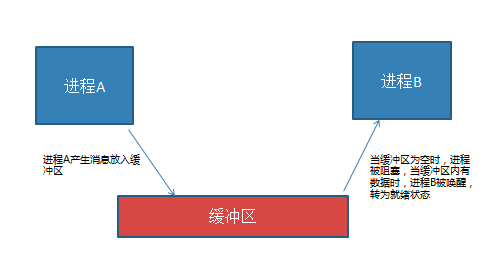
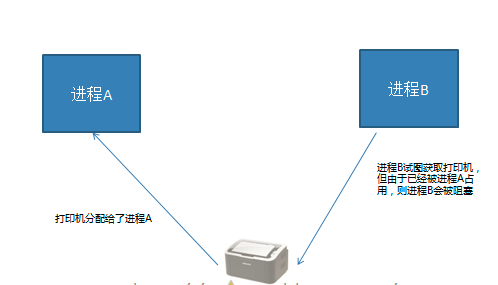
互斥 : 互斥是一种制约关系,当一个进程或者线程占有资源时会进行加锁处理,此时其他进程线程就无法操作该资源,直到解锁后才能操作。
线程同步互斥方法
线程Event
from threading import Event
e = Event() 创建线程event对象
e.wait([timeout]) 阻塞等待e被set
e.set() 设置e,使wait结束阻塞
e.clear() 使e回到未被设置状态
e.is_set() 查看当前e是否被设置
from threading import Thread,Event

s = None  # 用于通信

e = Event() # 创建event对象

def 杨子荣():

  print("杨子荣前来拜山头")

  global s

  s = "天王盖地虎"

  e.set()  # 对e设置

t = Thread(target=杨子荣)

t.start()

print("说对口令就是自己人")

e.wait()  # 阻塞等待口令说出

if s == '天王盖地虎':

  print("宝塔镇河妖")

  print("确认过眼神,你是对的人")

else:

  print("打死他...")

t.join()
线程锁 Lock
from threading import Lock
lock = Lock() 创建锁对象
lock.acquire() 上锁 如果lock已经上锁再调用会阻塞
lock.release() 解锁
with lock: # 上锁
...
...
with代码块结束自动解锁
from threading import Thread,Lock

a = b = 0

lock = Lock() # 定义锁

def value():

  while True:

    lock.acquire()  # 上锁

    if a != b:

      print("a = %d,b = %d"%(a,b))

    lock.release() # 解锁

t = Thread(target = value)

t.start()

while True:   # 上锁

  with lock:

    a += 1

    b += 1

              # 自动解锁

t.join()
python线程的GIL问题
GIL (全局解释器锁)
python ---》 支持线程操作 ---》IO的同步和互斥 --》 加锁 ----》 超级锁,给解释器加锁
后果:一个解释器,同一时刻只解释一个线程,此时其他线程需要等待。大大降低了python线程的执行效率
python GIL问题解决方案
* 修改c解释器
* 尽量使用多进程进行并行操作
* python线程可以用在高延迟多阻塞的IO情形
* 不使用cpython c# java做解释器
效率测试
分别测试 多进程 多线程 单进程执行相同的IO操作和CPU
#计算密集

def count(x,y):

    c = 0

    while c < 7000000:

        x += 1

        y += 1

        c += 1

#io密集

def write():

    f = open("test.txt",'w')

    for x in range(2000000):

        f.write("hello world\n")

    f.close()

def read():

    f = open("test.txt")

    lines = f.readlines()

    f.close()
操作的时间
#单进程程序

from test import *

import time

# t = time.time()

# for i in range(10):

#     count(1,1)

# print("Line cpu:",time.time() - t)

t = time.time()

for i in range(10):

    write()

    read()

print("Line IO:",time.time() - t)
Line cpu: 8.15166711807251
Line IO: 6.841825246810913
from test import *

import threading

import time

counts = []

t = time.time()

for x in range(10):

    th = threading.Thread(target = count,args = (1,1))

    th.start()

    counts.append(th)

for i in counts:

    i.join()

print("Thread cpu",time.time() - t)
from test import *

import threading

import time

counts = []

def io():

    write()

    read()

t = time.time()

for x in range(10):

    th = threading.Thread(target = io)

    th.start()

    counts.append(th)

for i in counts:

    i.join()

print("Thread IO",time.time() - t)
Thread cpu 8.414522647857666
Thread IO 6.023292541503906
from test import *

import multiprocessing

import time

counts = []

t = time.time()

for x in range(10):

    th = multiprocessing.Process\

    (target = count,args = (1,1))

    th.start()

    counts.append(th)

for i in counts:

    i.join()

print("Process cpu",time.time() - t)
from test import *

import multiprocessing

import time

counts = []

def io():

    write()

    read()

t = time.time()

for x in range(10):

    th = multiprocessing.Process(target = io)

    th.start()

    counts.append(th)

for i in counts:

    i.join()

print("Process IO",time.time() - t)
Process cpu 4.079084157943726
Process IO 3.2132551670074463
进程和线程的区别和联系
- 两者都是多任务编程的方式,都能够使用计算机的多核
- 进程的创建删除要比线程消耗更多的计算机资源
- 进程空间独立,数据安全性好,有专门的进程间通信方法
- 线程使用全局变量通信,更加简单,但是需要同步互斥操 作
- 一个进程可以包含多个线程,线程共享进程的空间资源
- 进程线程都独立执行,有自己的特有资源如属性,id, 命令集等
使用情况:
- 一个进程中并发任务比较多,比较简单,适合使用多线程
- 如果数据程序比较复杂,特别是可能多个任务通信比较多 的时候,要考虑到使用线程同步互斥的复杂性
- 多个任务存在明显差异,和功能分离的时候没有必要一定 写入到一个进程中
- 使用python考虑线程GIL问题
pythonNet day07的更多相关文章
- python学习菜单
一.python简介 二.python字符串 三.列表 四.集合.元组.字典 五.函数 六.python 模块 七.python 高阶函数 八.python 装饰器 九.python 迭代器与生成器 ...
- day07 Cookie 和 Session(非常重要)
day07 Cookie 和 Session 1. 会话技术 2. cookie 的方法和 cookie 案例-显示用户上次访问网站的时间 3. cookie 的细节 - 删除 cookie 4. S ...
- python day07笔记总结
2019.4.4 S21 day07笔记总结 一.深浅拷贝 1.copy.copy() 浅拷贝 deep.copy() 深拷贝 2.一般情况 1.str/int/bool 是不可变类型 ...
- Python面向对象-day07
写在前面 上课第七天,打卡: 时间的高效利用: 前言: 今天egon老师补充了下 is 和 == 的区别,整理如下:Python中变量的属性以及判断方法 一.面向过程和面向对象 - 1.面向过程 核心 ...
- 逆袭之旅.DAY07东软实训..封装~继承~抽象~final
2018年7月3日.逆袭之旅DAY07 package day0703.exam1; /** * 狗狗类 使用权限修饰符private和public进行封装 * @author Administrat ...
- Python之路PythonNet,第四篇,网络4
pythonnet 网络4 select 支持水平触发 poll 支持水平触发 epoll epoll 也是一种IO多路复用的方式,效率比select和poll 要高一点: epol ...
- Python之路PythonNet,第三篇,网络3
pythonnet 网络3 udp 通信 recvfrom sendtofork 多进程并发threading 多线程并发socketserver 系统模块 套接字的属性 setsockopt g ...
- Python之路PythonNet,第二篇,网络2
pythonnet 网络2 问题: 什么是七层模型tcp 和udp区别三次握手和四次挥手************************************************** tcp ...
- Python之路PythonNet,第一篇,网络1
pythonnet 网络1 ARPAnet(互联网雏形)---> 民用 ISO(国际标准化组织)--->网络体系结构标准 OSI模型 OSI : 网络信息传输比较复杂需要很多功能协同 ...
随机推荐
- LA 3942 背单词
https://vjudge.net/problem/UVALive-3942 题意: 给出一个由S个不同单词组成的字典和一个长字符串.把这个字符串分解成若干个单词的连接,有多少种方法?比如,有4个单 ...
- a标签 在新页面打开
<a href="https://www.baidu.com/" target="_blank">下载</a>
- Android之利用JSBridge库实现Html,JavaScript与Android的所有交互
java 和 js互通框架 WebViewJavascriptBridge是移动UIView和Html交互通信的桥梁,用作者的话来说就是实现java和js的互相调用的桥梁. 替代了WebView的自带 ...
- java.lang.NoSuchMethodError: org.springframework.core.io.ResourceEditor
这种情况一般是jar包版本问题,pom导入的jar包存在一个2.5.6的,删掉即可.
- hdu1850nim博弈输出问题
和之前一道题是类似的,输出第一步走的方法,遍历数组找到a[i]^s<a[i]的那个数a[i]-a[i]^s就是要取的数 #include<map> #include<set&g ...
- uva10944 状态压缩bfs or DP
又是一道状压搜索,题解有的是状压DP做的目前不会日后补 写好了以后一直蜜汁WA,看别人代码把判断再次回到原点的语句写在了Q.pop()之后而不是for里,对我也是一种启发吧这样写确实有好处比如起点就是 ...
- DBMS_LOB的简单用法以及释放DBMS_LOB生成的临时CLOB内存
dbms_lob包(一) dbms_lob包(二) 如何释放DBMS_LOB.CREATETEMPORARY的空间 Temporary LOB导致临时表空间暴满. oracle数据库中的大对象1——永 ...
- 5G RRC——为NAS层提供连接管理,消息传递等服务; 对接入网的底层协议实体提供参数配置的功能; 负责UE移动性管理相关的测量、控制等功能
from:http://www.cnblogs.com/kkdd-2013/p/3868676.html 1 RRC协议功能 为NAS层提供连接管理,消息传递等服务: 对接入网的底层协议实体提供参数配 ...
- zookeeper和Kafka集群安装配置
3个虚拟机,首先关闭防火墙,在进行下面操作 一.java环境 yum list java* yum -y install java-1.8.0-openjdk* 查看Java版本 Java -vers ...
- C++设计模式之桥接模式
[DP]书上定义:将抽象部分与它的实现部分分离,使它们都可以独立地变化.考虑装操作系统,有多种配置的计算机,同样也有多款操作系统.如何运用桥接模式呢?可以将操作系统和计算机分别抽象出来,让它们各自发展 ...