
根据给定文件编写Makefile文件 两种方法编译
实例一
1、分析源文件代码依赖关系

mian.c
#include "test1.h"

#include "test2.h"

#include <stdio.h>

int main()

{

        test1_func("hello test1!");

        test2_func("hello test2!");

        return ;

}
这里可以看出 main.o 文件的生成需要 main.c , test1.h , test2.h
test1.h
#ifndef _TEST_1_H

#define _TEST_1_H

        void test1_func(char *str);

#endif
test1.h 里面有 test1.c 里面函数的声明
test2.h
fndef _TEST_2_H

#define _TEST_2_H

        void test2_func(char *str);

#endif
test2.h 里面有 test2.c 里面函数的声明
test1.c
#include "test1.h"

#include <stdio.h>

void test1_func(char *str)

{

        printf("This is test1 : %s ",str);

}
生成 test1.o 文件,需要 test1.c , test1.h
test2.c
#include "test2.h"

#include <stdio.h>

void test2_func(char *str)

{

        printf("This is test2 : %s",str);

}
生成 test2.o 文件,需要 test2.c , test2.h
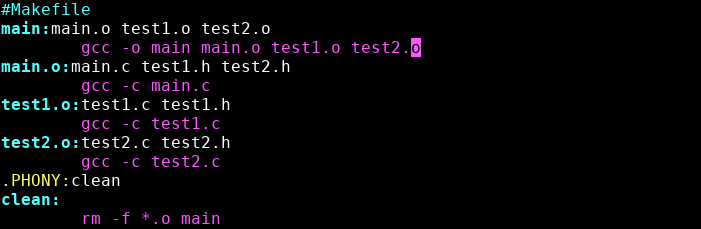
2、直接编写Makefile文件
[root@localhost MakefileExample]# vim Makefile
#Makefile

main:main.o test1.o test2.o

        gcc -o main main.o test1.o test2.o

main.o:main.c test1.h test2.h

        gcc -c main.c

test1.o:test1.c test1.h

        gcc -c test1.c

test2.o:test2.c test2.h

        gcc -c test2.c

.PHONY:clean

clean:

        rm -f *.o main
make 编译

清除生成的 .o 文件

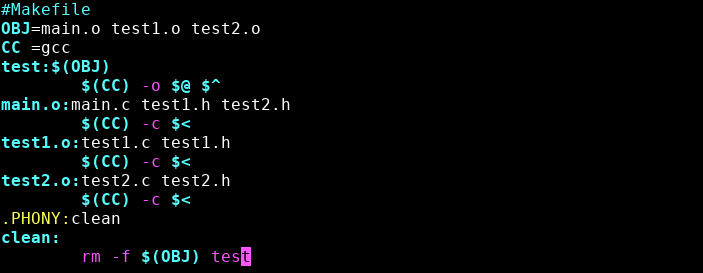
3、运用变量编写Makefile文件
#Makefile

OBJ=main.o test1.o test2.o

CC =gcc

test:$(OBJ)

        $(CC) -o $@ $^

main.o:main.c test1.h test2.h

        $(CC) -c $<

test1.o:test1.c test1.h

        $(CC) -c $<

test2.o:test2.c test2.h

        $(CC) -c $<

.PHONY:clean

clean:

        rm -f $(OBJ) test
make编译

实例二
1、分析源文件代码依赖关系

hello.c
void showhello()  {

        hello();

}
生成 hello.o 文件需要依赖 hello.c , hello.h
hello.h
/*hello.h*/

#ifndef  HELLO_H

#define  HELLO_H

void hello()   {

        star1();

        printf("hello,my friends\n");

}

#endif
hello.h 里面有 star() 函数的函数体
star.c
#include "starfun.h"

#include "hello.h"

#include <stdio.h>

int main() {

        star1();

        star2();

        showhello();

        return ;

}
生成 star.o 文件,需要依赖 star.c , hello.h , starfun.h 文件
starfun.h
/*****starfun.h*****/

#ifndef STARFUN_H

#define STARFUN_H

#define  NUM 4

#define  NUMBER 3

int star1() {

        int i,j,k;

        for(k=;k<=NUM;++k) {

                for(i=;i<=(NUM-k);++i)

                        printf(" ");

                for(j=;j<=(*k-);++j)

                        printf("*");

                printf("\n");

        }

        return ;

}

int star2() {

        int i,j,k;

        for(k=NUMBER;k>=;--k)  {

                for(i=;i<=(NUMBER-k+);++i)

                        printf(" ");

                for(j=;j<=(*k-);++j)

                        printf("*");

                printf("\n");

        }

        return ;

}

#endif
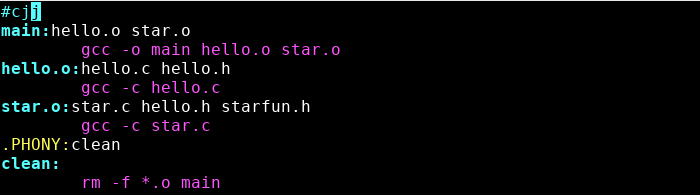
2、直接编写Makefile文件
[root@localhost test_2]# vim Makefile
#cjj

main:hello.o star.o

        gcc -o main hello.o star.o

hello.o:hello.c hello.h

        gcc -c hello.c

star.o:star.c hello.h starfun.h

        gcc -c star.c

.PHONY:clean

clean:

        rm -f *.o main
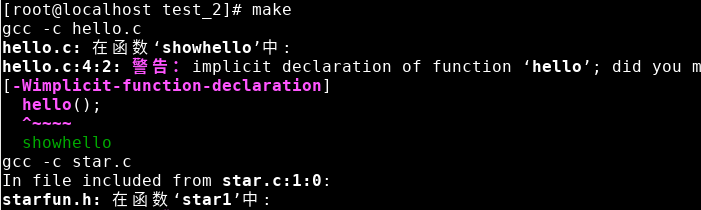
make 编译(会出现警告,不影响运行)
运行生成的文件
[root@localhost test_2]# ./main
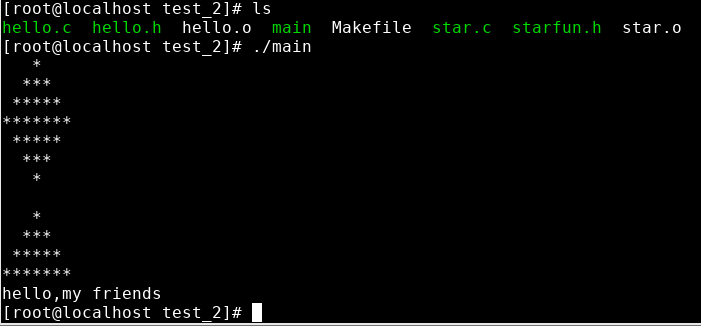
删除 .o 文件和 main 文件

3、运用变量编写Makefile文件
#cjj

OBJ=hello.o star.o

CC =gcc

STAR=star.c hello.h starfun.h

main:$(OBJ)

        $(CC) -o $@ $^

hello.o:hello.c hello.h

        $(CC) -c $<

star.o:$(STAR)

        $(CC) -c star.c

.PHONY:clean

clean:

        rm -f $(OBJ) main
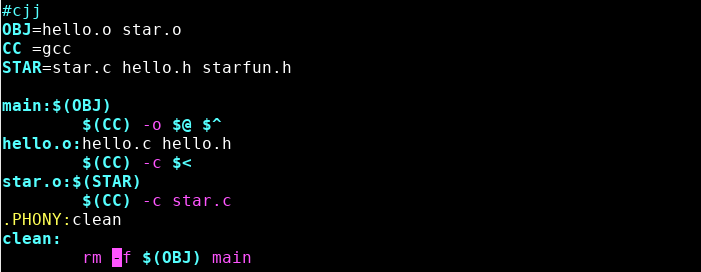
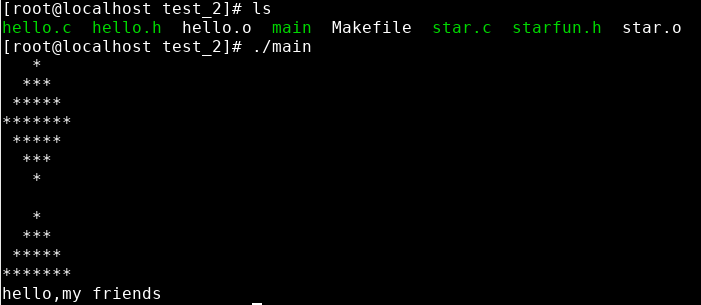
编译并运行
根据给定文件编写Makefile文件 两种方法编译的更多相关文章
- Windows文件自删除的两种方法
可执行模块的自删除技术已经被讨论的很多, 有很多极富创意的思路和想法被提出, 但有些似是而非的方案往往使人误入歧途. 举个例子来说, 很多文章认为下面的一小段代码可以实现自删除:void main(v ...
- C#实现Web文件上传的两种方法
1. C#实现Web文件的上传 在Web编程中,我们常需要把一些本地文件上传到Web服务器上,上传后,用户可以通过浏览器方便地浏览这些文件,应用十分广泛. 那么使用C#如何实现文件上传的功能呢?下面笔 ...
- SpringBoot从入门到精通十一(SpringBoot文件上传的两种方法)
前言 在企业级项目开发过程中,上传文件是最常用到的功能.SpringBoot集成了SpringMVC,当然上传文件的方式跟SpringMVC没有什么出入. 本章目标 使用SpringBoot项目完成单 ...
- vba判断文件是否存在的两种方法(转)
方法1. 用VBA自带的dir()判断,代码如下: 在 Microsoft Windows 中, Dir 支持多字符 (*)和单字符 (?) 的通配符来指定多重文件 Function IsFileEx ...
- VC++实现获取文件占用空间大小的两种方法(非文件大小)
// GetFileSpaceSize.cpp : Defines the entry point for the console application. // /***************** ...
- 清除SQLServer日志的两种方法
日志文件满而造成SQL数据库无法写入文件时,可用两种方法:一种方法:清空日志.1.打开查询分析器,输入命令DUMP TRANSACTION 数据库名 WITH NO_LOG2.再打开企业管理器--右键 ...
- 教会你如何编写makefile文件
最近一直在学习makefile是如何编写的.当我们写的程序文件比较少的时候,敲入gcc /g++,当你在大型工程中,在一个个编译文件的话,你可能就会很郁闷.linux有一个自带的make命令,它让你的 ...
- 如何编写makefile文件
最近一直在学习makefile是如何编写的. 当我们写的程序文件比较少的时候,敲入gcc /g++,当你在大型工程中,在一个个编译文件的话,你可能就会很郁闷.linux有一个自带的make ...
- 转:教会你如何编写makefile文件
最近一直在学习makefile是如何编写的.当我们写的程序文件比较少的时候,敲入gcc /g++,当你在大型工程中,在一个个编译文件的话,你可能就会很郁闷.linux有一个自带的make命令,它让你的 ...
随机推荐
- Easy install ryu
参考:Ubuntu14.04安装Ryu控制器 环境:Ubuntu 14.04 64bit 使用pip安装ryu: // dependencies sudo apt-get install Python ...
- spring boot: 热部署spring-boot-devtools
spring boot: 热部署spring-boot-devtools 1引入spring-boot-devtools依赖包 <!-- spring boot devtools 热部署 --& ...
- mysql插入中文数据报错 java.sql.SQLException: Incorrect string value: '\xE5\x90\x88\xE8\xAE\xA1' for column
1.我们创建数据库的时候没有更改数据库的字符集为utf8. 在mysql工具中,右击数据库,->"改变数据库",->选择“基字符集”为utf-8; 2,数据库中表的字符 ...
- IOS-网络(HTTP请求、同步请求、异步请求、JSON解析数据)
// // ViewController.m // IOS_0129_HTTP请求 // // Created by ma c on 16/1/29. // Copyright © 2016年 博文科 ...
- SSH-Auditor:一款SSH弱密码探测工具
SSH-Auditor:一款SSH弱密码探测工具 freebuf 2018-09-16 ssh-auditor是一款可帮助你探测所在网络中ssh弱密码的工具. 特性 以下操作ssh-auditor都 ...
- Docker ENTRYPOINT
entrypoint: 在启动镜像的时候会执行这个命令下的脚本,在docker run 和docker start情况下都会触发. 好比这个脚本是对某一个文件追加数据,每次start的时候都会追加,文 ...
- JMeter VS LoadRunner
对比项 JMeter LoadRunner 安装 简单,下载解压即可 复杂,安装包大于1GB,安装时间较久 录制/回放模式 支持 支持 测试协议 偏少,但用户可自行拓展 较多,用户不可自行拓展 分布式 ...
- SUSE Linux Enterprise Server设置IP地址、网关、DNS(转载)
说明: ip:192.168.21.172 子网掩码:255.255.255.0 网关:192.168.21.2 dns:8.8.8.8 8.8.4.4 1.设置ip地址vi /etc/sysco ...
- 7-19 PAT Judge(25 分)
The ranklist of PAT is generated from the status list, which shows the scores of the submissions. Th ...
- 《DSP using MATLAB》Problem 2.6
1.代码 %% ------------------------------------------------------------------------ %% Output Info abou ...