
浅谈style.height、clientHeight、offsetHeight、scrollHeight
先分别介绍以下,以下资料来自MDN
HTMLElement.offsetHeight 是一个只读属性,它返回该元素的像素高度,高度包含该元素的垂直内边距和边框,且是一个整数。
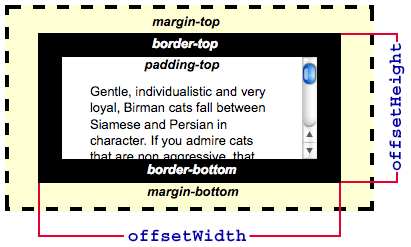
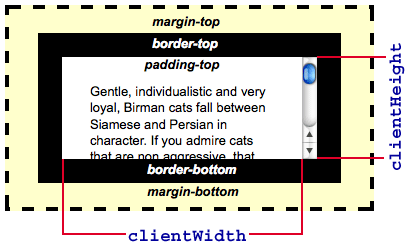
Element.clientHeight 是一个只读属性,它返回该元素的像素高度,高度包含该元素的垂直内边距和边框,且是一个整数。
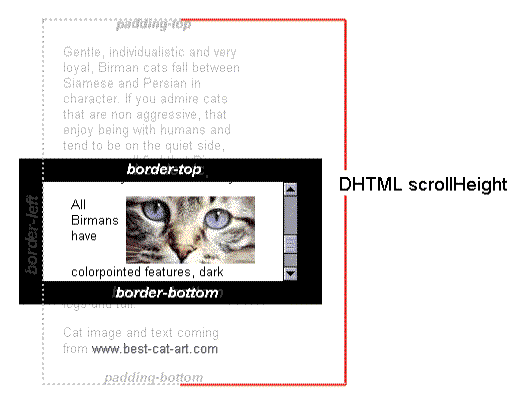
Element.scrollHeight 是一个只读属性,是一个元素内容高度的度量,包括由于溢出导致的视图中不可见内容
|
style.height |
clientHeight |
offsetHeight |
scrollHeight |
|
|
所属对象 |
Object |
Element |
HTMLElement |
Element |
|
获取高度 |
内联样式高度 |
元素高度+内边距 |
元素高度+内边距+边框+滚动条 |
元素高度+内边距+伪元素 |
|
不包含滚动条 |
不包含伪元素 |
|||
|
出现滚动条 |
可见部分高度 |
元素所有部分 |
||
|
读写属性 |
读写 |
只读 |
只读 |
只读 |
#本文有写的不好或不对的地方还请各位指出,一起学习!#
浅谈style.height、clientHeight、offsetHeight、scrollHeight的更多相关文章
- clientHeight & offsetHeight & scrollHeight
clientHeight & offsetHeight & scrollHeight scrollWidth/scrollHeight,offsetWidth/offsetHeight ...
- style.height、offsetHeight、clientHeight、scrollHeight的差别
style.height 包含元素的滚动栏,不包含边框 clientHeight 不包含元素的滚动栏和边框 offsetHeight 包含元素的滚动栏和边框 scrollHeight offsetHe ...
- JavaScript获取浏览器高度和宽度值(documentElement,clientHeight,offsetHeight,scrollHeight,scrollTop,offsetParent,offsetY,innerHeight)
IE中: document.body.clientWidth ==> BODY对象宽度 document.body.clientHeight ==> BODY对象高度 document.d ...
- 关于body/documentElement ---->clientHeight, offsetHeight, scrollHeight
http://blog.csdn.net/woxueliuyun/article/details/8638427 http://blog.sina.com.cn/s/blog_9dd702d50101 ...
- clientHeight,offsetHeight,scrollHeight迷一样的三个值
https://blog.csdn.net/qq_39083004/article/details/78498178 https://www.imooc.com/article/17571 推荐 o ...
- 浅谈style.,currentStyle,getComputedStyle,getAttribute
xxx为属性. ele为元素. 1.style.是针对于样式 在前面的一篇博客中我也有说到,ele.style.xxx; 通常用于赋值,赋值也是针对于行内样式,用它来取值的话,它只能取到内联样式. 今 ...
- clientHeight ,offsetHeight,style.height,scrollHeight有区别与联系
style.height 包括 元素的滚动条,不包括边框clientHeight 不包括元素的滚动条和边框,只有在没有元素的滚动条的情况下,style.height相等于clientHeightoff ...
- 浅谈FileReader
FileReader 对象允许Web应用程序异步读取存储在用户计算机上的文件(或原始数据缓冲区)的内容,使用 File 或 Blob 对象指定要读取的文件或数据. 了解https://develope ...
- height、clientHeight、scrollHeight、offsetHeight区别
转自 http://www.cnblogs.com/yuteng/articles/1894578.html 我们来实现test中的onclick事件 function justAtest() ...
随机推荐
- 【Azure IoT DevKit】实验终于做完了
大家好,我是MSP李桑榆 今天终于把几个Azure IoT DevKit的小实验的视频给做完了. 不敢说什么指导,只是给大家一个参考.因为Devkit不需要你写一行代码,只需要你按着步骤来,并没有什么 ...
- Chapter 4 Left Outer Join in MapReduce
4.1 Introdution Consider a company such as Amazon, which has over 200 millions of users and possibly ...
- (六)Linux下的压缩命令
======================================================================================== .zip格式的压缩和解 ...
- python各种模块的使用
Pexpect模块:http://www.ibm.com/developerworks/cn/linux/l-cn-pexpect1/ ConfigParser模块:http://blog.china ...
- 【node.js】回调函数
学习链接:http://www.runoob.com/nodejs/nodejs-callback.html Node.js 异步编程的直接体现就是回调. 异步编程依托于回调来实现,但不能说使用了回调 ...
- 30、springboot与检索(2)
项目中进行整合: 1.整合 新建项目加入依赖(NoSql) springboot默认使用SpringDate ElasticSearch模块进行操作 查看自动配置类: SpringBoot默认支持 ...
- 【转】Spring+Mybatis+SpringMVC+Maven+MySql搭建实例
林炳文Evankaka原创作品.转载请注明出处http://blog.csdn.net/evankaka 摘要:本文主要讲了如何使用Maven来搭建Spring+Mybatis+SpringMVC+M ...
- java 常用类2
1.1 日期时间类 时间戳(timestamp):距离特定时间的时间间隔. 计算机时间戳是指距离历元(1970-01-01 00:00:00:000)的时间间隔(ms). 计算机中时间2019-04- ...
- mysql自增ID过大修改方法
执行sql: alter table table_name AUTO_INCREMENT=100
- PAT——1071. 小赌怡情
常言道“小赌怡情”.这是一个很简单的小游戏:首先由计算机给出第一个整数:然后玩家下注赌第二个整数将会比第一个数大还是小:玩家下注t个筹码后,计算机给出第二个数.若玩家猜对了,则系统奖励玩家t个筹码:否 ...