
selenium+java破解滑动验证码
2019-04-16更新
- 修复极验页面改版,这次采用极验官方的demo地址:https://www.geetest.com/demo/slide-bind.html
- 截止2019-04-16,极验和腾讯的两个滑动验证码都是能保证比较高的成功率通过的
- 如何在无界面服务器上搭建selenium运行环境,可以参考我的另一篇文章:https://www.cnblogs.com/w-y-c-m/p/10533361.html
- 完整代码github地址见底部
2018-09-20更新
- 新增对腾讯滑动验证码
https://007.qq.com/online.html?ADTAG=capt.slide的支持,本地测试通过率50左右,有待优化中,主要失败在计算距离上(其中企鹅背景会计算失败),大家有好的想法欢迎提出。 - Run with TencentCrawler.java
- 腾讯滑动验证码破解的思路和极验滑动验证码略微不同,腾讯只会返回一张完整图片,导致没法通过两张图片比对的方式来计算移动距离。所以只能通过一张图来计算距离,这里计算的方式是通过
y轴上至少找到一条长度为30px的白线。另外此处直接通过http请求的方式来下载的原图,这么做有两个原因- 截图的方式会对那条关键白线的像素点有所干扰,计算的时候不太方便
- 返回到前端的图片并没有像极验那样对图片做混淆
2018-09-18更新
- 更新移动轨迹算法,成功率90左右,感谢Ouyang-Wenbin提供的代码。
2018-09-08更新
- 页面改版,导致截图拿到的两张图片一样。
- 另外原有的移动轨迹算法成功率有所下降,目前本地测试成功率50%左右。
2018-06-12更新
- 17年8月份初次分享出来的时候还是可用的,在极验后台更新以后。成功率急剧下降。
- 再加上威锋网也更新了,之前的demo也不可用了。个人原因也一直没有更新。
- 现在是极验官网作为demo。
- 现在的破解思路和之前大致相同,不过也省了很多事。之前版本其实有点麻烦弯路,不知道selenium提供了截图的api。导致自己通过css去还原图片,比较麻烦。现在极验也是通过canvas的方式对图片做的还原,没有以前那么容易还原了。所以当前版本直接采用截图的形式。
- 另外需要注意的是selenium截图的一个坑,不确定是否由我自己环境导致的,我当前测试环境是mac pro。具体表现网页截图分辨率大小和网页原本的分辨率大小不一致,这种情况可能导致在取某个element时拿不到想要的元素。
最核心的依然是移动轨迹的算法,这次采用的一种看起来很简单的轨迹,就是一个像素点的移动。本地测试了10次,通过了10次,测试通过率100%。
Quick Start
- 修改GeetestCrawlerV2中自己环境的ChromeDriver地址。
Run with GeetestCrawlerV2.java
最后
- github地址:https://github.com/wycm/selenium-geetest-crack
如果觉得不错,请给个star。
分割线以下是原文
摘要
分析验证码素材图片混淆原理,并采用selenium模拟人拖动滑块过程,进而破解验证码。
人工验证的过程
- 打开威锋网注册页面(https://passport.feng.com/?r=user/register)
- 移动鼠标至小滑块,一张完整的图片会出现(如下图1)

- 点击鼠标左键,图片中间会出现一个缺块(如下图2)

- 移动小滑块正上方图案至缺块处
- 验证通过
selenium模拟验证的过程
- 加载威锋网注册页面(https://passport.feng.com/?r=user/register)
- 下载图片1和缺块图片2
- 根据两张图片的差异计算平移的距离x
- 模拟鼠标点击事件,点击小滑块向右移动x
- 验证通过
详细分析
- 打开chrome浏览器控制台,会发现图1所示的验证码图片并不是极验后台返回的原图。而是由多个div拼接而成(如下图3)
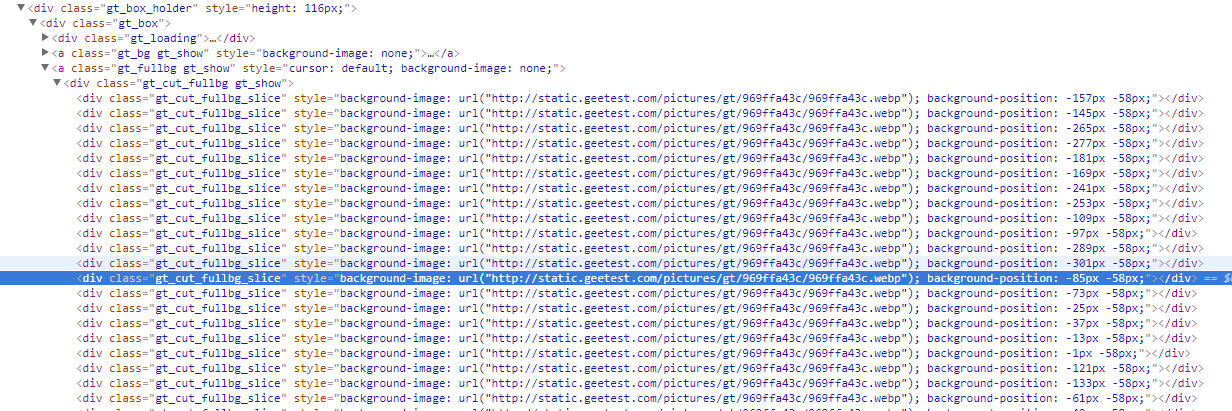
通过图片显示div的style属性可知,极验后台把图片进行切割加错位处理。把素材图片切割成10 * 58大小的52张小图,再进行错位处理。在网页上显示的时候,再通过css的background-position属性对图片进行还原。以上的图1和图2都是经过了这种处理。在这种情况下,使用selenium模拟验证是需要对下载的验证码图片进行还原。如上图3的第一个div.gt_cut_fullbg_slice标签,它的大小为10px * 58px,其中style属性为background-image: url("http://static.geetest.com/pictures/gt/969ffa43c/969ffa43c.webp"); background-position: -157px -58px;会把该属性对应url的图片进行一个平移操作,以左上角为参考,向左平移157px,向上平移58px,图片超出部分不会显示。所以上图1所示图片是由26 * 2个10px * 58px大小的div组成(如下图4)。每一个小方块的大小58 * 10

- 下载图片并还原,上一步骤分析了图片具体的混淆逻辑,具体还原图片的代码实现如下,主要逻辑是把原图裁剪为52张小图,然后拼接成一张完整的图。
/**
 *还原图片
 * @param type
 */
private static void restoreImage(String type) throws IOException {
    //把图片裁剪为2 * 26份
    for(int i = 0; i < 52; i++){
        cutPic(basePath + type +".jpg"
                ,basePath + "result/" + type + i + ".jpg", -moveArray[i][0], -moveArray[i][1], 10, 58);
    }
    //拼接图片
    String[] b = new String[26];
    for(int i = 0; i < 26; i++){
        b[i] = String.format(basePath + "result/" + type + "%d.jpg", i);
    }
    mergeImage(b, 1, basePath + "result/" + type + "result1.jpg");
    //拼接图片
    String[] c = new String[26];
    for(int i = 0; i < 26; i++){
        c[i] = String.format(basePath + "result/" + type + "%d.jpg", i + 26);
    }
    mergeImage(c, 1, basePath + "result/" + type + "result2.jpg");
    mergeImage(new String[]{basePath + "result/" + type + "result1.jpg",
            basePath + "result/" + type + "result2.jpg"}, 2, basePath + "result/" + type + "result3.jpg");
    //删除产生的中间图片
    for(int i = 0; i < 52; i++){
        new File(basePath + "result/" + type + i + ".jpg").deleteOnExit();
    }
    new File(basePath + "result/" + type + "result1.jpg").deleteOnExit();
    new File(basePath + "result/" + type + "result2.jpg").deleteOnExit();
}
还原过程需要注意的是,后台返回错位的图片是312 * 116大小的。而网页上图片div的大小是260 * 116。
- 计算平移距离,遍历图片的每一个像素点,当两张图的R、G、B之差的和大于255,说明该点的差异过大,很有可能就是需要平移到该位置的那个点,代码如下。
BufferedImage fullBI = ImageIO.read(new File(basePath + "result/" + FULL_IMAGE_NAME + "result3.jpg"));
    BufferedImage bgBI = ImageIO.read(new File(basePath + "result/" + BG_IMAGE_NAME + "result3.jpg"));
    for (int i = 0; i < bgBI.getWidth(); i++){
        for (int j = 0; j < bgBI.getHeight(); j++) {
            int[] fullRgb = new int[3];
            fullRgb[0] = (fullBI.getRGB(i, j)  & 0xff0000) >> 16;
            fullRgb[1] = (fullBI.getRGB(i, j)  & 0xff00) >> 8;
            fullRgb[2] = (fullBI.getRGB(i, j)  & 0xff);

            int[] bgRgb = new int[3];
            bgRgb[0] = (bgBI.getRGB(i, j)  & 0xff0000) >> 16;
            bgRgb[1] = (bgBI.getRGB(i, j)  & 0xff00) >> 8;
            bgRgb[2] = (bgBI.getRGB(i, j)  & 0xff);
            if(difference(fullRgb, bgRgb) > 255){
                return i;
            }
        }
}- 模拟鼠标移动事件,这一步骤是最关键的步骤,极验验证码后台正是通过移动滑块的轨迹来判断是否为机器所为。整个移动轨迹的过程越随机越好,我这里提供一种成功率较高的移动算法,代码如下。
public static void move(WebDriver driver, WebElement element, int distance) throws InterruptedException {
    int xDis = distance + 11;
    System.out.println("应平移距离:" + xDis);
    int moveX = new Random().nextInt(8) - 5;
    int moveY = 1;
    Actions actions = new Actions(driver);
    new Actions(driver).clickAndHold(element).perform();
    Thread.sleep(200);
    printLocation(element);
    actions.moveToElement(element, moveX, moveY).perform();
    System.out.println(moveX + "--" + moveY);
    printLocation(element);
    for (int i = 0; i < 22; i++){
        int s = 10;
        if (i % 2 == 0){
            s = -10;
        }
        actions.moveToElement(element, s, 1).perform();
        printLocation(element);
        Thread.sleep(new Random().nextInt(100) + 150);
    }

    System.out.println(xDis + "--" + 1);
    actions.moveByOffset(xDis, 1).perform();
    printLocation(element);
    Thread.sleep(200);
    actions.release(element).perform();
}- 完整代码如下
package com.github.wycm;

import org.apache.commons.io.FileUtils;
import org.jsoup.Jsoup;
import org.jsoup.nodes.Document;
import org.jsoup.nodes.Element;
import org.jsoup.select.Elements;
import org.openqa.selenium.By;
import org.openqa.selenium.Point;
import org.openqa.selenium.WebDriver;
import org.openqa.selenium.WebElement;
import org.openqa.selenium.chrome.ChromeDriver;
import org.openqa.selenium.interactions.Actions;
import org.openqa.selenium.support.ui.ExpectedCondition;
import org.openqa.selenium.support.ui.WebDriverWait;

import javax.imageio.ImageIO;
import javax.imageio.ImageReadParam;
import javax.imageio.ImageReader;
import javax.imageio.stream.ImageInputStream;
import java.awt.*;
import java.awt.image.BufferedImage;
import java.io.File;
import java.io.FileInputStream;
import java.io.IOException;
import java.net.URL;
import java.util.Iterator;
import java.util.Random;
import java.util.regex.Matcher;
import java.util.regex.Pattern;

public class GeettestCrawler {
    private static String basePath = "src/main/resources/";
    private static String FULL_IMAGE_NAME = "full-image";
    private static String BG_IMAGE_NAME = "bg-image";
    private static int[][] moveArray = new int[52][2];
    private static boolean moveArrayInit = false;
    private static String INDEX_URL = "https://passport.feng.com/?r=user/register";
    private static WebDriver driver;

    static {
        System.setProperty("webdriver.chrome.driver", "D:/dev/selenium/chromedriver_V2.30/chromedriver_win32/chromedriver.exe");
        if (!System.getProperty("os.name").toLowerCase().contains("windows")){
            System.setProperty("webdriver.chrome.driver", "/Users/wangyang/workspace/selenium/chromedriver_V2.30/chromedriver");
        }
        driver = new ChromeDriver();
    }

    public static void main(String[] args) throws InterruptedException {
        for (int i = 0; i < 10; i++){
            try {
                invoke();
            } catch (IOException e) {
                e.printStackTrace();
            } catch (InterruptedException e) {
                e.printStackTrace();
            }
        }
        driver.quit();
    }
    private static void invoke() throws IOException, InterruptedException {
        //设置input参数
        driver.get(INDEX_URL);

        //通过[class=gt_slider_knob gt_show]
        By moveBtn = By.cssSelector(".gt_slider_knob.gt_show");
        waitForLoad(driver, moveBtn);
        WebElement moveElemet = driver.findElement(moveBtn);
        int i = 0;
        while (i++ < 15){
            int distance = getMoveDistance(driver);
            move(driver, moveElemet, distance - 6);
            By gtTypeBy = By.cssSelector(".gt_info_type");
            By gtInfoBy = By.cssSelector(".gt_info_content");
            waitForLoad(driver, gtTypeBy);
            waitForLoad(driver, gtInfoBy);
            String gtType = driver.findElement(gtTypeBy).getText();
            String gtInfo = driver.findElement(gtInfoBy).getText();
            System.out.println(gtType + "---" + gtInfo);
            /**
             * 再来一次:
             * 验证失败:
             */
            if(!gtType.equals("再来一次:") && !gtType.equals("验证失败:")){
                Thread.sleep(4000);
                System.out.println(driver);
                break;
            }
            Thread.sleep(4000);
        }
    }

    /**
     * 移动
     * @param driver
     * @param element
     * @param distance
     * @throws InterruptedException
     */
    public static void move(WebDriver driver, WebElement element, int distance) throws InterruptedException {
        int xDis = distance + 11;
        System.out.println("应平移距离:" + xDis);
        int moveX = new Random().nextInt(8) - 5;
        int moveY = 1;
        Actions actions = new Actions(driver);
        new Actions(driver).clickAndHold(element).perform();
        Thread.sleep(200);
        printLocation(element);
        actions.moveToElement(element, moveX, moveY).perform();
        System.out.println(moveX + "--" + moveY);
        printLocation(element);
        for (int i = 0; i < 22; i++){
            int s = 10;
            if (i % 2 == 0){
                s = -10;
            }
            actions.moveToElement(element, s, 1).perform();
//            printLocation(element);
            Thread.sleep(new Random().nextInt(100) + 150);
        }

        System.out.println(xDis + "--" + 1);
        actions.moveByOffset(xDis, 1).perform();
        printLocation(element);
        Thread.sleep(200);
        actions.release(element).perform();
    }
    private static void printLocation(WebElement element){
        Point point  = element.getLocation();
        System.out.println(point.toString());
    }
    /**
     * 等待元素加载,10s超时
     * @param driver
     * @param by
     */
    public static void waitForLoad(final WebDriver driver, final By by){
        new WebDriverWait(driver, 10).until(new ExpectedCondition<Boolean>() {
            public Boolean apply(WebDriver d) {
                WebElement element = driver.findElement(by);
                if (element != null){
                    return true;
                }
                return false;
            }
        });
    }

    /**
     * 计算需要平移的距离
     * @param driver
     * @return
     * @throws IOException
     */
    public static int getMoveDistance(WebDriver driver) throws IOException {
        String pageSource = driver.getPageSource();
        String fullImageUrl = getFullImageUrl(pageSource);
        FileUtils.copyURLToFile(new URL(fullImageUrl), new File(basePath + FULL_IMAGE_NAME + ".jpg"));
        String getBgImageUrl = getBgImageUrl(pageSource);
        FileUtils.copyURLToFile(new URL(getBgImageUrl), new File(basePath + BG_IMAGE_NAME + ".jpg"));
        initMoveArray(driver);
        restoreImage(FULL_IMAGE_NAME);
        restoreImage(BG_IMAGE_NAME);
        BufferedImage fullBI = ImageIO.read(new File(basePath + "result/" + FULL_IMAGE_NAME + "result3.jpg"));
        BufferedImage bgBI = ImageIO.read(new File(basePath + "result/" + BG_IMAGE_NAME + "result3.jpg"));
        for (int i = 0; i < bgBI.getWidth(); i++){
            for (int j = 0; j < bgBI.getHeight(); j++) {
                int[] fullRgb = new int[3];
                fullRgb[0] = (fullBI.getRGB(i, j)  & 0xff0000) >> 16;
                fullRgb[1] = (fullBI.getRGB(i, j)  & 0xff00) >> 8;
                fullRgb[2] = (fullBI.getRGB(i, j)  & 0xff);

                int[] bgRgb = new int[3];
                bgRgb[0] = (bgBI.getRGB(i, j)  & 0xff0000) >> 16;
                bgRgb[1] = (bgBI.getRGB(i, j)  & 0xff00) >> 8;
                bgRgb[2] = (bgBI.getRGB(i, j)  & 0xff);
                if(difference(fullRgb, bgRgb) > 255){
                    return i;
                }
            }
        }
        throw new RuntimeException("未找到需要平移的位置");
    }
    private static int difference(int[] a, int[] b){
        return Math.abs(a[0] - b[0]) + Math.abs(a[1] - b[1]) + Math.abs(a[2] - b[2]);
    }
    /**
     * 获取move数组
     * @param driver
     */
    private static void initMoveArray(WebDriver driver){
        if (moveArrayInit){
            return;
        }
        Document document = Jsoup.parse(driver.getPageSource());
        Elements elements = document.select("[class=gt_cut_bg gt_show]").first().children();
        int i = 0;
        for(Element element : elements){
            Pattern pattern = Pattern.compile(".*background-position: (.*?)px (.*?)px.*");
            Matcher matcher = pattern.matcher(element.toString());
            if (matcher.find()){
                String width = matcher.group(1);
                String height = matcher.group(2);
                moveArray[i][0] = Integer.parseInt(width);
                moveArray[i++][1] = Integer.parseInt(height);
            } else {
                throw new RuntimeException("解析异常");
            }
        }
        moveArrayInit = true;
    }
    /**
     *还原图片
     * @param type
     */
    private static void restoreImage(String type) throws IOException {
        //把图片裁剪为2 * 26份
        for(int i = 0; i < 52; i++){
            cutPic(basePath + type +".jpg"
                    ,basePath + "result/" + type + i + ".jpg", -moveArray[i][0], -moveArray[i][1], 10, 58);
        }
        //拼接图片
        String[] b = new String[26];
        for(int i = 0; i < 26; i++){
            b[i] = String.format(basePath + "result/" + type + "%d.jpg", i);
        }
        mergeImage(b, 1, basePath + "result/" + type + "result1.jpg");
        //拼接图片
        String[] c = new String[26];
        for(int i = 0; i < 26; i++){
            c[i] = String.format(basePath + "result/" + type + "%d.jpg", i + 26);
        }
        mergeImage(c, 1, basePath + "result/" + type + "result2.jpg");
        mergeImage(new String[]{basePath + "result/" + type + "result1.jpg",
                basePath + "result/" + type + "result2.jpg"}, 2, basePath + "result/" + type + "result3.jpg");
        //删除产生的中间图片
        for(int i = 0; i < 52; i++){
            new File(basePath + "result/" + type + i + ".jpg").deleteOnExit();
        }
        new File(basePath + "result/" + type + "result1.jpg").deleteOnExit();
        new File(basePath + "result/" + type + "result2.jpg").deleteOnExit();
    }
    /**
     * 获取原始图url
     * @param pageSource
     * @return
     */
    private static String getFullImageUrl(String pageSource){
        String url = null;
        Document document = Jsoup.parse(pageSource);
        String style = document.select("[class=gt_cut_fullbg_slice]").first().attr("style");
        Pattern pattern = Pattern.compile("url\\(\"(.*)\"\\)");
        Matcher matcher = pattern.matcher(style);
        if (matcher.find()){
            url = matcher.group(1);
        }
        url = url.replace(".webp", ".jpg");
        System.out.println(url);
        return url;
    }
    /**
     * 获取带背景的url
     * @param pageSource
     * @return
     */
    private static String getBgImageUrl(String pageSource){
        String url = null;
        Document document = Jsoup.parse(pageSource);
        String style = document.select(".gt_cut_bg_slice").first().attr("style");
        Pattern pattern = Pattern.compile("url\\(\"(.*)\"\\)");
        Matcher matcher = pattern.matcher(style);
        if (matcher.find()){
            url = matcher.group(1);
        }
        url = url.replace(".webp", ".jpg");
        System.out.println(url);
        return url;
    }
    public static boolean cutPic(String srcFile, String outFile, int x, int y,
                                 int width, int height) {
        FileInputStream is = null;
        ImageInputStream iis = null;
        try {
            if (!new File(srcFile).exists()) {
                return false;
            }
            is = new FileInputStream(srcFile);
            String ext = srcFile.substring(srcFile.lastIndexOf(".") + 1);
            Iterator<ImageReader> it = ImageIO.getImageReadersByFormatName(ext);
            ImageReader reader = it.next();
            iis = ImageIO.createImageInputStream(is);
            reader.setInput(iis, true);
            ImageReadParam param = reader.getDefaultReadParam();
            Rectangle rect = new Rectangle(x, y, width, height);
            param.setSourceRegion(rect);
            BufferedImage bi = reader.read(0, param);
            File tempOutFile = new File(outFile);
            if (!tempOutFile.exists()) {
                tempOutFile.mkdirs();
            }
            ImageIO.write(bi, ext, new File(outFile));
            return true;
        } catch (Exception e) {
            e.printStackTrace();
            return false;
        } finally {
            try {
                if (is != null) {
                    is.close();
                }
                if (iis != null) {
                    iis.close();
                }
            } catch (IOException e) {
                e.printStackTrace();
                return false;
            }
        }
    }
    /**
     * 图片拼接 (注意:必须两张图片长宽一致哦)
     * @param files 要拼接的文件列表
     * @param type  1横向拼接,2 纵向拼接
     * @param targetFile 输出文件
     */
    private static void mergeImage(String[] files, int type, String targetFile) {
        int length = files.length;
        File[] src = new File[length];
        BufferedImage[] images = new BufferedImage[length];
        int[][] ImageArrays = new int[length][];
        for (int i = 0; i < length; i++) {
            try {
                src[i] = new File(files[i]);
                images[i] = ImageIO.read(src[i]);
            } catch (Exception e) {
                throw new RuntimeException(e);
            }
            int width = images[i].getWidth();
            int height = images[i].getHeight();
            ImageArrays[i] = new int[width * height];
            ImageArrays[i] = images[i].getRGB(0, 0, width, height, ImageArrays[i], 0, width);
        }
        int newHeight = 0;
        int newWidth = 0;
        for (int i = 0; i < images.length; i++) {
            // 横向
            if (type == 1) {
                newHeight = newHeight > images[i].getHeight() ? newHeight : images[i].getHeight();
                newWidth += images[i].getWidth();
            } else if (type == 2) {// 纵向
                newWidth = newWidth > images[i].getWidth() ? newWidth : images[i].getWidth();
                newHeight += images[i].getHeight();
            }
        }
        if (type == 1 && newWidth < 1) {
            return;
        }
        if (type == 2 && newHeight < 1) {
            return;
        }
        // 生成新图片
        try {
            BufferedImage ImageNew = new BufferedImage(newWidth, newHeight, BufferedImage.TYPE_INT_RGB);
            int height_i = 0;
            int width_i = 0;
            for (int i = 0; i < images.length; i++) {
                if (type == 1) {
                    ImageNew.setRGB(width_i, 0, images[i].getWidth(), newHeight, ImageArrays[i], 0,
                            images[i].getWidth());
                    width_i += images[i].getWidth();
                } else if (type == 2) {
                    ImageNew.setRGB(0, height_i, newWidth, images[i].getHeight(), ImageArrays[i], 0, newWidth);
                    height_i += images[i].getHeight();
                }
            }
            //输出想要的图片
            ImageIO.write(ImageNew, targetFile.split("\\.")[1], new File(targetFile));

        } catch (Exception e) {
            throw new RuntimeException(e);
        }
    }
}
- pom文件依赖如下
    <dependency>
      <groupId>org.seleniumhq.selenium</groupId>
      <artifactId>selenium-server</artifactId>
      <version>3.0.1</version>
    </dependency>
    <!-- https://mvnrepository.com/artifact/org.jsoup/jsoup -->
    <dependency>
      <groupId>org.jsoup</groupId>
      <artifactId>jsoup</artifactId>
      <version>1.7.2</version>
    </dependency>
效果
- 附上一张滑动效果图


最后
- github地址:https://github.com/wycm/selenium-geetest-crack
- 如果觉得不错,请给个star
- 欢迎加入爬虫qq交流群:633925314
版权声明
作者:wycm
出处:https://www.cnblogs.com/w-y-c-m/p/7359455.html
您的支持是对博主最大的鼓励,感谢您的认真阅读。
本文版权归作者所有,欢迎转载,但未经作者同意必须保留此段声明,且在文章页面明显位置给出原文连接,否则保留追究法律责任的权利。


selenium+java破解滑动验证码的更多相关文章
- selenium+java破解极验滑动验证码的示例代码
转自: https://www.jianshu.com/p/1466f1ba3275 selenium+java破解极验滑动验证码 卧颜沉默 关注 2017.08.15 20:07* 字数 3085 ...
- selenium篇之滑动验证码
一.介绍 现在出现了一种通过用户鼠标移动滑块来填补有缺口图片的验证码,我们叫做滑动验证码.它的原理很简单,首先生成一张图片,然后随机挖去一块,在页面展示被挖去部分的图片,再通过js获取用户滑动距离,以 ...
- selenium登录 京东滑动验证码
京东的滑动验证码在页面上是没有原图的,所有我是用ps把他们拼成一个的. from selenium import webdriver from selenium.webdriver import Ac ...
- selenium过豆瓣滑动验证码
首先是加速度代码 def get_tracks(distance): """ 拿到移动轨迹,模仿人的滑动行为,先匀加速后匀减速 匀变速运动基本公式: ①v = v0+at ...
- selenium+java破解极验滑动验证码
摘要 分析验证码素材图片混淆原理,并采用selenium模拟人拖动滑块过程,进而破解验证码. 人工验证的过程 打开威锋网注册页面(https://passport.feng.com/?r=user/r ...
- 通过比较rgb破解滑动验证码
目标url:信用中国(广东中山)行政处罚 /** * base64转BufferedImage * * @param base64 * @return */ public static Buffere ...
- selenium处理极验滑动验证码
要爬取一个网站遇到了极验的验证码,这周都在想着怎么破解这个,网上搜了好多知乎上看到有人问了这问题https://www.zhihu.com/question/28833985,我按照这思路去大概实现了 ...
- 一步步实现滑动验证码,Java图片处理关键代码
最近滑动验证码在很多网站逐步流行起来,一方面对用户体验来说,比较新颖,操作简单,另一方面相对图形验证码来说,安全性并没有很大的降低.当然到目前为止,没有绝对的安全验证,只是不断增加攻击者的绕过成本. ...
- 使用 Python+Selenium 破解滑块验证码
开发工具 Python版本:3.6.4 相关模块: pillow模块: selenium模块: numpy模块: 以及一些Python自带的模块. 其他: chromedriver 环境搭建 安装 ...
随机推荐
- Sencha Cmd创建Ext JS示例项目
Sencha提供了免费的Cmd工具,可以用来创建Ext JS项目并提供了一些便利的功能. Sencha也在官方文档中提供了一个示例来演示如何创建一个Sample Login App. 本文就介绍一下这 ...
- x86 x64下调用约定浅析
x86平台下调用约定 我们都知道x86平台下常用的有三种调用约定,__cdecl.__stdcall.__fastcall.我们分别对这三种调用约定进行分析. __cdecl __cdecl是C/C+ ...
- AndroidのListView之滑动列表项(点击事件和滑动事件共存)
这里正好在项目有这么一个bt的需求,如下图ListView的item可以响应点击事件也可以响应item的左右滑动事件,两个事件可以相互独立互不影响. 听说iphone的list选项就有这样bt的功能, ...
- Excel 2010 最熟悉的陌生功能:筛选器(将当前所选内容添加到筛选器)
使用excel2010版的同学,在进行筛选时,肯定都对这句话很熟悉:将当前所选内容添加到筛选器.但很多同学天天看到,却不知道什么是筛选器?它有什么作用. 其实,这里所指的筛选器就是储存筛选结果的一个虚 ...
- Fluent Nhibernate Mapping for Sql Views
Views are mapped the same way tables are mapped except that you should put Readonly() in the mapping ...
- 收集一些常用的CDN链接!无需下载快速使用!
一些常用的CDN链接,可以到这里看: http://www.bootcdn.cn/ 这个网站查找资源的方式很简单,后缀加上要查找的名字即可: 例如: http://www.bootcdn.cn/boo ...
- Linux系统下tomcat安装配置
Linux系统中Tomcat的安装配置. 前提JDK已经安装好. 安装 下载tomcatwget http://mirrors.cnnic.cn/apache/tomcat/tomcat-8/v8.0 ...
- SpringMVC中使用@ResponseBody注解将任意POJO对象返回值转换成json进行返回
@ResponseBody 作用: 该注解用于将Controller的方法返回的对象,通过适当的HttpMessageConverter转换为指定格式后,写入到Response对象的body数据区. ...
- chorme快捷键
Chrome窗口和标签页快捷键:Ctrl+N 打开新窗口 Ctrl+T 打开新标签页 Ctrl+Shift+N 在隐身模式下打开新窗口 Ctrl+O,然后选择文件 在谷歌浏览器中打开计算机上的文件 按 ...
- javascript飞机大战-----001分析
1.游戏引擎 首先要做飞机大战要考虑的是这个游戏被分成了哪几大部分?这样我们一块一块去做,特别清晰明了.那么接下来我们就简单的分析下飞机大战分成了哪几大部分 1.游戏引擎 2.英雄机 3.敌机 4.子 ...