
动态展开tableView的cell[1]
动态展开tableView的cell[1]
源码地址:https://github.com/xerxes235/HVTableView

虽然作者写的demo很好看,可是,你很难理解他是怎么玩的-_-!!,不信,你可以去下载他的demo试一下:)
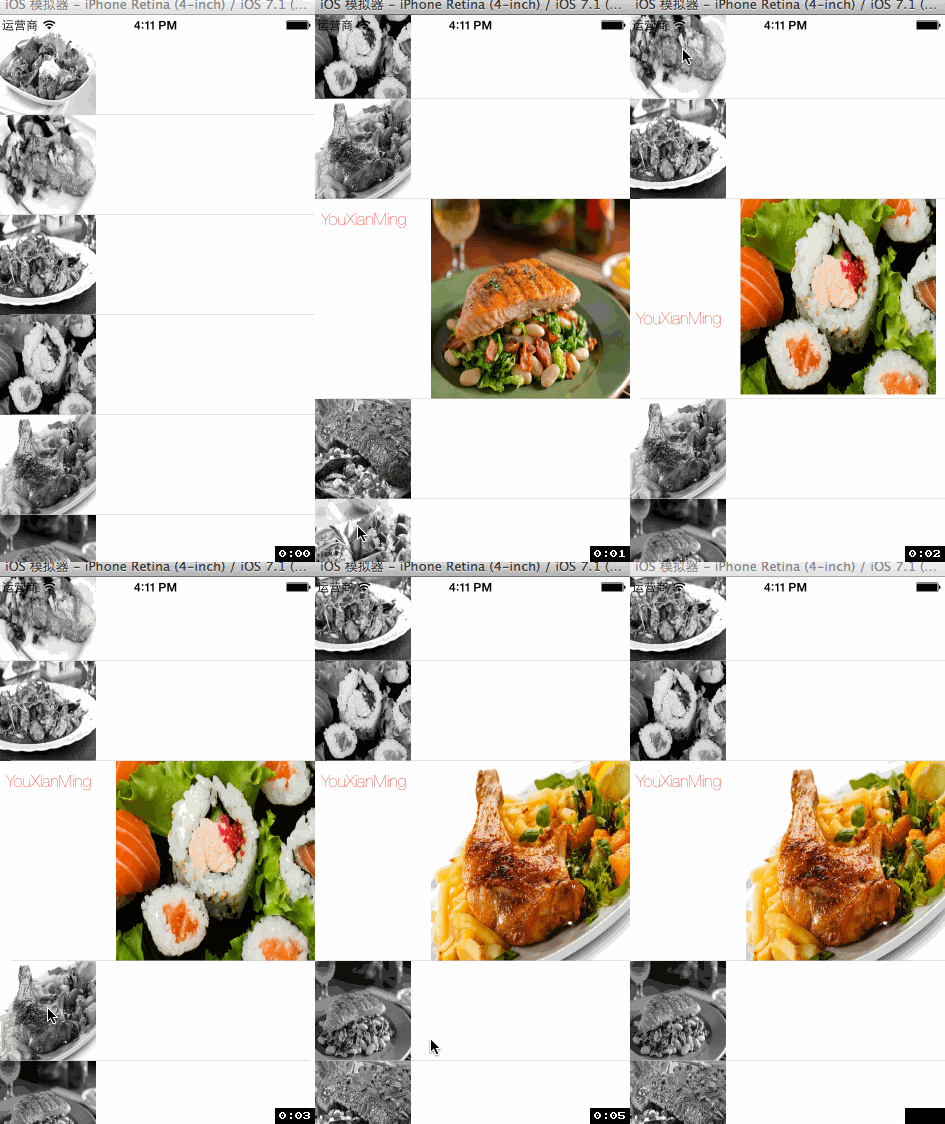
本人运行时的效果如下图:

源码:
RootViewController.m
 //

 //  RootViewController.m

 //  AnimationTableView

 //

 //  Copyright (c) 2014年 Y.X. All rights reserved.

 //

 #import "RootViewController.h"

 #import "HVTableView.h"

 #import "YXCell.h"

 @interface RootViewController ()<HVTableViewDelegate, HVTableViewDataSource>

 @property (nonatomic, strong) HVTableView *showTable;

 @property (nonatomic, strong) NSArray     *picAry;

 @end

 @implementation RootViewController

 - (void)viewDidLoad

 {

     [super viewDidLoad];

     // 图片源

     _picAry = @[[UIImage imageNamed:@"1.jpg"],

                 [UIImage imageNamed:@"2.jpg"],

                 [UIImage imageNamed:@"3.jpg"],

                 [UIImage imageNamed:@"4.jpg"],

                 [UIImage imageNamed:@"5.jpg"],

                 [UIImage imageNamed:@"6.jpg"],

                 [UIImage imageNamed:@"7.jpg"],

                 [UIImage imageNamed:@"8.jpg"],

                 [UIImage imageNamed:@"9.jpg"],

                 [UIImage imageNamed:@"10.jpg"]];

     // tableView

     _showTable = \

         [[HVTableView alloc] initWithFrame:self.view.bounds

                          expandOnlyOneCell:YES

                           enableAutoScroll:YES];

     _showTable.HVTableViewDelegate   = self;

     _showTable.HVTableViewDataSource = self;

     [_showTable reloadData];

     // 加载进视图

     [self.view addSubview:_showTable];

 }

 #pragma mark - 各个代理

 -(NSInteger)numberOfSectionsInTableView:(UITableView *)tableView

 {

     return ;

 }

 -(NSInteger)tableView:(UITableView *)tableView numberOfRowsInSection:(NSInteger)section

 {

     return _picAry.count;

 }

 //==============================================

 #pragma mark 展开时的cell(可以添加动画)

 //==============================================

 -(void)tableView:(UITableView *)tableView

       expandCell:(UITableViewCell *)cell

    withIndexPath:(NSIndexPath *)indexPath

 {

     YXCell *tmpCell = (YXCell *)cell;

     [UIView animateWithDuration:0.3f animations:^{

         tmpCell.showImageView.frame = CGRectMake(, , , );

     }];

     [UIView animateWithDuration:0.5f animations:^{

         tmpCell.name.frame = CGRectMake(, , , );

     }];

 }

 //==============================================

 #pragma mark 收缩时的cell(可以添加动画)

 //==============================================

 -(void)tableView:(UITableView *)tableView

     collapseCell:(UITableViewCell *)cell

    withIndexPath:(NSIndexPath *)indexPath

 {

     YXCell *tmpCell = (YXCell *)cell;

     [UIView animateWithDuration:0.3f animations:^{

         tmpCell.showImageView.frame = CGRectMake(, , , );

         tmpCell.name.frame = CGRectMake(, , , );

     }];

 }

 //==============================================

 #pragma mark 返回高度

 //==============================================

 -(CGFloat)tableView:(UITableView *)tableView

 heightForRowAtIndexPath:(NSIndexPath *)indexPath

          isExpanded:(BOOL)isexpanded

 {

     if (isexpanded == YES)

     {

         // 展开时的高度

         return ;

     }

     else

     {

         // 没有展开时的高度

         return ;

     }

 }

 //==============================================

 #pragma mark 返回高度

 //==============================================

 -(UITableViewCell *)tableView:(UITableView *)tableView

         cellForRowAtIndexPath:(NSIndexPath *)indexPath

                    isExpanded:(BOOL)isExpanded

 {

     static NSString *CellIdentifier = @"aCell";

     YXCell *cell = [tableView dequeueReusableCellWithIdentifier:CellIdentifier];

     if (cell == nil)

     {

         cell = [[YXCell alloc] initWithStyle:UITableViewCellStyleSubtitle

                              reuseIdentifier:CellIdentifier];

     }

     // 选择时没有颜色

     cell.selectionStyle = UITableViewCellSelectionStyleNone;

     // 加载图片

     cell.showImageView.image = _picAry[indexPath.row];

     // 没有展开cell,进行一些设置(不要添加任何动画)

     if (isExpanded == NO)

     {

         cell.showImageView.frame = CGRectMake(, , , );

         cell.name.frame          = CGRectMake(, , , );

     }

     // 展开的cell,进行一些设置(不要添加任何动画)

     else

     {

         cell.showImageView.frame = CGRectMake(, , , );

         cell.name.frame          = CGRectMake(, , , );

     }

     return cell;

 }

 @end
YXCell.h
//

//  YXCell.h

//  AnimationTableView

//

//  Copyright (c) 2014年 Y.X. All rights reserved.

//

#import <UIKit/UIKit.h>

@interface YXCell : UITableViewCell

@property (nonatomic, strong) UILabel     *name;

@property (nonatomic, strong) UIImageView *showImageView;

@end
YXCell.m
//

//  YXCell.m

//  AnimationTableView

//

//  Copyright (c) 2014年 Y.X. All rights reserved.

//

#import "YXCell.h"

@implementation YXCell

- (id)initWithStyle:(UITableViewCellStyle)style reuseIdentifier:(NSString *)reuseIdentifier

{

    self = [super initWithStyle:style reuseIdentifier:reuseIdentifier];

    if (self)

    {

        // 尺寸在外面的cell设定

        _showImageView  = [[UIImageView alloc] initWithFrame:CGRectZero];

        [self addSubview:_showImageView];

        _name           = [[UILabel alloc] initWithFrame:CGRectZero];

        _name.font      = [UIFont fontWithName:@"HelveticaNeue-UltraLight" size:.f];

        _name.text      = @"YouXianMing";

        _name.textColor = [UIColor blackColor];

        [self addSubview:_name];

        self.layer.masksToBounds = YES;

    }

    return self;

}

@end
关键的几步:
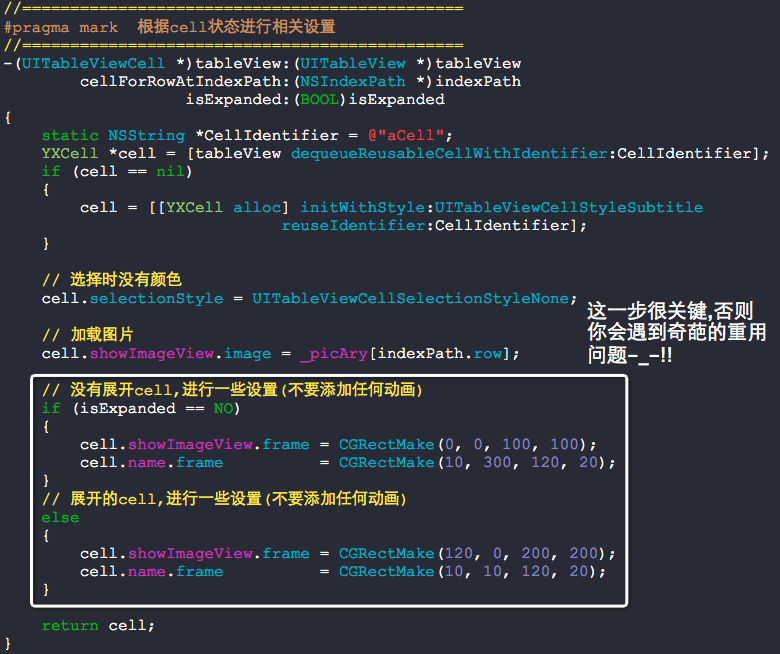

怎么实现复杂逼格高的动画?这个就需要你的想象力来脑补了-_-!!,没有实现不出来的效果,只有想不出来的效果:)
附录:
其实笔者深刻理解他的原理,然后尝试着自己写了一个,不过,那恶心的重用问题,不自己亲自动手是不理解别人写代码的用心良苦的-_-!!!!!
先共享源码供君尝试:
//

//  YXCell.h

//  ExpendTableView

//

//  Copyright (c) 2014年 Y.X. All rights reserved.

//

#import <UIKit/UIKit.h>

@interface YXCell : UITableViewCell

@property (nonatomic, strong) UIView *showView;

@end
//

//  YXCell.m

//  ExpendTableView

//

//  Copyright (c) 2014年 Y.X. All rights reserved.

//

#import "YXCell.h"

@implementation YXCell

- (id)initWithStyle:(UITableViewCellStyle)style reuseIdentifier:(NSString *)reuseIdentifier

{

    self = [super initWithStyle:style reuseIdentifier:reuseIdentifier];

    if (self)

    {

        _showView = [[UIView alloc] initWithFrame:CGRectZero];

        _showView.backgroundColor = [UIColor redColor];

        [self addSubview:_showView];

    }

    return self;

}

@end
//

//  RootViewController.m

//  ExpendTableView

//

//  Copyright (c) 2014年 Y.X. All rights reserved.

//

#import "RootViewController.h"

#import "YXCell.h"

@interface RootViewController ()<UITableViewDataSource, UITableViewDelegate>

{

    BOOL  flag[];

}

@property (nonatomic, strong) UITableView      *tableView;

@end

@implementation RootViewController

- (void)viewDidLoad

{

    [super viewDidLoad];

    _tableView = [[UITableView alloc] initWithFrame:self.view.bounds

                                              style:UITableViewStylePlain];

    _tableView.delegate   = self;

    _tableView.dataSource = self;

    [self.view addSubview:_tableView];

}

-(NSInteger)numberOfSectionsInTableView:(UITableView *)tableView

{

    return ;

}

-(NSInteger)tableView:(UITableView *)tableView numberOfRowsInSection:(NSInteger)section

{

    return ;

}

-(CGFloat)tableView:(UITableView *)tableView heightForRowAtIndexPath:(NSIndexPath *)indexPath

{

    if (flag[indexPath.row] == YES)

    {

        return .f;

    }

    else

    {

        return .f;

    }

}

//==============================================

#pragma mark  根据cell状态进行相关设置

//==============================================

-(UITableViewCell *)tableView:(UITableView *)tableView

        cellForRowAtIndexPath:(NSIndexPath *)indexPath

{

    static NSString *CellIdentifier = @"aCell";

    YXCell *cell = [tableView dequeueReusableCellWithIdentifier:CellIdentifier];

    if (cell == nil)

    {

        cell = [[YXCell alloc] initWithStyle:UITableViewCellStyleSubtitle

                             reuseIdentifier:CellIdentifier];

    }

    // 选择时没有颜色

    cell.selectionStyle = UITableViewCellSelectionStyleNone;

    if (flag[indexPath.row] == YES)

    {

        [UIView animateWithDuration:.f animations:^{

            cell.showView.frame = CGRectMake(, , , );

        }];

    }

    else

    {

        cell.showView.frame = CGRectMake(-, , , );

    }

    return cell;

}

- (void)tableView:(UITableView *)tableView didSelectRowAtIndexPath:(NSIndexPath *)indexPath

{

    if (flag[indexPath.row] == NO)

    {

        for (int i = ; i < ; i++)

        {

            flag[i] = NO;

        }

        flag[indexPath.row] = YES;

        [tableView beginUpdates];

        [tableView reloadRowsAtIndexPaths:[NSArray arrayWithObject:indexPath]

                         withRowAnimation:UITableViewRowAnimationAutomatic];

        [tableView endUpdates];

    }

    else

    {

        flag[indexPath.row] = NO;

        [tableView beginUpdates];

        [tableView reloadRowsAtIndexPaths:[NSArray arrayWithObject:indexPath]

                         withRowAnimation:UITableViewRowAnimationAutomatic];

        [tableView endUpdates];

    }

}

@end
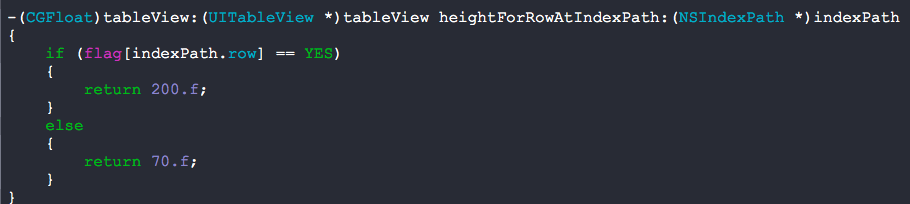
以下三个地方是相互配合的,但还是难以解决重用问题-_-!!!!


动态展开tableView的cell[1]的更多相关文章
- 动态展开tableView的cell[2]
动态展开tableView的cell[2] http://code4app.com/ios/%E5%8A%A8%E6%80%81%E6%B7%BB%E5%8A%A0cell/53845f8a933bf ...
- 使用HVTableView动态展开tableView中的cell
使用HVTableView动态展开tableView中的cell 效果: 源码: HVTableView.h 与 HVTableView.m // // HVTableView.h // HRVTab ...
- IOS中用UIFont返回字体的行高、动态改变tableView中Cell的高度
一.动态改变Cell的高度 1.利用tableView代理方法的返回值决定每一行cell的高度 - (CGFloat)tableView:(UITableView *)tableView height ...
- 动态切换tableView中的cell的种类
动态切换tableView中的cell的种类 为什么要动态切换tableView中cell的种类呢?如果项目经理不出这种需求,你也就见不到这篇文章了:) 效果: 源码: 首先,你要准备3种cell,直 ...
- 解决tableView中cell动态加载控件的重用问题
解决tableView中cell动态加载控件的重用问题 tableView的cell,有时候需要在运行时取得对应的数据后才能够动态的创建该cell中的控件并加载到该cell中,此时,你一定会遇到重用问 ...
- jqGrid subGrid配置 如何首次加载动态展开所有的子表格
有时候需求需要默认加载表格的时候把子表格的数据也显示出来,经过研究相关SubGrids API配置如下: 属性 类型 描述 默认值 subGrid boolean 设置为true启用子表格.如果启用子 ...
- 关于tableview内cell自定义的注册以及创建
自定义cell的方法主要有两种,storyboard以及xib(假设新建的是cellTableViewCell类) 比较倾向于xib方式使用xib在xib文件内将自定义的cell绘制好后导入到调用文件 ...
- TableView的cell加载倒计时重用问题解决方案
TableView的cell加载倒计时重用问题解决方案 效果 说明 1. 写过类似需求的朋友一定知道,TableView上面加载倒计时功能会遇到复杂的重用问题难以解决 2. 本人提供一种解决思路,高效 ...
- IOS 关于tableview中cell的长按手势
说明:虽然是tableview中cell的长按手势 但是手势是添加在tableview上的 UILongPressGestureRecognizer *longpress = [[UILongPre ...
随机推荐
- MYSQL 缓存
在PHP.INI中query_cache_type设置为1. 即 开始MYSQL全局SQL语句 都缓存.(0 不使用) 临时关闭查询缓冲的方法:1. SELECT SQL_NO_CACHE fi ...
- $scope作用域与依赖注入
一.$scope与$rootscope作用域 $scope下的数据作为该控制器下的数据moduel,只有在该控制器下才能够访问:而$rootScope则可以可以再任何有效的地方访问到,这个有效的地方指 ...
- Struts2 extends用法
1.创建一个struts-extends.xml文件 <?xml version="1.0" encoding="UTF-8"?> <!DOC ...
- 大数乘法的C代码实现
在C语言中,宽度最大的无符号整数类型是unsigned long long, 占8个字节.那么,如果整数超过8个字节,如何进行大数乘法呢? 例如: $ python Python 2.7.6 (def ...
- cppjieba分词学习笔记
cppjieba分词包主要提供中文分词.关键词提取.词性标注三种功能 一.分词 cppjieba分词用的方法是最大概率分词(MP)和隐马尔科夫模型(HMM),以及将MP和HMM结合成的MixSegme ...
- golang的bytes.NewReader函数出现的问题
在我试图装入一个300mb的数据时,发生了溢出. 我本以为不会出现这种问题的(内存和硬盘都够用),可见golang的bytes包还是设置了容量限制的. 虽然通常来说300mb的[]byte不管什么情况 ...
- Java将Excel的列数以字母表示的字符串转换成数字表示
我们知道,在 Excel 中,行数用数字表示,而列数是用字母表示的(如下图所示),有时候需要把它转换成数字来使用,或者把数字转换成字母.(例如使用POI操作Excel) 下面是转换代码,用来进行字母和 ...
- C#核心语法-泛型(详细讲解泛型方法、泛型类、泛型接口、泛型约束,了解协变逆变)
泛型(generic)是C#语言2.0和通用语言运行时(CLR)的一个新特性.泛型为.NET框架引入了类型参数(type parameters)的概念.类型参数使得设计类和方法时,不必确定一个或多个具 ...
- web.xml文件初始化过程
在使用各种框架后,有时会发现不了了错误处在哪里,了解Servlet的初始化过程(也可以说是web.xml的初始化吧),也许对你对于框架的理解与报错的原因理解会有帮助 context-param > ...
- 在Asp.Net Core中取得物理路径
在Asp.Net Core中取得物理路径: 从ASP.NET Core RC2开始,可以通过注入 IHostingEnvironment 服务对象来取得Web根目录和内容根目录的物理路径,如下所示: ...