
flask config笔记

#从flask这个包中导入Flask这个类

#Flask这个类是项目的核心,以后很多操作都是基于这个类的对象

#注册url、注册蓝图等都是基于这个类的对象

from flask import Flask

import config #配置文件

#创建一个Flask对象,传递__name__参数进去

#__name__参数的作用:

#1.可以规定模板和静态文件的查找路劲

#2.以后一些Flask插件,比如Flask-migrate、Flask-SQLAlchemy如果报错了,

#那么Flask可以通过这个参数找到具体的报错位置

app = Flask(__name__)

# app.debug = True #第二中模式debug

# app.config.update(DEBUG=True)#第三种模式

#可以看出config其实是一个字典

app.config.from_object(config) #第四种模式,从配置文件中导入

#为什么config的debug必须是大写

我们看下
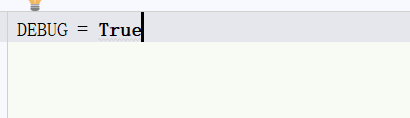
from_object的源码
def from_object(self, obj):
    """Updates the values from the given object.  An object can be of one
    of the following two types:

    -   a string: in this case the object with that name will be imported
    -   an actual object reference: that object is used directly

    Objects are usually either modules or classes. :meth:`from_object`
    loads only the uppercase attributes of the module/class. A ``dict``
    object will not work with :meth:`from_object` because the keys of a
    ``dict`` are not attributes of the ``dict`` class.

    Example of module-based configuration::

        app.config.from_object('yourapplication.default_config')
        from yourapplication import default_config
        app.config.from_object(default_config)

    You should not use this function to load the actual configuration but
    rather configuration defaults.  The actual config should be loaded
    with :meth:`from_pyfile` and ideally from a location not within the
    package because the package might be installed system wide.

    See :ref:`config-dev-prod` for an example of class-based configuration
    using :meth:`from_object`.

    :param obj: an import name or object
    """
    if isinstance(obj, string_types):
        obj = import_string(obj)
    for key in dir(obj):#这里用dir()内置函数查看文件参数
        if key.isupper():#这里判断了必须大写
            self[key] = getattr(obj, key)这里获取debug的值
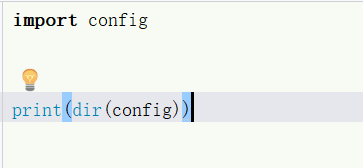

再看下from_pyfile的源码
 def from_pyfile(self, filename, silent=False):

        """Updates the values in the config from a Python file.  This function

        behaves as if the file was imported as module with the

        :meth:`from_object` function.

        :param filename: the filename of the config.  This can either be an

                         absolute filename or a filename relative to the

                         root path.

        :param silent: set to ``True`` if you want silent failure for missing

                       files.

        .. versionadded:: 0.7

           `silent` parameter.

        """

        filename = os.path.join(self.root_path, filename)

        d = types.ModuleType('config')

        d.__file__ = filename #

        try:

            with open(filename, mode='rb') as config_file:

                exec(compile(config_file.read(), filename, 'exec'), d.__dict__)

        except IOError as e:

            if silent and e.errno in (

                errno.ENOENT, errno.EISDIR, errno.ENOTDIR

            ):

                return False

            e.strerror = 'Unable to load configuration file (%s)' % e.strerror

            raise

        self.from_object(d)

        return True

第一个知识点:
d.__file__ = filename #__file__

文件的绝对路径
第二个知识点:
compile() 函数将一个字符串编译为字节代码。
参数source:字符串或者AST(Abstract Syntax Trees)对象。
参数 filename:代码文件名称,如果不是从文件读取代码则传递一些可辨认的值。
参数model:指定编译代码的种类。可以指定为 ‘exec’,’eval’,’single’。如果是exec类型,表示这是一个序列语句,可以进行运行;如果是eval类型,表示这是一个单一的表达式语句,可以用来计算相应的值出来;如果是single类型,表示这是一个单一语句,采用交互模式执行,在这种情况下,如果是一个表达式,一般会输出结果,而不是打印为None输出。
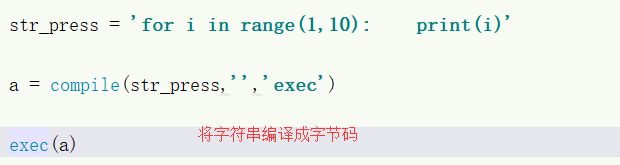
exec第三个知识点:
这个暂时放下
flask config笔记的更多相关文章
- Python Flask学习笔记之模板
Python Flask学习笔记之模板 Jinja2模板引擎 默认情况下,Flask在程序文件夹中的templates子文件夹中寻找模板.Flask提供的render_template函数把Jinja ...
- Python Flask学习笔记之Hello World
Python Flask学习笔记之Hello World 安装virtualenv,配置Flask开发环境 virtualenv 虚拟环境是Python解释器的一个私有副本,在这个环境中可以安装私有包 ...
- Flask之笔记集合
目录 一.简述 二.基本使用 三.配置文件 四.路由系统 2.自定义正则路由 五.模版语言 六.请求和响应 七.Session 2.自定义session 八.蓝图 九.message 十.中间件 十一 ...
- Flask入门笔记(一)
一.程序的基本结构 1.1 最简单的Flask程序 1 2 3 4 5 6 7 8 9 10 11 12 13 14 #coding=utf-8 # 初始化 from flask import Fla ...
- Flask项目笔记
一.jsonify jsonify 是flask的函数,可以将字典转换成json数据返回给浏览器二. 钩子函数 @app.before_first_request:第一次请求调用,用于初始化数据 @ ...
- Flask学习笔记(2)--最简单的小应用
0x01 第一个小程序 PyCharm新建一个flask项目,第一个小程序,我们来看一下 #引入flask类 from flask import Flask #将Flask对象实例化 app = Fl ...
- flask config
# config配置 { 'DEBUG': False, # 是否开启Debug模式 'TESTING': False, # 是否开启测试模式 'PROPAGATE_EXCEPTIONS': None ...
- pythonweb框架Flask学习笔记05-简单登陆
源代码从下链接引用:https://www.cnblogs.com/felixwang2/p/9261493.html 我使用的是python3.6 在运行代码的时候遇到了以下问题 session[' ...
- flask开发笔记
目录 虚拟环境 Debug模式 配置文件 url传入参数 url反转 重定义向 模板 创建 jinjia2语法 模板继承 flash 加载静态文件 MySQL数据库命令 配置 更新.提交.删除 模型操 ...
随机推荐
- MAC下安装Homebrew和GDB,并解决无法调试问题
Homebrew官网 http://brew.sh/index_zh-cn.html Homebrew是神马 linux系统有个让人蛋疼的通病,软件包依赖,好在当前主流的两大发行版本都自带了解决方案, ...
- qt5--数据类型转换
QString-->Char* str.toUtf8().data() pointf=QPointF(point); //将QPoint转换为QPointF point ...
- LVS 学习
参考网站:http://www.linuxvirtualserver.org 一,部分概念 服务器集群系统: 通过高性能网络或局域网互联的服务器集群正成为实现高可伸缩的.高可用网络服务的有效结构,这种 ...
- VS2015安装QT插件
下载安装完后直接重新启动vs
- shiro之缓存
1 细说shiro之七:缓存:https://www.cnblogs.com/nuccch/p/8044226.html 2 Shiro缓存使用Redis.Ehcache.自带的MpCache实现的三 ...
- Tomcat配置多个文件夹
在Tomcat下,conf/server.xml文件下的 Server/Service/Engine/Host节点下,最后添加上以下语句 <Context path="/myweb ...
- react-router中,<switch>
有<Switch>标签,则其中的<Route>在路径相同的情况下,只匹配第一个,这个可以避免重复匹配: 无<Switch>标签,则其中的<Route>在 ...
- effective c++ (三)
条款07:为多态基类申明virtual析构函数 1.c++明白指出,当derived class对象经由一个base class指针被删除,而该base class带有一个non-virtual 析构 ...
- AtCoder AGC036C GP 2 (组合计数)
题目链接 https://atcoder.jp/contests/agc036/tasks/agc036_c 题解 终于有时间补agc036的题了. 这题其实不难的来着--我太菜了考场上没想出来 首先 ...
- Apicloud_(接口验证)用户注册头部信息X-APICloud-AppKey生成
接口验证KEY生成规则说明 官方文档: 传送门 "X-APICloud-AppKey"生成规则是基于SHA1()算法生成的 AppKey= SHA1(你的应用ID + 'UZ' + ...