
四、Vue CLI-异步请求(axios)
一、模块的安装
npm install axios --save

#--save可以不用写
如图:

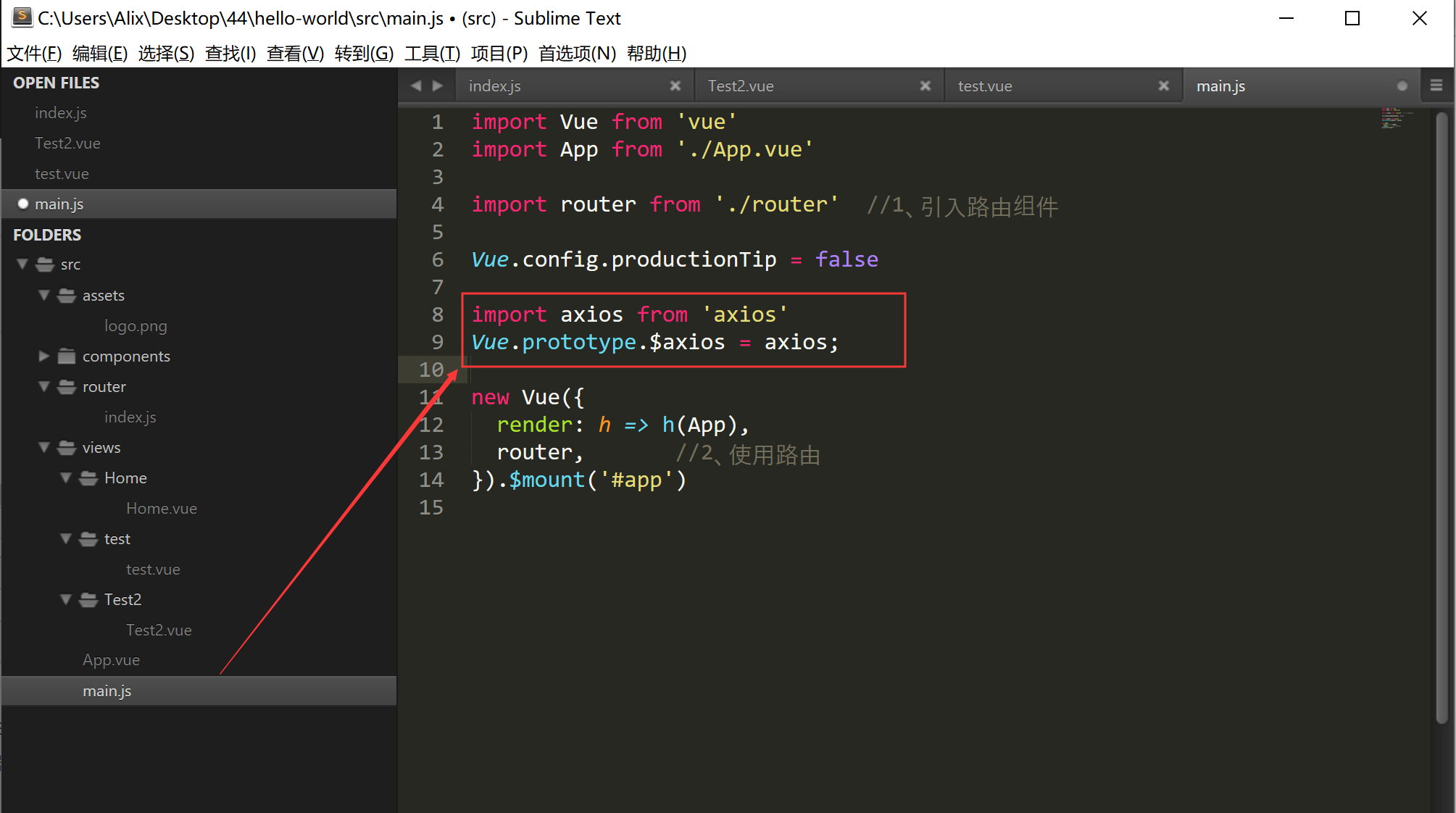
二、配置main.js
import axios from 'axios'

Vue.prototype.$axios = axios;
如图:
三、简单使用示例
页面加载时执行:
<template>

    <div class="header">{{title}}</div>

</template>

<script>

    //当前组件的脚本

    export default{

        // 当前组件的名称

        name:"test", //非必填项,则自动以文件名为主

        data(){

            return {//当前组件中所有的数据

                title:'猫眼电影'

            };

        },methods:{ //当前组件中所有的函数

            //普通的方法

            xx:function(){

                alert("调用普通方法");

            }

        },created()

        {

            window.console.log("页面加载完毕之前执行,执行顺序:父组件-子组件");

            this.xx();

        },mounted()

        {

            window.console.log("页面加载完毕之前执行,执行顺序:子组件-父组件");

        }

    }

</script>

<style>

    .header{

        height: 1.25rem;

        line-height: 2.5;

        background: #e54847;

        color: #fff;

        text-align: center;

        font-size: 0.5rem;

    }

</style>
点击按钮执行:
<template>

  <div>

    <div v-show="show">HelloWorld</div>

    <button @click="handleClick">Click</button>

    <ul>

      <li v-for="(item,index) of list" :key="index">{{item}}</li>

    </ul>

  </div>

</template>

<script>

export default {

  name: "test",

  data() {

    return {

      show: true,

      list: [1, 2, 3]

    };

  },

  methods: {

    handleClick: function() {

      this.show = !this.show;

    }

  }

};

</script>
异步请求的
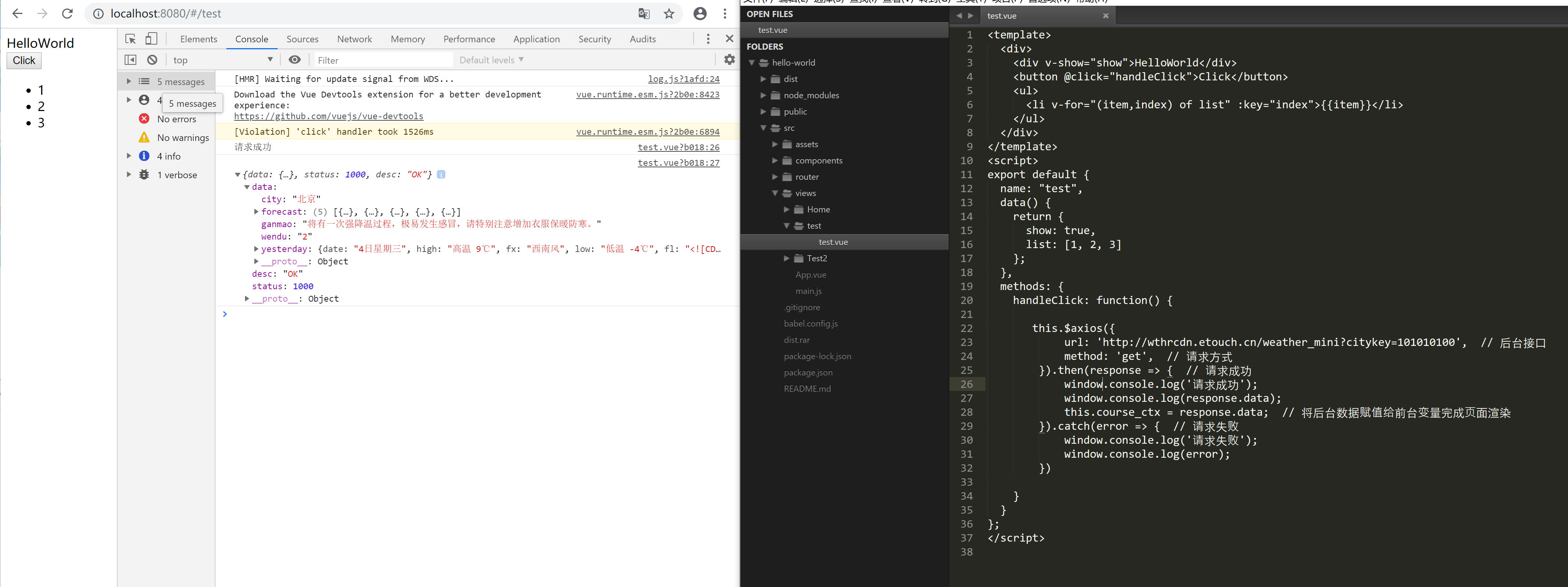
代码如下:
<template>

  <div>

    <div v-show="show">HelloWorld</div>

    <button @click="handleClick">Click</button>

    <ul>

      <li v-for="(item,index) of list" :key="index">{{item}}</li>

    </ul>

  </div>

</template>

<script>

export default {

  name: "test",

  data() {

    return {

      show: true,

      list: [1, 2, 3]

    };

  },

  methods: {

    handleClick: function() {

       this.$axios({

            url: 'http://wthrcdn.etouch.cn/weather_mini?citykey=101010100',  // 后台接口

            method: 'get',  // 请求方式

        }).then(response => {  // 请求成功

            window.console.log('请求成功');

            window.console.log(response.data);

            this.course_ctx = response.data;  // 将后台数据赋值给前台变量完成页面渲染

        }).catch(error => {  // 请求失败

            window.console.log('请求失败');

            window.console.log(error);

        })

    }

  }

};

</script>
四、路由跳转与参数
可以使用 this.$router.push(location) 来更改url,完成跳转
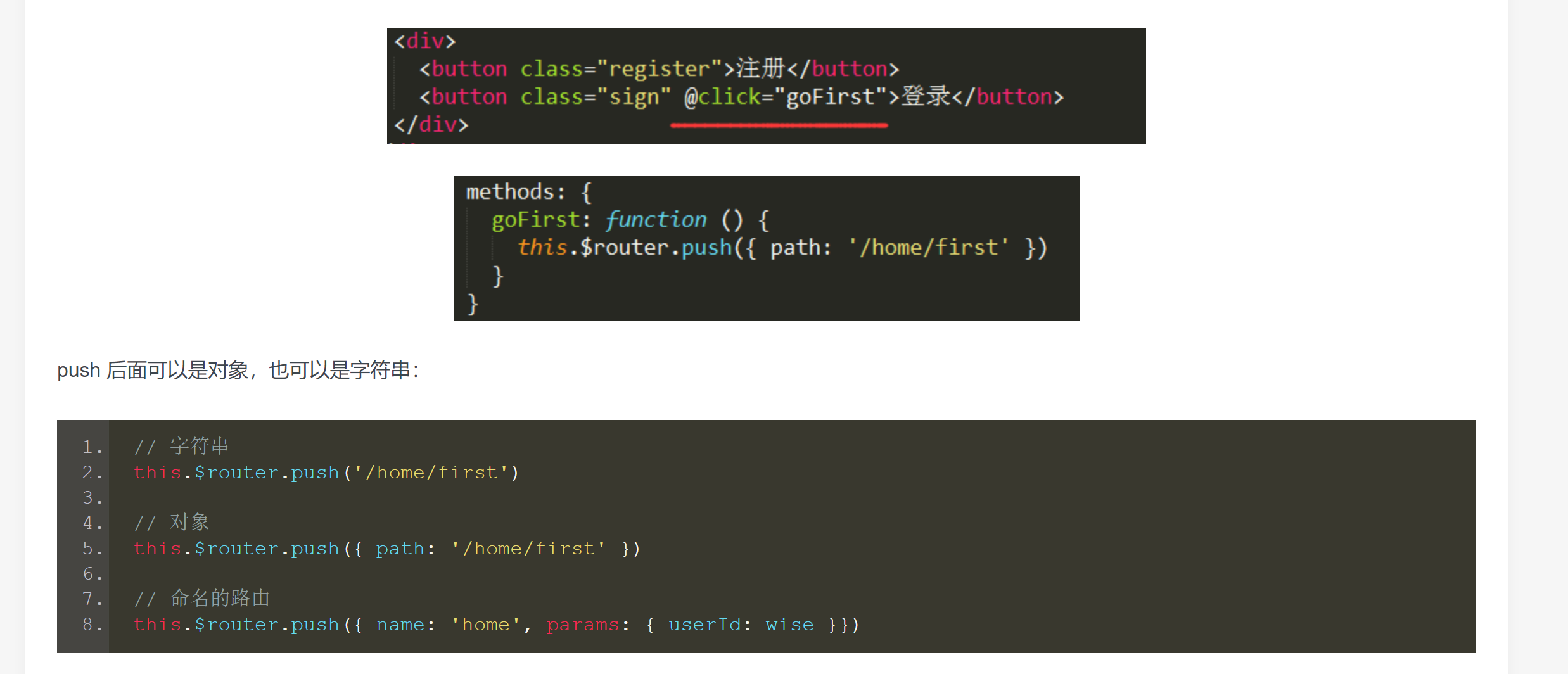
代码如下:
接受页面:
<template>

<div>

    <div>Test2页面</div>

    <div>{{this.$route.params.user}}</div>

    <button @click="write">打印接收的参数</button>

</div>

</template>

<script>

export default {

    name:"test2",

    data(){

        return {

            status:true

        }

    },

    methods:{

        write(){

            window.console.log(this.$route.params.user);

        }

    }

}

</script>

<style>

</style>
点击跳转页面
<template>

  <div>

    <div v-show="show">HelloWorld</div>

    <button @click="handleClick">Click</button>

    <ul>

      <li v-for="(item,index) of list" :key="index">{{item}}</li>

    </ul>

  </div>

</template>

<script>

export default {

  name: "test",

  data() {

    return {

      show: true,

      list: [1, 2, 3]

    };

  },

  methods: {

    handleClick: function() {

            //this.$router.push('/test2')

            this.$router.push('/test2?user="wise"')    //接受页面 this.$route.query.user

            /*this.$router.push({

                name:'test2',

                params:{

                  user:"wise"

                }

            })*/

    }

  }

};

</script>
四、Vue CLI-异步请求(axios)的更多相关文章
- vue处理异步请求
vue 处理异步请求 项目中需要 先调一个接口去取到人员编号,再去调另一个借口,人员编号作为参数才能去请求数据 用setTimeout 其实也可以,先new了一个promise对象 ,把请求放在里面, ...
- vue中异步请求渲染问题(swiper不轮播)(在开发过程中遇到过什么问题、踩过的坑)
问题描述: 用vue封装一个swiper组件的时候,发现轮播图不能轮播了. 原因: 异步请求的时间远大于生命周期执行的时间,mounted初始化DOM时数据未返回,渲染数据是空数组,导致轮播图的容器层 ...
- vue发送ajx请求 axios
一. 简介 1.vue本身不支持发送AJAX请求,需要使用vue-resource(vue1.0版本).axios(vue2.0版本)等插件实现 2.axios是一个基于Promise的HTTP请求客 ...
- 在双重for循环内部使用async异步请求axios中遇到的问题
在methods中的方法 async getPro () { let _this = this let newArr = [] await axios.get(`api/v1/dailyProTbms ...
- 记一次vue 普通异步请求微信二进制二维码 乱码 问题解决然后渲染
后端压力大,前端分忧. /*用微信小程序token拿二维码*/ async fetchMINIQRcode({commit,state},params){ var instance = axios.c ...
- 09.1.VUE学习之watch监听属性变化实现类百度搜索栏功能ajax异步请求数据,返回数组
09.1html里 <!DOCTYPE html> <html> <head> <meta charset="utf-8"> < ...
- 09.VUE学习之watch监听属性变化实现类百度搜索栏功能ajax异步请求数据,返回字符串
cmd下安装axios npm install axios 安装好后,会多出node_modules文件夹 思路: 监听data里的word改变时,发送ajax异步请求数据, 把返回的数据赋值给dat ...
- SpringBoot中异步请求和异步调用(看这一篇就够了)
原创不易,如需转载,请注明出处https://www.cnblogs.com/baixianlong/p/10661591.html,否则将追究法律责任!!! 一.SpringBoot中异步请求的使用 ...
- Spring Boot 异步请求和异步调用,一文搞定
一.Spring Boot中异步请求的使用 1.异步请求与同步请求 特点: 可以先释放容器分配给请求的线程与相关资源,减轻系统负担,释放了容器所分配线程的请求,其响应将被延后,可以在耗时处理完成(例如 ...
- Vue+axios的四种异步请求,参数的携带以及接收
Vue中axios发送GET, POST, DELETE, PUT四种异步请求,参数携带和接收问题 web.xml配置如下 1.GET请求 发送GET请求: <!--params是关键字,说明所 ...
随机推荐
- DeepFaceLab:视频中有多人,仅替换特定人脸的方法!
DeepFaceLab自带的视频素材,一个是钢铁侠托尼斯塔克,一个是变形金刚男主角山姆.每一个视频中只有一个人.所以当你第一次玩的时候很顺畅,什么都不用管,一步一步按教程来就好好了. 直到有一天你 ...
- flutter block回调
block回调在oc中很常见,到了flutter中仍然有block回调 自定义一个StatefulWidget PageTitle 无参数回调VoidCallback VoidCallback onT ...
- RTX和谐说明
1.下载安装原版RTX20152.打开“服务”,停止RTX开头的服务.3.替换C:\Program Files\Tencent\RTXServer\License目录下的License.ini文件:替 ...
- 【神经网络与深度学习】用训练好的caffemodel来进行分类
现在我正在利用imagenet进行finetune训练,待训练好模型,下一步就是利用模型进行分类.故转载一些较有效的相关博客. 博客来源:http://www.cnblogs.com/denny402 ...
- etcd单节点数据备份与恢复
插入测试数据 # etcdctl put smith # etcdctl put allen # etcdctl put ward # etcdctl put jones # etcdctl put ...
- Dubbo基础、高级讲解
基础 https://blog.csdn.net/hardworking0323/article/category/6148466 高级 https://blog.csdn.net/hardworki ...
- 【转帖】AMD:未向合资企业THATIC发放后续芯片设计授权
AMD:未向合资企业THATIC发放后续芯片设计授权 https://www.cnbeta.com/articles/tech/854193.htm 海光和兆芯的CPU 都不靠谱啊. 在台北电脑展(C ...
- void *与id类型的相互转换
void *与id类型相互转换 在MRC下,void *与id类型相互转换完全没问题. id obj = [[NSObject alloc] init]; void *p = (void *)p; o ...
- Java第二周总结报告
第二周的学习,开始正式实践进行Java的学习. 本周做了什么? 了解的Java的一些基本知识,如Java变量,数据类型和运算符等.Java变量对不同的数据类型最好采用不同的命名规则,合理的命名有利于提 ...
- 初步学习jquery学习笔记(五)
jquery学习笔记五 jquery遍历 什么是遍历? 从某个标签开始,按照某种规则移动,直到找到目标标签为止 标签树 <div> <ul> <li> <sp ...