
java中的Excel导出功能
public void exportExcel(Long activityId, HttpServletResponse response) throws IOException

    {

        // 获取统计报表信息

        List<ProductInfo> productInfoList = reportDao.queryStatisticReport(activityId);

        // 创建一个工作薄

        HSSFWorkbook workbook = new HSSFWorkbook();

        // 创建一个工作表sheet

        HSSFSheet sheet = workbook.createSheet("统计报表");

        // 设置单元格每列的宽度

        sheet.setColumnWidth(0, 50 * 256);

        sheet.setColumnWidth(1, 50 * 256);

        sheet.setColumnWidth(2, 10 * 256);

   	// 表格信息内容的样式

        HSSFCellStyle style = workbook.createCellStyle();

        // 水平居中

        style.setAlignment(HorizontalAlignment.CENTER);

        // 垂直居中

        style.setVerticalAlignment(VerticalAlignment.CENTER);

        // 行数

        int rowCount = 0;

        // 第一行的标题行

        HSSFRow row0 = sheet.createRow(rowCount++);

        // 列表格

        HSSFCell cell_title = row0.createCell(0);

        cell_title.setCellValue("统计报表");

        // 标题样式

        HSSFCellStyle style_title = workbook.createCellStyle();

        style_title.setAlignment(HorizontalAlignment.CENTER);

        style_title.setVerticalAlignment(VerticalAlignment.CENTER);

        //设置字体样式

        HSSFFont font  = workbook.createFont();

        //字号

        font.setFontHeightInPoints((short) 16);

        // 红色字体

        font.setColor(HSSFFont.COLOR_RED);

        style_title.setFont(font);

        cell_title.setCellStyle(style_title);

        sheet.addMergedRegion(new CellRangeAddress(0, 0, 0, 2));

        // 第二行的表头

        HSSFRow row1 = sheet.createRow(rowCount++);

        // 表头样式

        HSSFCellStyle style_header = workbook.createCellStyle();

        style_header.setAlignment(HorizontalAlignment.CENTER);

        style_header.setVerticalAlignment(VerticalAlignment.CENTER);

        style_header.setFillForegroundColor(new HSSFColor.SKY_BLUE().getIndex());

        style_header.setFillPattern(FillPatternType.SOLID_FOREGROUND);

        // 列表格

        HSSFCell cell_header0 = row1.createCell(0);

        cell_header0.setCellValue("展示商品名称");

        cell_header0.setCellStyle(style_header);

        HSSFCell cell_header1 = row1.createCell(1);

        cell_header1.setCellValue("SKU商品名称");

        cell_header1.setCellStyle(style_header);

        HSSFCell cell_header2 = row1.createCell(2);

        cell_header2.setCellValue("数量");

        cell_header2.setCellStyle(style_header);

        if (!StringUtils.isEmpty(productInfoList))

        {

            for (ProductInfo productInfo : productInfoList)

            {

                List<SbomInfo> sbomInfoList = productInfo.getSbomInfoList();

                for (int i = 0; i < sbomInfoList.size(); i++)

                {

                    // 行表格

                    HSSFRow row = sheet.createRow(rowCount);

                    SbomInfo sbomInfo = sbomInfoList.get(i);

                    if (i == 0)

                    {

                        // 列表格

                        HSSFCell cell0 = row.createCell(0);

                        cell0.setCellValue(productInfo.getDisPrdName());

                        cell0.setCellStyle(style);

                        // 含有2个以上数据的,则需要合并单元格

                        if (sbomInfoList.size() > 1)

                        {

                            sheet.addMergedRegion(new CellRangeAddress(rowCount, rowCount + sbomInfoList.size() - 1, 0, 0));

                        }

                    }

                    // 列表格

                    HSSFCell cell1 = row.createCell(1);

                    cell1.setCellValue(sbomInfo.getSbomName());

                    cell1.setCellStyle(style);

                    // 列表格

                    HSSFCell cell2 = row.createCell(2);

                    cell2.setCellValue(sbomInfo.getNumber());

                    cell2.setCellStyle(style);

                    // 行数增1

                    rowCount = rowCount + 1;

                }

            }

        }

        // 设置文件名

        String fileName = "统计报表.xls";

        response.setContentType("application/vnd.ms-excel");

        response.setHeader("Content-disposition", "attachment;filename=" + URLEncoder.encode(fileName, "UTF-8"));

        response.setHeader("Pragma", "No-cache");

        OutputStream outputStream = response.getOutputStream();

        workbook.write(outputStream);

        outputStream.flush();

        outputStream.close();

        workbook.close();

    }
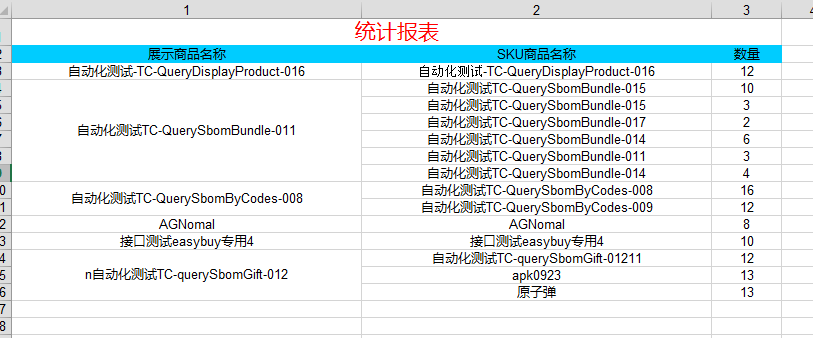
导出Excel表格:
java中的Excel导出功能的更多相关文章
- Atitit.excel导出 功能解决方案 php java C#.net版总集合.doc
Atitit.excel导出 功能解决方案 php java C#.net版总集合.docx 1.1. Excel的保存格式office2003 office2007/2010格式1 1.2. 类库选 ...
- Java中导入、导出Excel
原文:Java中导入.导出Excel 一.介绍 当前B/S模式已成为应用开发的主流,而在企业办公系统中,常常有客户这样子要求:你要把我们的报表直接用Excel打开(电信系统.银行系统).或者是:我们已 ...
- 我是陌生人 Java中导入、导出Excel
我是陌生人 Java中导入.导出Excel 一.介绍 当前B/S模式已成为应用开发的主流,而在企业办公系统中,常常有客户这样子要求:你要把我们的报表直接用Excel打开(电信系统.银行系统).或者是: ...
- 利用Aspose.Cells完成easyUI中DataGrid数据的Excel导出功能
我准备在项目中实现该功能之前,google发现大部分代码都是利用一般处理程序HttpHandler实现的服务器端数据的Excel导出,但是这样存在的问题是ashx读取的数据一般都是数据库中视图的数据, ...
- 用SpringMvc实现Excel导出功能
以前只知道用poi导出Excel,最近用了SpringMvc的Excel导出功能,结合jxl和poi实现,的确比只用Poi好,两种实现方式如下: 一.结合jxl实现: 1.引入jxl的所需jar包: ...
- excel导出功能优化
先说说优化前,怎么做EXCEL导出功能的: 1. 先定义一个VO类,类中的字段按照EXCEL的顺序定义,并且该类只能用于EXCEL导出使用,不能随便修改. 2. 将查询到的结果集循环写入到这个VO类中 ...
- excel导出功能原型
本篇博客是记录自己实现的excel导出功能原型,下面我将简单介绍本原型: 这是我自制的窗体,有一个ListView和一个Button(导出)控件. 这是我在网上找到了使用exel需要引用的库. usi ...
- java(POI):基于模版的Excel导出功能,局部列写保护总结
需求描述: 1.导出的Excel中部分列包含有下拉列表,并没有尝试过用代码实现这种功能,个人感觉比较棘手,故采用了模版的形式,直接导出数据到已经创建好的Excel模版中 2.Excel的第一列需要写保 ...
- java中的数据导出到Excel表中
整个项目中导出数据到.Excel的源码 import java.io.BufferedOutputStream; import java.io.FileInputStream; import java ...
随机推荐
- [CSP-S模拟测试]:打扫卫生(暴力)
题目描述 有$N$头奶牛,每头那牛都有一个标号$P_i1\leqslant Pi\leqslant M\leqslant N\leqslant 40,000$.现在$Farmer\ John$要把这 ...
- IDEA简单破解激活操作流程(我在用的)
其实简单的,你需要下一个包,将他放入你的IDEA安装目录的bin下,如下下图 下载地址:https://pan.baidu.com/s/1aJDefDGmfYGrkcJCpZYccA 看到红线的地方了 ...
- ES5 Object.defineProperties / Object.defineProperty 的使用
临时笔记,稍后整理 var obj = { v: , render: function () { console.log(") } }; // Object.defineProperties ...
- something about motorcycle and automobile
cycle: 循环, 周期, 自行车. 摩托车: motorcycle, motor cycle 轮胎 continent(al): 大陆的, (七)大洲的; 德国的大陆轮胎, 马牌轮胎; 如吉普的c ...
- LeetCode 10——正则表达式匹配
1. 题目 2. 解答 在 回溯算法 中我们介绍了一种递归的思路来求解这个问题. 此外,这个问题也可以用动态规划的思路来解决.我们定义状态 \(P[i][j]\) 为子串 \(s[0, i)\) 和 ...
- 阿里云DNS api接口 shell 更改DNS解析
可定时任务检查域名解析,调用alidns.sh更新DNS解析 #!/bin/bash # alidns.sh #https://www.cnblogs.com/elvi/p/11663910.html ...
- spring的基础配置
<?xml version="1.0" encoding="UTF-8"?> <beans xmlns="http://www.sp ...
- 5分钟连续出现某现象+微信模板消息提醒 PHP
需求场景:用电插座电流连续出现5次电流过高(大于 3A)后停止用电服务,前四次发送电流过高提醒,最后一次发送结束用电服务提醒 思路: Redis key 设为:插座编号+user户编号 value ...
- kNN算法实例(约会对象喜好预测和手写识别)
import numpy as np import operator import random import os def file2matrix(filePath):#从文本中提取特征矩阵和标签 ...
- vue 常用插件,保存
UI组件 element- 饿了么出品的Vue2的web UI工具套件 Vux- 基于Vue和WeUI的组件库 mint-ui- Vue 2的移动UI元素 iview- 基于 Vuejs 的开源 UI ...