
appium 链接真机运行时报错
今天用appium链接真机时,碰到的第一个问题:Attempt to re-install io.appium.settings without first uninstalling.(这是日志中显示的报错信息)
解决办法:还在找原因,后续更新进来。
百度找到答案了,测试后,就没有再出现这个报错了。
appium_server_v1.4.16版本不适配android7.0系统,运行报错“Attempt to re-install io.appium.settings without first uninstalling”
要解决的问题:appium在androidV7.0系统上运行时报错 Failure [INSTALL_FAILED_ALREADY_EXISTS: Attempt to re-install io.appium.settings without first uninstalling.]
原因分析:appium的uiautomator版本与androidV7.0不适配。
预置条件:手机端已经安装完Appium Settings 和 Unlock两个应用
解决步骤:1.修改源码文件-注释安装appiumSettings和unlock的两行代码
文件路径: C:\Program Files (x86)\Appium\node_modules\appium\lib\devices\android\android.js
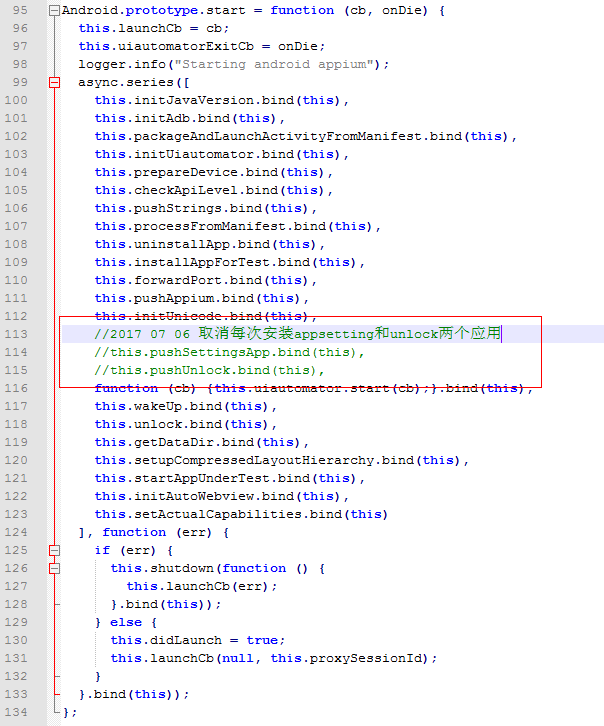
2.修改源码文件如下:
a.打开 \Program Files (x86)\Appium\node_modules\appium\node_modules\appium-adb\lib\adb.js
b.在adb.js的1035行找到
this.shell("ps '" + name + "'", function (err, stdout) {
if (err) return cb(err); 替换成 this.shell_grep("ps", name, function (err, stdout) { if (err) { logger.debug("No matching processes found"); return cb(null, []); }并增加上面用到的shell_grep函数:
ADB.prototype.shell_grep = function (cmd, grep, cb) { if (cmd.indexOf('"') === -1) { cmd = '"' + cmd + '"'; } var execCmd = 'shell ' + cmd + '| grep ' + grep; this.exec(execCmd, cb); };3.重启appium
appium 链接真机运行时报错的更多相关文章
- appium 链接真机后,运行代码,但是APP并没有启动
要淡定,链接真机后,问题一下多出来这么多,还没有启动程序,就碰到接二连三的问题. 爽到家了.慢慢解决吧. 具体问题是这样的: # coding=utf-8from appium import webd ...
- iOS 真机测试时报错:Provisioning profile "iOS Team Provisioning Profile: XXX” doesn't include the currently selected device “XXX”.
这几天因工作需要,去给客户演示iOS项目打包的过程.之前演示都是顺利的,但后来客户自己操作时打电话说遇到了问题,出现报错. 就过去看了一下,发现一个很陌生的错误提示: The operation co ...
- appium+python自动化测试真机测试时报错“info: [debug] Error: Could not extract PIDs from ps output. PIDS: [], Procs: ["bad pid 'uiautomator'"]”
刚开始启动服务时,弹出授权提示,以为是手机app权限问题,后来debug后,发现了一个警告日志:UiAutomator did not shut down fast enough, calling i ...
- appium 链接真机
1. 安装驱动 说明:如果驱动装不上,可以使用第三方的工具去安装.(一般来说还是用第三方) 这里推荐锤子科技的HandShaker, 地址:http://www.smartisan.com/apps/ ...
- xcode6 真机运行报错 Command /usr/bin/codesign failed with exit code 1
解决方法: 百度下载‘iphone配置实用工具’, 打开此软件之后,选择预配置描述文件, 选中iphone过期和重复的描述文件,按delete键删除.然后重启xcode即可
- Swift真机调试时报错dyld: Library not loaded: @rpath/libswiftCore.dylib
dyld: Library not loaded: @rpath/libswiftCore.dylib Referenced from: /private/var/mobile/Containers/ ...
- Xcode真机运行报错iPhone has denied the launch request
1.打开钥匙串 ->Apple Worldwide Developer Relations Certification Authority ->双击 并点击信任->选择使用系统默认2 ...
- Xcode真机调试报错(证书的签发者无效)
Xcode真机调试时报错: dyld: Library not loaded: @rpath/libswiftAVFoundation.dylib Referenced from: /var/mobi ...
- python+appium 【已解决】真机运行appium报错“WebDriverException: Message: A new session could not be created. (Original error: Command failed: C:\Windows\system32\cmd.exe /s /c.......详见内文
问题报错提示: selenium.common.exceptions.WebDriverException: Message: A new session could not be created. ...
随机推荐
- 用K-近邻算法分类和回归
import numpy as npfrom matplotlib import pyplot as plt X_train = np.array([ [158, 64], [170, 66], [1 ...
- (转)k8s存储之NFS
转:https://www.cnblogs.com/DaweiJ/articles/9131762.html 1 NFS介绍 NFS是Network File System的简写,即网络文件系统,NF ...
- wsl中加载git之后,发现文件是修改状态
查看git status,发现所有文件都被修改. git diff文件查看,发现是行尾的问题导致的. https://github.com/Microsoft/WSL/issues/184 在wsl里 ...
- iOS图片压缩问题
对于压缩的处理我给出的建议是 先判断 图片的大小,如果是本地图片最好用nsfilemanager 来判断 .如果不能用这个判断的话 就只能先将图片转成data,然后再判断了. 图片转成data 当然就 ...
- 动态创建类/ swizzle class
动态创建类 Class subclass = objc_allocateClassPair(baseClass, subclassName, );//生成,指定父类 //添加方法,变量...一些操作 ...
- 4.tensorflow——CNN
1.CNN结构:X-->CONV(relu)-->MAXPOOL-->CONV(relu)-->FC(relu)-->FC(softmax)-->Y 1.1 卷积层 ...
- swoole webSocket 聊天室示例
swoole1.7.9增加了内置的WebSocket服务器支持,通过几行PHP代码就可以写出一个异步非阻塞多进程的WebSocket服务器. 基于swoole websocket的用户上下线通知,在线 ...
- HBase–RegionServer宕机恢复原理
Region Server宕机总述 HBase一个很大的特色是扩展性极其友好,可以通过简单地加机器实现集群规模的线性扩展,而且机器的配置并不需要太好,通过大量廉价机器代替价格昂贵的高性能机器.但也正因 ...
- HTML设置span宽度
CSS中的 width 属性并不总是有效的如果对象是 inline 对象,width 属性就会被忽略,Firefox 和 IE 是遵循CSS标准,因而直接设置span宽度会无效. 解决:span { ...
- Python 2 将死,你准备好了吗?
Python 软件基金会宣布,到 2020 年元旦,将不再为编程语言 Python 2.x 分支提供任何支持.这一天将标志着一出延续多年的戏剧的高潮:Python 从较旧的.功能较弱的.广泛使用的版本 ...