
nginx实现高性能负载均衡的Tomcat集群
1. 安装软件:
nginx
两个apache-tomcat
安装过程省略。
2.配置两个tomcat的http端口,第一个为18080,第二个为28080
注意:需要把server.xml文件中所有的端口都改为1xxxx或者2xxxx,不然就会有端口冲突,导致有一个tomcat启动不了。
如:
<?xml version='1.0' encoding='utf-8'?>
<!--
Licensed to the Apache Software Foundation (ASF) under one or more
contributor license agreements. See the NOTICE file distributed with
this work for additional information regarding copyright ownership.
The ASF licenses this file to You under the Apache License, Version 2.0
(the "License"); you may not use this file except in compliance with
the License. You may obtain a copy of the License at http://www.apache.org/licenses/LICENSE-2.0 Unless required by applicable law or agreed to in writing, software
distributed under the License is distributed on an "AS IS" BASIS,
WITHOUT WARRANTIES OR CONDITIONS OF ANY KIND, either express or implied.
See the License for the specific language governing permissions and
limitations under the License.
-->
<!-- Note: A "Server" is not itself a "Container", so you may not
define subcomponents such as "Valves" at this level.
Documentation at /docs/config/server.html
-->
<Server port="28005" shutdown="SHUTDOWN">
<Listener className="org.apache.catalina.startup.VersionLoggerListener" />
<!-- Security listener. Documentation at /docs/config/listeners.html
<Listener className="org.apache.catalina.security.SecurityListener" />
-->
<!--APR library loader. Documentation at /docs/apr.html -->
<Listener className="org.apache.catalina.core.AprLifecycleListener" SSLEngine="on" />
<!-- Prevent memory leaks due to use of particular java/javax APIs-->
<Listener className="org.apache.catalina.core.JreMemoryLeakPreventionListener" />
<Listener className="org.apache.catalina.mbeans.GlobalResourcesLifecycleListener" />
<Listener className="org.apache.catalina.core.ThreadLocalLeakPreventionListener" /> <!-- Global JNDI resources
Documentation at /docs/jndi-resources-howto.html
-->
<GlobalNamingResources>
<!-- Editable user database that can also be used by
UserDatabaseRealm to authenticate users
-->
<Resource name="UserDatabase" auth="Container"
type="org.apache.catalina.UserDatabase"
description="User database that can be updated and saved"
factory="org.apache.catalina.users.MemoryUserDatabaseFactory"
pathname="conf/tomcat-users.xml" />
</GlobalNamingResources> <!-- A "Service" is a collection of one or more "Connectors" that share
a single "Container" Note: A "Service" is not itself a "Container",
so you may not define subcomponents such as "Valves" at this level.
Documentation at /docs/config/service.html
-->
<Service name="Catalina"> <!--The connectors can use a shared executor, you can define one or more named thread pools-->
<!--
<Executor name="tomcatThreadPool" namePrefix="catalina-exec-"
maxThreads="150" minSpareThreads="4"/>
--> <!-- A "Connector" represents an endpoint by which requests are received
and responses are returned. Documentation at :
Java HTTP Connector: /docs/config/http.html
Java AJP Connector: /docs/config/ajp.html
APR (HTTP/AJP) Connector: /docs/apr.html
Define a non-SSL/TLS HTTP/1.1 Connector on port 8080
-->
<Connector port="28888" protocol="HTTP/1.1"
connectionTimeout="20000"
redirectPort="28443" />
<!-- A "Connector" using the shared thread pool-->
<!--
<Connector executor="tomcatThreadPool"
port="8080" protocol="HTTP/1.1"
connectionTimeout="20000"
redirectPort="8443" />
-->
<!-- Define a SSL/TLS HTTP/1.1 Connector on port 8443
This connector uses the NIO implementation with the JSSE engine. When
using the JSSE engine, the JSSE configuration attributes must be used.
-->
<!--
<Connector port="8443" protocol="org.apache.coyote.http11.Http11NioProtocol"
maxThreads="150" SSLEnabled="true">
<SSLHostConfig>
<Certificate certificateKeystoreFile="conf/keystore-rsa.pem"
type="RSA" />
</SSLHostConfig>
</Connector>
-->
<!-- Define a SSL/TLS HTTP/1.1 Connector on port 8443 with HTTP/2
This connector uses the APR/native implementation. When using the
APR/native implementation or the OpenSSL engine with NIO or NIO2 then
the OpenSSL configuration attributes must be used.
-->
<!--
<Connector port="8443" protocol="org.apache.coyote.http11.Http11AprProtocol"
maxThreads="150" SSLEnabled="true" >
<UpgradeProtocol className="org.apache.coyote.http2.Http2Protocol" />
<SSLHostConfig honorCipherOrder="false" >
<Certificate certificateKeyFile="conf/localhost-rsa-key.pem"
certificateFile="conf/localhost-rsa-chain.pem"
type="RSA" />
</SSLHostConfig>
</Connector>
--> <!-- Define an AJP 1.3 Connector on port 8009 -->
<Connector port="28009" protocol="AJP/1.3" redirectPort="28443" /> <!-- An Engine represents the entry point (within Catalina) that processes
every request. The Engine implementation for Tomcat stand alone
analyzes the HTTP headers included with the request, and passes them
on to the appropriate Host (virtual host).
Documentation at /docs/config/engine.html --> <!-- You should set jvmRoute to support load-balancing via AJP ie :
<Engine name="Catalina" defaultHost="localhost" jvmRoute="jvm1">
-->
<Engine name="Catalina" defaultHost="localhost"> <!--For clustering, please take a look at documentation at:
/docs/cluster-howto.html (simple how to)
/docs/config/cluster.html (reference documentation) -->
<!--
<Cluster className="org.apache.catalina.ha.tcp.SimpleTcpCluster"/>
--> <!-- Use the LockOutRealm to prevent attempts to guess user passwords
via a brute-force attack -->
<Realm className="org.apache.catalina.realm.LockOutRealm">
<!-- This Realm uses the UserDatabase configured in the global JNDI
resources under the key "UserDatabase". Any edits
that are performed against this UserDatabase are immediately
available for use by the Realm. -->
<Realm className="org.apache.catalina.realm.UserDatabaseRealm"
resourceName="UserDatabase"/>
</Realm> <Host name="localhost" appBase="webapps"
unpackWARs="true" autoDeploy="true"> <!-- SingleSignOn valve, share authentication between web applications
Documentation at: /docs/config/valve.html -->
<!--
<Valve className="org.apache.catalina.authenticator.SingleSignOn" />
--> <!-- Access log processes all example.
Documentation at: /docs/config/valve.html
Note: The pattern used is equivalent to using pattern="common" -->
<Valve className="org.apache.catalina.valves.AccessLogValve" directory="logs"
prefix="localhost_access_log" suffix=".txt"
pattern="%h %l %u %t "%r" %s %b" /> </Host>
</Engine>
</Service> <Service name="Catalina"> <!--The connectors can use a shared executor, you can define one or more named thread pools-->
<!--
<Executor name="tomcatThreadPool" namePrefix="catalina-exec-"
maxThreads="150" minSpareThreads="4"/>
--> <!-- A "Connector" represents an endpoint by which requests are received
and responses are returned. Documentation at :
Java HTTP Connector: /docs/config/http.html
Java AJP Connector: /docs/config/ajp.html
APR (HTTP/AJP) Connector: /docs/apr.html
Define a non-SSL/TLS HTTP/1.1 Connector on port 8080
-->
<Connector port="28080" protocol="HTTP/1.1"
connectionTimeout="20000"
redirectPort="28443" />
<!-- A "Connector" using the shared thread pool-->
<!--
<Connector executor="tomcatThreadPool"
port="8080" protocol="HTTP/1.1"
connectionTimeout="20000"
redirectPort="8443" />
-->
<!-- Define a SSL/TLS HTTP/1.1 Connector on port 8443
This connector uses the NIO implementation with the JSSE engine. When
using the JSSE engine, the JSSE configuration attributes must be used.
-->
<!--
<Connector port="8443" protocol="org.apache.coyote.http11.Http11NioProtocol"
maxThreads="150" SSLEnabled="true">
<SSLHostConfig>
<Certificate certificateKeystoreFile="conf/keystore-rsa.pem"
type="RSA" />
</SSLHostConfig>
</Connector>
-->
<!-- Define a SSL/TLS HTTP/1.1 Connector on port 8443 with HTTP/2
This connector uses the APR/native implementation. When using the
APR/native implementation or the OpenSSL engine with NIO or NIO2 then
the OpenSSL configuration attributes must be used.
-->
<!--
<Connector port="8443" protocol="org.apache.coyote.http11.Http11AprProtocol"
maxThreads="150" SSLEnabled="true" >
<UpgradeProtocol className="org.apache.coyote.http2.Http2Protocol" />
<SSLHostConfig honorCipherOrder="false" >
<Certificate certificateKeyFile="conf/localhost-rsa-key.pem"
certificateFile="conf/localhost-rsa-chain.pem"
type="RSA" />
</SSLHostConfig>
</Connector>
--> <!-- Define an AJP 1.3 Connector on port 8009 -->
<Connector port="28009" protocol="AJP/1.3" redirectPort="28443" /> <!-- An Engine represents the entry point (within Catalina) that processes
every request. The Engine implementation for Tomcat stand alone
analyzes the HTTP headers included with the request, and passes them
on to the appropriate Host (virtual host).
Documentation at /docs/config/engine.html --> <!-- You should set jvmRoute to support load-balancing via AJP ie :
<Engine name="Catalina" defaultHost="localhost" jvmRoute="jvm1">
-->
<Engine name="Catalina" defaultHost="localhost"> <!--For clustering, please take a look at documentation at:
/docs/cluster-howto.html (simple how to)
/docs/config/cluster.html (reference documentation) -->
<!--
<Cluster className="org.apache.catalina.ha.tcp.SimpleTcpCluster"/>
--> <!-- Use the LockOutRealm to prevent attempts to guess user passwords
via a brute-force attack -->
<Realm className="org.apache.catalina.realm.LockOutRealm">
<!-- This Realm uses the UserDatabase configured in the global JNDI
resources under the key "UserDatabase". Any edits
that are performed against this UserDatabase are immediately
available for use by the Realm. -->
<Realm className="org.apache.catalina.realm.UserDatabaseRealm"
resourceName="UserDatabase"/>
</Realm> <Host name="localhost" appBase="webapps"
unpackWARs="true" autoDeploy="true"> <!-- SingleSignOn valve, share authentication between web applications
Documentation at: /docs/config/valve.html -->
<!--
<Valve className="org.apache.catalina.authenticator.SingleSignOn" />
--> <!-- Access log processes all example.
Documentation at: /docs/config/valve.html
Note: The pattern used is equivalent to using pattern="common" -->
<Valve className="org.apache.catalina.valves.AccessLogValve" directory="logs"
prefix="localhost_access_log" suffix=".txt"
pattern="%h %l %u %t "%r" %s %b" /> </Host>
</Engine>
</Service> </Server>
3..写个简单的页面分别放到两个tomcat下,如图
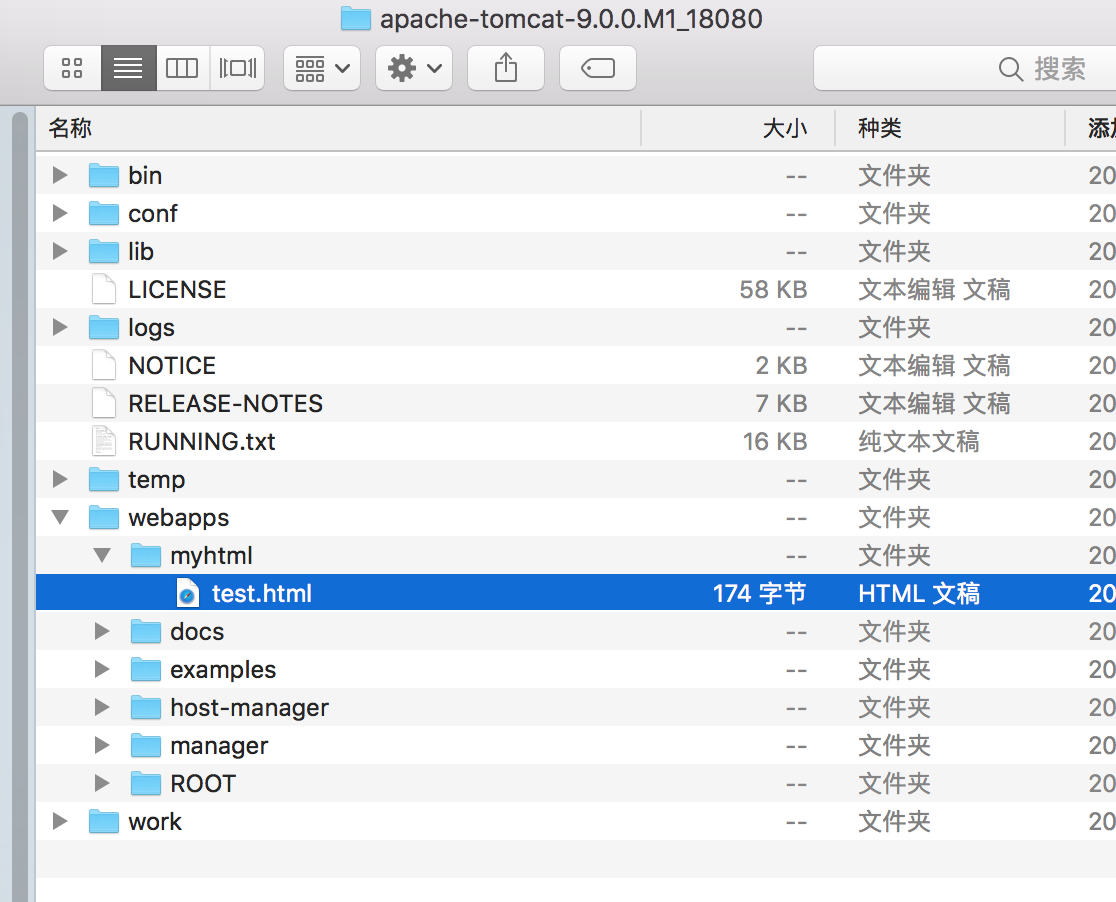
18080下的test.html内容如下:
<html>

<head>

<meto http-equiv="Content-Type" content="text/html:charSet=GBK">

<title>一个简单的页面</title>

</head>

<body>

the port is 18080

</body>

</html>
28080下的test.html内容如下:
<html>

<head>

<meto http-equiv="Content-Type" content="text/html:charSet=GBK">

<title>一个简单的页面</title>

</head>

<body>

hello this is 28080 ha ha ha ....

</body>

</html>
4.正常启动两个tomcat,测试是否正常启动:
访问http://localhost:18080/myhtml/test.html和http://localhost:28080/myhtml/test.html
如果能访问到对应的测试页面,测启动正常。
5.配置nginx,如下:
#user  nobody;

worker_processes  1; #工作进程的个数,一般与计算机的cpu核数一致

#error_log  logs/error.log;

#error_log  logs/error.log  notice;

#error_log  logs/error.log  info;

#pid        logs/nginx.pid;

events {

    worker_connections  1024; #单个进程最大连接数(最大连接数=连接数*进程数)

}

http {

    include       mime.types; #文件扩展名与文件类型映射表

    default_type  application/octet-stream; #默认文件类型

    #log_format  main  '$remote_addr - $remote_user [$time_local] "$request" '

    #                  '$status $body_bytes_sent "$http_referer" '

    #                  '"$http_user_agent" "$http_x_forwarded_for"';

    #access_log  logs/access.log  main;

    sendfile        on; #开启高效文件传输模式,sendfile指令指定nginx是否调用sendfile函数来输出文件,对于普通应用设为 on,如果用来进行下载等应用磁盘IO重负载应用,可设置为off,以平衡磁盘与网络I/O处理速度,降低系统的负载。注意:如果图片显示不正常把这个改成off。

    #tcp_nopush     on;

    #keepalive_timeout  0;

    keepalive_timeout  65; #长连接超时时间,单位是秒

    gzip  on; #启用Gizp压缩

    #服务器的集群

    upstream  netitcast.com { #服务器集群名字

        #服务器配置列表,weight是权重的意思,权重越大,分配的概率越大

        server  127.0.0.1:18080  weight=1;

        server  127.0.0.1:28080  weight=2;

    }

#当前的Nginx的配置

    server {

        listen       8080; #监听80端口,可以改成其他端口

        server_name  localhost; #当前服务的域名,如果请求为localhost:8080,则交给http://netitcast.com的nginx集群来处理

        #charset koi8-r;

        #access_log  logs/host.access.log  main;

        location / {

            proxy_pass  http://netitcast.com;  #与 服务器集群名字 一致

            proxy_redirect  default;

        }

        #error_page  404              /404.html;

        # redirect server error pages to the static page /50x.html

        #

        error_page   500 502 503 504  /50x.html;

        location = /50x.html {

            root   html;

        }

        # proxy the PHP scripts to Apache listening on 127.0.0.1:80

        #

        #location ~ \.php$ {

        #    proxy_pass   http://127.0.0.1;

        #}

        # pass the PHP scripts to FastCGI server listening on 127.0.0.1:9000

        #

        #location ~ \.php$ {

        #    root           html;

        #    fastcgi_pass   127.0.0.1:9000;

        #    fastcgi_index  index.php;

        #    fastcgi_param  SCRIPT_FILENAME  /scripts$fastcgi_script_name;

        #    include        fastcgi_params;

        #}

        # deny access to .htaccess files, if Apache's document root

        # concurs with nginx's one

        #

        #location ~ /\.ht {

        #    deny  all;

        #}

    }

    # another virtual host using mix of IP-, name-, and port-based configuration

    #

    #server {

    #    listen       8000;

    #    listen       somename:8080;

    #    server_name  somename  alias  another.alias;

    #    location / {

    #        root   html;

    #        index  index.html index.htm;

    #    }

    #}

    # HTTPS server

    #

    #server {

    #    listen       443 ssl;

    #    server_name  localhost;

    #    ssl_certificate      cert.pem;

    #    ssl_certificate_key  cert.key;

    #    ssl_session_cache    shared:SSL:1m;

    #    ssl_session_timeout  5m;

    #    ssl_ciphers  HIGH:!aNULL:!MD5;

    #    ssl_prefer_server_ciphers  on;

    #    location / {

    #        root   html;

    #        index  index.html index.htm;

    #    }

    #}

    include servers/*;

}
6.到此配置完成,下面开始演示负载均衡,
首先启动nginx,
localhost:nginx mhx$ sudo nginx
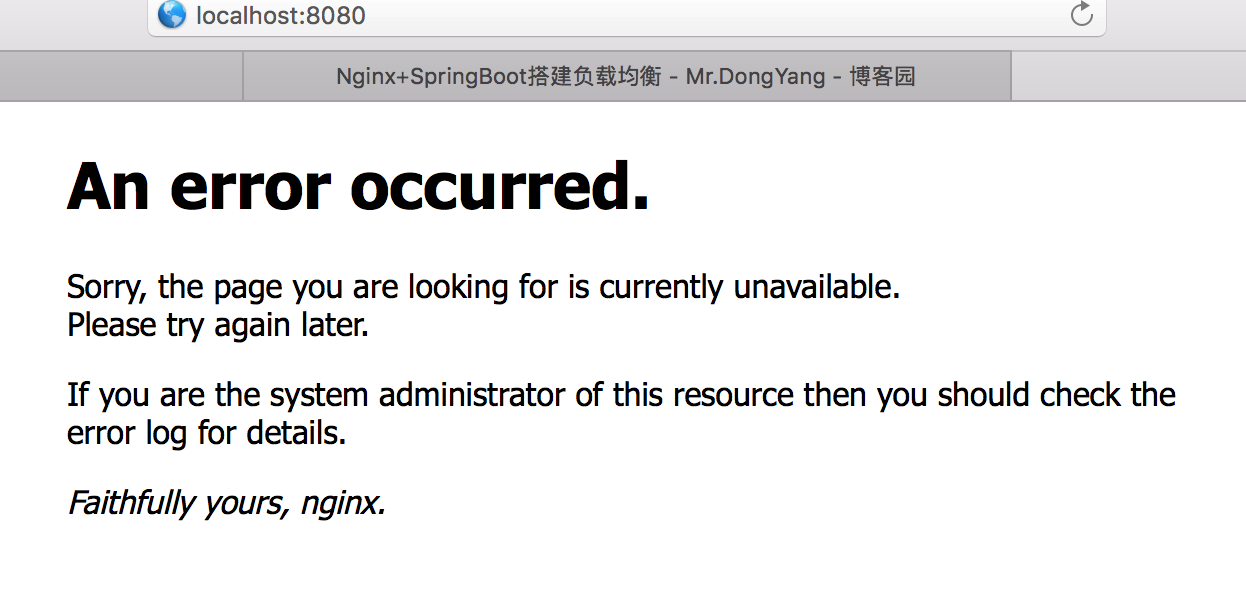
在浏览器中访问 http://localhost:8080,如果出现Nginx界面,则说明启动成功.
如:
7.测试负载均衡:
访问:http://localhost:8080/myhtml/test.html多次
页面出现内容:
the port is 18080 (出现频率占比1/3)
或者
hello this is 28080 ha ha ha .... (出现频率占比2/3)
nginx实现高性能负载均衡的Tomcat集群的更多相关文章
- apache、mod_jk负载均衡与tomcat集群
最近需要搭建apache和tomcat的集群,实现静态网站直接通过apache访问,动态网站转交给tomcat处理,实现负载均衡和tomcat集群配置. apache安装 wget http://ap ...
- 161028、Nginx负载均衡实现tomcat集群方案简要小结
重点两部分:一.负载均衡二.tomcat集群 所谓tomcat集群,就是可以向外提供并行服务的多台机器,任何一台服务器宕机,其它服务器可以替代它向外提供服务,而不影响用户访问. Nginx是一个常用的 ...
- Apache负载均衡与Tomcat集群配置学习(Windows环境)
本文主要参考自http://www.iteye.com/topic/985404?dhcc,经由实际操作配置操并记录而成. 由于最近的一个Java开发项目用到了Tomcat中间件作为web服务器,刚开 ...
- lvs+keepalived+nginx实现高性能负载均衡集群【转】
转自 lvs+keepalived+nginx实现高性能负载均衡集群 - 青衫lys - 博客园http://www.cnblogs.com/liuyisai/p/5990645.html 一.为什么 ...
- Apache+Tomcat部署负载均衡(或集群)
本来只打算写Tomcat集群部署,简化Apache和Tomcat整合过程的.后来想了想,这样不便于没有用过Apache的朋友来学习本文内容.于是干脆加大篇幅,让对Apache不了解的朋友能对Apach ...
- Linux下"负载均衡+高可用"集群的考虑点 以及 高可用方案说明(Keepalive/Heartbeat)
当下Linux运维技术越来越受到企业的关注和追捧, 在某些企业, 尤其是牵涉到电子商务和电子广告类的网站,通常会要求作负载均衡和高可用的Linux集群方案.那么如何实施Llinux集群架构,才能既有效 ...
- linux系统下对网站实施负载均衡+高可用集群需要考虑的几点
随着linux系统的成熟和广泛普及,linux运维技术越来越受到企业的关注和追捧.在一些中小企业,尤其是牵涉到电子商务和电子广告类的网站,通常会要求作负载均衡和高可用的Linux集群方案. 那么如何实 ...
- 高可用性、负载均衡的mysql集群解决方案
高可用性.负载均衡的mysql集群解决方案 一.mysql的市场占有率 二.mysql为什么受到如此的欢迎 三.mysql数据库系统的优缺点 四.网络服务器的需求 五.什么是mysql的集群 六.什么 ...
- 「mysql优化专题」高可用性、负载均衡的mysql集群解决方案(12)
一.为什么需要mysql集群? 一个庞大的分布式系统的性能瓶颈中,最脆弱的就是连接.连接有两个,一个是客户端与后端的连接,另一个是后端与数据库的连接.简单如图下两个蓝色框框(其实,这张图是我在悟空问答 ...
随机推荐
- phpstrom 安装
环境: ubuntu18.4 一. 安装 1. 下载安装包.tar.gz 下载地址:https://www.jetbrains.com/phpstorm/download/#section=linux ...
- TP、FP、FN、TN的含义
true positive(被正确分类的正例) false negative(本来是正例,错分为负例) true negative(被正确分类的负例) false positive(本来是负例,被错分 ...
- python 图像处理中二值化方法归纳总结
python图像处理二值化方法 1. opencv 简单阈值 cv2.threshold 2. opencv 自适应阈值 cv2.adaptiveThreshold 3. Otsu's 二值化 例子: ...
- 如何使用Keka for Mac提取受密码保护的文件?用Keka提取文件的格式
如何使用Keka for Mac提取受密码保护的文件?keka Mac是很多人喜欢的压缩解压工具,以小巧,使用简单,界面简洁受到很多Mac用户的喜欢,你还可以使用它提取文件,下面我们就来介绍一下关于用 ...
- error C2872: ‘ofstream’ : ambiguous symbol
转自VC错误:http://www.vcerror.com/?p=1123 问题描述: 编译时出现: error C2872: 'ofstream' : ambiguous symbol error ...
- 从单片机到系统之--uboot启动arm linux
UBOOT官网下载地址:http://ftp.denx.de/pub/u-boot/ 很详细的UBOOT解释: https://www.crifan.com/files/doc/docbook/ubo ...
- leetcode-解题记录 884. 两句话中的不常见单词
题目 给定两个句子 A 和 B . (句子是一串由空格分隔的单词.每个单词仅由小写字母组成.) 如果一个单词在其中一个句子中只出现一次,在另一个句子中却没有出现,那么这个单词就是不常见的. 返回所有不 ...
- ASP.NET Core 菜鸟之路:从Startup.cs说起 转发https://www.cnblogs.com/chenug/p/6869109.html
1.前言 本文主要是以Visual Studio 2017 默认的 WebApi 模板作为基架,基于Asp .Net Core 1.0,本文面向的是初学者,如果你有 ASP.NET Core 相关实践 ...
- Nginx允许跨域访问的配置问题
网站项目动静分离,静态资源服务器A 业务服务器B B中静态资源由A加载 出现如下问题: @font-face { font-family: 'iconfont'; src: url('../font ...
- Boosting Ensemble and GBDT Algorithm
Boosting Ensemble: 机器学习中,Ensemble model除了Bagging以外,更常用的是Boosting.与Bagging不同,Boosting中各个模型是串行的.其思想是,后 ...