
C#:通过Visual Studio项目预生成命令获取SVN版本号
之前有一个winfrom项目,想要通过获取SVN版本号作为程序的内部编译版本号。网上也有各种方法,但没有一篇行得通的方法。于是我经过一系列研究,得出了一些经验,特总结成一篇博客。
方法一:通过SVN命令获取版本号
类似地,我在项目中添加了一个名为"Version_inf.bat"的用于生成版本号的批处理文件,把他放在启动项目的目录中。批处理文件中写下如下脚本:
    svn info>bin\Debug\SVN_Version.dll

    findstr “Revision” bin\Debug\SVN_Version.dll
这段脚本的意思是通过“svn info”命令获取“Revision”版本信息到Debug的输出目录的“SVN_Version.dll”文件中。(前提是电脑上必须安装了svn软件才能正常使用此命令。)
在程序的Program主入口中,写上类似的代码:
     string str_PathResult = null;

     Microsoft.Win32.RegistryKey regKey = null;//表示 Windows 注册表中的项级节点(注册表对象?)

     Microsoft.Win32.RegistryKey regSubKey = null;

     try

     {

         regKey = Microsoft.Win32.Registry.LocalMachine;//读取HKEY_LOCAL_MACHINE项

         if (regKey != null)

         {

             string keyPath = @"SOFTWARE\TortoiseSVN";

             regSubKey = regKey.OpenSubKey(keyPath, false);

         }

         //得到SVN安装路径

         if (regSubKey != null)

         {

             if (regSubKey.GetValue("Directory") != null)

             {

                 str_PathResult = regSubKey.GetValue("Directory").ToString();

             }

         }

         //如果存在SVN安装信息,则通过调用批处理获取版本号

         if (str_PathResult != null)

         {

             string path = System.Environment.CurrentDirectory;

             ////删除已经存在的版本信息,避免出现串号

             //if (File.Exists(path + "\\SVN_Version.dll"))

             //{

             //    File.Delete(path + "\\SVN_Version.dll");

             //}

             int pathNum = path.LastIndexOf("\\") - ;

             ProcessStartInfo psi = new ProcessStartInfo();

             string pathStr = path.Substring(, pathNum) + "Version_inf.bat";

             //string newPathStr = (pathStr.Substring(0, pathStr.LastIndexOf("."))) + ".bat";

             psi.FileName = pathStr;

             //psi.FileName = path.Substring(0, pathNum) + "Version_inf.bat";

             psi.UseShellExecute = false;

             psi.WorkingDirectory = path.Substring(, pathNum).Substring(, path.Substring(, pathNum).Length - );

             psi.CreateNoWindow = true;

             Process.Start(psi);

         }

     }

     catch (Exception ex)

     {

         //MessageBox.Show("检测SVN信息出错," + ex.ToString(), "提示信息");

         //LogUtil.WriteException(ex, "Program.Main()");

     }

     finally

     {

         if (regKey != null)

         {

             regKey.Close();

             regKey = null;

         }

         if (regSubKey != null)

         {

             regSubKey.Close();

             regSubKey = null;

         }

     }
这样每次程序编译的时候就会生成一个新的“SVN_Version.dll”文件,里面记录了最后一次更新的记录版本号。
然后在主窗口读取“SVN_Version.dll”文件中的版本信息显示到程序的主界面上,代码如下:
     AssemblyName name = Assembly.GetExecutingAssembly().GetName();

     String version = name.Version.ToString().Substring(, name.Version.ToString().LastIndexOf("."));

     //SVN版本号文件保存路径

     String svnVersionPath = System.AppDomain.CurrentDomain.BaseDirectory + "SVN_Version.dll";

     if (File.Exists(svnVersionPath))

     {

         //StreamReader svnSteamReader = new StreamReader(svnVersionPath);

         string[] lines = File.ReadAllLines(svnVersionPath);

         if (lines.Length > )

         {

             for (int i = ; i < lines.Length; i++)

             {

                 if (lines[i].Contains("Revision"))

                 {

                     String[] temps = lines[i].Split(':');

                     if (temps.Length > )

                     {

                         version += String.Format(".{0}", temps[].Trim());

                         break;

                     }

                 }

             }

             tssVersion.Text += version;

         }

         else

         {

             tssVersion.Text += "获取出错";

         }

     }

     else

     {

         tssVersion.Text += "未知的版本";

     }
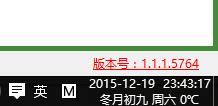
这样就完成了SVN版本号的获取和内部编译号的显示了。如下图:
但是这种的方法的问题是:
1)svn命令在程序没有变化或者没有获取最新版本时会无法生成版本号;
2)只是在主界面显示了版本号,但是并没有真正改变项目生成文件的版本号;
3)如果电脑中没有安装svn程序,则极有可能会出现错误;
所以我又研究了方法二。
方法二:通过项目预处理事件获取SVN版本号
先在项目的Properties目录下新建一个“AssemblyInfo.template.cs”的模板类文件,并把“AssemblyInfo.cs”文件从SVN版本号中忽略。在模板文件中写下类似的代码:
 using System.Reflection;

 using System.Runtime.CompilerServices;

 using System.Runtime.InteropServices;

 // 有关程序集的常规信息通过以下

 // 特性集控制。更改这些特性值可修改

 // 与程序集关联的信息。

 [assembly: AssemblyTitle("程序名")]

 [assembly: AssemblyDescription("更新时间:$WCDATE$")]

 [assembly: AssemblyConfiguration("")]

 [assembly: AssemblyCompany("")]

 [assembly: AssemblyProduct("程序名")]

 [assembly: AssemblyCopyright("Copyright © 2013")]

 [assembly: AssemblyTrademark("")]

 [assembly: AssemblyCulture("")]

 // 将 ComVisible 设置为 false 使此程序集中的类型

 // 对 COM 组件不可见。如果需要从 COM 访问此程序集中的类型,

 // 则将该类型上的 ComVisible 特性设置为 true。

 [assembly: ComVisible(false)]

 // 如果此项目向 COM 公开,则下列 GUID 用于类型库的 ID

 [assembly: Guid("18501865-f051-43be-ab03-59a2d9e76fcf")]

 // 程序集的版本信息由下面四个值组成:

 //

 //      主版本

 //      次版本

 //      内部版本号

 //      修订号

 //

 // 可以指定所有这些值,也可以使用“内部版本号”和“修订号”的默认值,

 // 方法是按如下所示使用“*”:

 // [assembly: AssemblyVersion("1.0.*")]

 [assembly: AssemblyVersion("1.1.1.$WCREV$")]

 [assembly: AssemblyFileVersion("1.1.1.$WCREV$")]
然后在项目属性的生成事件中编写如下预先生成事件执行的命令:
$(SolutionDir)Lib\SubWCRev.exe $(SolutionDir) $(ProjectDir)Properties\AssemblyInfo.template.cs $(ProjectDir)Properties\AssemblyInfo.cs -f
这段话的意思就是找到SVN的SubWCRev.exe文件,获取到版本信息后通过模板将数据写入到“AssemblyInfo.cs”文件中。
这样每次生成之后版本号就写入到了项目输出的文件中。将每个项目都按照如上方法添加模板和预生成事件,那么程序文件就会都带有版本信息。
实际效果如下图所示:

程序在显示的时候,可以通过封装一个公共属性让其他人可以调用到版本号信息:
   /// <summary>

   /// 版本号

   /// </summary>

   public static string AppVersion

    {

         set { AppDomain.CurrentDomain.SetData("AppVersion", value); }

         get { return AppDomain.CurrentDomain.GetData("AppVersion") == null ? "" : AppDomain.CurrentDomain.GetData("AppVersion").ToString(); }

    }
这样就大功告成啦!!!
当然如果想获取项目生成的文件或者想获取某个指定文件的版本号属性,可以使用如下方法:
 /// <summary>

 /// 获取文件的版本号

 /// </summary>

 /// <param name="filePath">文件的完整路径</param>

 /// <returns>文件的版本号</returns>

 public static string GetFileVersion(string filePath)

 {

     string FileVersions = "";

     try

     {

         System.Diagnostics.FileVersionInfo file1 = System.Diagnostics.FileVersionInfo.GetVersionInfo(filePath);

         FileVersions = file1.FileVersion;

         if (FileVersions != "")

         {

             string[] strVer = FileVersions.Split('.');

             if (strVer.Length == )

             {

                 FileVersions = strVer[] + ".00.0000";

             }

         }

     }

     catch (Exception ex)

     {

         FileVersions = "";

     }

     return FileVersions;

 }
特别说明:本文章为本人Healer007 原创! 署名:小萝卜 转载请注明出处,谢谢!
C#:通过Visual Studio项目预生成命令获取SVN版本号的更多相关文章
- Visual Studio项目的生成事件代码
我们打开vs的项目属性可以看到有生成事件,如下图: 可以看到有两块空白区域,这个空白区域可以让我们写代码或脚本来处理编译生成前后的时候,处理一些事情,今天就简单的来说说这两块. 生成前事件命令行 我想 ...
- 怎么将visual studio项目打包生成dll文件
1.打开电脑再打开visual studio软件,在软件里面新建一个项目,文件---->新建---->项目,打开新建项目窗口. 2.选择C#类工程,并为项目命名. 3.将类库文件class ...
- 因GIT默认忽略.dll文件导致的Visual Studio项目通过Bamboo编译失败
背景 由GIT管理的Visual Studio项目,使用Stash管理远端代码库,通过与Stash集成的Bamboo生成项目并发布 现象 Visual Studio项目本地生成成功,用SourceTr ...
- 在Visual Studio中新增生成项目
在Visual Studio中新增生成项目 选择适配器类型 选择WCF-SQL适配器 创建连接选项 选择相应的存储过程 生成相应的消息架构
- 【译】Visual Studio 15 预览版更新说明
序:恰逢Build2016大会召开,微软发布了VS2015的update2更新包和VS2016预览版.本人正在提升英文水平中,于是在这里对VS2016预览版的官方文档进行了部分翻译.因为VS有些功能使 ...
- Visual Studio 2019预览,净生产力
本文章为机器翻译. https://blogs.msdn.microsoft.com/dotnet/2018/12/13/visual-studio-2019-net-productivity/ 该文 ...
- 关于在Visual Studio 2019预览版中的用户体验和界面的变化
原文地址:https://blogs.msdn.microsoft.com/visualstudio/2018/11/12/a-preview-of-ux-and-ui-changes-in-visu ...
- Visual Studio 2022 预览版3 最新功能解说
我们很高兴地宣布Visual Studio 2022 的第三个预览版问世啦!预览版3 提供了更多关于个人和团队生产力.现代开发和持续创新等主题的新功能.在本文中,我们将重点介绍Visual Studi ...
- 创建用于自定义SharePoint解决方案部署的Visual Studio项目
转:http://soft.zdnet.com.cn/software_zone/2007/0903/488083.shtml 在基于SharePoint的开发中,我们通常会在WSS的TEMPLATE ...
随机推荐
- linux下mysql集群的安装
3台redhat服务器: SQL节点(mysqld): 192.168.1.77;192.168.1.78 数据节点(ndbd): 192.168.1.77;192.168.1.78 管理节点(ndb ...
- 問題排查:建立選單時的錯誤 errcode:40016, errmsg:invalid button size hint: [RI68La0851vr18]
可能原因: 1.如提示所說,第一層選單個數超過限制 (最多3個) 2.選單的 json 格式有誤,目前已知少了括弧會提示此錯誤
- 链接,光标,DHTML,缩放
18.1css中链接的使用超链接伪类属性:a:link 表示该链接文字尚未被点选a:visited 表示该链接文字已被点选过a:active 表示该链接文字正被点选,但未被放开a:hover 表示当鼠 ...
- mui学习笔记
一.页面刷新问题 1.父页面A跳转到子页面B,B页面修改数据后再跳回A页面,刷新A页面数据 (1).父页面A代码 window.addEventListener("pageflowrefre ...
- Android(Xamarin)之旅(二)
新的一年,新的开始,2016,我要做什么,大家要做什么,啦啦啦. OK,上篇已经介绍了几个简单的控件,这次,我们继续说说控件.但是可能有人认为这有什么难的,问题不在这里,而在于,如果你注意了每一个空间 ...
- Android中轴旋转特效实现,制作别样的图片浏览器
转载请注明出处:http://blog.csdn.net/guolin_blog/article/details/10766017 Android API Demos中有很多非常Nice的例子,这些例 ...
- java for循环和数组--冒泡排序、二分查找法
//100以内与7相关的数 for(int a=1;a<=100;a++){ if(a%7==0||a%10==7||a/10==7){ System.out.print(a+ ...
- nodejs:express 4.x
最近学习express,最新的版本到了4.x,与之前的3.0版本相比,变化还是很大的.网上的教程很多都是基于3.0的,再编译一个例子的时候,吃了不少苦头.现总结一下express4.x的变化. 安装: ...
- Service的两种用法及其生命周期
先来一点基础知识: Service 是android的四大组件之一,与Activity同属于一个级别,它是运行在后台进行服务的组件(例如在后台播放的音乐,播放音乐的同时并不影响其他操作).Servic ...
- 上线踩坑引发的处理方式---lsof,strace
两个跟踪进程的linux命令 lsof -p pidstrace -p pid快速跟踪进程出现问题的地方.由于进程本身运行良好,但是内部一直等待第三方哪个应答,导致进程假死.引用自:http://li ...