
Spring MVC + MyBatis整合(IntelliJ IDEA环境下)
一些重要的知识:
mybais-spring.jar及其提供的API:

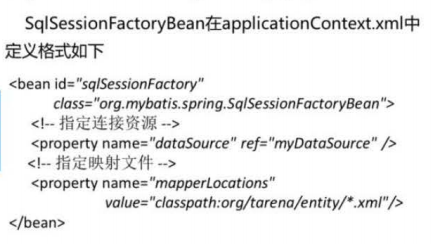
SqlSessionFactoryBean:

SqlSessionFactory是由SqlSessionFactoryBuilder产生的,
Spring整合MyBats时SqlSessionFactoryBean也是由SqlSessionFactoryBuilder生成的。
MapperFactoryBean:

在使用MapperFactoryBean时,有一个Mapper,就需要一个MapperFactoryBean。
为此,需要基于扫描机制的,MapperScannerConfigurer。具体配置方法略。
只需配置要扫描的包。
将扫描该包下所有的带有@MyBatisRepository的Mapper。
第一阶段,spring整合mybatis
项目目录:

applicationContext.xml:
<?xml version="1.0" encoding="UTF-8"?>

<beans xmlns:xsi="http://www.w3.org/2001/XMLSchema-instance" xmlns="http://www.springframework.org/schema/beans"

       xmlns:cache="http://www.springframework.org/schema/cache" xmlns:context="http://www.springframework.org/schema/context"

       xmlns:mvc="http://www.springframework.org/schema/mvc"

       xmlns:task="http://www.springframework.org/schema/task" xmlns:tx="http://www.springframework.org/schema/tx"

       xsi:schemaLocation="

           http://www.springframework.org/schema/beans   http://www.springframework.org/schema/beans/spring-beans-3.2.xsd

           http://www.springframework.org/schema/cache   http://www.springframework.org/schema/cache/spring-cache-3.2.xsd

           http://www.springframework.org/schema/context http://www.springframework.org/schema/context/spring-context-3.2.xsd

           http://www.springframework.org/schema/mvc     http://www.springframework.org/schema/mvc/spring-mvc-3.2.xsd

           http://www.springframework.org/schema/task    http://www.springframework.org/schema/task/spring-task-3.2.xsd

           http://www.springframework.org/schema/tx      http://www.springframework.org/schema/tx/spring-tx-3.2.xsd

       "

       default-lazy-init="true">

    <bean id="myDataSource" class="org.apache.commons.dbcp.BasicDataSource"

          destroy-method="close">

        <property name = "driverClassName" value = "com.mysql.jdbc.Driver"/>

        <property name = "url" value = "jdbc:mysql:///test"/>

        <property name = "username" value = "root"/>

        <property name = "password" value = "1234"/>

    </bean>

    <bean id = "sqlSessionFactory" class = "org.mybatis.spring.SqlSessionFactoryBean">

          <property name="dataSource" ref = "myDataSource"/>

        <property name = "mapperLocations" value = "classpath:com/rixiang/entity/*.xml"/>

    </bean>

    <bean class = "org.mybatis.spring.mapper.MapperScannerConfigurer">

        <property name="sqlSessionFactory" ref = "sqlSessionFactory"/>

        <property name="basePackage" value = "com.rixiang"/>

        <property name = "annotationClass" value = "com.rixiang.annotation.MyBatisRepository"/>

    </bean>

</beans>
EmpDAO,记得添加@MybatisRepository注解:
package com.rixiang.dao;

import java.util.List;

import com.rixiang.annotation.MyBatisRepository;

import com.rixiang.entity.Emp;

@MyBatisRepository

public interface EmpDAO {

    public List<Emp> findAll();

}
MyBatisRepository:
package com.rixiang.annotation;

import org.springframework.stereotype.Repository;

/**

 * Created by samdi on 2016/3/3.

 */

@Repository

public @interface MyBatisRepository {

    String value() default "";

}
test:
package com.rixiang.test;

import com.rixiang.dao.EmpDAO;

import com.rixiang.entity.Emp;

import org.junit.Test;

import org.springframework.context.ApplicationContext;

import org.springframework.context.support.ClassPathXmlApplicationContext;

import java.io.IOException;

import java.util.List;

/**

 * Created by samdi on 2016/3/3.

 */

public class TestEmpDAO {

    @Test

    public void testFindAll() throws IOException {

        String conf = "applicationContext.xml";

        ApplicationContext ac = new ClassPathXmlApplicationContext(conf);

        EmpDAO mapper = ac.getBean("empDAO",EmpDAO.class);

        List<Emp> list = mapper.findAll();

        for(Emp emp:list){

            System.out.println(emp.getEmpno() + " " + emp.getEname());

        }

    }

}
第二阶段:SpringMVC+MyBatis:

controller:
package com.rixiang.web;

import java.util.List;

import com.rixiang.dao.EmpDAO;

import com.rixiang.entity.Emp;

import org.springframework.beans.factory.annotation.Autowired;

import org.springframework.stereotype.Controller;

import org.springframework.ui.Model;

import org.springframework.web.bind.annotation.RequestMapping;

@Controller

@RequestMapping("emp")

public class EmpListController {

    private EmpDAO dao;

    @Autowired

    public void setDao(EmpDAO dao){

        this.dao = dao;

    }

    @RequestMapping("/list")

    public String execute(Model model){

        List<Emp> list = dao.findAll();

        model.addAttribute("emps",list);

        return "emp_list";

    }

}
applicationContext.xml:
<?xml version="1.0" encoding="UTF-8"?>

<beans xmlns:xsi="http://www.w3.org/2001/XMLSchema-instance" xmlns="http://www.springframework.org/schema/beans"

       xmlns:cache="http://www.springframework.org/schema/cache" xmlns:context="http://www.springframework.org/schema/context"

       xmlns:mvc="http://www.springframework.org/schema/mvc"

       xmlns:task="http://www.springframework.org/schema/task" xmlns:tx="http://www.springframework.org/schema/tx"

       xsi:schemaLocation="

           http://www.springframework.org/schema/beans   http://www.springframework.org/schema/beans/spring-beans-3.2.xsd

           http://www.springframework.org/schema/cache   http://www.springframework.org/schema/cache/spring-cache-3.2.xsd

           http://www.springframework.org/schema/context http://www.springframework.org/schema/context/spring-context-3.2.xsd

           http://www.springframework.org/schema/mvc     http://www.springframework.org/schema/mvc/spring-mvc-3.2.xsd

           http://www.springframework.org/schema/task    http://www.springframework.org/schema/task/spring-task-3.2.xsd

           http://www.springframework.org/schema/tx      http://www.springframework.org/schema/tx/spring-tx-3.2.xsd

       "

       default-lazy-init="true">

    <bean id="myDataSource" class="org.apache.commons.dbcp.BasicDataSource"

          destroy-method="close">

        <property name = "driverClassName" value = "com.mysql.jdbc.Driver"/>

        <property name = "url" value = "jdbc:mysql:///test"/>

        <property name = "username" value = "root"/>

        <property name = "password" value = "1234"/>

    </bean>

    <bean id = "sqlSessionFactory" class = "org.mybatis.spring.SqlSessionFactoryBean">

          <property name="dataSource" ref = "myDataSource"/>

        <property name = "mapperLocations" value = "classpath:com/rixiang/entity/*.xml"/>

    </bean>

    <bean class = "org.mybatis.spring.mapper.MapperScannerConfigurer">

        <property name="sqlSessionFactory" ref = "sqlSessionFactory"/>

        <property name="basePackage" value = "com.rixiang"/>

        <property name = "annotationClass" value = "com.rixiang.annotation.MyBatisRepository"/>

    </bean>

    <context:component-scan base-package="com.rixiang"/>

    <!-- 支持@RequestMapping请求和Controller映射 -->

    <mvc:annotation-driven/>

    <!-- 定义视图解析器viewResolver -->

    <bean id = "viewResolver"

          class = "org.springframework.web.servlet.view.InternalResourceViewResolver">

        <property name = "prefix" value = "/WEB-INF/jsp/"/>

        <property name = "suffix" value = ".jsp"/>

    </bean>

</beans>
jsp:
<%@ page language = "java" import = "java.util.*" pageEncoding="UTF-8"%>

<%@ taglib uri="http://java.sun.com/jsp/jstl/core" prefix="c"%>

<html>

      <head>

         <title>员工列表示例</title>

      </head>

      <body>

          <table border="1">

             <tr>

                 <td>编号</td>

                 <td>姓名</td>

                 <td>工资</td>

                 <td>入职时间</td>

             </tr>

             <c:forEach items="${emps}" var="emp">

             <tr>

                  <td>${emp.empno}</td>

                  <td>${emp.ename}</td>

                  <td>${emp.sal}</td>

                  <td>${emp.hiredate}</td>

             </tr>

            </c:forEach>

          </table>

      </body>

</html>
web.xml:
<?xml version="1.0" encoding="UTF-8"?>

<web-app xmlns="http://xmlns.jcp.org/xml/ns/javaee"

         xmlns:xsi="http://www.w3.org/2001/XMLSchema-instance"

         xsi:schemaLocation="http://xmlns.jcp.org/xml/ns/javaee http://xmlns.jcp.org/xml/ns/javaee/web-app_3_1.xsd"

         version="3.1">

    <servlet>

        <servlet-name>springmvc</servlet-name>

        <servlet-class>org.springframework.web.servlet.DispatcherServlet</servlet-class>

        <init-param>

            <param-name>contextConfigLocation</param-name>

            <param-value>classpath:applicationContext.xml</param-value>

        </init-param>

    </servlet>

    <servlet-mapping>

        <servlet-name>springmvc</servlet-name>

        <url-pattern>*.do</url-pattern>

    </servlet-mapping>

    <welcome-file-list>

        <welcome-file>index.jsp</welcome-file>

    </welcome-file-list>

</web-app>
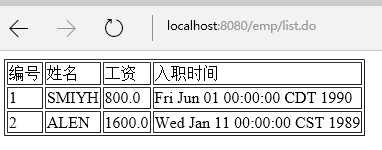
运行:
Spring MVC + MyBatis整合(IntelliJ IDEA环境下)的更多相关文章
- spring, spring mvc, mybatis整合文件配置详解
转自:http://www.cnblogs.com/wxisme/p/4924561.html 使用SSM框架做了几个小项目了,感觉还不错是时候总结一下了.先总结一下SSM整合的文件配置.其实具体的用 ...
- ssm整合说明与模板-Spring Spring MVC Mybatis整合开发
ssm整合说明 spring+spring mvc+mybatis 说明 源码下载 由于之前存在ssh框架,spring+struts+hibernate,其中spring负责aop与ioc,所以一般 ...
- Spring + Spring MVC + MyBatis 整合
1.所需要Jar包 ? <!-- Spring3.0.1包 --> org.springframework.web-3.0.1 系列 <!-- 公共包 --> sl ...
- Spring+MVC+Mybatis整合
本文是对慕课网上"搞定SSM开发"路径的系列课程的总结,详细的项目文档和课程总结放在github上了.点击查看 什么是秒杀业务 网站售卖某产品时,规定在某个日期开始售卖限量的产品, ...
- Spring+Spring MVC+MyBatis整合
一.准备工作 1.1导入所需jar包 1.2数据库 CREATE TABLE `t_customer` ( `id` ) NOT NULL AUTO_INCREMENT, `username` ...
- Spring4+Spring MVC+MyBatis整合思路
1.Spring框架的搭建 这个很简单,只需要web容器中注册org.springframework.web.context.ContextLoaderListener,并指定spring加载配置文件 ...
- Spring + Spring MVC + MyBatis框架整合
---恢复内容开始--- 一.Maven Web项目创建 如有需要,请参考:使用maven创建web项目 二.Spring + Spring MVC + MyBatis整合 1.Maven引入需要的J ...
- Spring MVC 学习总结(十)——Spring+Spring MVC+MyBatis框架集成(IntelliJ IDEA SSM集成)
与SSH(Struts/Spring/Hibernate/)一样,Spring+SpringMVC+MyBatis也有一个简称SSM,Spring实现业务对象管理,Spring MVC负责请求的转发和 ...
- 基于Maven的Spring + Spring MVC + Mybatis的环境搭建
基于Maven的Spring + Spring MVC + Mybatis的环境搭建项目开发,先将环境先搭建起来.上次做了一个Spring + Spring MVC + Mybatis + Log4J ...
随机推荐
- WordPress建站指南
WordPress建站指南(1) 写在前面: 3月份用10天零碎时间火速完成了建站,后台95%的工作都交给了WP(WordPress).如果想偷懒的话,WP是一个绝好的选择,估计有个小半天就建完收 ...
- 【Python全栈笔记】00 12-14 Oct Linux 和 Python 基础
Linux 基础认识 更加稳定,安全,开源 设置好ssh协议后可以通过windows系统连接Linux,基于ssh协议进行通信 '/' 为根目录 cd / -> 切换到根目录 ls -lh 列出 ...
- spring结合Quartz的集群功能实现
一:前沿 在上一篇(http://www.cnblogs.com/wuhao1991/p/4331613.html)的博客中记载了定时的功能,但是集成是没有成功的,在这篇中,我在解释下这里的”集成的含 ...
- HttpServletRequest
javaweb学习总结(十)——HttpServletRequest对象(一) 一.HttpServletRequest介绍 HttpServletRequest对象代表客户端的请求,当客户端通过HT ...
- android中如何发送及接收数据(两种方法)?
1.如在MainActivity.java中的按钮点击时设置: //发送数据方法1--简单型 i.putExtra("txt", "没错,我就是刚传来的信息!" ...
- Scanf函数输入字符串
Scanf函数输入字符串 #define _CRT_SECURE_NO_WARNINGS //#pragma warning(disable:4996) #include <stdio.h> ...
- java 开发常用的Linux命令
1.查找文件 find / -name filename.txt 根据名称查找/目录下的filename.txt文件. find . -name "*.xml" 递归查找所有的xm ...
- 分布式日志1 用c#的队列写日志
using System; using System.Collections.Generic; using System.Linq; using System.Web; using System.We ...
- 数论 : 模运算法则(poj 1152)
题目:An Easy Problem! 题意:求给出数的最小进制. 思路:暴力WA: discuss中的idea: 给出数ABCD,若存在n 满足 (A* n^3 +B*n^2+C*n^1+D*n^0 ...
- monkeyrunner功能函数
MonkeyRunner Command Summary 1. #导入模块; from com.android.monkeyrunner import MonkeyRunner, MonkeyD ...