
Fedora20 MATE Destop 环境下安装Sougoupinyin输入法+皮肤
卸载ibus
# yum erase ibus*
选择性安装 fcitx
# yum install fcitx fcitx-configtool
$ ls -a
$ vi .bashrc  .bash_profile  /etc/profile
#追加

____~~~

    export GTK_IM_MODULE=fcitx

    export QT_IM_MODULE=fcitx

    export XMODIFIERS="@im=fcitx"
____~~~
# fcitx --version
#成功

___~~~

result:

fcitx version: 4.2.8.4

___~~~
然后
# alternatives --config xinputrc
选项 命令
-----------------------------------------------
1 /etc/X11/xinit/xinput.d/xim.conf
2 /etc/X11/xinit/xinput.d/none.conf
3 /etc/X11/xinit/xinput.d/xcompose.conf
*+ 4 /etc/X11/xinit/xinput.d/fcitx.conf
按 Enter 保留当前选项[+],或者键入选项编号:4
http://mirrors.ustc.edu.cn/deepin/pool/non-free/f/fcitx-sogoupinyin-release/
解压包文件#或者双击挂载
安装
# tar Jxvf data.tar.xz -C /
# cp /usr/lib/x86_64-linux-gnu/fcitx/fcitx-sogoupinyin.so /usr/lib64/fcitx/
# ls -l fcitx-sogoupinyin.so

___~~~

-rw-r--r--.  root root  11月  : fcitx-sogoupinyin.so

___~~~
# chmod +x fcitx-sogoupinyin.so

# ls -l fcitx-sogoupinyin.so

___~~~

-rwxr-xr-x.  root root  11月  : fcitx-sogoupinyin.so

___~~~
Alt+F2
运行 fcitx sogou-qimpanel
将皮肤放在
/usr/share/fcitx/skin 目录下 OK
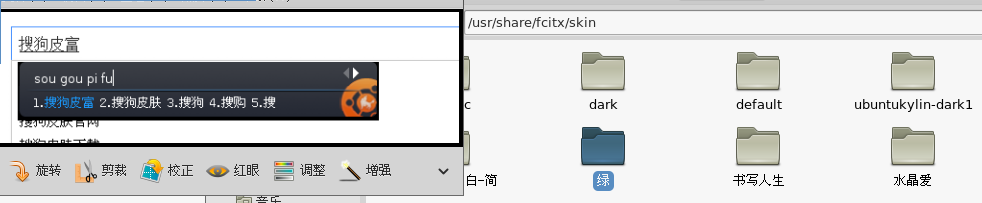
问题:
(WARN- /builddir/build/BUILD/fcitx-4.2.8.4/src/module/dbus/dbusstuff.c:) Connection Error (Did not receive a reply. Possible causes include: the remote application did not send a reply, the message bus security policy blocked the reply, the reply timeout expired, or the network connection was broken.)
解决 :
# yum install dpkg
Fedora20 MATE Destop 环境下安装Sougoupinyin输入法+皮肤的更多相关文章
- ubuntu14.04英文环境下安装中文输入法
ubuntu14.04英文环境下安装中文输入法 发表于1年前(2014-07-12 20:12) 阅读(4478) | 评论(0) 3人收藏此文章, 我要收藏 赞1 9月19日成都 OSC 源创会 ...
- 装机篇:ubuntu 14.04 在英文环境下安装中文输入法(转载)
ubuntu默认的输入法是ibus,综合网上评论,fcitx的支持者更多,而且个人感觉fcitx也的确不错,可以满足日常输入. STEP1: 在Ubuntu Software Center 搜索fci ...
- ubuntu 全英文环境下安装 拼音输入法
原文转自:http://my.oschina.net/No5stranger/blog/290026 ubuntu默认的输入法是ibus,综合网上评论,fcitx的支持者更多,而且个人感觉fcitx也 ...
- CentOS7英文环境下使用中文输入法
一般我们使用英文环境是没有办法使用中文的,这是因为我们没有设置在英文环境下的中文配置,下面我们在英文环境下配置中文输入法ibus使得我们可以输入中文. 首先,安装ibus(centos6以后已经默认安 ...
- 【转】windows环境下安装win8.1+Mac OS X 10.10双系统教程
先要感谢远景论坛里的各位大神们的帖子 没有他们的分享我也不能顺利的装上Mac OS X 10.10! 写这篇随笔主要是为了防止自己遗忘,同时给大家分享下我的经验. 本教程适用于BIOS+MBR分区的 ...
- 在 windows 环境下安装 redislive
这是一篇在 windows 环境下安装 redislive 的教程! 项目地址:https://github.com/nkrode/RedisLive 配置文档:http://www.nkrode.c ...
- windows环境下安装win8.1+Mac OS X 10.10双系统教程
首先要感谢远景论坛里的各位大神们的帖子 没有他们的分享我也不能顺利的装上Mac OS X 10.10! 写这篇随笔主要是为了防止自己遗忘,同时给大家分享下我的经验. 本教程适用于BIOS+MBR分区 ...
- 在 xampp 环境下安装 laravel
网上搜了很多教程,很多都是采用命令行安装的.但是对于web前端来说,根本就不知道在干吗! 于是,打算写一篇文章,来教后面的人如何在 XAMPP 环境下安装 laravel. 初步认识 XAMPP(Ap ...
- Linux环境下安装Tigase XMPP Server
Tigase是一种XMPP服务器,可以作为采用XMPP协议的各种IM(Instant Messeging)工具(如Pandion.Spark等)的服务器. 在Linux环境下安装Tigase的步骤如下 ...
随机推荐
- How Browsers Work: Behind the scenes of modern web browsers
http://www.html5rocks.com/en/tutorials/internals/howbrowserswork/#Parser_Lexer_combination Grammars ...
- Selinux在HTTP+PHP服务中的安全权限修改
在PHP用使用fopen的写入功能实,常会遇到诸如: PHP Warning: fopen(file): failed to open stream: Permission denied in (f ...
- python 之 推导式
推导式 : 英文 comprehension 支持推导式的有列表list 字典dict 集合set 注意元组没有 推导式,如果你那样去写,他会变成一个generator生 ...
- ViewModel命令ICommand对象定义
如果定义如下 public ICommand ViewMenuItemCommand: 那么UI绑定,则无法执行代理方法 需如下定义 public ICommand ViewMenuItemComma ...
- C/C++ 判断主机字节存储序列
aaarticlea/png;base64,iVBORw0KGgoAAAANSUhEUgAAA0oAAADFCAIAAADltpUqAAAgAElEQVR4nOyd65XyvA6FqYASKIEWqI
- 使用ASP.NET web API创建REST服务(二)
Creating a REST service using ASP.NET Web API A service that is created based upon the architecture ...
- {$ecs_css_path}
includes里的init.php的187-194行 if (!empty($_CFG['stylename'])) { $smarty->assign('ecs_css_path', 'th ...
- 《Maven实战》阅读笔记
java -versionmvn -vmvn help:system m2eclipse maven->install MAVEN_OPTS: -Xms128m -Xmx512mmvn clea ...
- iostart命令
Linux系统中的 iostat命令可以对系统的磁盘IO和CPU使用情况进行监控.iostat属于sysstat软件包,可以用yum -y install sysstat 直接安装. 1.基本使用:i ...
- android JSONArray JSONObject 字符串转json数组 遍历json对象
String json = "{''data'':[{''name'':''Wallace''},{''name'':''Grommit''}]}"; StringBuffer m ...