
五分钟,运用cocoaui库,搭建主流iOS app中我的界面
本项目基于天天团购项目,在上一篇中有说到!
首先介绍一些cocoaui,是国内的一名程序员做的开源的开源系统,目的是为了简化ios布局!官网地址:www.cocoaui.com,github地址:https://github.com/ideawu/cocoaui
我们这里使用xml定义布局界面,其实就是传统的html + css定义界面,大部分人都有网页布局的经验,搞ios布局还是很容易入手并且快捷的!我们首先看下我们要做的界面:
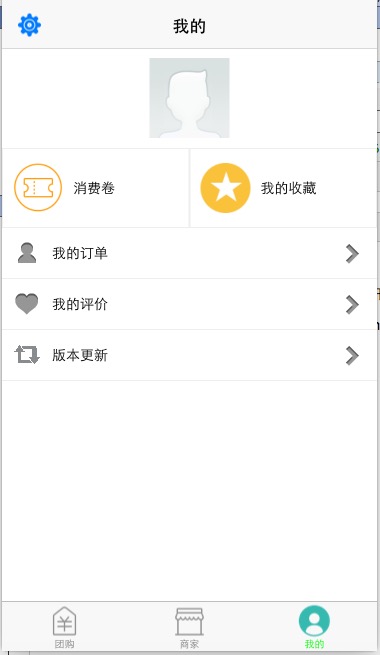
我们按照html+css的格式来定义这个界面:
<div>
    <style>
        .headDiv
        {
        width:100%;
        }

        .divStyle{
        width:100%;
        height:auto;
        border-bottom: 1 solid #eee;
        background:#fff;
        vertical-align:middle;
        }

        .subdivStyle
        {
        height:auto;
        border: 1 solid #eee;
        height:40px;
        background:#fff;
        }

        .textStyle{
        float:left;
        height:40px;
        valign:middle;
        }

        .btnStyle
        {
        background:#EDA67B;
        width:80%;
        height:50px;
        float:center;
        }

    </style>

    <div id="headContent" class="headDiv">
        <img id="profileHeader" style="width:80px;height:80px;float:center;margin:10px;" src="default_head.png" />
    </div>

    <div id="myWashCar" class="subdivStyle" style="width:50%;height:80px;">
        <img style="margin:10px;width:50px;height:50px;valign:middle;" src="ic_mt_coupon" />
        <span type="text" class="textStyle" >消费卷</span>
    </div>
    <div id="myCoupon" class="subdivStyle" style="width:100%;height:80px;">
        <img style="margin:10px;width:50px;height:50px;valign:middle" src="ic_user_main_favorite.png" />
        <span class="textStyle" style="vertical-align:middle;" >我的收藏</span>
    </div>

    <div id="myCar" class="divStyle">
        <img style="margin:10px" src="myfollow.png" />
        <span type="text" class="textStyle">我的订单</span>
        <img style="float:right;margin:10px;" src="ic_arrow.png" />
    </div>

    <div id="myMsg" class="divStyle">
        <img style="margin:10px" src="mylike.png" />
        <span class="textStyle">我的评价</span>
        <img style="float:right;margin:10px;" src="ic_arrow.png" />
    </div>
    <div id="myVersion" class="divStyle">
        <img style="margin:10px" src="moreitems_version.png" />
        <span type="text" class="textStyle">版本更新</span>
        <img style="float:right;margin:10px;" src="ic_arrow.png" />
    </div>

</div>
将其命名为profile.xml文件放到工程中。格式是不是和普通的html+css界面一模样!支持大部分的html标记和css属性!
然后在ProfileViewController中引入profile.xml文件:代码如下:
- (void)viewDidLoad
{
    [super viewDidLoad];

    [self initSystemBtn];

    root = [IView namedView:@"profile.xml"];
    [self addIViewRow:root];
    [self reload];

    [self initEvent];
}
点击头像需要进入修改玩家信息界面,需要监听头像的点击事件:
-(void)initEvent
{
    __weak typeof(self) me = self;
    IImage *profileHeader = (IImage *)[root getViewById:@"profileHeader"];
    [profileHeader addEvent:IEventClick handler:^(IEventType type,IView *view){
        [me gotoProfileEdit];
    }];
}
是不是很简单就能定义一个界面!
补充
1:对SdWebImage的支持,IImage(UIImageView的再次封装)中暴露了UIIMageView的接口,可以方便的使用sdWebImage,开始是不支持的,和作者沟通了一下,暴露了这个接口!
2:对上拉刷新和下拉加载的支持。有例子为证:http://www.cocoaui.com/docs/api/IRefreshControl
3: 对于webview的支持!控件中没有对于webview的支持,如果页面中需要嵌入webview则需要动态创建!
4:对于radio和checkbox的支持,目前还不支持,需要动态创建,不过非常easy!
5: 由于很多app 都需要微信端,xml文件布局可以直接移植到移动端下面!
五分钟,运用cocoaui库,搭建主流iOS app中我的界面的更多相关文章
- iOS App中 使用 OpenSSL 库
转自:http://blog.csdn.net/kmyhy/article/details/6534067 在你的 iOS App中 使用 OpenSSL 库 ——译自x2on的“Tutorial: ...
- 在iOS APP中使用H5显示百度地图时如何支持HTTPS?
现象: 公司正在开发一个iOSAPP,使用h5显示百度地图,但是发现同样的H5页面,在安卓可以显示出来,在iOS中就显示不出来. 原因分析: 但是现在iOS开发中,苹果已经要求在APP中的所有对外连接 ...
- 关于iOS APP中网络层的设计
在iOS开发中,请求网络数据,处理获得的数据是很常见的功能,但是很少有资料会讨论关于网络的处理应该放在MVC中得哪个层中. 我在网上Google了一番,记下了几个觉得比较不错的链接.现记录如下: ht ...
- 在iOS App 中添加启动画面
你可以认为你需要为启动画面编写代码,然而Apple 让你可以非常简单地在Xcode中完成.不需要编写代码,你仅需要在Xcode中进行一些配置. 1.什么是启动画面(Splash Screen)? 启动 ...
- 五分钟用Docker快速搭建Go开发环境
挺早以前在我写过一篇用 `Docker`搭建LNMP开发环境的文章:[用Docker搭建Laravel开发环境](http://mp.weixin.qq.com/s?__biz=MzUzNTY5MzU ...
- 只需五分钟-用Maven快速搭建Spring Cloud微服务
Maven安装手册 1.准备安装包 安装包: apache-maven-3.5.4-bin.zip (最好JDK 1.7及以上版本) 集成包: eclipse-maven3-plugin.zip 2 ...
- [置顶] ios App 中嵌入应用商店
昨晚同事拿了一个app 发现其app 内部页面打开了appstore 并没有唤起手机自带的appstore, 刚开始以为是用webview 加载的 ,可是自己些了一个demo 发现并不是那样一回事 用 ...
- 新手介绍简单一下iOS开发中几种界面传值
首先在处理iOS-UI中,也许在很多地方需要用到两种甚至多种不同界面之间的传值,相比这也是很多iOS入门成员头疼问题,同样作为新手的我在接触这类传值时候也一脸懵然,经过一段时间的研究,对于简单的传值有 ...
- iOS APP跳转设置界面以及设置中的其他界面
1.跳转设置总页面(iOS10+以及之前的都可以用:ios10+ 是跳转到了应用到设置界面) [[UIApplication sharedApplication]openURL:[NSURL URLW ...
随机推荐
- Bag标签之中的一个行代码实行中文分词实例2
例1: 分词(返回以逗号隔开每一个词带上引號的词组.gap=",",quotes="'"或quotes='"') 单引號 <bag id=pPa ...
- Android开发之蓝牙 --修改本机蓝牙设备的可见性,并扫描周围可用的蓝牙设备
一. 修改本机蓝牙设备的可见性 二. 扫描周围可用的蓝牙设备 一. 清单文件AdroidManifest.xml: <uses-permission android:name="an ...
- Scala 深入浅出实战经典 第63讲:Scala中隐式类代码实战详解
王家林亲授<DT大数据梦工厂>大数据实战视频 Scala 深入浅出实战经典(1-87讲)完整视频.PPT.代码下载:百度云盘:http://pan.baidu.com/s/1c0noOt6 ...
- Android 5.1 AOSP 源码获取
本文已同步更新至:http://dxjia.cn/2015/08/android-aosp-code-sync/ Android 5.1源码开放有一个多月啦,但由于城墙的关系,每次想着更新最新源码学习 ...
- Solve: Your project references the latest version of Entity Framework (for MySQL) in Visual Studio 2013
The error message while trying to create a ADO.net Entity Data Model ( Entity Framework 6 ) for MySq ...
- JavaScript跨域方法
一.什么是跨域 JavaScript出于安全方面的考虑,不允许跨域调用其他页面的对象.但在安全限制的同时也给注入iframe或是ajax应用上带来了不少麻烦.这里把涉及到跨域的一些问题简单地整理一下: ...
- Entity Framework: Joining in memory data with DbSet
转载自:https://ilmatte.wordpress.com/2013/01/06/entity-framework-joining-in-memory-data-with-dbset/ The ...
- OAuth介绍
1.认识OAUTH OAUTH协议为用户资源的授权提供了一个安全的.开放而又简易的标准.与以往的授权方式不同之处是OAUTH的授权不会使第三方触及到用户的帐号信息 (如用户名与密码),即第三方无需使用 ...
- 使用Object的wait,notify,notifyAll做线程调度
我们知道java中的所有类的祖先都是Object,Object类有四个个方法wait(),wait(long timeout),notify(),notifyAll(),这四个方法可以用来做线程的调度 ...
- easyui plugin——etreegrid:CRUD Treegrid
昨天写了一个ko+easyui的同样的实现,感觉写的太乱,用起来十分麻烦,于是今天照着edatagrid,写了一个etreegrid,这样再用ko绑定就方便多了. 使用很简单,$(tableId).e ...