
IP Failover Setup using Keepalived on CentOS/Redhat 6
source url:http://tecadmin.net/ip-failover-setup-using-keepalived-on-centos-redhat-6/
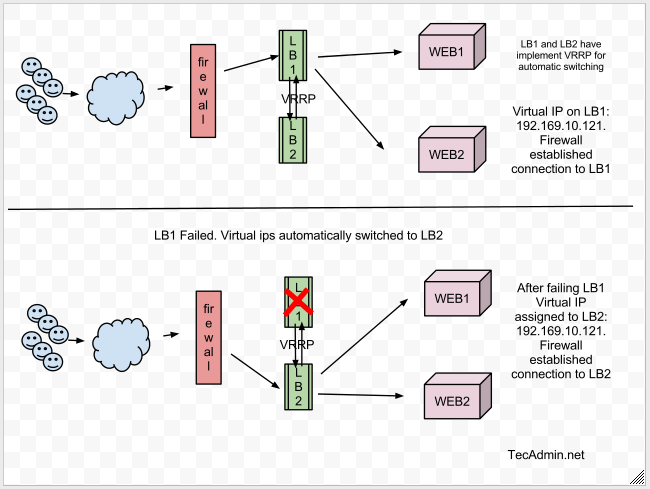
Keepalived is used for IP failover between two servers. It facilities for load balancing and high-availability to Linux based infrastructures. It works on VRRP ( Virtual Router Redundancy Protocol ) protocol. We have running two load balance servers using HAProxy and now we need to implement VRRP between both servers. This tutorial will help you to configure KeepAliveD, Use thistutorial to configure HAProxy on both servers.
Network Scenario:
  1. LB1 Server: 192.168.10.111 ( eth1 )

  2. LB2 Server: 192.168.10.112 ( eth1 )

  3. Virtual IP: 192.168.10.121
Now we are implementing ip failover setup between LB1 and LB2 servers.
Graphical representation of Fail over Setup:
Step 1: Install Required Packages
Use following command to install required packages to configure Keepalived on server.
# yum install gcc kernel-headers kernel-devel
Step 2: Install Keepalived
Keepalived is available in centos base repository. Install it using yum command line tool.
# yum install keepalived
Keepalived configuration File: /etc/keepalived/keepalived.conf
Step 3: Configure Keepalived on LB1.
Edit Keepalived configuration file on LB1 and add following configuration.
vrrp_instance VI_1 {

interface eth1

state MASTER

virtual_router_id 10

priority 101   # 101 on master, 100 on backup

virtual_ipaddress {

192.168.10.121

}

}
Step 4: Configure Keepalived on LB2.
Edit Keepalived configuration file on LB2 and add following configuration.
vrrp_instance VI_1 {

interface eth1

state BACKUP

virtual_router_id 10

priority 100   # 101 on master, 100 on backup

virtual_ipaddress {

192.168.10.121

}

}
Note: 1. priority value will be higher on Master server, It doesn't matter what you used in state.  If your state is MASTER but your priority is lower than the router with BACKUP, you will lose the MASTER state.

2. virtual_router_id should be same on both LB1 and LB2 servers.

3. By default single vrrp_instance support up to 20 virtual_ipaddress. In order to add more addresses you need to add more vrrp_instance
Step 5: Start Keepalived
Start Keepalived service using following command and also configure to auto start on system boot.
# service keepalived start

# chkconfig keepalived on
Step 6: Check Virtual IPs
By default virtual ip will assigned to master server, In case of master get down, it will automatically assigned to slave server. Use following command to show assigned virtual ip on interface.
# ip addr show eth1
Sample output
2: eth1: <broadcast,multicast,up,lower_up> mtu 1500 qdisc pfifo_fast state UNKNOWN qlen 1000

    link/ether 00:0c:29:6f:ed:60 brd ff:ff:ff:ff:ff:ff

    inet 192.168.10.111/24 brd 192.168.1.255 scope global eth1

    inet 192.168.10.121/32 scope global eth1

    inet6 fe80::20c:29ff:fe6f:ed60/64 scope link

       valid_lft forever preferred_lft forever
Verify IP Failover
1. Shutdown master server ( LB1 ) and check if ips are automatically assigned to slave server.
# ip addr show eth1
2. Now start LB1 and stop slave server ( LB2 ). IPs will automatically assigned to master server.
# ip addr show eth1
3. Watch log files to insure its working
# tailf /var/log/messages
Sample Output
Mar 19 17:30:24 localhost Keepalived_vrrp[6958]: VRRP_Instance(VI_1) Transition to MASTER STATE

Mar 19 17:30:25 localhost Keepalived_vrrp[6958]: VRRP_Instance(VI_1) Entering MASTER STATE

Mar 19 17:30:25 localhost Keepalived_vrrp[6958]: VRRP_Instance(VI_1) setting protocol VIPs.

Mar 19 17:30:25 localhost Keepalived_healthcheckers[6957]: Netlink reflector reports IP 192.168.10.121 added

Mar 19 17:30:25 localhost avahi-daemon[1407]: Registering new address record for 192.168.10.121 on eth1.IPv4.

Mar 19 17:30:25 localhost Keepalived_vrrp[6958]: VRRP_Instance(VI_1) Sending gratuitous ARPs on eth1 for
I hope this article will help to setup IP failover between two load balance servers.
Related posts:
- How to Enable Email Alerts in Keepalived Its a good practice to enable email alerts in your...
- How to Setup Master Slave DNS Server on CentOS 6 and RHEL The DNS ( Domain Name System ) is a distributed...
- Install and Configure Sendmail on CentOS/RHEL 6 Sendmail is a mail server used for sending and receiving...
- Keep your CentOS/Redhat server up to date Hi Guys, Being a system administrator, you always need to...
IP Failover Setup using Keepalived on CentOS/Redhat 6的更多相关文章
- install keepalived on RedHat/CentOS to provide IP failover for web cluster
Contents [hide] 1 Introduction 2 Our Sample Setup 3 Install Keepalived 4 Install Kernel Headers 5 C ...
- CentOS / Redhat : Configure CentOS as a Software Router with two interfaces
CentOS / Redhat : Configure CentOS as a Software Router with two interfaces Linux can be easily co ...
- 定制CentOS (Redhat AS 5.1)安装盘
CentOS(Redhat)提供了一套完整的自动化安装机制,利用该机制,我们可以自己定制无人值守的自动安装光盘,也可以进行系统裁减,甚至可以以CentOS为基础制作自己软件系统的系统安装盘.以下全部内 ...
- 在Windows基础上(硬盘)安装Linux操作系统(CentOS/RedHat)
注:该方法安装CentOS ,RedHat均没有问题,其它Linux操作系统,没有尝试过. 0.创建一个fat32的盘.我分了8G给这个盘,盘符为F.F盘以后的内存所有删除,作为未分配的内存.这个留用 ...
- setup FTP server on CentOS 7
Setup FTP Server on CentOS 7 Install vsftpd vsftpd (Very Secure File Transport Protocol Daemon) is a ...
- Xrdp - 通过Windows的RDP连接Linux远程桌面(Ubuntu/CentOS/Redhat 7)(转载)
您多久访问一次Linux桌面? 您使用什么工具来访问远程桌面? Xrdp是一个开源工具,允许用户通过Windows RDP访问Linux远程桌面. 除了Windows RDP之外,xr ...
- Xrdp - 通过Windows的RDP连接Linux远程桌面(Ubuntu/CentOS/Redhat 7)
Xrdp - 通过Windows的RDP连接Linux远程桌面(Ubuntu/CentOS/Redhat 7) 您多久访问一次Linux桌面? 您使用什么工具来访问远程桌面? Xrdp是一个开源工具, ...
- CentOS(RedHat) 6.2 Samba share权限拒绝访问
在实现<CentOS(RedHat) 6.2下Samba配置>的过程中,发现CentOS 6.2的Samba share总是没有权限写文件,已经试过在Windows XP/Windows ...
- Linux/centos/redhat下各种压缩解压缩方式详解
1.zip命令 zip -r myfile.zip ./* 将当前目录下的所有文件和文件夹全部压缩成myfile.zip文件,-r表示递归压缩子目录下所有文件. 2.unzip unzip -o -d ...
随机推荐
- WIN7、WIN8 右键在目录当前打开命令行Cmd窗口(图文)
Win7系统大家习惯“Win+R”的组合键打开命令提示符. 通常右击文件夹是没有进入命令行 进入某个文件夹里面,先按住Shift键,然后鼠标右键,出现选项“在此处打开命令窗口(W)”也可以打开命令行. ...
- Maven 简单配置gpg
1. 下载maven到指定目录,指定对应的gpg的执行命令所需要的属性.这里比如下载解压后的maven目录是: C:\maven-apache-3.3.2 ,那么配置文件目录是: C:\maven-a ...
- Unity3D Shader入门指南(一)
动机 自己使用Unity3D也有一段时间了,但是很多时候是流于表面,更多地是把这个引擎简单地用作脚本控制,而对更深入一些的层次几乎没有了解.虽然说Unity引擎设计的初衷就是创建简单的不需要开发者操心 ...
- linux系统date命令详解
Linux时钟分为系统时钟(System Clock)和硬件(Real Time Clock,简称RTC)时钟.系统时钟是指当前Linux Kernel中的时钟,而硬件时钟则是主板上由电池供电的时钟, ...
- Bencode的编码与解码
开源地址: https://github.com/CreateChen/Bencode Nuget: Install-Package Bencode 1. Bencode规则 BEncoding是Bi ...
- ubuntu11.10搭建eclipse C++开发环境[zhuan]
1.最重要的东西,C++必要工具,安装的是GCC工具链,Make等一系列开发工具: sudo apt-get install build-essential 2. 安装Eclipse sudo apt ...
- Android 数据通信
一. Http/Net1. http 通讯协议和android中相关API介绍 2.发送http请求实例[GET,POST]论坛参考文献:http://www.eoeandroid.com/viewt ...
- Codeforces Round #384 (Div. 2) C. Vladik and fractions 构造题
C. Vladik and fractions 题目链接 http://codeforces.com/contest/743/problem/C 题面 Vladik and Chloe decided ...
- windows7系统下如何安装windows xp系统(无法识别硬盘,删除隐藏分区)
一.硬盘模式的设置 要设置好硬盘模式,否则安装操作系统的时候,根本就不识别硬盘,自然无法安装操作系统了.此步骤主要是解决无法识别硬盘的问题. 首先,进入BIOS当中,一般在advanced当中,有一个 ...
- [译] 二、开始iOS编程之前,你还需要做什么?
声明:本文翻译自AppCoda网站的文章:What You Need to Begin iOS Programming?,作者是创建者Simon Ng.如有异议,请联系博主. 更新:帖子已经重新被 ...