
使用cxf构建webservice
一、简介
cxf是apache下的一个开源的,功能齐全的WebService框架。是由Celtix和XFire两个开源框架组合而成。cxf可以帮助我们使用前端编程模型构建和开发服务,如JAX-
WS和JAZ-RS。这些服务可以使用不同的协议,如SOAP,XML/HTTP,RESTFul HTTP或者CORBA和使用各种的数据传输协议,如HTTP,JMS 和JBI。除此之外cxf还有如下特性:
- 使用简单,可与maven,spring等进行集成。
- 支持Web Service标准,包括soap,WS-I Basic Profile, WSDL, WS-Addressing, WS-Policy, WS-ReliableMessaging, WS-Security, WS-SecurityPolicy, WS-
- SecureConverstation, 和WS-Trust (partial)。
- 对二进制和遗留协议的支持,cxf设计并提供了一个可插拔的架构,不仅支持xml还支持非xml类型的绑定,如json,corba。可使用多种类型格式进行传输。
- 提供了多中工具生成代码,如WSDL to JAVA, WSDL to JavaScript, Java to JavaScript等。
二、使用
cxf的下载地址如下:http://cxf.apache.org/download.html 。这里下载的是windows版本apache-cxf-3.0.3.zip。在c盘根目录下解压该文件,解压后文件目录结构如下:
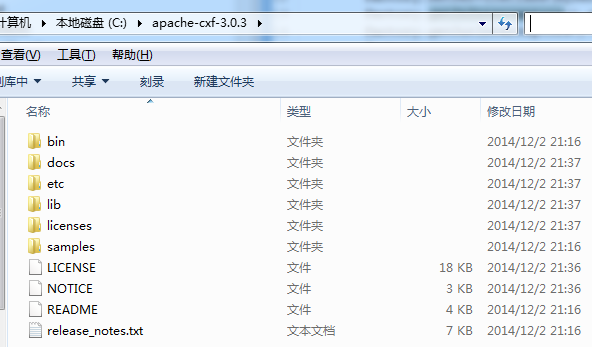
其中bin目录下的是为我们提供的相关转换工具,docs目录下的是相关文档,lib目录下是cxf的jar依赖;license目录下的是许可,samples是为我们提供的例子。
新建一个java项目cxf_server,并将lib下的jar文件(不包括endorse,和integration目录)添加到项目的依赖。
1、编写MyService接口 代码如下:
 package com.cxf.testauto;

 import javax.jws.WebService;

 @WebService

 public interface MyService {

     public String sayHello(String username, String address, String school);

 }
2、编写MyService的实现类
package com.cxf.testauto;

public class MyServiceImpl implements MyService {

    @Override

    public String sayHello(String username, String address, String school) {

        System.out.println("sayHello is invoked!");

        String result = "hello: " + username + ", your info is: " + address + ", " + school;

        return result;

    }

}
3、Server 服务的启动类
package com.cxf.testauto;

import org.apache.cxf.interceptor.LoggingInInterceptor;

import org.apache.cxf.interceptor.LoggingOutInterceptor;

import org.apache.cxf.jaxws.JaxWsServerFactoryBean;

public class Server {

    public static void main(String[] args) {

        JaxWsServerFactoryBean factory = new JaxWsServerFactoryBean();

        factory.setAddress("http://localhost:9000/myservice");

        factory.setServiceClass(MyServiceImpl.class);

        factory.getInInterceptors().add(new LoggingInInterceptor());

        factory.getOutInterceptors().add(new LoggingOutInterceptor());

        factory.create();

    }

}
主要:如果jdk版本比较低会报java.lang.LinkageError: JAXB 2.0 API jar is being loaded, but this RI (...) needs 2.2 API.类似的错误。此时需要在运行该类的时候指定运行参数,打开Run Configurations窗口,在VM arguments输入如下参数:
-Djava.ext.dirs=C:\apache-cxf-3.0.3\lib\endorsed
表示指定jvm运行的时候,加载C:\apache-cxf-3.0.3\lib\endorsed目录下的jar文件。如下图所示
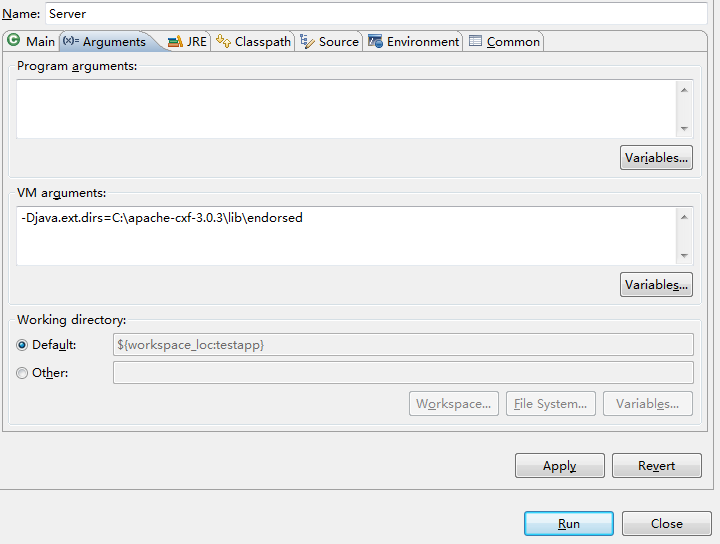
点击Apply,运行即可。
4、运行Server类
启动成功后,我们可以通过浏览器访问wsdl文件,使用http://localhost:9000/myservice?wsdl 地址访问即可。wsdl文件内容如下:
 <?xml version='1.0' encoding='UTF-8'?>

 <wsdl:definitions xmlns:xsd="http://www.w3.org/2001/XMLSchema"

     xmlns:wsdl="http://schemas.xmlsoap.org/wsdl/" xmlns:tns="http://testauto.cxf.com/"

     xmlns:soap="http://schemas.xmlsoap.org/wsdl/soap/" xmlns:ns1="http://schemas.xmlsoap.org/soap/http"

     name="MyServiceImplService" targetNamespace="http://testauto.cxf.com/">

     <wsdl:types>

         <xs:schema xmlns:xs="http://www.w3.org/2001/XMLSchema"

             xmlns:tns="http://testauto.cxf.com/" elementFormDefault="unqualified"

             targetNamespace="http://testauto.cxf.com/" version="1.0">

             <xs:element name="sayHello" type="tns:sayHello" />

             <xs:element name="sayHelloResponse" type="tns:sayHelloResponse" />

             <xs:complexType name="sayHello">

                 <xs:sequence>

                     <xs:element minOccurs="0" name="arg0" type="xs:string" />

                     <xs:element minOccurs="0" name="arg1" type="xs:string" />

                     <xs:element minOccurs="0" name="arg2" type="xs:string" />

                 </xs:sequence>

             </xs:complexType>

             <xs:complexType name="sayHelloResponse">

                 <xs:sequence>

                     <xs:element minOccurs="0" name="return" type="xs:string" />

                 </xs:sequence>

             </xs:complexType>

         </xs:schema>

     </wsdl:types>

     <wsdl:message name="sayHelloResponse">

         <wsdl:part element="tns:sayHelloResponse" name="parameters">

         </wsdl:part>

     </wsdl:message>

     <wsdl:message name="sayHello">

         <wsdl:part element="tns:sayHello" name="parameters">

         </wsdl:part>

     </wsdl:message>

     <wsdl:portType name="MyService">

         <wsdl:operation name="sayHello">

             <wsdl:input message="tns:sayHello" name="sayHello">

             </wsdl:input>

             <wsdl:output message="tns:sayHelloResponse" name="sayHelloResponse">

             </wsdl:output>

         </wsdl:operation>

     </wsdl:portType>

     <wsdl:binding name="MyServiceImplServiceSoapBinding" type="tns:MyService">

         <soap:binding style="document"

             transport="http://schemas.xmlsoap.org/soap/http" />

         <wsdl:operation name="sayHello">

             <soap:operation soapAction="" style="document" />

             <wsdl:input name="sayHello">

                 <soap:body use="literal" />

             </wsdl:input>

             <wsdl:output name="sayHelloResponse">

                 <soap:body use="literal" />

             </wsdl:output>

         </wsdl:operation>

     </wsdl:binding>

     <wsdl:service name="MyServiceImplService">

         <wsdl:port binding="tns:MyServiceImplServiceSoapBinding"

             name="MyServiceImplPort">

             <soap:address location="http://localhost:9000/myservice" />

         </wsdl:port>

     </wsdl:service>

 </wsdl:definitions>
5、通过wsdl文件生成客户端
将C:\apache-cxf-3.0.3\bin 添加进系统环境变量path中。
cmd进入c盘根目录,运行命令
C:\>wsdl2java -client -encoding utf8 -frontend jaxws21 http://localhost:9000/myservice?wsdl
该命令根据wsdl生产调用的客户端。-client表示生成客户端;-encoding表示生成的java代码的编码格式;frontend表示参照jaxws21标准;ttp://localhost:9000/myservice?wsdl为wsdl的地址,也可以是磁盘上的某一个wsdl文件。
执行结果如下:

命令执行成功后将会在c盘根目录下生成客户端的调用代码:生成的代码结构如下
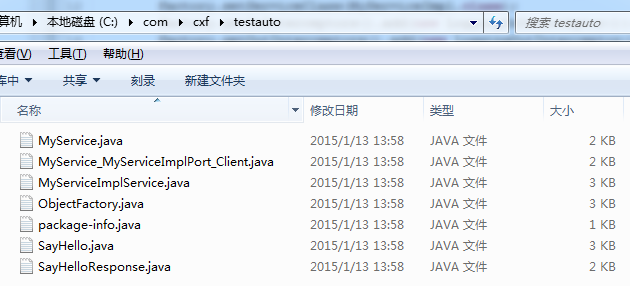
我们主要使用到的就是MyService_MyServiceImplPort_Client.java这个调用类。
6、进行调用,新建另一个java工程cxf_client,将生成的客户端代码拷贝到这个工程中。并对MyService_MyServiceImplPort_Client.java类进行修改。
MyService_MyServiceImplPort_Client.java修改后的内容如下:
package com.cxf.testauto;

/**

 * Please modify this class to meet your needs

 * This class is not complete

 */

import java.io.File;

import java.net.MalformedURLException;

import java.net.URL;

import javax.xml.namespace.QName;

import javax.jws.WebMethod;

import javax.jws.WebParam;

import javax.jws.WebResult;

import javax.jws.WebService;

import javax.xml.bind.annotation.XmlSeeAlso;

import javax.xml.ws.RequestWrapper;

import javax.xml.ws.ResponseWrapper;

/**

 * This class was generated by Apache CXF 3.0.3

 * 2015-01-13T13:58:38.847+08:00

 * Generated source version: 3.0.3

 *

 */

public final class MyService_MyServiceImplPort_Client {

    private static final QName SERVICE_NAME = new QName("http://testauto.cxf.com/", "MyServiceImplService");

    private MyService_MyServiceImplPort_Client() {

    }

    public static void main(String args[]) throws java.lang.Exception {

        URL wsdlURL = MyServiceImplService.WSDL_LOCATION;

        if (args.length > 0 && args[0] != null && !"".equals(args[0])) {

            File wsdlFile = new File(args[0]);

            try {

                if (wsdlFile.exists()) {

                    wsdlURL = wsdlFile.toURI().toURL();

                } else {

                    wsdlURL = new URL(args[0]);

                }

            } catch (MalformedURLException e) {

                e.printStackTrace();

            }

        }

        MyServiceImplService ss = new MyServiceImplService(wsdlURL, SERVICE_NAME);

        MyService port = ss.getMyServiceImplPort();

        {

        System.out.println("Invoking sayHello...");

        java.lang.String _sayHello_arg0 = "zhangsan";

        java.lang.String _sayHello_arg1 = "beijing";

        java.lang.String _sayHello_arg2 = "hello world";

        java.lang.String _sayHello__return = port.sayHello(_sayHello_arg0, _sayHello_arg1, _sayHello_arg2);//对webservice 接口进行调用

        System.out.println("sayHello.result=" + _sayHello__return);

        }

        System.exit(0);

    }

}
运行该类,完成调用。
client端打印的结果如下:

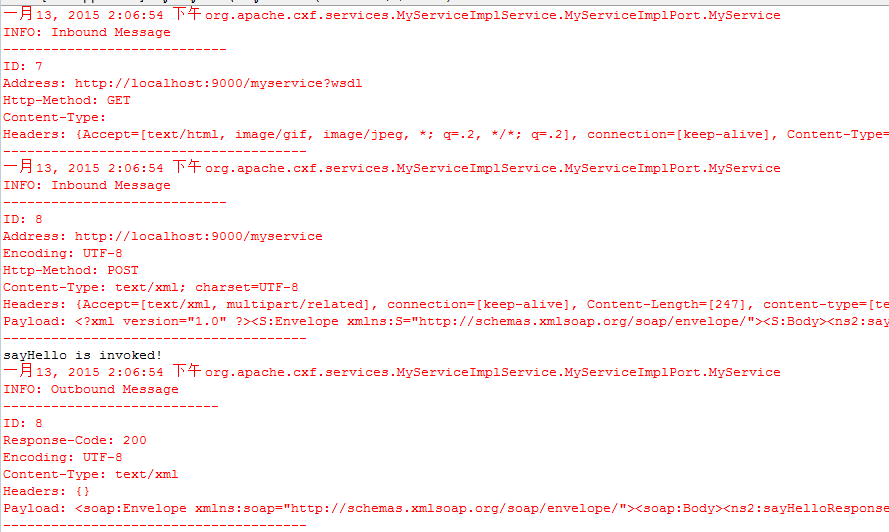
server端打印的结果如下:
使用cxf构建webservice的更多相关文章
- cxf构建webservice的两种方式
一.简介 对于基于soap传输协议的webservice有两种开发模式,代码优先和契约优先的模式.代码优先的模式是通过编写服务器端的代码,使用代码生成wsdl:契约优先模式首先编写wsdl,再通过ws ...
- SpringBoot | 第三十四章:CXF构建WebService服务
前言 上一章节,讲解了如何使用Spring-WS构建WebService服务.其实,创建WebService的方式有很多的,今天来看看如何使用apache cxf来构建及调用WebService服务. ...
- Eclipse+Maven+Spring+CXF 构建webservice 服务
一. 软件准备 Eclipse 4.2.1 Maven 2.2.1 Spring 3.2.6 CXF 3.0.2 二. 步骤 首先,在Eclipse中用maven构建一个quickstart版本的ma ...
- 【转】构建基于CXF的WebService服务
构建基于CXF的WebService服务 Apache CXF = Celtix+ XFire,开始叫 Apache CeltiXfire,后来更名为 Apache CXF 了,以下简称为 CXF.C ...
- 3.使用CXF开发webService
CXF 简介 关于 Apache CXF Apache CXF = Celtix + XFire,Apache CXF 的前身叫 Apache CeltiXfire,现在已经正式更名为 Apache ...
- CXF之webservice
使用 CXF 做 webservice 简单例子 Apache CXF 是一个开放源代码框架,提供了用于方便地构建和开发 Web 服务的可靠基础架构.它允许创建高性能和可扩展的服务,您可以将这 ...
- Spring Boot+CXF搭建WebService(转)
概述 最近项目用到在Spring boot下搭建WebService服务,对Java语言下的WebService了解甚少,而今抽个时间查阅资料整理下Spring Boot结合CXF打架WebServi ...
- 使用 CXF 做 webservice 简单例子(转载)
使用 CXF 做 webservice 简单例子 Apache CXF 是一个开放源代码框架,提供了用于方便地构建和开发 Web 服务的可靠基础架构.它允许创建高性能和可扩展的服务,您可以将这 ...
- 使用CXF发布WebService
这里普及一下WebService和cxf的知识.关于webservice和cxf: WebService.各种提供服务的组件 .企业总线.通讯总线(ESB)CXF:是一个SOA框架,Axi ...
随机推荐
- IOS中图片加载的一些注意点
图片的加载: [UIImage imageNamed:@"home"] //加载 png图片 在ios中获取一张图片只需要写图片名即可 不需要写后缀 默认都是加载.png的图片 但 ...
- .net中以传引用的方式 向方法中传参数
CLR(CommonLanguageRuntime)公共语言运行时,允许以传引用而非传值的方式传递参数.在C#中,这是用关键字 out 和ref来做到的. 从CLR角度来看,这两个关键字没什么区别,生 ...
- C#设计模式——策略模式(Strategy Pattern)
一.概述我们来实现一个企业的工资系统,该企业中不同级别的员工工资算法都不相同,针对该问题,最容易想到的莫过于在代码中堆积一大堆if…else…语句或者是switch…case…语句.如果该企业中不同级 ...
- 关于下载DynamicDataDisplay.dll后被默认锁定的问题
问题:命名空间 d3:“http://research.microsoft.com/DynamicDataDisplay/1.0”不存在ChartPlotter元素 原因:下载DynamicDataD ...
- Mysql –>EF edmx(model first)–> Sql server table
一.mysql environment When we create an new database,first We need draw er diagram for somebody to sho ...
- [PHP] 自动加载的实现
基于psr的规范,使用命名空间和spl_autoload_register()来实现自动加载 文件结构: |--Api |--Account.php |--User.php|--Service |-- ...
- java猜数字游戏
import java.util.Scanner; //导入包 class GuessNum { public static void main(String[] args) { int num = ...
- 一个SpringMVC简单Demo中出现的错误
最近在学springmvc 一个简答的Springmvc配置包括如下步骤: 1.在 web.xml 文件中配置 DispatcherServlet (该中央控制器相当于 MVC 模式中的 C),还可以 ...
- [转载]hashmap hashtable 的区别
Hashtable 和 HashMap 做为 Map 的基本特性 两者都实现了Map接口,基本特性相同 - 对同一个Key,只会有一个对应的value值存在 - 如 ...
- ahjesus sql手动重新更新ID
declare cus_cursor cursor scroll for SELECT Id from [dbo].[TLotterySpiderRule] open cus_cursor decla ...