
(2-2)SpringCloud-服务注册到Eureka Server集群并消费
服务注册到Eureka Server集群
在(2-1)SpringCloue-Eureka实现高可用注册中心中我们搭建好了高可用的Eureka注册中心,下面我们要把服务注册到Eureka Server 的集群中。
步骤一、修改(1-1)SpringCloud-Eureka:服务的注册与发现中 “服务注册与服务发现---注册服务提供者” 中的配置文件
eureka.client.serviceUrl.defaultZone=http://peer2:8752/eureka,http://peer2:8751/eureka

server.port=8877

spring.application.name=service-ha-hello
步骤二、启动集群注册中心
java -jar eureka-server-1.0.0.jar --spring.profiles.active=peer1

java -jar eureka-server-1.0.0.jar --spring.profiles.active=peer2
步骤三、启动服务提供者
java -jar eureka-server-ha-service-1.0.0.jar --server.port=8877

java -jar eureka-server-ha-service-1.0.0.jar --server.port=8878
然后我们看到注册中心控制台已经有两个服务提供者了。说明注册成功了

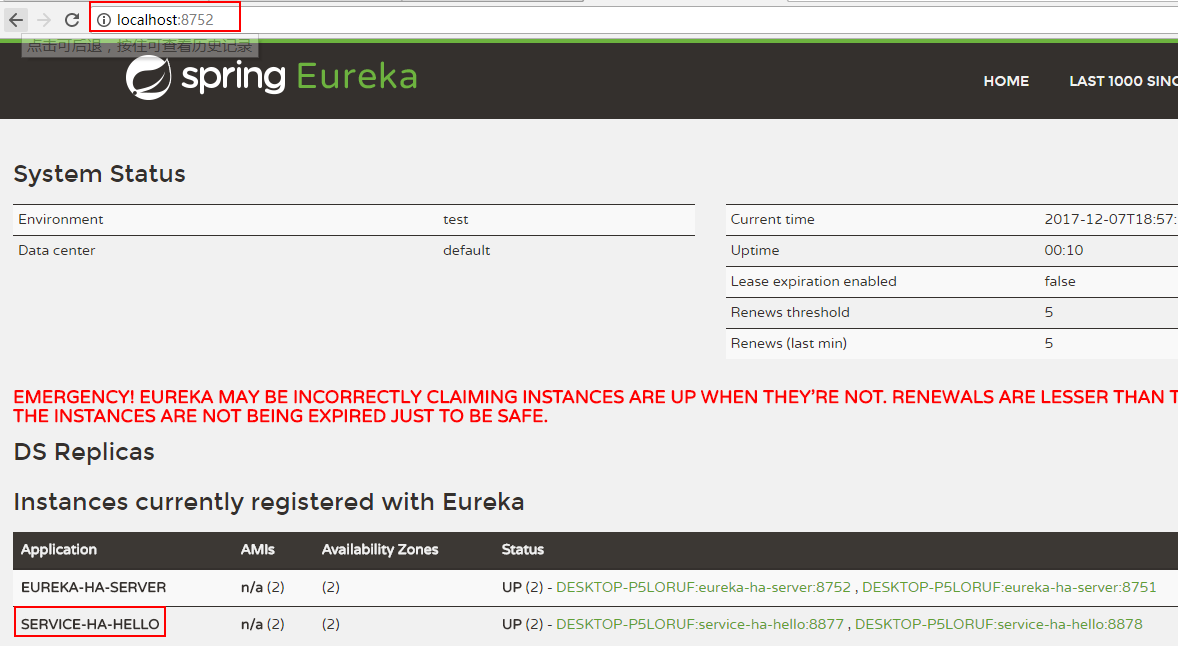
https://gitee.com/huayicompany/springcloud-learn/tree/master/lesson2/eureka-server-ha-service
Ribbon负载均衡服务消费者实现:
根据 (1-2)SpringCloud:服务的消费者rest+ribbon 中的例子修改。
步骤一、修改ServiceRibbonApplication中的restTemplate()
package org.hope;

import org.springframework.boot.SpringApplication;

import org.springframework.boot.autoconfigure.SpringBootApplication;

import org.springframework.cloud.client.discovery.EnableDiscoveryClient;

import org.springframework.cloud.client.loadbalancer.LoadBalanced;

import org.springframework.context.annotation.Bean;

import org.springframework.web.client.RestTemplate;

@SpringBootApplication

@EnableDiscoveryClient

public class ServiceRibbonApplication {

    public static void main(String[] args) {

        SpringApplication.run(ServiceRibbonApplication.class, args);

    }

    @Bean

    @LoadBalanced//添加了这个注解

    RestTemplate restTemplate() {

        return new RestTemplate();

    }

}
步骤二、修改HelloService中的restTemplate
package org.hope.service;

import org.springframework.beans.factory.annotation.Autowired;

import org.springframework.stereotype.Service;

import org.springframework.web.client.RestTemplate;

@Service

public class HelloService {

    @Autowired

    RestTemplate restTemplate;

    public String hiService(String name) {

        //这里不能用这个localhost,否则调用不成功

//        return restTemplate.getForEntity("http://localhost:8877/hello?name=" + name, String.class).getBody();

        return restTemplate.getForEntity("http://service-ha-hello/hello?name=" + name, String.class).getBody();

    }

}
步骤三、浏览器中输入http://localhost:8764/hello?name=zhangsan
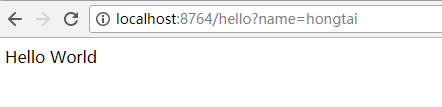
尝试多请求几次,看两个eureka-server-ha-service的控制台,可以看到两个控制台交替的打印日志。
https://gitee.com/huayicompany/springcloud-learn/tree/master/lesson2/service-ha-ribbon
参考:
[1] 《SpringCloud微服务实战》,电子工业出版社,翟永超
(2-2)SpringCloud-服务注册到Eureka Server集群并消费的更多相关文章
- Spring Cloud之微服务注册到Eureka Server集群
在Spring Cloud之服务注册中心搭建Eureka Server服务注册中⼼ - 池塘里洗澡的鸭子 - 博客园 (cnblogs.com)中已经搭建好了Eureka Server集群,本文就利用 ...
- Spring Cloud之微服务注册到Eureka Server集群后访问改造
上篇Spring Cloud之服务注册中心搭建Eureka Server服务注册中⼼ - 池塘里洗澡的鸭子 - 博客园 (cnblogs.com)已经已经成功将两个微服务注册到集群中,那么能正常能与注 ...
- SpringCloud系列四:实现Eureka Server的高可用并将应用注册到Eureka Sever集群上
1. 回顾 上一篇博客中,实现了单节点的Eureka Server.Eureka Client会定时连接Eureka Server,获取注册表中的信息并缓存到本地.微服务在消费远程API时总是使用本地 ...
- springcloud(四)-Eureka Server集群
Eureka Server的高可用 这一节我们接着上一节说. 有分布式应用开发经验的朋友应该发现,前文编写的单节点Eureka Server并不适合线上生产环境.Eureka Client会定时连接E ...
- SpringCloud 将服务注册到Eureka Server上
提供好服务生产者: 1.添加spring-cloud-starter-eureka依赖 <dependencyManagement> <dependencies> <de ...
- SpringCloud系列三:将微服务注册到Eureka Server上
1. 回顾 通过上篇博客的讲解,我们知道硬编码提供者地址的方式有不少问题.要想解决这些问题,服务消费者需要一个强大的服务发现机制,服务消费者使用这种机制获取服务提供者的网络信息.不仅如此,即使服务提供 ...
- spring boot 2.0.3+spring cloud (Finchley)1、搭建服务注册和发现组件Eureka 以及构建高可用Eureka Server集群
一 .搭建Eureka 编写Eureka Server 由于有多个spring boot项目,采用maven多module的结构,项目结构如下: 新建一个maven主工程,在主maven的pom文件中 ...
- 0402-服务注册与发现-Eureka Server使用、将服务注册到Eureka server上
一.Eureka Server使用 官方文档地址:http://cloud.spring.io/spring-cloud-static/Edgware.SR3/single/spring-cloud. ...
- 将微服务注册到Eureka Server
一.微服务程序编写 1.在已写好的微服务程序中添加pom依赖: <dependency> <groupId>org.springframework.cloud</grou ...
随机推荐
- angular4.0配置同时使用localhost和本机IP访问项目
之前写过<angular4.0配置本机IP访问项目>的文章,今天再次更新一个,谢谢大家的指正. 今天的目的是:使用本机IP地址,或者localhost都可以访问项目. 第一步:找到此文件& ...
- textarea显示源代码
textarea显示源代码 近期做的项目中,有需要显示源码的效果 最开始使用了很多冗余的办法,使用<pre></pre>和<code></code>标签 ...
- C#调用windows api 实现打印机控制
using System; using System.Text; using System.Runtime.InteropServices; using System.Security; using ...
- 记一次使用Node.js electron打包网站的记录
具体步骤请参考:http://blog.csdn.net/a727911438/article/details/70834467 打包时出现了不少问题,逐一记录下来以供其他人参考. package.j ...
- master_pos_wait函数与MySQL主从切换
背景 主从切换是高可用MySQL架构的必要步骤(即使用不发生,也要有备无患).一般设置为双M(M1.M2),假设当前状态为写M1,而M2只读,切换的大致流程如下: 1. 停止应用写M1,将M1设置为 ...
- mvc接口、webapi、webservice 对比
最近做了很多项目,也同时使用了mvc的接口,webapi的接口,以及webservice 的接口.先两两对比如下: mvc和webapi区别: 1.MVC是建站的一种框架,倾向于返回用户的页面请求:a ...
- Git的使用-如何将本地项目上传到Github
默认你的电脑上已经安装了git. 第一步:我们需要先创建一个本地的版本库(其实也就是一个文件夹). 你可以直接右击新建文件夹,也可以右击打开Git bash命令行窗口通过命令来创建. 现在我通过命令行 ...
- JAVA实现跳一跳辅助程序之虎啸龙吟
前序: 今天有幸,看到2位博主的文章,在此表示感谢.自己也动手实现了一下. 实现原理 请参考博主 https://www.cnblogs.com/dongkuo/p/8285162.html 另感谢博 ...
- Django-数据库访问优化
数据库访问优化 使用标准数据库优化技巧 索引.我们可以使用Field.db_index或者Meta.index_together在Django中添加索引,优先向经常使用filter(),exclude ...
- Android基础_web通信3
在Android基础_web通信2中,我运用的JSONObject是Android原生的json类,通过import org.json.JSONObject来导入. 还有另外一种更简单的方法,就是用G ...