
来个Button看一看
0.目录
1.前言
2.基本属性与方法
3.点点更健康
4.我的Button有点多
5.震惊!TextView竟然...
1.前言
每次写代码总会忘记一些东西,又要重新Goooooooooogle,好烦呐~
本文参考网站(排名不分先后):
1.Android Button的基本使用
2.Android中设置文本颜色的三种方法
3.android:layout_gravity和android:gravity的区别
2.基本属性与方法
Button 支持的 XML 属性及相关方法:
| XML属性 | 相关方法 | 说明 |
|---|---|---|
| android:id | findViewById | 在XML中设置id,然后在.java中才可以调用这个按钮做其他事 |
| android:text | setText() | 设置文字 |
| android:textColor | setTextColor() | 设置文字颜色 |
| android:textSize | setTextSize() | 设置文字大小 |
| android:background | setBackground() | 设置背景颜色或者背景图片 |
| android:enabled | setEnabled() | 设置按钮是否可以被点击 |
| android:layout_gravity | 设置按钮的位置 | |
| android:gravity | 设置文字的位置 |
以下用实例来讲解:
XML文件为:
<LinearLayout xmlns:android="http://schemas.android.com/apk/res/android"
    xmlns:tools="http://schemas.android.com/tools"
    android:layout_width="match_parent"
    android:layout_height="match_parent"
    android:orientation="vertical"
    tools:context="com.example.pylearn_01_1.MainActivity" >

    <Button
        android:id="@+id/btn1"
        android:layout_width="wrap_content"
        android:layout_height="wrap_content"
        android:text="自古一楼没卵用" />

    <Button
        android:id="@+id/btn2"
        android:layout_width="fill_parent"
        android:layout_height="wrap_content"
        android:text="使用XML布局"
        android:textColor="@android:color/white"
        android:textSize="50sp" />

    <Button
        android:id="@+id/btn3"
        android:layout_width="wrap_content"
        android:layout_height="wrap_content" />

    <Button
        android:id="@+id/btn4"
        android:layout_width="wrap_content"
        android:layout_height="wrap_content"
        android:background="@android:color/background_dark" />

    <Button
        android:id="@+id/btn5"
        android:layout_width="wrap_content"
        android:layout_height="wrap_content"
        android:text="可远观而不可亵玩"
        android:enabled="false" />

    <Button
        android:id="@+id/btn6"
        android:layout_width="wrap_content"
        android:layout_height="wrap_content"
        android:text="使用layout_gravity让按钮居中"
        android:layout_gravity="center" />

    <Button
        android:id="@+id/btn7"
        android:layout_width="wrap_content"
        android:layout_height="wrap_content"
        android:text="使用gravity让文字居中"
        android:gravity="center" />

</LinearLayout>
java文件为:
package com.example.pylearn_01_1;

import android.app.Activity;
import android.os.Bundle;
import android.view.Menu;
import android.view.MenuItem;
import android.widget.Button;

public class MainActivity extends Activity {

    /* pylearn_01_1
     * Button基本属性与方法
     */
    Button btn3;

    @Override
    protected void onCreate(Bundle savedInstanceState) {
        super.onCreate(savedInstanceState);
        setContentView(R.layout.activity_main);

        btn3=(Button)findViewById(R.id.btn3);

        btn3.setText("使用java布局");//设置文字内容
        btn3.setTextColor(android.graphics.Color.RED);//设置文字颜色
        btn3.setTextSize(45);//设置文字大小
        btn3.setEnabled(false);//设置按钮不能被点击
    }

    @Override
    public boolean onCreateOptionsMenu(Menu menu) {
        // Inflate the menu; this adds items to the action bar if it is present.
        getMenuInflater().inflate(R.menu.main, menu);
        return true;
    }

    @Override
    public boolean onOptionsItemSelected(MenuItem item) {
        // Handle action bar item clicks here. The action bar will
        // automatically handle clicks on the Home/Up button, so long
        // as you specify a parent activity in AndroidManifest.xml.
        int id = item.getItemId();
        if (id == R.id.action_settings) {
            return true;
        }
        return super.onOptionsItemSelected(item);
    }
}
eclipse中看xml为:
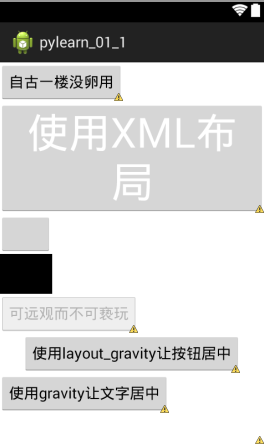
模拟器中运行结果为:

源代码在此:pylearn_01_1
3.点点更健康
Button弄出来当然不是为了当花瓶的,咱们需要通过点击它来完成一些事情。
按钮的点击事件可以使用
btn.setOnClickListener(new OnClickListener() {
    @Override
    public void onClick(View v) {
        //do something
    }
});
来实现。
源代码在此:pylearn_01_2
也可以使用
btn1.setOnClickListener(this);
btn2.setOnClickListener(this);然后让MainActivity extends Activity implements OnClickListener实现onClick方法:
@Override
public void onClick(View v) {
    // TODO 自动生成的方法存根
    switch ( v.getId() ) {
        case R.id.btn1:
            fun_btn1();
            break;
        case R.id.btn2:
            fun_btn2();
            break;
    }
}源代码在此:pylearn_01_3
这两种方法都可以实现按钮点击事件的处理。
4.我的Button有点多
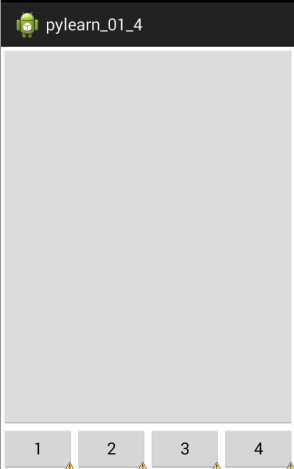
如何实现多个Button平分天下:
使用android:layout_weight控制各个按钮的权重,然后在parent布局中控制好权重和android:weightSum。最后设置各个按钮的占比为android:layout_width="0dp"。这样就实现了按钮的多个按钮的平均分配。
<LinearLayout xmlns:android="http://schemas.android.com/apk/res/android"
    xmlns:tools="http://schemas.android.com/tools"
    android:layout_width="match_parent"
    android:layout_height="match_parent"
    android:orientation="vertical"
    tools:context="com.example.pylearn_01_1.MainActivity" >

    <Button
        android:id="@+id/btn"
        android:layout_width="fill_parent"
        android:layout_height="0dp"
        android:layout_weight="1" />

    <LinearLayout
        android:layout_width="fill_parent"
        android:layout_height="wrap_content"
        android:weightSum="4" >

        <Button
            android:id="@+id/btn1"
            android:layout_width="0dp"
            android:layout_height="wrap_content"
            android:layout_weight="1"
            android:text="1" />

        <Button
            android:id="@+id/btn2"
            android:layout_width="0dp"
            android:layout_height="wrap_content"
            android:layout_weight="1"
            android:text="2" />

        <Button
            android:id="@+id/btn3"
            android:layout_width="0dp"
            android:layout_height="wrap_content"
            android:layout_weight="1"
            android:text="3" />

        <Button
            android:id="@+id/btn4"
            android:layout_width="0dp"
            android:layout_height="wrap_content"
            android:layout_weight="1"
            android:text="4" />
    </LinearLayout>
</LinearLayout>
效果如下:
源代码在此:pylearn_01_4
5.震惊!TextView竟然...
忘记在哪看到的一句话:
能用TextView的地方就别用Button
Button能实现的基本上TextView也能实现
有兴趣可以试试:把上面所有程序中的Button换成TextView,毫无违和感。
来个Button看一看的更多相关文章
- 瞧一瞧,看一看呐,用MVC+EF快速弄出一个CRUD,一行代码都不用写,真的一行代码都不用写!!!!
瞧一瞧,看一看呐用MVC+EF快速弄出一个CRUD,一行代码都不用写,真的一行代码都不用写!!!! 现在要写的呢就是,用MVC和EF弄出一个CRUD四个页面和一个列表页面的一个快速DEMO,当然是在不 ...
- 2015年4月27日---C语言:输出特殊图案,请在c环境中运行,看一看,Very Beautiful!
---恢复内容开始--- 题目:输出特殊图案,请在c环境中运行,看一看,Very Beautiful! 1.程序分析:字符共有256个.不同字符,图形不一样. 2.程序源代码: [code=c] #i ...
- Loj#6183. 看无可看
Loj#6183. 看无可看 题目描述 首先用特征根求出通项公式\(A_n=p\cdot 3^n+q\cdot(-1)^n\).通过给定的\(f_0,f_1\)可以解出\(p,q\). 然后我们要求的 ...
- 看无可看 分治FFT+特征值方程
题面: 看无可看(see.pas/cpp/c) 题目描述 “What’s left to see when our eyes won’t open?” “若彼此瞑目在即,是否终亦看无可看?” ---- ...
- Scrum模拟微信看一看“疫情专区”的敏捷开发过程
无论作为产品用户还是管理咨询顾问,都非常非常喜欢微信.自认感情比较克制属于“高冷”挂,但从很多方面都太佩服太崇拜张小龙了(新书里微信也会是最喜欢的案例之一,真的不只是一个产品而已,很多方面都太牛了). ...
- Mysql数据库优化技术之配置篇、索引篇 ( 必看 必看 转)
转自:Mysql数据库优化技术之配置篇.索引篇 ( 必看 必看 ) (一)减少数据库访问对于可以静态化的页面,尽可能静态化对一个动态页面中可以静态的局部,采用静态化部分数据可以生成XML,或者文本文件 ...
- iOS - 基础知识总结(OC版) 面试必看 再不看就要用swift了
OC的理解与特性 OC作为一门面向对象的语言,自然具有面向对象的语言特性:封装.继承.多态.它既具有静态语言的特性(如C++),又有动态语言的效率(动态绑定.动态加载等).总体来讲,OC确实是一门不错 ...
- 今天做项目用到框架,关于angual,然后自己整理了一番,自己上网也看了看。
1. Angular 1.1. 库与框架的区别 jQuery:库 库一般都是封装了一些常用的方法 自己手动去调用这些方法,来完成我们的功能 $('#txt').val('我是小明'): $('div' ...
- PHP_Bibel阅读学习(一)——看书看经典,写文写代码
基础快速再看一下,然后每天有新的好玩的看. 这本书,反正好评不少,就是`PHP和MySQL Web开发`,机械工业出版社,澳洲人写的,红皮,有兴趣的可以看一下. 第一篇 使用PHP 一.入门 5分钟翻 ...
随机推荐
- 安装mayavi和VTK库的血泪史
一开始安装VTK库是从官网上下载,但是怎么都找不到whl文件,只有exe文件(vtkpython-7.1.1-Windows-64bit.exe).下载安装之后再PyCharm中import vtk出 ...
- 数据模型(LP32 ILP32 LP64 LLP64 ILP64 )
数据模型(LP32 ILP32 LP64 LLP64 ILP64 ) 32位环境涉及"ILP32"数据模型,是因为C数据类型为32位的int.long.指针.而64位环境使用不同的 ...
- Chrome DevTools 开发者工具 技巧 调试
https://developers.google.com/chrome-developer-tools/docs/tips-and-tricks 1.console面板多行输入 Shift + ...
- URI 方法 encodeURI() encodeURIComponent() docodeURI() decodeURIComponent()
URI 方法 encodeURI() encodeURIComponent() docodeURI() decodeURIComponent() var sUri = “http://ww ...
- Problem E: 分数类的输出
Problem E: 分数类的输出 Time Limit: 3 Sec Memory Limit: 128 MBSubmit: 2699 Solved: 1227[Submit][Status][ ...
- elastic-search单机部署以及中文分词IKAnalyzer安装
前提条件 elasticsearch使用版本5.6.3,需要jdk版本1.8,低于该版本不能使用 下载 https://artifacts.elastic.co/downloads/elasticse ...
- Java面试之框架篇(九)
spring现在无疑是Java中最火的框架,使用范围广,几乎每个公司面试都会涉及spring和数据库,你可以对Struts不熟悉,但一定不能表现出对spring不了解.第九篇赢在面试全篇介绍sprin ...
- HTTP协议类
本文从以下几方面介绍HTTP协议 HTTP协议的主要特点 HTTP报文的组成部分 HTTP方法 HTTP状态码 POST和GET的区别 什么是持久连接 什么是管线化 主要特点: http协议的特点: ...
- [最短路]信使(msner)
[题目描述] 战争时期,前线有n个哨所,每个哨所可能会与其他若干个哨所之间有通信联系.信使负责在哨所之间传递信息,当然,这是要花费一定时间的(以天为单位).指挥部设在第一个哨所.当指挥部下达一个命令后 ...
- Chrome 浏览器报 filed to load resource:net err cache read failure 错误:
在IE/FF下没有该错误提示,但在Chrome下命令行出现如下错误信息: Failed to load resource: net::ERR_CACHE_MISS 该问题是Chrome浏览器开发工具的 ...