
使用PuTTY连接Azure VM
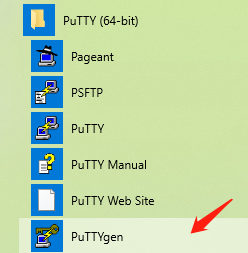
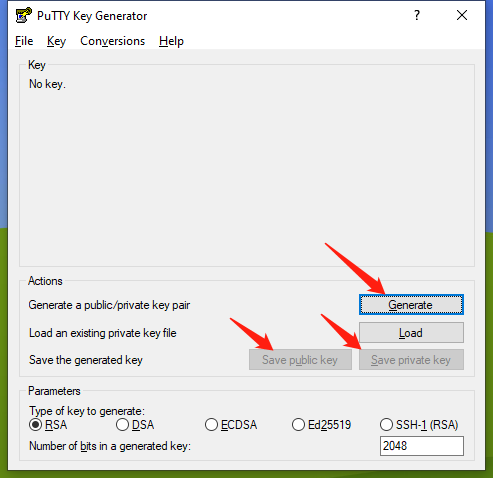
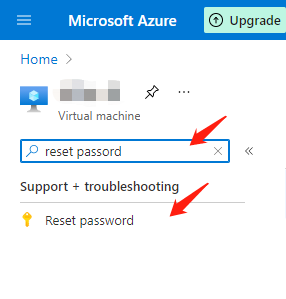
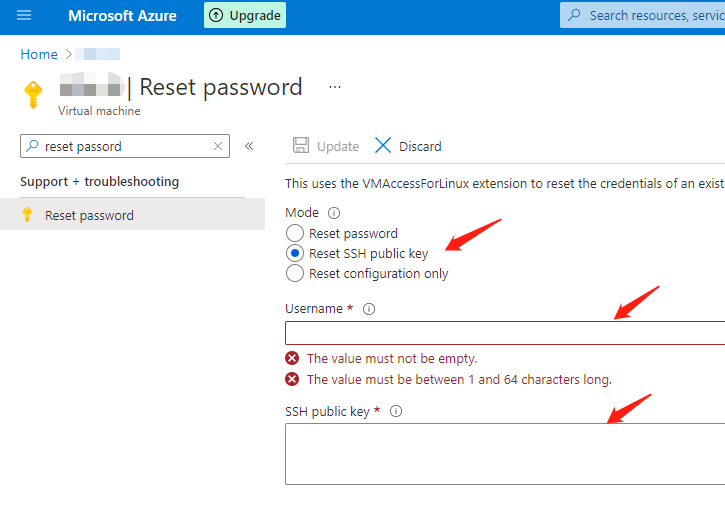
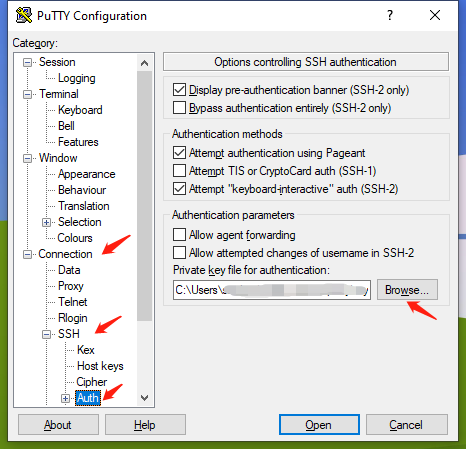
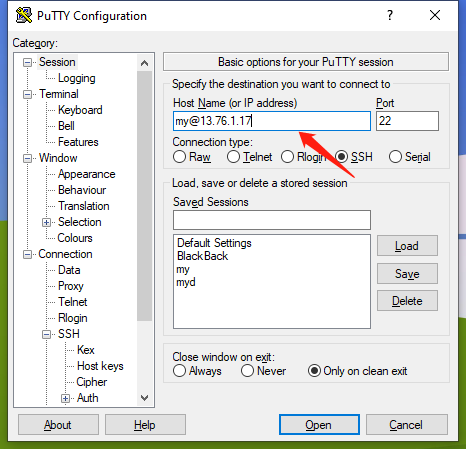
使用PuTTY连接Azure VMhtml { -webkit-print-color-adjust: exact } 点击启动PuTTYgen 点击Generate,随意晃动鼠标以生成密钥; 待生成后,点击Save public key将公钥存储到电脑上,再点击Save private key将私钥存储到电脑上; 公钥将以txt文件存储,私钥将以ppk文件存储; 登录Azure portal:https://portal.azure.com/#home 导航至虚拟机的页面,如果虚拟机没有启动,务必启动虚拟机再进行余下操作 左侧导航栏搜索 reset password 点击左侧导航栏 Reset password 点选Reset SSH public key; 输入用户名(可自定); 使用记事本打开PuTTYgen生成的公钥txt文件,全选复制,粘贴至SSH public key中; 待检验完成,左上角Update 按钮会被激活,点击即可保存。 点击启动PuTTY, 根据左侧导航栏,展开Connection,展开SSH,点选Auth, 点击Browse选取之前存储的私钥ppk文件; 注意:私钥和公钥必须要对应。 根据左侧导航栏,点选Session 输入Host Name,格式为 <UserName>@<Public IP Address>,UserName即为设置公钥时填入的UserName,Public IP Address即为虚拟机的IP Address,例如 my@13.76.1.17 选择Connection Type为SSH; 点击Open即可启动 建议设置虚拟机的公共IP address为固定,否则虚拟机每次重启都有可能换一个空闲的IP,由此需要经常修改PuTTY连接的Host Name
* { box-sizing: border-box; -webkit-print-color-adjust: exact }
{ }
{ }
{ }
{ }
{ }
{ }
{ }
{ }
{ }
{ }
{ }
{ }
{ }
{ }
{ }
{ }
{ }
{ }
{ }
{ }
{ }
{ }
{ }
{ }
{ }
{ }
{ }
{ }
{ }
{ }
{ }
{ }
{ }
{ }
{ }
ul:first-child { }
li { }
{ }
li { }
{ }
li { }
{ }
li { }
{ }
li { }
{ }
li { }
{ }
details { }
summary { }
{ }
{ }
{ }
{ }
{ }
{ }
{ }
{ }
{ }
{ }
{ }
{ }
{ }
.user { }
time { }
{ }
{ }
{ }
{ }
{ }
{ }
code { }
{ }
{ }
{ }
{ }
{ }
{ }
{ }
{ }
{ }
{ }
{ }
{ font-family: iawriter-mono, Nitti, Menlo, Courier, monospace }
{ }
{ }
{ }
{ font-family: PT Mono, iawriter-mono, Nitti, Menlo, Courier, monospace, "Twemoji", "Noto Color Emoji", "Noto Sans Mono CJK SC", "Noto Sans Mono CJK KR" }
{ }
{ }
{ }
{ }
{ }
{ }
{ }
{ }
{ }
{ }
{ }
{ }
{ }
{ }
{ }
{ }
{ }
{ }
{ }
{ }
{ }
{ }
{ }
{ }
{ }
{ }
{ }
{ }
{ }
{ }
{ }
{ }
{ }
{ }
{ }
{ }
{ }
{ }
{ background-color: rgba(206, 205, 202, 0.5) }
{ background-color: rgba(155, 154, 151, 0.4) }
{ background-color: rgba(140, 46, 0, 0.2) }
{ background-color: rgba(245, 93, 0, 0.2) }
{ background-color: rgba(233, 168, 0, 0.2) }
{ background-color: rgba(0, 135, 107, 0.2) }
{ background-color: rgba(0, 120, 223, 0.2) }
{ background-color: rgba(103, 36, 222, 0.2) }
{ background-color: rgba(221, 0, 129, 0.2) }
{ background-color: rgba(255, 0, 26, 0.2) }
{ }
{ }
{ }
使用PuTTY连接Azure VM
1. 使用PuTTYgen生成密钥
2. 复制公钥到Azure VM中
3. 使用PuTTY连接
Tips
使用PuTTY连接Azure VM的更多相关文章
- Windows Azure Virtual Machine (29) 修改Azure VM 数据磁盘容量
<Windows Azure Platform 系列文章目录> 当我们使用Windows Azure管理界面,创建Azure虚拟机的时候,默认挂载的磁盘是固定大小的 1.比如我创建1个Wi ...
- Azure VM对远程桌面登录的支持-示例
我们在开发Windows Azure的应用程序,虽然在大部分的情况下都可以使用Azure Emulator模拟器来模拟在云端计算节点(Azure VM)的执行结果,但是并不能100%模拟真正在Azur ...
- 我的 Azure VM 为何会重新启动?
在客户创建的客服案件中, Azure VM意外重启是一个常见的问题,客户要求客服确定重新启动的原因.希望下面的详细说明能够帮助您了解 Azure VM重新启动的原因. WindowsAzure大约 ...
- Dynamic CRM 2013 on Windows Azure VM
三个A2 Size的VM,运行Windows Server 2012: AD Server,SQL Server,App Server 将AD Server的ip地址填写到Windows Azure虚 ...
- 在Azure China用自定义镜像创建Azure VM Scale Set
在Azure China用自定义镜像创建Azure VM Scale Set 在此感谢世纪互联的工程师Johnny Lee和Lan,你们给了我很大的帮助.因为Azure China的官网没有给出完整的 ...
- 在 Azure VM 中使用应用商店映像创建 HPC Pack 群集的头节点
使用 Azure 应用商店和 Azure 门户中的 Microsoft HPC Pack 2012 R2 虚拟机映像创建 HPC 群集的头节点. 此 HPC Pack VM 映像基于预安装了 HPC ...
- 了解 Azure VM 的系统重启
有时 Azure 虚拟机 (VM) 可能重启,即使没有明显原因,也没有证据表明用户发起重启操作. 本文列出了可导致 VM 重启的操作和事件,并针对如何避免意外重启问题或减少该问题影响提供见解. 配置 ...
- 【应用程序见解 Application Insights】使用Azure Monitor Application Insights Agent获取Azure VM中监控数据及IIS请求指标等信息
问题情形 为了使用Application Insights也可以监控Azure VM中的相关性能数据,如CPU, Memory,IIS Reuqest等信息,可以在VM中开始一个一个扩展插件: Azu ...
- 【Azure Developer】在Azure VM (Windows) 中搭建 kafka服务,并且通过本地以及远程验证 发送+消费 消息
问题描述 查看了 "How to Install and Run Apache Kafka on Windows? " 一文后,成功安装了Kafka服务,但是如何使用呢?如何在其他 ...
随机推荐
- SetWindowsHookEx 消息钩取进程卡死
<逆向工程核心原理> windows消息钩取部分的例子在win10下卡死,失败.通过搜索发现,要保证钩取的进程与注入的dll要保持cpu平台相同 SetWindowsHookEx可用于将d ...
- TCP/IP协议的经典面试知识点总结
前言 大家好啊,我是汤小圆. 今天给大家推荐的是,TCP/IP协议的经典面试知识点总结,希望对大家有帮助,谢谢. 简介 我们平时经常听到的TCP/IP协议,其实是一个协议族: 只不过因为TCP.IP是 ...
- 了解PSexec
PSExec允许用户连接到远程计算机并通过命名管道执行命令.命名管道是通过一个随机命名的二进制文件建立的,该文件被写入远程计算机上的ADMIN $共享,并被SVCManager用来创建新服务. 您可以 ...
- Windows + Jenkins + .NetFramework + SVN 持续部署
Windows + Jenkins + .NetFramework + SVN 持续部署 环境准备 服务端环境 安装 Windows 服务器 1.阿里云购买临时服务器 阿里云:https://www. ...
- istio: 无法提供内部访问外部服务
现象 能够内部无法访问外部服务. 在部署测试服务 kubectl apply -f samples/sleep/sleep.yaml 设置环境变量 export SOURCE_POD=$(kubect ...
- 问题笔记-vueCli3.0打包路径出错
需求:vueCli3.0打包路径出错.解决办法:vueCli3.0打包,新版本更新脚手架做出精简,webpack配置文件需要手动配置.在文件根目录创建一个vue.config.js配置文件.基本版: ...
- java面试-对象的创建、内存布局、访问定位
一.对象的创建 1.虚拟机遇到一条new指令时,首先将去检查这个指令的参数是否能在常量池中定位到一个类的符号引用,并且检查这个符号引用代表的类是否已被加载.解析和初始化过.如果没有,那必须先执行相应的 ...
- 201871030140-朱婷婷 实验三 结对项目—《D{0-1}KP 实例数据集算法实验平台》项目报告
项目 内容 课程班级博客链接 2018级卓越班 这个作业要求链接 实验三 结对项目 我的课程学习目标 1.体验软件项目开发中的两人合作,练习结对编程:2.掌握GitHub协作开发程序的操作方法. 这个 ...
- Dynamic Programming 动态规划入门笔记
算法导论笔记 programming 指的是一种表格法,并非编写计算机程序 动态规划与分治方法相似,都是通过组合子问题的解来求解原问题.但是分治法将问题划分为互不相交的子问题.而动态规划是应用与子问题 ...
- Windows命令行学习(系统信息收集)
echo off :关闭回显 echo on :开启回显 net user :显示主机的电脑用户 ipconfig /displaydns:后面的 /displaydns是显示当前电脑所缓存的dns信 ...