
SpringBoot使用注解进行分页
分页使用可以说非常普遍了,有时候会需要非常灵活的方式去开启或关闭分页,尝试使用一下注解的方式来进行分页。
依赖安装
需要使用的依赖:
- Mybatis-Plus
- PageHelper
- SpringBoot AOP
添加pom依赖
<!-- Mybatis-Plus -->

<dependency>

    <groupId>com.baomidou</groupId>

    <artifactId>mybatis-plus-boot-starter</artifactId>

    <version>3.4.3.4</version>

</dependency>

<!-- 分页 -->

<dependency>

    <groupId>com.github.pagehelper</groupId>

    <artifactId>pagehelper-spring-boot-starter</artifactId>

    <version>1.4.0</version>

</dependency>

<!-- AOP -->

<dependency>

    <groupId>org.springframework.boot</groupId>

    <artifactId>spring-boot-starter-aop</artifactId>

    <version>2.5.5</version>

</dependency>
添加公共返回实体类
需要两种实体类,一种是不分页直接返回数据的,另一种是分页返回数据和总数据条数的
普通实体类 AjaxResult
@Data

@NoArgsConstructor

@AllArgsConstructor

public class AjaxResult<T> {

    public static final int CODE_SUCCESS = 200;

    public static final int CODE_UNAUTHORIZED = 401;

    public static final int CODE_FORBIDDEN = 403;

    public static final int CODE_ERROR = 500;

    public static final String MSG_SUCCESS = "操作成功";

    public static final String MSG_FAILED = "操作失败";

    public static final String MSG_NOT_PERMISSION = "用户权限不足";

    public static final String MSG_UNAUTHORIZED = "用户未登录或身份已过期";

    private int code;

    private String msg;

    private T data;

    public static <T> AjaxResult success(int code, T data) {

        return new AjaxResult(code, MSG_SUCCESS, data);

    }

    public static <T> AjaxResult success(T data) {

        return success(CODE_SUCCESS, data);

    }

    public static <T> AjaxResult success() {

        return success(CODE_SUCCESS, null);

    }

    public static AjaxResult error(int code, String msg) {

        return new AjaxResult(code, msg, null);

    }

    public static AjaxResult error(String msg) {

        return error(CODE_ERROR, msg);

    }

    public static AjaxResult error() {

        return new AjaxResult(CODE_ERROR, MSG_FAILED, null);

    }

}
分页实体类 PageResult
继承AjaxResult,额外添加total、pageNo和pageSize等字段
@Data

public class PageResult extends AjaxResult {

    private long total;

    private long pageNo;

    private long pageSize;

    public PageResult() {

        this.setCode(CODE_SUCCESS);

        this.setMsg(MSG_SUCCESS);

    }

    public PageResult(AjaxResult ajaxResult) {

        this();

        if (Objects.nonNull(ajaxResult)) {

            setCode(ajaxResult.getCode());

            setMsg(ajaxResult.getMsg());

        }

    }

}
注解处理
分页注解 Pagination
创建一个用于分页的注解Pagination
其实这里的pageNo和pageSize没什么需求的话可以去掉的
/**

 * 分页注解

 */

@Target(ElementType.METHOD)

@Retention(RetentionPolicy.RUNTIME)

public @interface Pagination {

    // 第几页的请求参数名称 通过获取参数名称获取真正的pageNo

    String pageNo() default "pageNo";

    // 分页大小的请求参数名称

    String pageSize() default "pageSize";

}
使用AOP进行分页
创建一个类用于处理分页注解,切入点要根据自己注解进行修改
@Aspect

@Component

@Slf4j

public class PaginationAspect {

    /**

     * 定义切入点

     */

    @Pointcut("@annotation(cn.montaro.social.aspect.annotation.Pagination)")

    public void access() {

    }

    @SneakyThrows

    @Around("access()")

    public Object around(ProceedingJoinPoint joinPoint) {

        Object[] args = joinPoint.getArgs();

        Pagination pagination = getPaginationAnnotation(joinPoint);

        startPage(pagination.pageNo(), pagination.pageSize());

        // 调用原本方法的内容并获取返回值

        Object result = joinPoint.proceed(args);

        // 返回的数据类型要保证和注解方法上的一致

        return pageResult(result);

    }

    /**

     * 获取Pagination注解

     *

     * @param joinPoint

     * @return

     */

    public Pagination getPaginationAnnotation(ProceedingJoinPoint joinPoint) {

        MethodSignature methodSignature = (MethodSignature) joinPoint.getSignature();

        Method method = methodSignature.getMethod();

        Pagination pagination = method.getAnnotation(Pagination.class);

        return pagination;

    }

    /**

     * 开始分页

     */

    private void startPage(String pageNoParameterName, String pageSizeParameterName) {

        // 获取pageNo和pageSize

        int pageNo = ServletUtils.getParameterToInt(pageNoParameterName, 1);

        int pageSize = ServletUtils.getParameterToInt(pageSizeParameterName, 10);

        PageHelper.startPage(pageNo, pageSize);

    }

    /**

     * 对分页结果进行包装 如果分页成功则会返回PageResult

     *

     * @param result

     */

    private Object pageResult(Object result) {

        /**

         * 如果分页成功,则查询返回的结应该是一个Page {@link com.github.pagehelper.Page}

         * 进行一次强制转换就能获取到 total、pageNo、pageSize 这些字段

         */

        PageInfo pageInfo = null;

        AjaxResult ajaxResult = null;

        // 列表数据 如果方法返回Page则直接使用 如果是AjaxResult则getData再封装

        Object list = null;

        if (result instanceof Page) {

            list = result;

            Page page = (Page) result;

            pageInfo = new PageInfo(page);

        } else if (result instanceof AjaxResult) {

            ajaxResult = (AjaxResult) result;

            Object data = ajaxResult.getData();

            if (data instanceof List) {

                list = data;

                pageInfo = new PageInfo((List) data);

            }

        }

        if (pageInfo != null) {

            PageResult pageResult = new PageResult(ajaxResult);

            pageResult.setData(list);

            pageResult.setPageNo(pageInfo.getPageNum());

            pageResult.setPageSize(pageInfo.getPageSize());

            pageResult.setTotal(pageInfo.getTotal());

            return pageResult;

        }

        return result;

    }

}
还有注解中使用到的ServletUtils
public class ServletUtils {

    public static HttpServletRequest getRequest() {

        ServletRequestAttributes requestAttributes = getRequestAttributes();

        return requestAttributes.getRequest();

    }

    public static ServletRequestAttributes getRequestAttributes() {

        RequestAttributes requestAttributes = RequestContextHolder.getRequestAttributes();

        return (ServletRequestAttributes) requestAttributes;

    }

    public static Integer getParameterToInt(String parameterName, Integer defaultValue) {

        HttpServletRequest request = getRequest();

        String strValue = request.getParameter(parameterName);

        Integer intValue = Convert.toInt(strValue, defaultValue);

        return intValue;

    }

    public static Integer getParameterToInt(String parameterName) {

        return getParameterToInt(parameterName, null);

    }

}
使用注解
为了避免跑题,此处就省略mybatis-plus的使用了。
需要分页就加上@Pagination注解就行了,不需要就注释掉,代码完全不需要修改
分页的时候传入pageNo和pageSize参数就可以了,如果参数名需要更改,就修改@Pagination就可以了
编写Controller类
@RestController

@RequestMapping("/user")

public class UserController {

    @Autowired

    private IUserService userService;

    /**

     * 列出所有用户

     * @return

     */

    @Pagination

    @GetMapping("/list")

    public AjaxResult list(UserQueryReq query) {

        List<User> userList = userService.selectUserListByQuery(query);

        return AjaxResult.success(userList);

    }

}
测试
使用的PostMan,看看效果
使用注解的时候
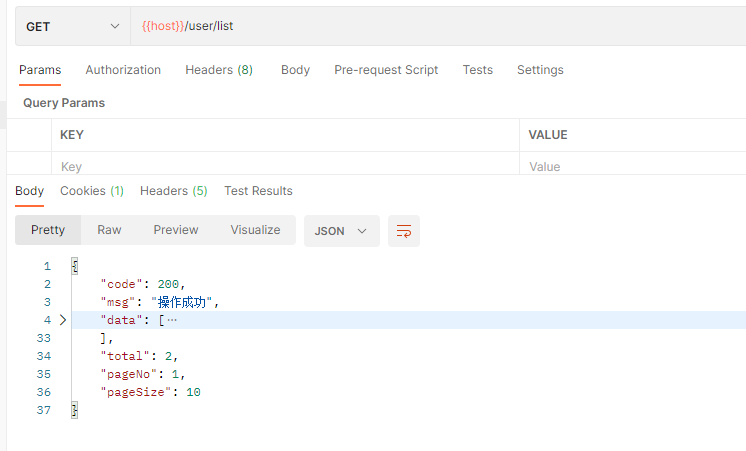
把注解注释掉
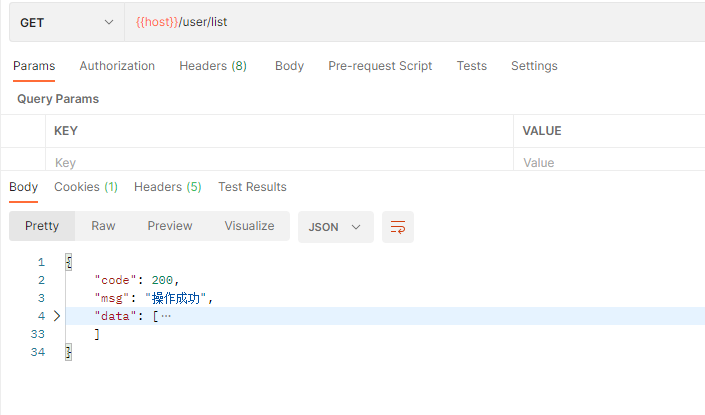
效果可以说非常完美了!
博主也是菜鸟一枚,如果有什么问题欢迎留言互相讨论
SpringBoot使用注解进行分页的更多相关文章
- SpringBoot+Mybatis配置Pagehelper分页插件实现自动分页
SpringBoot+Mybatis配置Pagehelper分页插件实现自动分页 **SpringBoot+Mybatis使用Pagehelper分页插件自动分页,非常好用,不用在自己去计算和组装了. ...
- SpringBoot+Mybatis+PageHelper实现分页
SpringBoot+Mybatis+PageHelper实现分页 mybatis自己没有分页功能,我们可以通过PageHelper工具来实现分页,非常简单方便 第一步:添加依赖 <depend ...
- SpringBoot 常用注解(持续更新)
SpringBoot 常用注解 @SpringBootApplication @Bean @ComponentScan @ControllerAdvice @ExceptionHandler @Res ...
- 常见的springmvc、SpringBoot的注解
springMvc的常用注解 : @Controller :用于标记在一个类上,使用它标记的类就是一个springmcv Controller对象,分发处理器将会扫描使用了该注解 的类的方法,并检测该 ...
- 浅谈SpringBoot核心注解原理
SpringBoot核心注解原理 今天跟大家来探讨下SpringBoot的核心注解@SpringBootApplication以及run方法,理解下springBoot为什么不需要XML,达到零配置 ...
- SpringBoot的注解注入功能移植到.Net平台(开源)
*:first-child { margin-top: 0 !important; } .markdown-body>*:last-child { margin-bottom: 0 !impor ...
- SpringBoot(14)—注解装配Bean
SpringBoot(14)-注解装配Bean SpringBoot装配Bean方式主要有两种 通过Java配置文件@Bean的方式定义Bean. 通过注解扫描的方式@Component/@Compo ...
- SpringBoot 入门篇(二) SpringBoot常用注解以及自动配置
一.SpringBoot常用注解二.SpringBoot自动配置机制SpringBoot版本:1.5.13.RELEASE 对应官方文档链接:https://docs.spring.io/spring ...
- [技术博客] SPRINGBOOT自定义注解
SPRINGBOOT自定义注解 在springboot中,有各种各样的注解,这些注解能够简化我们的配置,提高开发效率.一般来说,springboot提供的注解已经佷丰富了,但如果我们想针对某个特定情景 ...
随机推荐
- 用C++实现的增强Eratosthenes筛法程序
运行示例 PS H:\Read\num\x64\Release> .\eSievePro Eratosthenes sieve: a method to find out all primes ...
- k8s 存活探针(健康检查)
重启策略 (RestartPolicy ) Always:当容器终止退出后,总是重启容器,默认策略. OnFailure:当容器异常退出(退出状态码非0)时,才重启容器. Never:当容器终止退出, ...
- SpringBoot详解(一)——
https://www.cnblogs.com/lifullmoon/p/14957771.html https://www.cnblogs.com/lifullmoon/p/14957751.htm ...
- hash类型数据的操作指令
1. 2. 3. 4. 5. 6. 7. 8. 9. 10. 11. 12.
- Ordering the Soldiers 题解
CodeChef:ORDERS 简化题意: \(n\) 个人排队,给定每个人需要向左移动几个,求最终排列. 即还原逆序对. 错误想法 既然知道每个人向左移动 \(a_i\) 个,那就相当于让他的排名 ...
- Mysql常用sql语句(10)- is null 空值查询
测试必备的Mysql常用sql语句系列 https://www.cnblogs.com/poloyy/category/1683347.html 前言 is null是一个关键字来的,用于判断字段的值 ...
- 使用shell脚本实现everthing的功能
我们知道,在 Windows 下,有一款非常实用的神器,叫作 Everything ,它可以在极短的时间里,搜索出来你所想要的文件/目录,如下图示: Linux 下也有一些类似于 everything ...
- 为老的vueCli项目添加vite支持
1.前言 接手公司的某个项目已经两年了,现在每次启动项目都接近1分钟,hmr也要好几秒的时间,but vite2发布之后就看到了曙光,但是一直没有动手进行升级,昨天终于忍不住了,升级之后几秒钟就完成了 ...
- springboot整合jsp报错
今天在学springboot整合jsp时遇到了一个问题,虽然jsp不被spring官方推荐使用,但抱着学习的心态还是想解决一下这个问题.在写好了需要pom文件之后,访问网站得到了500的错误提示,后台 ...
- javascript 对象池
* 一个对象池的简单应用 tool tip tootip.html <html> <head> <meta charset="UTF-8"> & ...