
技巧02--Terminal Preview优化
0x00 下载安装
可在MS应用商店安装,也可以直接百度下载安装包安装

0x01 设置默认自启
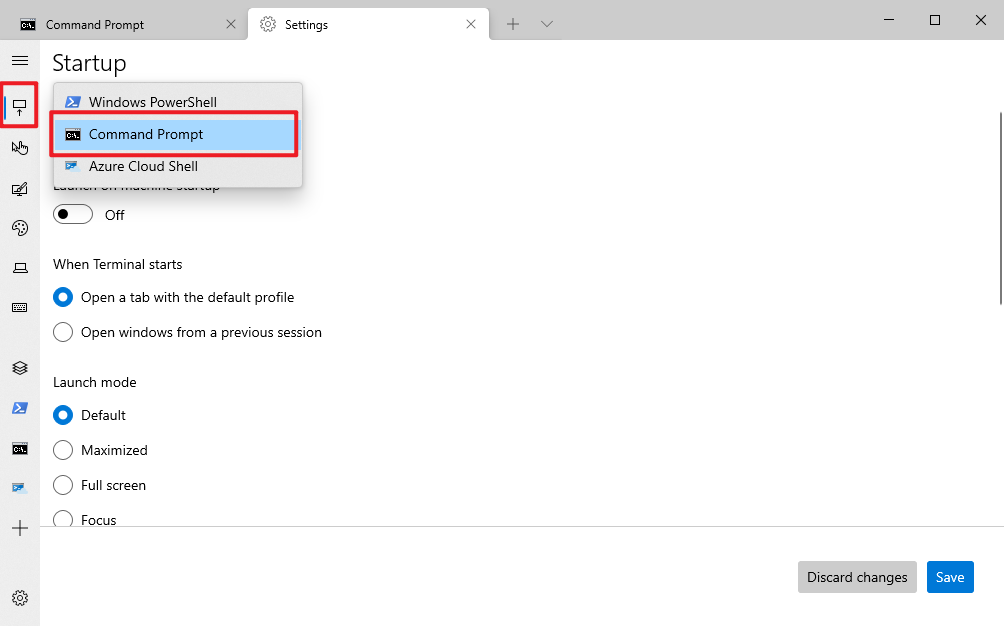
0x02 Terminal Preview美化
1、打开终端settings
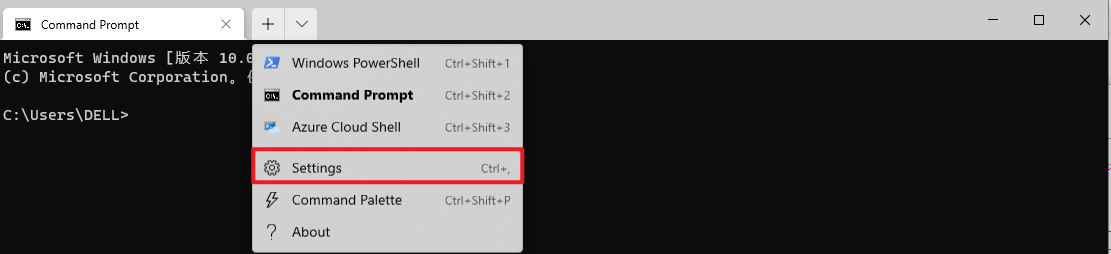
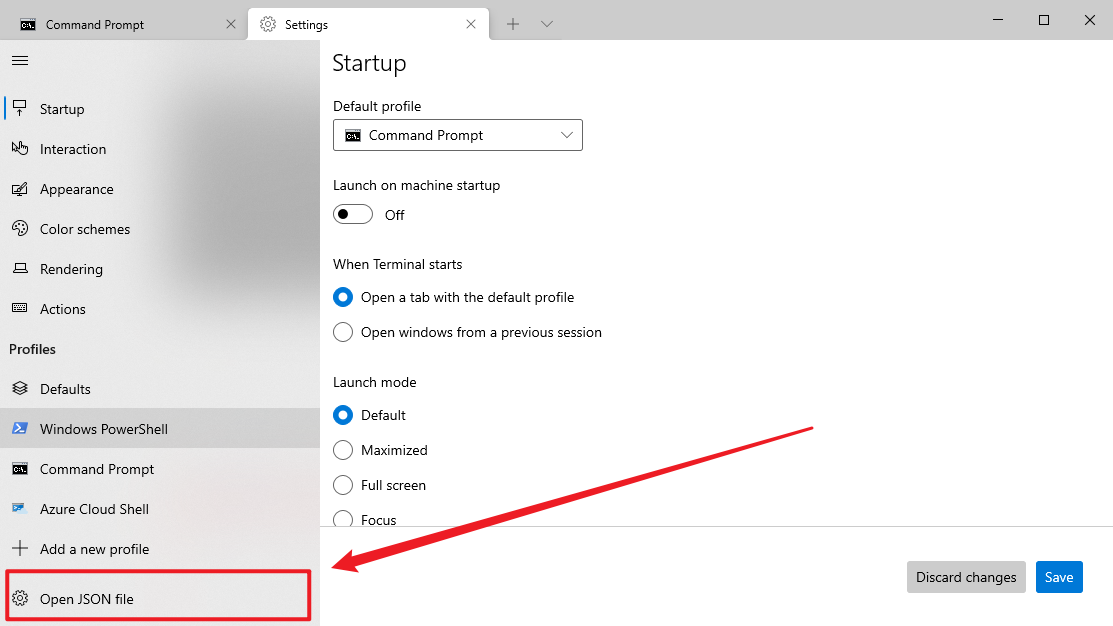
2、点击这个Open JSON file
保存一下这个文件位置
C:\Users\DELL\AppData\Local\Packages\Microsoft.WindowsTerminalPreview_8wekyb3d8bbwe\LocalState
3、将settings.json备份!!稍有不测,就复制粘贴回来

4、打开settings.json文件,对照下面的文档进行编辑
// This file was initially generated by Windows Terminal 1.0.1401.0

// It should still be usable in newer versions, but newer versions might have additional

// settings, help text, or changes that you will not see unless you clear this file

// and let us generate a new one for you.

// To view the default settings, hold "alt" while clicking on the "Settings" button.

// For documentation on these settings, see: https://aka.ms/terminal-documentation

{

    "$schema": "https://aka.ms/terminal-profiles-schema",

    // 默认使用的终端 (ubuntu/powershell/cmd....)

    "defaultProfile": "{c6eaf9f4-32a7-5fdc-b5cf-066e8a4b1e40}",

    // You can add more global application settings here.

    // To learn more about global settings, visit https://aka.ms/terminal-global-settings

    // 主题设置

    "theme": "dark", // --------- 这里有改动 ------------- "dark/light/system" 就标题栏有变化....

    // 启动设置

    // 1、以最大化方式启动

    "launchMode": "default", // "maximized"

    // 2、启动位置

    "initialPosition": "100,50",

    // 3、首次启动时的列

    "initialCols": 100,

    // 4、首次启动时的行

    "initialRows": 30,

    // If enabled, selections are automatically copied to your clipboard.

    "copyOnSelect": true, // --- 这里有改动 ----默认 false  , 选中复制,右键粘贴

    // If enabled, formatted data is also copied to your clipboard

    "copyFormatting": false,

    // 滚动速度

    "rowsToScroll": "system", // 这是滚动鼠标滚轮一次滚动的行数 默认 "system"

    // A profile specifies a command to execute paired with information about how it should look and feel.

    // Each one of them will appear in the 'New Tab' dropdown,

    //   and can be invoked from the commandline with `wt.exe -p xxx`

    // To learn more about profiles, visit https://aka.ms/terminal-profile-settings

    "profiles": {

        "defaults": {

            // 初始目录设置

            "startingDirectory": "C:/Users/yogurt/Desktop/",

            // 文本设置

            // 字体

            "fontFace": "Cascadia Mono",

            // 字体大小

            "fontSize": 13,

            // 边距

            "padding": "2,2,2,2",

            // 消除文本锯齿

            "antialiasingMode": "cleartype",

            // 颜色设置

            // 配色方案,   配色方案是在 schemes 对象中定义的, 有几个预先定义的方案, 查看 https://docs.microsoft.com/zh-cn/windows/terminal/customize-settings/color-schemes

            "colorScheme": "One Half Dark", // One Half Dark,  One Half Light,  Solarized Dark,  Solarized Light,

            // Acrylic 设置

            "useAcrylic": true,

            // Acrylic 不透明度

            "acrylicOpacity": 0.8,

            // // 背景图像设置

            // "backgroundImage":  "C:/Users/yogurt/Pictures/Saved Pictures/background.png",

            // // 背景图像拉伸模式 "none"、"fill"、"uniform"、"uniformToFill"

            // "backgroundImageStretchMode": "uniform",

            // // 背景图像不透明度

            // "backgroundImageOpacity": 0.8,

            // 历史记录可现实行数

            "historySize": 9001 // default 9001

        },

        "list": [

            {

                // Make changes here to the powershell.exe profile.

                "guid": "{61c54bbd-c2c6-5271-96e7-009a87ff44bf}",

                "name": "Windows PowerShell",

                "commandline": "powershell.exe",

                "hidden": false

            },

            {

                // Make changes here to the cmd.exe profile.

                "guid": "{0caa0dad-35be-5f56-a8ff-afceeeaa6101}",

                "name": "命令提示符",

                "commandline": "cmd.exe",

                "hidden": false

            },

            {

                "guid": "{c6eaf9f4-32a7-5fdc-b5cf-066e8a4b1e40}",

                "hidden": false,

                "name": "Ubuntu-18.04",

                "source": "Windows.Terminal.Wsl"

            },

            {

                "guid": "{b453ae62-4e3d-5e58-b989-0a998ec441b8}",

                "hidden": false,

                "name": "Azure Cloud Shell",

                "source": "Windows.Terminal.Azure"

            }

        ]

    },

    // Add custom color schemes to this array.

    // To learn more about color schemes, visit https://aka.ms/terminal-color-schemes

    // 自定义配色方案, 我觉得没必要。。。不折腾.....

    "schemes": [],

    // Add custom keybindings to this array.

    // To unbind a key combination from your defaults.json, set the command to "unbound".

    // To learn more about keybindings, visit https://aka.ms/terminal-keybindings

    "keybindings": [

        // Copy and paste are bound to Ctrl+Shift+C and Ctrl+Shift+V in your defaults.json.

        // These two lines additionally bind them to Ctrl+C and Ctrl+V.

        // To learn more about selection, visit https://aka.ms/terminal-selection

        {

            "command": {

                "action": "copy",

                "singleLine": false

            },

            "keys": "ctrl+c"

        },

        {

            "command": "paste",

            "keys": "ctrl+v"

        },

        // Press Ctrl+Shift+F to open the search box

        {

            "command": "find",

            "keys": "ctrl+shift+f"

        },

        // Press Alt+Shift+D to open a new pane.

        // - "split": "auto" makes this pane open in the direction that provides the most surface area.

        // - "splitMode": "duplicate" makes the new pane use the focused pane's profile.

        // To learn more about panes, visit https://aka.ms/terminal-panes

        {

            "command": {

                "action": "splitPane",

                "split": "auto",

                "splitMode": "duplicate"

            },

            "keys": "alt+shift+d"

        },

        // 下面是我自定义的快捷键

        {

            "command": "closePane",

            "keys": "ctrl+w"

        },

        {

            "command": "closeTab",

            "keys": "ctrl+shift+w"

        }

    ]

}
对比一下,就知道在哪里更改图片背景啥的了。
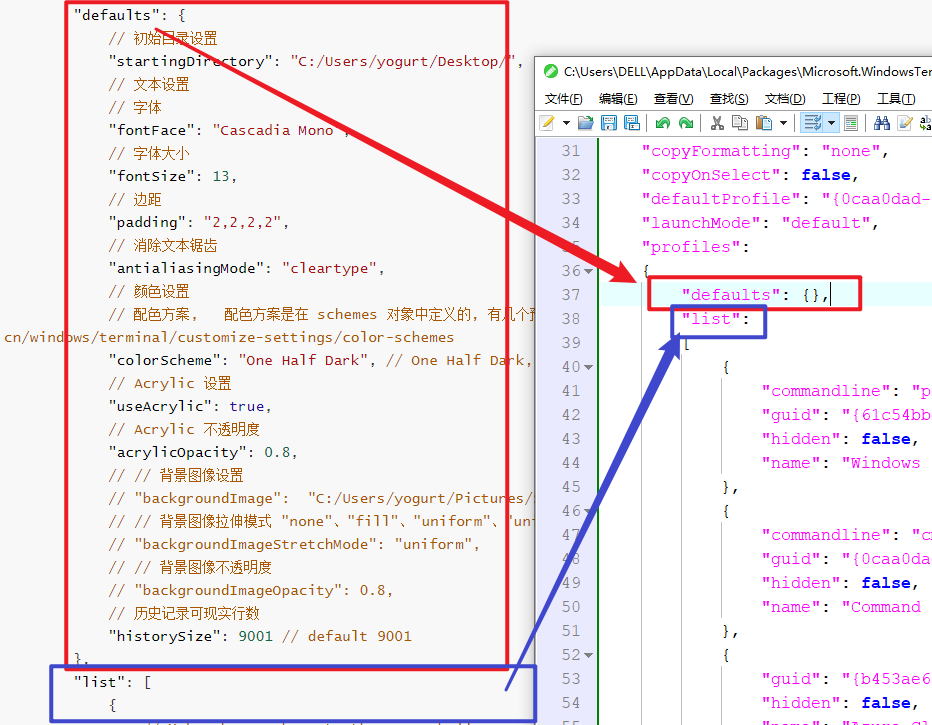
5、对照相应的位置,复制粘贴过来,去掉注释
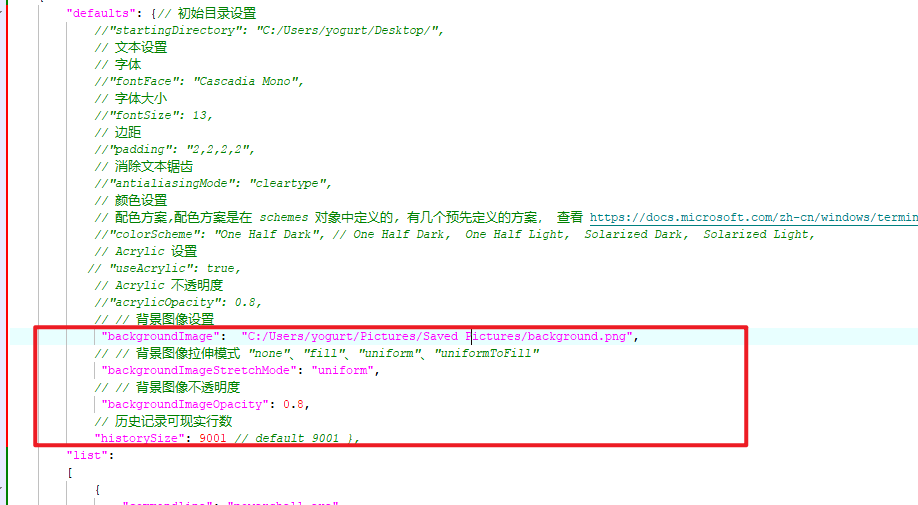
6、从网上找几张自己喜欢的图片,改一下配置即可,支持实时更改显示,挺方便的。

踩坑经验
1、注意背景图片路径是/而不是反斜杠\!!!!

2、复制过来的时候,下面},被移到了注释那里,改过来就行

0x03 设置置顶

技巧02--Terminal Preview优化的更多相关文章
- Windows Store可以下载安装Windows Terminal (Preview)
Windows Terminal (Preview)已经可以在Windows Store下载安装. Windows Terminal (Preview)运行要求为: Windows 10 版本 183 ...
- Windows Terminal (Preview)治好了cmd,powershell的癌症
前言 话说n年前,我想开发一款powershell麻将游戏,但是发现命令行下无法显示麻将牌这种特殊符号. 经过研究发现,这是4字节的utf16le字符串.而powershell依赖的渲染引擎,只能渲染 ...
- Windows Terminal Preview v0.7 Release
Windows Terminal Preview v0.7 Release The following key bindings are included by default within this ...
- BestCoder Round #89 02单调队列优化dp
1.BestCoder Round #89 2.总结:4个题,只能做A.B,全都靠hack上分.. 01 HDU 5944 水 1.题意:一个字符串,求有多少组字符y,r,x的下标能组成等比数列 ...
- VisualStudio神级插件Resharper的基本配置和使用技巧大全+Resharper性能优化
所谓工欲善其事,必先利其器.尽管visual studio本身已经非常强大,但优秀的插件仍然可以帮开发者大大提高效率. ReSharper是一款由jetbrain开发的针对C#,VB.NET,ASP. ...
- 02.SQLServer性能优化之---牛逼的OSQL----大数据导入
汇总篇:http://www.cnblogs.com/dunitian/p/4822808.html#tsql 上一篇:01.SQLServer性能优化之----强大的文件组----分盘存储 http ...
- SQL语句技巧_索引的优化_慢查询日志开启_root密码的破解
1.正则表达式的使用 regexp例:select name,email from t where email regexp '@163[.,]com$'使用like方式查询selct name,em ...
- 50个Android开发技巧(02 延迟载入和避免反复渲染视图)
当你在Application中创建复杂的布局时.页面的渲染过程也变得更加缓慢. 此时,我们须要利用 <include />标签(避免反复渲染)和 ViewStub类(延迟载入)来优化我们的 ...
- 第二次讨论——响应式设计、布局技巧、css性能优化、css预处理
第二次讨论 [响应式设计] 集中创建页面的图片排版大小,可以智能地根据用户行为以及使用的设备环境(系统平台.屏幕尺寸.屏幕定向等)进行相对应的布局. 响应式布局: meta标签的实用:设置布局宽度等于 ...
随机推荐
- c++之别让异常逃离析构函数
关于 本文代码演示环境: VS2017. 代码写的够不规范,目的是为了缩短文章篇幅. 本文主要是为了加深印象,写了好多次的代码,还是忘记了这茬.... 之前上传到github的代码会慢慢改过来. 本文 ...
- 【LeetCode】951. Flip Equivalent Binary Trees 解题报告(Python)
作者: 负雪明烛 id: fuxuemingzhu 个人博客: http://fuxuemingzhu.cn/ 目录 题目描述 题目大意 解题方法 递归 日期 题目地址:https://leetcod ...
- 【剑指Offer】滑动窗口的最大值 解题报告(Python)
作者: 负雪明烛 id: fuxuemingzhu 个人博客: http://fuxuemingzhu.cn/ 目录 题目描述 解题方法 暴力求解 单调递减队列 日期 题目地址:https://www ...
- The Longest Straight(FZUoj2216)
Problem 2216 The Longest Straight Accept: 82 Submit: 203Time Limit: 1000 mSec Memory Limit : ...
- 实战!Spring Boot 整合 阿里开源中间件 Canal 实现数据增量同步!
大家好,我是不才陈某~ 数据同步一直是一个令人头疼的问题.在业务量小,场景不多,数据量不大的情况下我们可能会选择在项目中直接写一些定时任务手动处理数据,例如从多个表将数据查出来,再汇总处理,再插入到相 ...
- 深度学习中常见的 Normlization 及权重初始化相关知识(原理及公式推导)
Batch Normlization(BN) 为什么要进行 BN 防止深度神经网络,每一层得参数更新会导致上层的输入数据发生变化,通过层层叠加,高层的输入分布变化会十分剧烈,这就使得高层需要不断去重新 ...
- 向setup.py里添加自定义command
向setup.py里添加自定义command 参考这里 继承distutils.cmd.Command类: class CCleanCommand(distutils.cmd.Command): &q ...
- MySQL高级查询与编程笔记 • 【第2章 数据定义和操作】
全部章节 >>>> 本章目录 2.1 数据定义语言和数据操作语言 2.1.1 设计"优乐网"数据库 2.1.2 数据定义语言 2.1.3 数据操作语言 ...
- nexus私服SNAPSHOT仓库maven-metadata.xml缺失导致的Could not find artifact:***.jar
环境:maven项目,使用Nexus私服(ip:192.168.10.100),jenkins实现代码的编译和打包. 问题分析思路:在2021年元旦假期前,jenkins上的编译打包任务一直正常工作, ...
- .NET 微服务——CI/CD(3):镜像自动分发
如何通过Jenkins完成镜像分发?基本做法是:打包镜像→上传镜像到仓库→脚本分发.镜像仓库也有很多,比如docker hub.Harbor等,今天这一篇讲一下基于阿里云镜像仓库的操作. 首先,准备一 ...