
【Linux】【Services】【Project】Haproxy Keepalived Postfix实现邮件网关Cluster
1. 简介:
1.1. 背景:公司使用exchange服务器作为邮件服务器,但是使用Postfix作为邮件网关实现病毒检测,内容过滤,反垃圾邮件等功能。原来的架构非常简单,只有两台机器,一个负责进公司的邮件,一个负责发公司到外部的邮件。由于公司人员增长迅速,再加上机房的迁移,原来的架构已经不能满足公司现有需要,需要重新设计一套邮件网关系统。
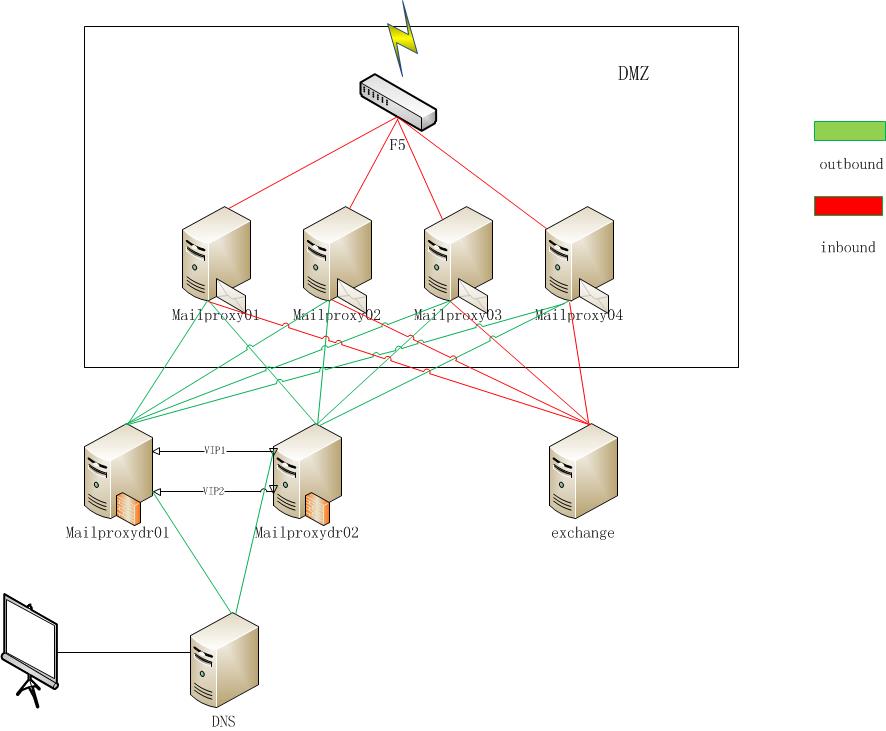
1.2. 基础概念:
1.2.1. postfix
1.2.2. haproxy:
1.2.3. keepalived:
1.2.4. clamav:
1.2.5. amavisd:
1.2.6. spamassassin:
1.2.7. SPF:
2. 环境:
2.1. OS: Red Hat Enterprise Linux Server release 7.3 (Maipo)
2.2. Kernel: 3.10.0-514.2.2.el7.x86_64
2.3. Haproxy: 1.5.18-3.el7_3.1
2.4. keepalived: 1.2.13-8.el7
2.5. 服务器
|
Server Name
|
IP
|
Software Installed
|
Comments
|
|---|---|---|---|
|
HCWHMAILPROXY01 |
10.25.8.2 |
postfix, amavisd,clamd,spamassassin,spf | |
|
HCWHMAILPROXY02 |
10.25.8.3 |
postfix, amavisd,clamd,spamassassin,spf | |
|
HCWHMAILPROXY03 |
10.25.8.4 |
postfix, amavisd,clamd,spamassassin,spf | |
|
HCWHMAILPROXY04 |
10.25.8.5 |
postfix, amavisd,clamd,spamassassin,spf | |
| HCWHMAILDR01 | 10.25.2.45 | haproxy | |
| HCWHMAILDR01 | 10.25.2.22 | keepalived | VIP |
| HCWHMAILDR02 | 10.25.2.46 | haproxy | |
| HCWHMAILDR02 | 10.25.2.23 | keepalived | VIP |
2.6. 网络信息
|
name
|
IP
|
Software
|
Managed by
|
Comments
|
|---|---|---|---|---|
| F5 | F5 | Network | need DNS name and IP from outbound | |
| lease line | Network | |||
| DNS | 10.24.2.1 | bind | Run Linux | resolve mailproxy.homecredit.cn to 10.25.2.22/23 |
3. 安装:
3.1. 调度器hcwhmaildr01/02, 配置好yum源之后可以直接安装
#直接安装就可以

[root@hcwhmaildr01 ~]# yum install keepalived haproxy -y

#记得开机启动并测试一下是否可以默认启动

[root@hcwhmaildr01 ~]# systemctl enable keepalived.service

Created symlink from /etc/systemd/system/multi-user.target.wants/keepalived.service to /usr/lib/systemd/system/keepalived.service.

[root@hcwhmaildr01 ~]# systemctl start keepalived.service

[root@hcwhmaildr01 ~]# systemctl enable haproxy.service

Created symlink from /etc/systemd/system/multi-user.target.wants/haproxy.service to /usr/lib/systemd/system/haproxy.service.

[root@hcwhmaildr01 ~]# systemctl start haproxy.service

[root@hcwhmaildr01 ~]#
keepalive配置文件 hcwhmaildr01
global_defs {

   notification_email {

     linux@homecredit.cn

   }

   notification_email_from zabbix@homecredit.cn

   smtp_server smtp.homecredit.cn

   smtp_connect_timeout 30

   router_id LVS_DEVEL

}

vrrp_script check_haproxy {

script "killall -0 haproxy"

        interval 1

        weight 21

}

vrrp_script chk_mantaince_down {

   script "[[ -f /etc/keepalived/down ]] && exit 1 || exit 0"

   interval 1

   weight 2

}

vrrp_instance VI_22 {

    state MASTER

    interface ens192

    virtual_router_id 22

    garp_master_delay 1

    mcast_src_ip 10.25.2.45

    lvs_sync_daemon_interface ens192

    priority 110

    advert_int 2

    authentication {

        auth_type PASS

        auth_pass 1111

    }

    track_interface {

    ens192

    }

    virtual_ipaddress {

        10.25.2.22/24 dev ens192 label ens192:0

    }

    track_script {

    check_haproxy

    chk_mantaince_down

    }

}

vrrp_instance VI_23 {

    state BACKUP

    interface ens192

    virtual_router_id 23

    garp_master_delay 1

    mcast_src_ip 10.25.2.45

    lvs_sync_daemon_interface ens192

    priority 100

    advert_int 2

    authentication {

        auth_type PASS

        auth_pass 1111

    }

    track_interface {

        ens192

    }

    virtual_ipaddress {

        10.25.2.23/24 dev ens192 label ens192:1

    }

    track_script {

    check_haproxy

    chk_mantaince_down

    }

}
[root@hcwhmaildr01 ~]# cat /etc/keepalived/keepalived.conf
keepalive配置文件 hcwhmaildr02
global_defs {

   notification_email {

     linux@homecredit.cn

   }

   notification_email_from zabbix@homecredit.cn

   smtp_server smtp.homecredit.cn

   smtp_connect_timeout 30

   router_id LVS_DEVEL

}

vrrp_script check_haproxy {

script "killall -0 haproxy"

        interval 1

        weight 21

}

vrrp_script chk_mantaince_down {

   script "[[ -f /etc/keepalived/down ]] && exit 1 || exit 0"

   interval 1

   weight 2

}

vrrp_instance VI_22 {

    state BACKUP

    interface ens192

    virtual_router_id 22

    garp_master_delay 1

    mcast_src_ip 10.25.2.46

    lvs_sync_daemon_interface ens192

    priority 100

    advert_int 2

    authentication {

        auth_type PASS

        auth_pass 1111

    }

    track_interface {

    ens192

    }

    virtual_ipaddress {

        10.25.2.22/24 dev ens192 label ens192:0

    }

    track_script {

    check_haproxy

    chk_mantaince_down

    }

}

vrrp_instance VI_23 {

    state MASTER

    interface ens192

    virtual_router_id 23

    garp_master_delay 1

    mcast_src_ip 10.25.2.46

    lvs_sync_daemon_interface ens192

    priority 110

    advert_int 2

    authentication {

        auth_type PASS

        auth_pass 1111

    }

    track_interface {

        ens192

    }

    virtual_ipaddress {

        10.25.2.23/24 dev ens192 label ens192:1

    }

    track_script {

    check_haproxy

    chk_mantaince_down

    }

}
[root@hcwhmaildr02 ~]# cat /etc/keepalived/keepalived.conf
haproxy配置文件 hcwhmaildr01
global

    log         127.0.0.1 local3

    chroot      /var/lib/haproxy

    pidfile     /var/run/haproxy.pid

    maxconn     4000

    user        haproxy

    group       haproxy

    daemon

    stats socket /var/lib/haproxy/stats

defaults

    mode                    http

    log                     global

    option                  httplog

    option                  dontlognull

    option http-server-close

    option forwardfor       except 127.0.0.0/8

    option                  redispatch

    retries                 3

    timeout http-request    10s

    timeout queue           1m

    timeout connect         10s

    timeout client          1m

    timeout server          1m

    timeout http-keep-alive 10s

    timeout check           10s

    maxconn                 3000

listen smtp *:25

    mode    tcp

    balance     roundrobin

    server  hcwhmailproxy01 10.25.8.2:25 weight 1 maxconn 10000 check inter 10s

    server  hcwhmailproxy02 10.25.8.3:25 weight 1 maxconn 10000 check inter 10s

    server  hcwhmailproxy03 10.25.8.4:25 weight 1 maxconn 10000 check inter 10s

    server  hcwhmailproxy04 10.25.8.5:25 weight 1 maxconn 10000 check inter 10s

listen stats *:9001

    stats enable

    stats uri /haproxyadmin?stats

    stats realm HAProxy\ Statistics

    stats auth admin:admin

    stats admin if TRUE
[root@hcwhmaildr01 ~]# cat /etc/haproxy/haproxy.cfg|grep -v "^#\|^.*#\|^$"
haproxy配置文件 hcwhmaildr02
global

    log         127.0.0.1 local3

    chroot      /var/lib/haproxy

    pidfile     /var/run/haproxy.pid

    maxconn     4000

    user        haproxy

    group       haproxy

    daemon

    stats socket /var/lib/haproxy/stats

defaults

    mode                    http

    log                     global

    option                  httplog

    option                  dontlognull

    option http-server-close

    option forwardfor       except 127.0.0.0/8

    option                  redispatch

    retries                 3

    timeout http-request    10s

    timeout queue           1m

    timeout connect         10s

    timeout client          1m

    timeout server          1m

    timeout http-keep-alive 10s

    timeout check           10s

    maxconn                 3000

listen smtp *:25

    mode    tcp

    balance     roundrobin

    server  hcwhmailproxy01 10.25.8.2:25 weight 1 maxconn 10000 check inter 10s

    server  hcwhmailproxy02 10.25.8.3:25 weight 1 maxconn 10000 check inter 10s

    server  hcwhmailproxy03 10.25.8.4:25 weight 1 maxconn 10000 check inter 10s

    server  hcwhmailproxy04 10.25.8.5:25 weight 1 maxconn 10000 check inter 10s

listen stats *:9001

    stats enable

    stats uri /haproxyadmin?stats

    stats realm HAProxy\ Statistics

    stats auth admin:admin

    stats admin if TRUE
[root@hcwhmaildr02 ~]# cat /etc/haproxy/haproxy.cfg|grep -v "^#\|^.*#\|^$"
3.2 postfix,amavisd-new, clamav, spamassassin, spf(python和perl版本的我都装上了),还有qshape命令postfix-perl-scripts
yum install perl-Mail-SPF,python-pyspf,postfix, spamassassin, clamav, amavisd-new, postfix-perl-scripts
/etc/postfix/mail.cf
alias_database = hash:/etc/aliases

alias_maps = hash:/etc/aliases

command_directory = /usr/sbin

config_directory = /etc/postfix

daemon_directory = /usr/libexec/postfix

data_directory = /var/lib/postfix

debug_peer_level = 2

debugger_command = PATH=/bin:/usr/bin:/usr/local/bin:/usr/X11R6/bin ddd $daemon_directory/$process_name $process_id

& sleep 5html_directory = no

inet_interfaces = all

inet_protocols = all

mail_owner = postfix

mailq_path = /usr/bin/mailq.postfix

manpage_directory = /usr/share/man

mydestination = $myhostname, localhost.$mydomain, localhost

newaliases_path = /usr/bin/newaliases.postfix

queue_directory = /var/spool/postfix

readme_directory = /usr/share/doc/postfix-2.10.1/README_FILES

sample_directory = /usr/share/doc/postfix-2.10.1/samples

sendmail_path = /usr/sbin/sendmail.postfix

setgid_group = postdrop

unknown_local_recipient_reject_code = 550

# 主机设置

mydestination = $myhostname, localhost.$mydomain, localhost

mynetworks_style = subnet

# 立即响应

smtpd_error_sleep_time = 0s

# 邮件大小和邮箱大小限制10M、2G

message_size_limit = 10485760

mailbox_size_limit = 2097152000

show_user_unknown_table_name = no

# 队列超时限制 1天

bounce_queue_lifetime = 1d

maximal_queue_lifetime = 1d

#HCC configuration

myhostname = hcwumailproxy01.homecredit.cn

transport_maps = hash:/etc/postfix/transport

relay_domains = homecredit.cn, shenzhen.homecredit.cn, ppf.cn, homecreditcfc.cn, hctest.cn

mynetworks = 10.24.0.0/16, 10.25.0.0/16, 10.26.0.0/16, 10.27.0.0/16, 10.31.0.0/16, 127.0.0.0/8, 10.30.0.0/16, 10.65.

0.0/16, 10.64.0.0/16mydomain = homecredit.cn

myorigin = $mydomain

masquerade_domains = homecredit.cn

masquerade_exceptions = root

# SMTP 收件方限制

smtpd_recipient_restrictions =

        permit_mynetworks,

        permit_sasl_authenticated,

        reject_non_fqdn_hostname,

        reject_non_fqdn_sender,

        reject_non_fqdn_recipient,

        reject_unauth_destination,

        reject_unauth_pipelining,

        reject_invalid_hostname,

    check_recipient_access hash:/etc/postfix/recipient_access

    check_policy_service unix:private/policy-spf

# SMTP 发件方限制

smtpd_sender_restrictions = check_sender_access hash:/etc/postfix/sender_access

# Header Check

header_checks = regexp:/etc/postfix/header_checks

# mailbox limit

#message_size_limit = 67108846

#mailbox_size_limit = 1024000000

canonical_maps = hash:/etc/postfix/canonical
/etc/postfix/master.cf
#

# Postfix master process configuration file.  For details on the format

# of the file, see the master(5) manual page (command: "man 5 master").

#

# Do not forget to execute "postfix reload" after editing this file.

#

# ==========================================================================

# service type  private unpriv  chroot  wakeup  maxproc command + args

#               (yes)   (yes)   (yes)   (never) (100)

# ==========================================================================

smtp      inet  n       -       n       -       -       smtpd

#smtp      inet  n       -       n       -       1       postscreen

#smtpd     pass  -       -       n       -       -       smtpd

#dnsblog   unix  -       -       n       -       0       dnsblog

#tlsproxy  unix  -       -       n       -       0       tlsproxy

#submission inet n       -       n       -       -       smtpd

#  -o syslog_name=postfix/submission

#  -o smtpd_tls_security_level=encrypt

#  -o smtpd_sasl_auth_enable=yes

  -o receive_override_options=no_address_mappings

  -o content_filter=smtp-amavis:127.0.0.1:10024

#  -o smtpd_reject_unlisted_recipient=no

#  -o smtpd_client_restrictions=$mua_client_restrictions

#  -o smtpd_helo_restrictions=$mua_helo_restrictions

#  -o smtpd_sender_restrictions=$mua_sender_restrictions

#  -o smtpd_recipient_restrictions=permit_sasl_authenticated,reject

#  -o milter_macro_daemon_name=ORIGINATING

#smtps     inet  n       -       n       -       -       smtpd

#  -o syslog_name=postfix/smtps

#  -o smtpd_tls_wrappermode=yes

#  -o smtpd_sasl_auth_enable=yes

#  -o smtpd_reject_unlisted_recipient=no

#  -o smtpd_client_restrictions=$mua_client_restrictions

#  -o smtpd_helo_restrictions=$mua_helo_restrictions

#  -o smtpd_sender_restrictions=$mua_sender_restrictions

#  -o smtpd_recipient_restrictions=permit_sasl_authenticated,reject

#  -o milter_macro_daemon_name=ORIGINATING

#628       inet  n       -       n       -       -       qmqpd

pickup    unix  n       -       n       60      1       pickup

cleanup   unix  n       -       n       -       0       cleanup

qmgr      unix  n       -       n       300     1       qmgr

#qmgr     unix  n       -       n       300     1       oqmgr

tlsmgr    unix  -       -       n       1000?   1       tlsmgr

rewrite   unix  -       -       n       -       -       trivial-rewrite

bounce    unix  -       -       n       -       0       bounce

defer     unix  -       -       n       -       0       bounce

trace     unix  -       -       n       -       0       bounce

verify    unix  -       -       n       -       1       verify

flush     unix  n       -       n       1000?   0       flush

proxymap  unix  -       -       n       -       -       proxymap

proxywrite unix -       -       n       -       1       proxymap

smtp      unix  -       -       n       -       -       smtp

relay     unix  -       -       n       -       -       smtp

#       -o smtp_helo_timeout=5 -o smtp_connect_timeout=5

showq     unix  n       -       n       -       -       showq

error     unix  -       -       n       -       -       error

retry     unix  -       -       n       -       -       error

discard   unix  -       -       n       -       -       discard

local     unix  -       n       n       -       -       local

virtual   unix  -       n       n       -       -       virtual

lmtp      unix  -       -       n       -       -       lmtp

anvil     unix  -       -       n       -       1       anvil

scache    unix  -       -       n       -       1       scache

#

# ====================================================================

# Interfaces to non-Postfix software. Be sure to examine the manual

# pages of the non-Postfix software to find out what options it wants.

#

# Many of the following services use the Postfix pipe(8) delivery

# agent.  See the pipe(8) man page for information about ${recipient}

# and other message envelope options.

# ====================================================================

#

# maildrop. See the Postfix MAILDROP_README file for details.

# Also specify in main.cf: maildrop_destination_recipient_limit=1

#

#maildrop  unix  -       n       n       -       -       pipe

#  flags=DRhu user=vmail argv=/usr/local/bin/maildrop -d ${recipient}

#

# ====================================================================

#

# Recent Cyrus versions can use the existing "lmtp" master.cf entry.

#

# Specify in cyrus.conf:

#   lmtp    cmd="lmtpd -a" listen="localhost:lmtp" proto=tcp4

#

# Specify in main.cf one or more of the following:

#  mailbox_transport = lmtp:inet:localhost

#  virtual_transport = lmtp:inet:localhost

#

# ====================================================================

#

# Cyrus 2.1.5 (Amos Gouaux)

# Also specify in main.cf: cyrus_destination_recipient_limit=1

#

#cyrus     unix  -       n       n       -       -       pipe

#  user=cyrus argv=/usr/lib/cyrus-imapd/deliver -e -r ${sender} -m ${extension} ${user}

#

# ====================================================================

#

# Old example of delivery via Cyrus.

#

#old-cyrus unix  -       n       n       -       -       pipe

#  flags=R user=cyrus argv=/usr/lib/cyrus-imapd/deliver -e -m ${extension} ${user}

#

# ====================================================================

#

# See the Postfix UUCP_README file for configuration details.

#

#uucp      unix  -       n       n       -       -       pipe

#  flags=Fqhu user=uucp argv=uux -r -n -z -a$sender - $nexthop!rmail ($recipient)

#

# ====================================================================

#

# Other external delivery methods.

#

#ifmail    unix  -       n       n       -       -       pipe

#  flags=F user=ftn argv=/usr/lib/ifmail/ifmail -r $nexthop ($recipient)

#

#bsmtp     unix  -       n       n       -       -       pipe

#  flags=Fq. user=bsmtp argv=/usr/local/sbin/bsmtp -f $sender $nexthop $recipient

#

#scalemail-backend unix -       n       n       -       2       pipe

#  flags=R user=scalemail argv=/usr/lib/scalemail/bin/scalemail-store

#  ${nexthop} ${user} ${extension}

#

#mailman   unix  -       n       n       -       -       pipe

#  flags=FR user=list argv=/usr/lib/mailman/bin/postfix-to-mailman.py

#  ${nexthop} ${user}

#

# spam/virus section

#

smtp-amavis  unix  -    -       y       -       2       smtp

 -o smtp_data_done_timeout=1200

 -o disable_dns_lookups=yes

 -o smtp_send_xforward_command=yes

127.0.0.1:10025 inet n  -       y       -       -       smtpd

 -o content_filter=

 -o smtpd_helo_restrictions=

 -o smtpd_sender_restrictions=

 -o smtpd_recipient_restrictions=permit_mynetworks,reject

 -o mynetworks=127.0.0.0/8

 -o smtpd_error_sleep_time=0

 -o smtpd_soft_error_limit=1001

 -o smtpd_hard_error_limit=1000

 -o receive_override_options=no_header_body_checks

 -o smtpd_helo_required=no

 -o smtpd_client_restrictions=

 -o smtpd_restriction_classes=

 -o disable_vrfy_command=no

 -o strict_rfc821_envelopes=yes

#

# SPF

#

policy-spf  unix  -       n       n       -       -       spawn

     user=nobody argv=/usr/libexec/postfix/policyd-spf
【Linux】【Services】【Project】Haproxy Keepalived Postfix实现邮件网关Cluster的更多相关文章
- Linux服务器学习----haproxy+keepalived
实验需要4台虚拟机,两台做服务器,两台做代理服务器 www1:ip:10.30.40.11 hk1: 代理:10.30.40.13(hk1.netdj.net) www2:ip 10.3 ...
- centos7.4安装高可用(haproxy+keepalived实现)kubernetes1.6.0集群(开启TLS认证)
目录 目录 前言 集群详情 环境说明 安装前准备 提醒 一.创建TLS证书和秘钥 安装CFSSL 创建 CA (Certificate Authority) 创建 CA 配置文件 创建 CA 证书签名 ...
- HaProxy+Keepalived+Mycat高可用群集配置
概述 本章节主要介绍配置HaProxy+Keepalived高可用群集,Mycat的配置就不在这里做介绍,可以参考我前面写的几篇关于Mycat的文章. 部署图: 配置 HaProxy安装 181和1 ...
- haproxy+keepalived实现高可用负载均衡
软件负载均衡一般通过两种方式来实现:基于操作系统的软负载实现和基于第三方应用的软负载实现.LVS就是基于Linux操作系统实现的一种软负载,HAProxy就是开源的并且基于第三应用实现的软负载. HA ...
- Linux LVS Nginx HAProxy 优缺点
说明:以下内容参考了抚琴煮酒的<构建高可用Linux服务器>第六章内容. 搭建负载均衡高可用环境相对简单,主要是要理解其中原理.此文描述了三种负载均衡器的优缺点,以便在实际的生产应用中,按 ...
- Haproxy+Keepalived搭建Weblogic高可用负载均衡集群
配置环境说明: KVM虚拟机配置 用途 数量 IP地址 机器名 虚拟IP地址 硬件 内存3G 系统盘20G cpu 4核 Haproxy keepalived 2台 192.168.1.10 192 ...
- Haproxy+Keepalived负载均衡
Haproxy介绍 HAProxy是一个特别适用于高可用性环境的TCP/HTTP开源的反向代理和负载均衡软件.在7层负载均衡方面的功能很强大(支持cookie track, header rewrit ...
- haproxy+keepalived(涵盖了lvs,nginx.haproxy比较)
文章转载自: haproxy+keepalived https://cloud.tencent.com/developer/article/1026385 网络四层和七层的区别 https: ...
- Haproxy+Keepalived高可用环境部署梳理(主主和主从模式)
Nginx.LVS.HAProxy 是目前使用最广泛的三种负载均衡软件,本人都在多个项目中实施过,通常会结合Keepalive做健康检查,实现故障转移的高可用功能. 1)在四层(tcp)实现负载均衡的 ...
随机推荐
- css语法规范、选择器、字体、文本
css语法规范 使用 HTML 时需要遵从一定的规范,CSS 也是如此.要想熟练地使用 CSS 对网页进行修饰,首先需要了解CSS 样式规则. CSS 规则由两个主要的部分构成:选择器以及一条或多条声 ...
- pylint代码静态检查
使用git-pylint-commit-hook工具 pre-commit脚本 配置文件放在仓库根目录/hooks下面 git-pylint-commit-hook --limit=9.0 --pyl ...
- Go语言核心36讲(Go语言实战与应用三)--学习笔记
25 | 更多的测试手法 在本篇文章,我会继续为你讲解更多更高级的测试方法.这会涉及testing包中更多的 API.go test命令支持的,更多标记更加复杂的测试结果,以及测试覆盖度分析等等. 前 ...
- 动手写一个简单的Web框架(模板渲染)
动手写一个简单的Web框架(模板渲染) 在百度上搜索jinja2,显示的大部分内容都是jinja2的渲染语法,这个不是Web框架需要做的事,最终,居然在Werkzeug的官方文档里找到模板渲染的代码. ...
- 大爽Python入门教程 0-4 安装Pycharm
大爽Python入门公开课教案 点击查看教程总目录 安装重量级IDE--Pycharm 一 下载 下面步骤1,2中网络卡顿的朋友, 请直接前往步骤3来下载. 使用搜索引擎搜索Pycharm, 打开搜索 ...
- 菜鸡的Java笔记 第十六 - java 引用传递
referenceDelivery 引用传递是整个java 的精髓,也是所有初学者最难学的地方 引用的本质:同一块堆内存可以被不同的栈内存所指向 下面通过三道程序来进行引用传 ...
- 简易发号SQL,可用于生成指定前缀自增序列--改进版
使用merge语法实现新增or更新 首先创建表 CREATE TABLE Test.dbo.Increments ( Prefix varchar(50) NOT NULL, [MaxNum ] bi ...
- [bzoj1280]卖猪
首先考虑猪无法流动,那么源点向每一个猪圈连猪圈中猪个数的边,每一个顾客向汇点连所需猪的边,每一个猪圈向能打开它的顾客连inf的边,跑最大流即可. 但考虑猪要流动,有一个十分巧妙地做法,将每一个顾客所有 ...
- [atARC098F]Donation
贪心,一定在最后一次经过某节点时付出$b_{u}$,条件是付出后$W\ge \max(a_{i}-b_{i},0)$(同时也可以仅考虑这个限制,因为$W$在过程中不会增大) 假设"最后一次经 ...
- Go语言核心36讲(Go语言实战与应用十二)--学习笔记
34 | 并发安全字典sync.Map (上) 我们今天再来讲一个并发安全的高级数据结构:sync.Map.众所周知,Go 语言自带的字典类型map并不是并发安全的. 前导知识:并发安全字典诞生史 换 ...