
VMD可视化hdf5格式的分子坐标文件
技术背景
VMD是分子动力学模拟领域常用的一款可视化软件,可以非常直观方便的展示分子的运动过程。而VMD本身对展现的格式有一定的要求,如果不是常见的rst等类型的坐标文件的话,就需要自己手动去实现一个可视化的插件。这里我们介绍的是通过VMD来可视化hdf5格式的坐标文件——hdf5是量子化学领域非常常用的一个数据格式,对于规模较大的数据集有很好的性能支持。
安装hdf5插件
这里本地使用的是Ubuntu20.04的系统,如果是其他系统,有可能需要针对性的修改下。首先我们将这个hdf5插件的源码下载到本地:
$ git clone https://github.com/h5md/VMD-h5mdplugin.git

正克隆到 'VMD-h5mdplugin'...

remote: Enumerating objects: 486, done.

remote: Total 486 (delta 0), reused 0 (delta 0), pack-reused 486

接收对象中: 100% (486/486), 1.18 MiB | 2.32 MiB/s, 完成.

处理 delta 中: 100% (302/302), 完成.

$ cd VMD-h5mdplugin/

$ ll

总用量 128

drwxrwxr-x 6 dechin dechin  4096 10月 26 15:58  ./

drwxrwxr-x 8 dechin dechin  4096 10月 26 15:58  ../

drwxrwxr-x 2 dechin dechin  4096 10月 26 15:58  cmake/

-rw-rw-r-- 1 dechin dechin  2133 10月 26 15:58  CMakeLists.txt

-rw-rw-r-- 1 dechin dechin  3190 10月 26 15:58 'Documentation VMD parameters'

drwxrwxr-x 8 dechin dechin  4096 10月 26 15:58  .git/

-rw-rw-r-- 1 dechin dechin    18 10月 26 15:58  .gitignore

-rw-rw-r-- 1 dechin dechin 16210 10月 26 15:58  h5mdplugin.c

-rw-rw-r-- 1 dechin dechin  5000 10月 26 15:58  h5mdtest.c

-rw-rw-r-- 1 dechin dechin 45631 10月 26 15:58  libh5md.c

-rw-rw-r-- 1 dechin dechin  4178 10月 26 15:58  libh5md.h

-rw-rw-r-- 1 dechin dechin   732 10月 26 15:58  LICENSE

-rw-rw-r-- 1 dechin dechin  1300 10月 26 15:58  Makefile

-rw-rw-r-- 1 dechin dechin  2624 10月 26 15:58  README.md

drwxrwxr-x 2 dechin dechin  4096 10月 26 15:58  samples/

drwxrwxr-x 2 dechin dechin  4096 10月 26 15:58  tests/
这里直接clone或者是下载zip压缩包都是可以的,然后按照官方指示,直接执行make,我们发现输出了一个报错:
$ make

HDF5_CC= h5cc -shlib -Wall -Wuninitialized -std=c99 -pedantic -fPIC -I/usr/local/lib/vmd/plugins/include   -c -o h5mdplugin.o h5mdplugin.c

/home/dechin/anaconda3/bin/h5cc: 1: eval: x86_64-conda_cos6-linux-gnu-cc: not found

make: *** [<内置>:h5mdplugin.o] 错误 127
经过了解,这个报错是由于没有安装gxx_linux-64这个库引起的,因此我们直接使用conda安装一下这个库即可:
$ conda install gxx_linux-64

Collecting package metadata (current_repodata.json): done

Solving environment: done

...

Preparing transaction: done

Verifying transaction: done

Executing transaction: done
安装完成后再次执行编译:
$ make

HDF5_CC= h5cc -shlib -Wall -Wuninitialized -std=c99 -pedantic -fPIC -I/usr/local/lib/vmd/plugins/include   -c -o h5mdplugin.o h5mdplugin.c

HDF5_CC= h5cc -shlib -Wall -Wuninitialized -std=c99 -pedantic -fPIC -I/usr/local/lib/vmd/plugins/include   -c -o libh5md.o libh5md.c

libh5md.c: In function 'check_for_pos_dataset':

libh5md.c:94:4: warning: this 'if' clause does not guard... [-Wmisleading-indentation]

   94 |    if(pos_dataset_id>=0)

      |    ^~

libh5md.c:96:5: note: ...this statement, but the latter is misleadingly indented as if it were guarded by the 'if'

   96 |     printf("Position dataset found in group /%s.\n", obj_name);

      |     ^~~~~~

libh5md.c: In function 'h5md_free_timeindependent_dataset_automatically':

libh5md.c:922:2: warning: enumeration value 'H5T_NO_CLASS' not handled in switch [-Wswitch]

  922 |  switch (type_class) {

      |  ^~~~~~

libh5md.c:922:2: warning: enumeration value 'H5T_TIME' not handled in switch [-Wswitch]

libh5md.c:922:2: warning: enumeration value 'H5T_BITFIELD' not handled in switch [-Wswitch]

libh5md.c:922:2: warning: enumeration value 'H5T_OPAQUE' not handled in switch [-Wswitch]

libh5md.c:922:2: warning: enumeration value 'H5T_COMPOUND' not handled in switch [-Wswitch]

libh5md.c:922:2: warning: enumeration value 'H5T_REFERENCE' not handled in switch [-Wswitch]

libh5md.c:922:2: warning: enumeration value 'H5T_ENUM' not handled in switch [-Wswitch]

libh5md.c:922:2: warning: enumeration value 'H5T_VLEN' not handled in switch [-Wswitch]

libh5md.c:922:2: warning: enumeration value 'H5T_ARRAY' not handled in switch [-Wswitch]

libh5md.c:922:2: warning: enumeration value 'H5T_NCLASSES' not handled in switch [-Wswitch]

libh5md.c: In function 'h5md_get_all_infromation_about_property':

libh5md.c:907:22: warning: 'dataset_id' may be used uninitialized in this function [-Wmaybe-uninitialized]

  907 |   int current_status=H5Dread(dataset_id, wanted_memory_datatype, memspace_id, dataspace_id, H5P_DEFAULT, data_out);

      |                      ^~~~~~~~~~~~~~~~~~~~~~~~~~~~~~~~~~~~~~~~~~~~~~~~~~~~~~~~~~~~~~~~~~~~~~~~~~~~~~~~~~~~~~~~~~~~~

HDF5_CC= h5cc -shlib -Wall -Wuninitialized -std=c99 -pedantic -fPIC -shared -Wl,--no-undefined -L. libh5md.o -o libh5md.so  -lm

HDF5_CC= h5cc -shlib -Wall -Wuninitialized -std=c99 -pedantic -fPIC -shared -Wl,--no-undefined -L. h5mdplugin.o -o h5mdplugin.so  -Wl,-rpath,'\$ORIGIN' -lh5md

HDF5_CC= h5cc -shlib h5mdtest.c -o h5mdtest h5mdplugin.c -I/usr/local/lib/vmd/plugins/include  -Wall -Wuninitialized -std=c99 -pedantic -fPIC -L. -Wl,-rpath,'\$ORIGIN'  -lh5md

$ ll

总用量 288

drwxrwxr-x 6 dechin dechin  4096 10月 26 16:24  ./

drwxrwxr-x 8 dechin dechin  4096 10月 26 15:58  ../

drwxrwxr-x 2 dechin dechin  4096 10月 26 15:58  cmake/

-rw-rw-r-- 1 dechin dechin  2133 10月 26 15:58  CMakeLists.txt

-rw-rw-r-- 1 dechin dechin  3190 10月 26 15:58 'Documentation VMD parameters'

drwxrwxr-x 8 dechin dechin  4096 10月 26 15:58  .git/

-rw-rw-r-- 1 dechin dechin    18 10月 26 15:58  .gitignore

-rw-rw-r-- 1 dechin dechin 16210 10月 26 15:58  h5mdplugin.c

-rw-rw-r-- 1 dechin dechin 17536 10月 26 16:24  h5mdplugin.o

-rwxrwxr-x 1 dechin dechin 26456 10月 26 16:24  h5mdplugin.so*

-rwxrwxr-x 1 dechin dechin 31872 10月 26 16:24  h5mdtest*

-rw-rw-r-- 1 dechin dechin  5000 10月 26 15:58  h5mdtest.c

-rw-rw-r-- 1 dechin dechin  6664 10月 26 16:24  h5mdtest.o

-rw-rw-r-- 1 dechin dechin 45631 10月 26 15:58  libh5md.c

-rw-rw-r-- 1 dechin dechin  4178 10月 26 15:58  libh5md.h

-rw-rw-r-- 1 dechin dechin 31152 10月 26 16:24  libh5md.o

-rwxrwxr-x 1 dechin dechin 40808 10月 26 16:24  libh5md.so*

-rw-rw-r-- 1 dechin dechin   732 10月 26 15:58  LICENSE

-rw-rw-r-- 1 dechin dechin  1300 10月 26 15:58  Makefile

-rw-rw-r-- 1 dechin dechin  2624 10月 26 15:58  README.md

drwxrwxr-x 2 dechin dechin  4096 10月 26 15:58  samples/

drwxrwxr-x 2 dechin dechin  4096 10月 26 15:58  tests/
此时我们发现编译构建成功,并且在当前的目录下生成了很多的so文件,这些动态链接库就是我们需要使用到的文件。接下来我们需要把这些动态链接文件拷贝到vmd的相应目录下,这个跟安装的位置有关系,比如博主的vmd是在local账号下安装的,vmd相关的库文件都在/usr/local/lib/vmd/这个路径下。总之就是需要在本地电脑上找到vmd下的molfile这个文件夹,然后将刚才生成的so文件都拷贝到这个文件夹下即可:
$ sudo cp *.so /usr/local/lib/vmd/plugins/LINUXAMD64/molfile
拷贝完成后,再次启动vmd时hdf5的插件就已经被包含在其中,我们可以直接加载hdf5格式的坐标文件。
VMD-hdf5案例测试
在刚才下载下来的VMD-h5mdplugin库中的samples目录下,有一些可以用于vmd插件测试和演示的样例文件,这里我们展示一下基本的读取过程:
- 在VMD上新建一个分子,并且将一个样例文件加载到分子信息中:
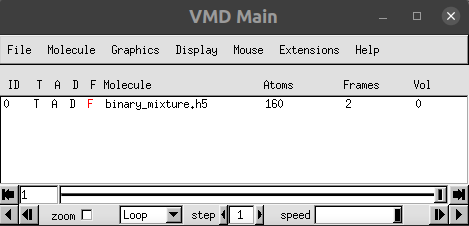
- 配置展示的模型和模型参数,比如这里使用了球棍模型:

- 查看最终展示效果:

总结概要
VMD是一个分子动力学模拟领域常用的可视化软件,hdf5是量子化学领域常用的一个二进制文件存储格式,本文通过介绍VMD-h5mdplugin这个插件的安装和使用方法,进一步演示了如何在VMD上直接展示hdf5格式文件的分子构象。
版权声明
本文首发链接为:https://www.cnblogs.com/dechinphy/p/vmd-hdf5.html
作者ID:DechinPhy
更多原著文章请参考:https://www.cnblogs.com/dechinphy/
打赏专用链接:https://www.cnblogs.com/dechinphy/gallery/image/379634.html
腾讯云专栏同步:https://cloud.tencent.com/developer/column/91958
VMD可视化hdf5格式的分子坐标文件的更多相关文章
- 在VMD上可视化hdf5格式的分子轨迹文件
技术背景 在处理分子动力学模拟的数据时,不可避免的会遇到众多的大轨迹文件.因此以什么样的格式来存储这些庞大的轨迹数据,也是一个在分子动力学模拟软件设计初期就应该妥善考虑的问题.现有的比较常见的方式,大 ...
- caffe上使用hdf5格式文件以及回归(regression)问题
最近用caffe做了一下regression问题,先用data layer中的data,float_data试了一下,data用来存放图片,float_data存放regression的values, ...
- tiff/tfw, jpg/jpgw坐标文件的格式(6个参数)
tiff/tfw, jpg/jpgw坐标文件的格式(6个参数) 0.100-0.13999904400510 以上每行对应的含义: 1 地图单元中的一个象素在X方向上的X分辨率尺度. 2 平移量. 3 ...
- gis空间分析案例_坐标文件高斯投影变换地理处理工具
gis空间分析案例_坐标文件投影变换地理处理工具 商务科技合作:向日葵,135—4855__4328,xiexiaokui#qq.com 功能: 对文件进行投影变换 特点: 1. 地理处理工具,可以与 ...
- Java用ZIP格式压缩和解压缩文件
转载:java jdk实例宝典 感觉讲的非常好就转载在这保存! java.util.zip包实现了Zip格式相关的类库,使用格式zip格式压缩和解压缩文件的时候,须要导入该包. 使用zipoutput ...
- Python生成PASCAL VOC格式的xml标注文件
Python生成PASCAL VOC格式的xml标注文件 PASCAL VOC数据集的标注文件是xml格式的.对于py-faster-rcnn,通常以下示例的字段是合适的: <annotatio ...
- Python3 Pandas的DataFrame格式数据写入excle文件、json、html、剪贴板、数据库
Python3 Pandas的DataFrame格式数据写入excle文件.json.html.剪贴板.数据库 一.DataFrame格式数据 Pandas是Python下一个开源数据分析的库,它提供 ...
- [转]【流媒體】H264—MP4格式及在MP4文件中提取H264的SPS、PPS及码流
[流媒體]H264—MP4格式及在MP4文件中提取H264的SPS.PPS及码流 SkySeraph Apr 1st 2012 Email:skyseraph00@163.com 一.MP4格式基本 ...
- 导入数据任务(id:373985)异常, 错误信息:解析导入文件错误,请检查导入文件内容,仅支持导入json格式数据及excel文件
小程序导入,别人导出的数据库json文件,错误信息如下: 导入数据库失败, Error: Poll error, 导入数据任务(id:373985)异常,错误信息:解析导入文件错误,请检查导入文件内容 ...
随机推荐
- B. 2194: 快速傅立叶之二解题报告
$$\begin{eqnarray}&c[k] = \sum_{i}^{n}a[i]b[i-k] \\&c[k] = \sum_{i}^{n}a[n-i]b[i-k] (倒序保存a) ...
- IIS托管Asp.net Core及Abp VNext
默认方式安装IIS后,从官方网站下载IIS模块 https://dotnet.microsoft.com/download/dotnet-core/3.1 2个都需要安装 安装后,新建网站指向发布的磁 ...
- try catch处理流的异常
1.try catch处理异常 try{} catch(Exception e){} finally{ 必然执行的代码,一般是释放资源 } 2.流使用try catch处理异常 其中,变量作用域只在当 ...
- NLP与深度学习(四)Transformer模型
1. Transformer模型 在Attention机制被提出后的第3年,2017年又有一篇影响力巨大的论文由Google提出,它就是著名的Attention Is All You Need[1]. ...
- ClickOnce手动更新
if (ApplicationDeployment.IsNetworkDeployed == true) { ApplicationDeploy ...
- WPF 过渡效果
http://blog.csdn.net/lhx527099095/article/details/8005095 先上张效果图看看 如果不如您的法眼 可以移步了 或者有更好的效果 可以留言给我 废话 ...
- 论文解读(SimCLR)《A Simple Framework for Contrastive Learning of Visual Representations》
1 题目 <A Simple Framework for Contrastive Learning of Visual Representations> 作者: Ting Chen, Si ...
- Elasticsearch(ES)的滚动搜索与批量操作
1. 概述 今天我们来聊一下Elasticsearch(ES)的滚动搜索与批量操作. 2. Elasticsearch(ES)的滚动搜索 2.1 概述 滚动搜索我们经常能够用到,例如:推荐列表,此类 ...
- python继承细节
不要子类化内置类型 内置类型(由C语言编写)不会调用用户定义的类覆盖的特殊方法. 例如,子类化dict作为测验: class DoppeDict(dict): def __setitem__(self ...
- P5494-[模板]线段树分裂
正题 题目链接:https://www.luogu.com.cn/problem/P5494 题目大意 给出一个可重集合要求支持 将集合\(p\)中在\([l,r]\)的数放到一个新的集合中 将集合\ ...