
Spring Security Resource Server的使用
Spring Security Resource Server的使用
一、背景
在前一节我们学习了 Spring Authorization Server的使用,此处我们简单的记录下 Spring 资源服务器的使用。
二、需求
资源服务器提供2个资源 ,userInfo 和 hello。
userInfo:资源是受保护的资源,需要user.userInfo权限才可以访问。
hello:资源是公开资源,不要权限即可访问。
三、分析
1、如何验证资源服务器中访问的令牌是有效的?
此处只考虑JWT的令牌。
令牌是授权服务器颁发的,且进行了签名操作,因此资源服务器对令牌的验证,就需要授权服务器的JWK信息,此处可以配置JwtDecoder来实现,并且填写好jwk set uri。
2、令牌是从请求中那个地方来的?
令牌可以从请求的 request header或者request query param中获取,因此就需要配置 BearerTokenResolver来实现。
3、令牌中的权限字段,默认会加上SCOPE_前缀,想去掉如何操作。
配置JwtAuthenticationConverter对象。
4、如果像向JWT的claim中增加值如何操作?
通过 JwtDecoder#setClaimSetConverter来操作。此处也可以实现删除claim的中内容。
5、如何验证JWT是否合法?
通过 JwtDecoder#setJwtValidator方法来操作。
6、如何设置从授权服务器获取JWK的超时时间?
通过 JwkSetUriJwtDecoderBuilder#restOperations来操作。
四、资源服务器认证流程
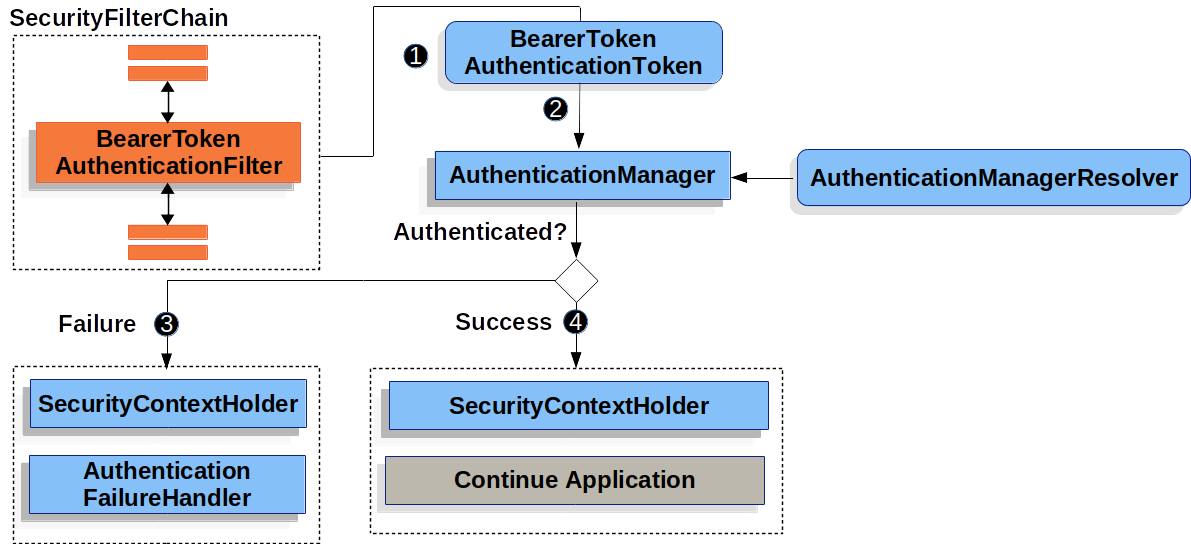
1、请求会被 BearerTokenAuthenticationFilter 拦截器拦截,并从中解析出token出来,如果没有解析出来,则由下一个过滤器处理。解析出来则构建一个BearerTokenAuthenticationToken对象。
2、下一步将HttpServletRequest传递给AuthenticationManagerResolver对象,由它选择出AuthenticationManager对象,然后将 BearerTokenAuthenticationToken传递给AuthenticationManager对象进行认证。AuthenticationManager对象的实现,取决于我们的token对象是JWT还是opaque token
3、验证失败
- 清空
SecurityContextHolder对象。 - 交由
AuthenticationFailureHandler对象处理。
4、验证成功
- 将
Authentication对象设置到SecurityContextHolder中。 - 交由余下的过滤器继续处理。
五、实现资源服务器
1、引入jar包
<dependency>

     <groupId>org.springframework.boot</groupId>

     <artifactId>spring-boot-starter-oauth2-resource-server</artifactId>

 </dependency>

 <dependency>

     <groupId>org.springframework.boot</groupId>

     <artifactId>spring-boot-starter-security</artifactId>

 </dependency>
2、资源服务器配置
package com.huan.study.resource.config;

import org.slf4j.Logger;

import org.slf4j.LoggerFactory;

import org.springframework.beans.factory.annotation.Autowired;

import org.springframework.boot.web.client.RestTemplateBuilder;

import org.springframework.http.HttpHeaders;

import org.springframework.http.MediaType;

import org.springframework.security.config.annotation.web.builders.HttpSecurity;

import org.springframework.security.config.annotation.web.configuration.EnableWebSecurity;

import org.springframework.security.config.annotation.web.configuration.WebSecurityConfigurerAdapter;

import org.springframework.security.oauth2.core.OAuth2AuthenticationException;

import org.springframework.security.oauth2.core.OAuth2Error;

import org.springframework.security.oauth2.jwt.JwtDecoder;

import org.springframework.security.oauth2.jwt.JwtValidators;

import org.springframework.security.oauth2.jwt.MappedJwtClaimSetConverter;

import org.springframework.security.oauth2.jwt.NimbusJwtDecoder;

import org.springframework.security.oauth2.server.resource.authentication.JwtAuthenticationConverter;

import org.springframework.security.oauth2.server.resource.authentication.JwtGrantedAuthoritiesConverter;

import org.springframework.security.oauth2.server.resource.web.BearerTokenResolver;

import org.springframework.security.oauth2.server.resource.web.DefaultBearerTokenResolver;

import java.nio.charset.StandardCharsets;

import java.time.Duration;

import java.util.Collections;

/**

 * 资源服务器配置

 *

 * @author huan.fu 2021/7/16 - 下午5:00

 */

@EnableWebSecurity

public class ResourceServerConfig extends WebSecurityConfigurerAdapter {

    private static final Logger log = LoggerFactory.getLogger(ResourceServerConfig.class);

    @Autowired

    private RestTemplateBuilder restTemplateBuilder;

    @Override

    protected void configure(HttpSecurity http) throws Exception {

        http.authorizeRequests()

                // 对于 userInfo 这个api 需要 s

                .antMatchers("/userInfo").access("hasAuthority('user.userInfo')")

                .and()

                .oauth2ResourceServer()

                .jwt()

                // 解码jwt信息

                .decoder(jwtDecoder(restTemplateBuilder))

                // 将jwt信息转换成JwtAuthenticationToken对象

                .jwtAuthenticationConverter(jwtAuthenticationConverter())

                .and()

                // 从request请求那个地方中获取 token

                .bearerTokenResolver(bearerTokenResolver())

                // 此时是认证失败

                .authenticationEntryPoint((request, response, exception) -> {

                    // oauth2 认证失败导致的,还有一种可能是非oauth2认证失败导致的,比如没有传递token,但是访问受权限保护的方法

                    if (exception instanceof OAuth2AuthenticationException) {

                        OAuth2AuthenticationException oAuth2AuthenticationException = (OAuth2AuthenticationException) exception;

                        OAuth2Error error = oAuth2AuthenticationException.getError();

                        log.info("认证失败,异常类型:[{}],异常:[{}]", exception.getClass().getName(), error);

                    }

                    response.setCharacterEncoding(StandardCharsets.UTF_8.name());

                    response.setContentType(MediaType.APPLICATION_JSON.toString());

                    response.getWriter().write("{\"code\":-3,\"message\":\"您无权限访问\"}");

                })

                // 认证成功后,无权限访问

                .accessDeniedHandler((request, response, exception) -> {

                    log.info("您无权限访问,异常类型:[{}]", exception.getClass().getName());

                    response.setCharacterEncoding(StandardCharsets.UTF_8.name());

                    response.setContentType(MediaType.APPLICATION_JSON.toString());

                    response.getWriter().write("{\"code\":-4,\"message\":\"您无权限访问\"}");

                })

        ;

    }

    /**

     * 从request请求中那个地方获取到token

     */

    private BearerTokenResolver bearerTokenResolver() {

        DefaultBearerTokenResolver bearerTokenResolver = new DefaultBearerTokenResolver();

        // 设置请求头的参数,即从这个请求头中获取到token

        bearerTokenResolver.setBearerTokenHeaderName(HttpHeaders.AUTHORIZATION);

        bearerTokenResolver.setAllowFormEncodedBodyParameter(false);

        // 是否可以从uri请求参数中获取token

        bearerTokenResolver.setAllowUriQueryParameter(false);

        return bearerTokenResolver;

    }

    /**

     * 从 JWT 的 scope 中获取的权限 取消 SCOPE_ 的前缀

     * 设置从 jwt claim 中那个字段获取权限

     * 如果需要同多个字段中获取权限或者是通过url请求获取的权限,则需要自己提供jwtAuthenticationConverter()这个方法的实现

     *

     * @return JwtAuthenticationConverter

     */

    private JwtAuthenticationConverter jwtAuthenticationConverter() {

        JwtAuthenticationConverter converter = new JwtAuthenticationConverter();

        JwtGrantedAuthoritiesConverter authoritiesConverter = new JwtGrantedAuthoritiesConverter();

        // 去掉 SCOPE_ 的前缀

        authoritiesConverter.setAuthorityPrefix("");

        // 从jwt claim 中那个字段获取权限,模式是从 scope 或 scp 字段中获取

        authoritiesConverter.setAuthoritiesClaimName("scope");

        converter.setJwtGrantedAuthoritiesConverter(authoritiesConverter);

        return converter;

    }

    /**

     * jwt 的解码器

     *

     * @return JwtDecoder

     */

    public JwtDecoder jwtDecoder(RestTemplateBuilder builder) {

        // 授权服务器 jwk 的信息

        NimbusJwtDecoder decoder = NimbusJwtDecoder.withJwkSetUri("http://qq.com:8080/oauth2/jwks")

                // 设置获取 jwk 信息的超时时间

                .restOperations(

                        builder.setReadTimeout(Duration.ofSeconds(3))

                                .setConnectTimeout(Duration.ofSeconds(3))

                                .build()

                )

                .build();

        // 对jwt进行校验

        decoder.setJwtValidator(JwtValidators.createDefault());

        // 对 jwt 的 claim 中增加值

        decoder.setClaimSetConverter(

                MappedJwtClaimSetConverter.withDefaults(Collections.singletonMap("为claim中增加key", custom -> "值"))

        );

        return decoder;

    }

}
此处对资源服务器进行了很多的自定义操作,因此配置比较长。
3、资源
1个受保护的资源和一个非受保护的资源。
@RestController

public class UserController {

    /**

     * 这个是受保护的资源,需要 user.userInfo 权限才可以访问。

     */

    @GetMapping("userInfo")

    public Map<String, Object> userInfo(@AuthenticationPrincipal Jwt principal) {

        return new HashMap<String, Object>(4) {{

            put("principal", principal);

            put("userInfo", "获取用户信息");

        }};

    }

    /**

     * 非受权限保护的资源

     */

    @GetMapping("hello")

    public String hello() {

        return "hello 不要需要受保护的资源";

    }

}
六、测试
1、访问非受保护的资源
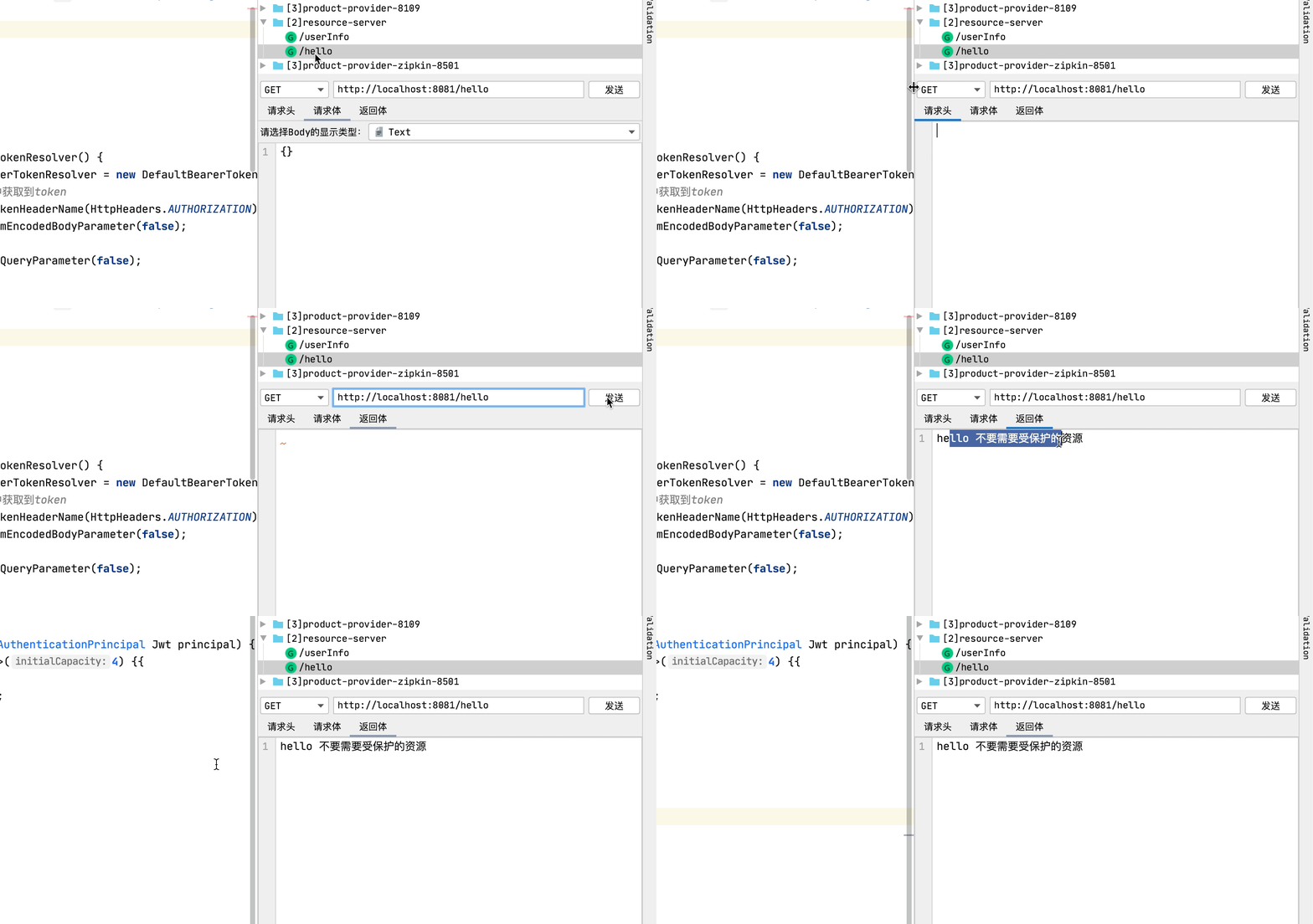
可以看到不需要token即可以访问。
2、访问受保护的资源
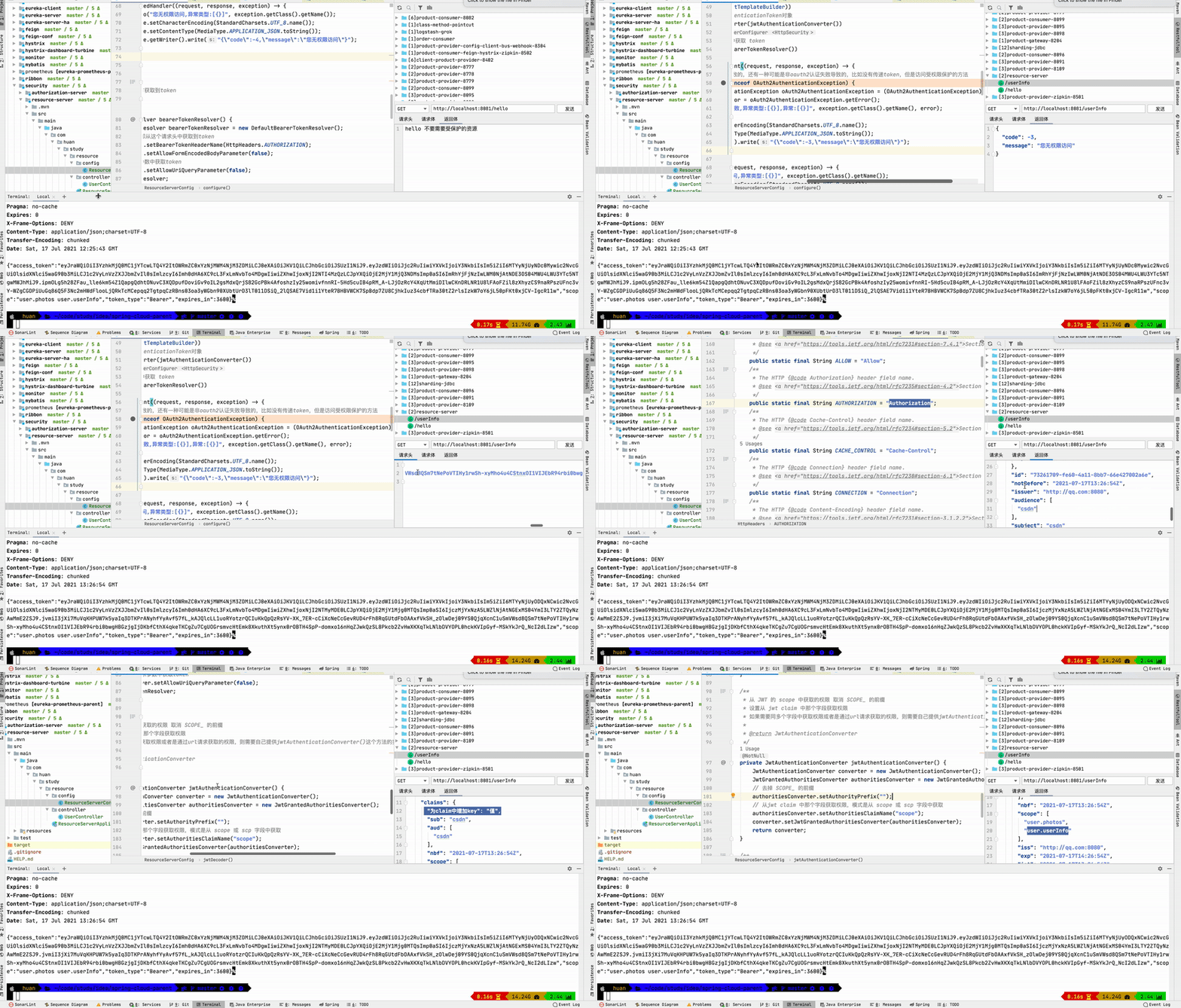
1、先不用token访问,可以看到是拒绝的。
2、然后通过授权服务器生成一个token,授权服务器为上一篇文章使用的授权服务器。
3、通过token访问后,可以返现可以访问资源了。
4、演示可以向token的claim中增加值。
5、演示 userInfo 是需要user.userInfo权限的。
七、完整代码
1、授权服务器,为上篇文章中的授权服务器
https://gitee.com/huan1993/spring-cloud-parent/tree/master/security/authorization-server
2、资源服务器
https://gitee.com/huan1993/spring-cloud-parent/tree/master/security/resource-server
八、参考文档
1、https://docs.spring.io/spring-security/site/docs/current/reference/html5/#oauth2resourceserver
Spring Security Resource Server的使用的更多相关文章
- Spring Cloud(6.3):搭建OAuth2 Resource Server
配置web.xml 添加spring-cloud-starter-security,spring-security-oauth2-autoconfigure2个依赖. <!-- Spring c ...
- 【OAuth2.0】Spring Security OAuth2.0篇之初识
不吐不快 因为项目需求开始接触OAuth2.0授权协议.断断续续接触了有两周左右的时间.不得不吐槽的,依然是自己的学习习惯问题,总是着急想了解一切,习惯性地钻牛角尖去理解小的细节,而不是从宏观上去掌握 ...
- REST Security with JWT using Java and Spring Security
Security Security is the enemy of convenience, and vice versa. This statement is true for any system ...
- Cross Site Request Forgery (CSRF)--spring security -转
http://docs.spring.io/spring-security/site/docs/3.2.0.CI-SNAPSHOT/reference/html/csrf.html 13. Cross ...
- Spring security oauth2最简单入门环境搭建
关于OAuth2的一些简介,见我的上篇blog:http://wwwcomy.iteye.com/blog/2229889 PS:貌似内容太水直接被鹳狸猿干沉.. 友情提示 学习曲线:spring+s ...
- Spring Security Oauth2系列(一)
前言: 关于oauth2,其实是一个规范,本文重点讲解spring对他进行的实现,如果你还不清楚授权服务器,资源服务器,认证授权等基础概念,可以移步理解OAuth 2.0 - 阮一峰,这是一篇对于oa ...
- spring security oauth2
https://connect.qq.com/manage.html#/ http://wiki.connect.qq.com/%E7%BD%91%E7%AB%99%E5%BA%94%E7%94%A8 ...
- Spring Security OAuth2 SSO
通常公司肯定不止一个系统,每个系统都需要进行认证和权限控制,不可能每个每个系统都自己去写,这个时候需要把登录单独提出来 登录和授权是统一的 业务系统该怎么写还怎么写 最近学习了一下Spring Sec ...
- Spring Security OAuth 2.0
续·前一篇<OAuth 2.0> OAuth 2.0 Provider 实现 在OAuth 2.0中,provider角色事实上是把授权服务和资源服务分开,有时候它们也可能在同一个应用中, ...
随机推荐
- Intel® QAT加速卡之编程demo框架
QAT demo流程框架 示例一: 代码路径:qat1.5.l.1.13.0-19\quickassist\lookaside\access_layer\src\sample_code\functio ...
- k8s核心资源之Pod概念&入门使用讲解(三)
目录 1. k8s核心资源之Pod 1.1 什么是Pod? 1.2 Pod如何管理多个容器? 1.3 Pod网络 1.4 Pod存储 1.5 Pod工作方式 1.5.1 自主式Pod 1.5.2 控制 ...
- Android Studio找不到设备,解决adb占用问题的方法
使用as连接真机时,找不到设备,发现 D:\Android\Sdk\platform-tools\adb.exe start-server' failed -- run manually if nec ...
- python matplotlib.pyplot 条形图详解
python matplotlib.pyplot 条形图详解 一.创建直方图 可以用bar函数来创建直方图 然后用show函数显示直方图 比如: import matplotlib.pyplot as ...
- Spring Cloud Hystrix 学习(三)请求合并
什么是请求合并?我们先来看两张图: 上方的两张图中,第二张可以看出服务端只执行了一次响应,这就是请求合并.客户端新增的请求合并模块,内部存在一个等待的时间窗口,将一定时间段内满足条件的请求进行合并,以 ...
- jenkins+requests+pytest+allure持续集成
环境搭建参考:https://www.jianshu.com/p/fc39030d057f 总体流程:
- 鸿蒙内核源码分析(消息队列篇) | 进程间如何异步传递大数据 | 百篇博客分析OpenHarmony源码 | v33.02
百篇博客系列篇.本篇为: v33.xx 鸿蒙内核源码分析(消息队列篇) | 进程间如何异步传递大数据 | 51.c.h .o 进程通讯相关篇为: v26.xx 鸿蒙内核源码分析(自旋锁篇) | 自旋锁 ...
- 【.NET 与树莓派】气压传感器——BMP180
BMP180 是一款数字气压计传感器,实际可读出温度和气压值.此模块使用 IIC(i2c)协议.模块体积很小,比老周的大拇指指甲还小:也很便宜,一般是长这样的.螺丝孔只开一个,也有开两个孔的. 这货基 ...
- Excel备忘录
1. 导入文本文件(.txt) 2. 排序 3. 批量填充空白 选定区域,Ctrl+G,定位,空值. 输入内容,Ctrl+Enter. 4. 清除无法修改的背景色. 5. 身份证号 数字精度为15位, ...
- IP多播与NAT地址转化
IP多播 与单播相比,在一对多的通信中,多播可以大大减少网络资源.在互联网上进行多播就叫做IP多播,IP多播所传送的分组需要使用IP多播地址. 如果某台主机想要收到某个特定的多播分组,那么怎样才能是这 ...