
JQuery Datatable用法
原文出处:http://sgyyz.blog.51cto.com/5069360/1408251
目标:
使用jQuery Datatable构造数据列表,并且增加或者隐藏相应的列,已达到数据显示要求。同时,jQuery Datatable强大的功能支持:排序,分页,搜索等。
Query Datatable能良好支持数据完全加载到本地后构建数据列表,排序、分页、搜索等功能就会自带,不需要我们去关心,在此主要说明通过后台动态的加载数据,已达到在大数据面前提高效率的效果。
1. 通过后台进行分页
2. 通过后台进行排序
3. 通过后台进行搜索
具体使用方法:
1. 首先构建我们需要的数据列表,以及页面显示表格。
|
1
2
3
4
5
6
7
8
9
10
|
<table id="datatable" width="100%" border="1"> <thead> <tr> <th>ID</th> <th>First Name</th> <th>Last Name</th> <th>Operation</th> </tr> <thead></table> |
表格建立很简单,只需用将表格定义好id,以及表头定义好。
2. 我们可以到jQuery Datatable官网上去下载一份jQuery和jQuery Datatable的js库。https://datatables.net/examples/server_side/simple.html。

3. 然后将这两个文件引入到页面文件中,注意jQuery的库一定要在最前面,因为页面加载的有顺序,保证后面的扩展库能使用到jQuery。同时,请下载最新的jQuery Datatable版本,因为它的写法以及参数更加简洁,功能更加多。【注:参数区别会在附录写明】
4. 编写前端代码。我们是要使用Ajax对后台进行请求,因此在配置datatable时,加上{"serverSide":true},已保证页面在加载时就请求后台,以及每次对datatable进行操作时也是请求后台。【附:如果想加上一点加载效果,可以增加{"processing": true}】。
配置请求后台URL:{"ajax": "load"}
5. 配置数据返回对应具体的列。在Datatable中,属性columns用来配置具体列的属性,包括对应的数据列名,是否支持搜索,是否显示,是否支持排序等。根据上述页面配置我们具体的列。如下:
|
1
2
3
4
5
6
7
8
9
10
11
12
|
$(document).ready(function() { $("#datatable").dataTable({ "processing": true, "serverSide": true, "ajax" : "load", "columns": [ {"data": "id", "bSortable": false}, {"data": "firstName"}, {"data": "lastName"} ] }); }); |
第一列ID,设置为不允许排序。也可以增加不显示:{"visible": false}
6. 此时对于后台而言,返回的数据一定要按照一定规范。如下:
|
1
2
3
4
5
6
7
8
9
10
11
12
13
14
15
16
17
18
19
20
21
22
23
|
{ "draw": 2, "recordsTotal": 11, "recordsFiltered": 11, "data": [ { "id": 1, "firstName": "Troy", "lastName": "Young" }, { "id": 2, "firstName": "Alice", "lastName": "LL" }, { "id": 3, "firstName": "Larry", "lastName": "Bird" } // ...... ]} |
参数解释:
draw:表示请求次数
recordsTotal:总记录数
recordsFiltered:过滤后的总记录数
data:具体的数据对象数组
7. 最后一列Operation,我们没有任何数据,用来放我们的通用操作列,如修改链接。 Datatable提供了自定义列columnDefs属性,他的值为数组对象,具体代码如下:
|
1
2
3
4
5
6
7
8
9
10
11
12
13
14
15
16
17
18
19
20
21
|
$(document).ready(function() { $("#datatable").dataTable({ "processing": true, "serverSide": true, "ajax" : "load", "columns": [ {"data": "id", "bSortable": false}, {"data": "firstName"}, {"data": "lastName"} ], "columnDefs": [ { "targets": [3], "data": "id", "render": function(data, type, full) { return "<a href='/update?id=" + data + "'>Update</a>"; } } ] }); }); |
targets:表示具体需要操作的目标列,下标从0开始
data: 表示我们需要的某一列数据对应的属性名
render:返回需要显示的内容。在此我们可以修改列中样式,增加具体内容
属性列表:data, 之前属性定义中对应的属性值
type, 未知
full, 全部数据值可以通过属性列名获取
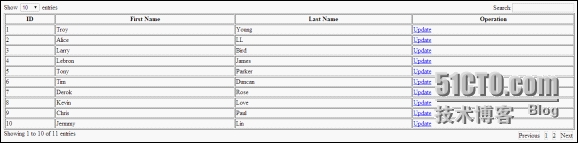
具体效果图如下:
8. 我们再来看具体如何进行搜索、排序、分页。由于只是为了做demo,因此使用最简单的JDBC+Servlet的方式来实现。
首先我们来看,datatable给我们在做请求是传递过来的参数:
|
1
2
3
4
5
6
7
8
9
10
11
12
13
14
15
16
17
18
19
20
21
22
23
24
25
26
27
28
|
=============== Request Paramerters ================draw: 1columns[0][data]: idcolumns[0][name]:columns[0][searchable]: truecolumns[0][orderable]: truecolumns[0][search][value]:columns[0][search][regex]: falsecolumns[1][data]: firstNamecolumns[1][name]:columns[1][searchable]: truecolumns[1][orderable]: truecolumns[1][search][value]:columns[1][search][regex]: falsecolumns[2][data]: lastNamecolumns[2][name]:columns[2][searchable]: truecolumns[2][orderable]: truecolumns[2][search][value]:columns[2][search][regex]: falseorder[0][column]: 0order[0][dir]: ascstart: 0length: 10search[value]:search[regex]: false_: 1399345292266=============== Request Paramerters ================ |
其中有用的数据就是start, length, order[0][column], order[0][dir], search[value]。具体参数意思:
start: 其实记录位置
length:页面显示数量
order[0][column]: 因为是二维的表格,因此只有一维需要排序,所以order的下标未0. 该属性表示第几列需要排序。
order[0][dir]: 排序方式ASC | DESC
search[value]: search输入框中的值
9. 这几个属性对后台进行排序、搜索、分页很有用。【注:因为是二维表,并且只是对一列进行操作,自然就是一维的,所以order下标始终为1。以后操作二维表有待研究。】
首先来看包含这几个功能的DAO层代码:
|
1
2
3
4
5
6
7
8
9
10
11
12
13
14
15
16
17
18
19
20
21
22
23
24
25
26
27
28
29
30
31
32
33
34
35
36
37
38
39
40
41
42
43
44
45
46
47
48
49
50
51
52
53
54
55
56
57
58
|
/** * This method includes the search, sort, pagination * @param pageSize * @param startRecord * @param sortColumn * @param sortDir * @param searchValue * @return */ public List<Data> loadDataList(int pageSize, int startRecord, String sortColumn, String sortDir, String searchValue) { List<Data> results = new ArrayList<Data>(); StringBuffer sql = new StringBuffer("select * from data "); // for search String[] columnsName = { "id", "firstName", "lastName" }; boolean searchAble = false; if(searchValue != null && !"".equals(searchValue)) { sql.append("where "); searchAble = true; } if(searchAble) { StringBuffer temp = new StringBuffer(); for (String column : columnsName) { temp.append( column+ " like '%" + searchValue + "%' or "); } sql.append(temp.substring(0, temp.length() - 3)); } // for order sql.append(" order by " + sortColumn + " " + sortDir + " "); // for pagination sql.append(" limit ?,? "); System.out.println(sql.toString()); try { stmt = conn.prepareStatement(sql.toString()); stmt.setInt(1, startRecord); stmt.setInt(2, startRecord + pageSize); ResultSet rs = stmt.executeQuery(); while(rs.next()) { Data data = new Data(); data.setId(rs.getInt(1)); data.setFirstName(rs.getString(2)); data.setLastName(rs.getString(3)); results.add(data); } } catch (SQLException e) { // TODO Auto-generated catch block e.printStackTrace(); } return results; } |
DAO层中,统计代码类似,只用把分页和排序的SQL拼接去掉即可。
我们需要将我们的数据转换成JSON返回给前端,并且还要显示总记录数,过滤后总记录数。因此我们需要一个统一的类来将这些数据进行封装。由于在一个系统中不只一个对象需要展示到前端,因此统一的做一个为datatable封装类。
|
1
2
3
4
5
6
7
8
9
10
11
12
13
14
15
16
|
package com.web.vo;import java.util.List;/** * This VO used to generate the JSON data for data table, so please ensure that the attribute name is correct. * If you want to define the fields name by yourself, please visit: https://datatables.net * @author troyyang * * @param <T> */public class DataVO<T> { private int draw; // Client request times private int recordsTotal; // Total records number without conditions private int recordsFiltered; // Total records number with conditions private List<T> data; // The data we should display on the page // getter and setter method} |
万事具备,只欠前后交互代码。此处使用最简单的servlet。
|
1
2
3
4
5
6
7
8
9
10
11
12
13
14
15
16
17
18
19
20
21
22
23
24
25
26
27
28
29
30
31
32
33
34
35
36
|
// For pagination int pageSize = 10; int startRecord = 0; String size = request.getParameter("length"); if (!"".equals(size) && size != null) { pageSize = Integer.parseInt(size); } String currentRecord = request.getParameter("start"); if (!"".equals(currentRecord) && currentRecord != null) { startRecord = Integer.parseInt(currentRecord); } // For sortable String sortOrder = request.getParameter("order[0][column]"); String sortDir = request.getParameter("order[0][dir]"); System.out.println("sortOrder: " + sortOrder); System.out.println("sortDir: " + sortDir); // For search String searchValue = request.getParameter("search[value]"); int count = 0; List<Data> results = new ArrayList<Data>(); count = dao.count(); results = dao.loadDataList(pageSize, startRecord, columnsName[Integer.parseInt(sortOrder)], sortDir, searchValue); DataVO<Data> result = new DataVO<Data>(); result.setDraw(Integer.parseInt(request.getParameter("draw") == null ? "0" : request.getParameter("draw")) + 1); result.setData(results); result.setRecordsTotal(count); result.setRecordsFiltered(count); Gson gson = new Gson(); String output = gson.toJson(result); System.out.println("Output JSON: \n" + output); PrintWriter out = response.getWriter(); out.write(output); out.flush(); out.close(); |
附录:
使用jQuery Datatable1.10之前的版本,必须使用sAjaxSource进行请求,但是请求数据和现在版本的请求数据不同,如下:
|
1
2
3
4
5
6
7
8
9
10
11
12
13
14
15
16
17
18
19
20
21
22
23
24
25
26
27
28
29
30
31
32
33
|
=============== Request Paramerters ================sEcho: 1iColumns: 4sColumns: ,,,iDisplayStart: 0iDisplayLength: 10mDataProp_0: idsSearch_0:bRegex_0: falsebSearchable_0: truebSortable_0: falsemDataProp_1: firstNamesSearch_1:bRegex_1: falsebSearchable_1: truebSortable_1: truemDataProp_2: lastNamesSearch_2:bRegex_2: falsebSearchable_2: truebSortable_2: truemDataProp_3: idsSearch_3:bRegex_3: falsebSearchable_3: truebSortable_3: truesSearch:bRegex: falseiSortCol_0: 0sSortDir_0: asciSortingCols: 1_: 1399515247114=============== Request Paramerters ================ |
JQuery Datatable用法的更多相关文章
- jquery dataTable汉化(插件形式)
1.jquery dataTable.js 官网:http://datatables.net/ 中文:http://dt.thxopen.com/ 2.汉化提示信息(放到xx.js中,引入即可) 注: ...
- jQuery $.each用法[转]
jQuery $.each用法 以下内容非原创,来自百度文库http://wenku.baidu.com/view/4796b6145f0e7cd18425368e.html 通过它,你可以遍历对象. ...
- jQuery 事件用法详解
jQuery 事件用法详解 目录 简介 实现原理 事件操作 绑定事件 解除事件 触发事件 事件委托 事件操作进阶 阻止默认事件 阻止事件传播 阻止事件向后执行 命名空间 自定义事件 事件队列 jque ...
- jquery cookie 用法
jquery cookie 用法 $.cookie("name","value","options") 当不设置options时,此coo ...
- [转]Jquery Ajax用法
原文地址:http://www.php100.com/html/program/jquery/2013/0905/6004.html jQuery学习之jQuery Ajax用法详解 来源: 时间 ...
- JQuery datepicker 用法
JQuery datepicker 用法 jQuery UI很强大,其中的日期选择插件Datepicker是一个配置灵活的插件,我们可以自定义其展示方式,包括日期格式.语言.限制选择日期范围.添加 ...
- jquery.cookie用法详细解析,封装的操作cookie的库有jquery.cookie.js
jquery.cookie用法详细解析 需要注意存入cookie前,对数据进行序列化, 得到后在反序列化: 熟练运用:JSON.stringify();和JSON.parse(): 通常分为如下几个步 ...
- JQuery Datatable Ajax请求两次问题的解决
最近一个项目中使用JQuery Datatable,用起来比较方便,但在测试过程中,发现当条件改变时,有时查询结果中的数据不正确. 使用FireBug跟踪时,发现在使用Ajax请求时,点击一次搜索按钮 ...
- jquery.post用法补充(type设置问题)
jquery.post用法 http://blog.csdn.net/itmyhome1990/article/details/12578275 当使用ajax获取data数据的时候,直接data.f ...
随机推荐
- Pycharm 自定义快捷键
之前使用 Eclipse 时,快捷键 Ctrl + M 会使当前窗口最大化.这里配置 PyCharm 具有相同功能. 1)打开 File > Settings > Keymap 2 ...
- apt-get update 更新 ubuntu时出现Hash sum mismatch的原因及解决方法
$ sudo apt-get update ...... Hit http://mirrors.163.com trusty/main Sources ...
- 阿里云轻量应用服务器debian8.9用apache多端口搭建多站点
前几天想要再搭个网站玩玩,就用阿里的服务器,apache本地搭建站点和服务器相差不多,然而却踩了大坑,差点耗死在这儿. 先进入apache这个目录,有如下文件夹: 打开ports.conf, 添加 ...
- Java调度池的实现原理
下图是关于ScheduledFutureTask的继承体系结构图.
- 实现多个标签页之间通信的几种方法(sharedworker)
效果图.gif prologue 之前在网上看到一个面试题:如何实现浏览器中多个标签页之间的通信.我目前想到的方法有三种:使用websocket协议.通过localstorage.以及使用html ...
- Log4.Net 在Winform、MVC、ashx程序里的使用,ashx程序里使用异步
最近做一个双11活动的,是一套相关的H5页面.本来以为难度不大,但是做下来几天还是遇到些问题.就总结一下吧,还是有收获的. 1.在H5页面中,有一个遮罩层,还是挺有意思的.直接用div+css控制遮罩 ...
- eclipes个人配置
设置字体:https://jingyan.baidu.com/article/f96699bb9442f3894e3c1b15.html general->appearance->colo ...
- 使用 Travis CI 实现项目的持续测试反馈
[篇幅较长,10.15前补充完毕,如希望探索可直接移步Github仓库:https://github.com/SivilTaram/CITest] 在编程课中,我们可以使用成熟的在线评测系统来测试某个 ...
- 记第一次多用户在Git提交代码
今天第一次进行了多用户(其实就两人)在自建Git服务器提交代码. 先记录碰到的问题:首先是本地提交代码时,进行了add,commit后,在push时碰到服务器故障,待设置好服务器后,再push时,却p ...
- rbac权限+中间件
1.权限组件rbac 1.什么是权限 1 项目与应用 2 什么是权限? 一个包含正则表达式url就是一个权限 who what how ---------->True or Flase 2.版本 ...