
搭建阿里云lnmp环境 (centos7+nginx+MySQL5.7.9+PHP7)
阿里云一台服务器出现问题!
我估计是一键安装包环境的原因,所以打算重新搭建下环境!
首先,当然是先做好快照!安全第一!
对系统盘做更换系统操作,装上纯净版的centos。
装好后,进入系统
一、挂载数据盘
df -h
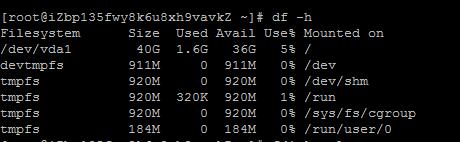
只有系统盘了,挂载上原来的数据盘
fdisk -l
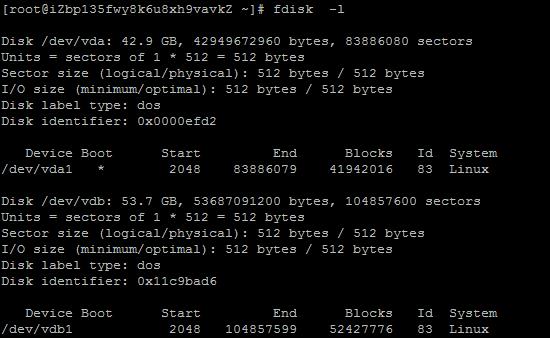
看到数据盘了/dev/vdb1
挂载上这个数据盘,
mkdir /data0

mount /dev/vdb1 /data0
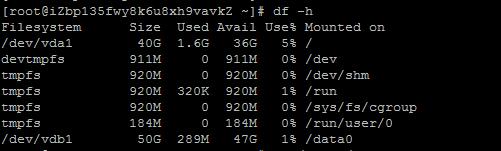
然后写入分区:
echo '/dev/vdb1 /data0 ext4 defaults 0 0' >> /etc/fstab
不写入分区表,重启后又要挂载的。
怎么知道分区类型是ext4,用这个命令:
df -hT
好的成功了!
二、安装nginx
首先更新系统软件
# yum update
安装nginx
1.安装nginx源
# yum localinstall http://nginx.org/packages/centos/7/noarch/RPMS/nginx-release-centos-7-0.el7.ngx.noarch.rpm
2.安装nginx
# yum install nginx
3.启动nginx
# service nginx start
Redirecting to /bin/systemctl start nginx.service
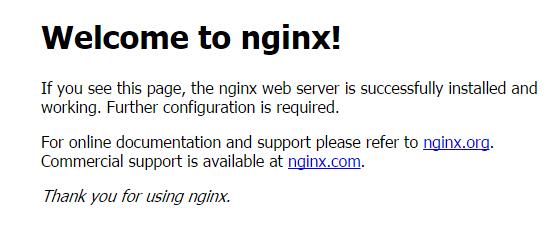
4.访问http://你的ip/
如果成功安装会出来nginx默认的欢迎界面
三、安装MySQL5.7.*
1.安装mysql源
# yum localinstall http://dev.mysql.com/get/mysql57-community-release-el7-7.noarch.rpm
2.安装mysql
# yum install mysql-community-server
3.安装mysql的开发包,以后会有用
# yum install mysql-community-devel
4.启动mysql
# service mysqld start
Redirecting to /bin/systemctl start mysqld.service
5.查看mysql启动状态
# service mysqld status
出现pid
证明启动成功
6.获取mysql默认生成的密码
# grep 'temporary password' /var/log/mysqld.log

选中的就是密码。
7.换成自己的密码
# mysql -uroot -p
Enter password:输入上页的密码,进入mysql
8. 更换密码
mysql> ALTER USER 'root'@'localhost' IDENTIFIED BY 'MyNewPasdfs4!';
这个密码一定要足够复杂,不然会不让你改,提示密码不合法;
9.退出mysql并试用下新密码
mysql> quit;

mysql -uroot -p
确认密码正确
四、编译安装php7.0.0
1.下载php7源码包
# cd /root & wget -O php7.tar.gz http://cn2.php.net/get/php-7.0.1.tar.gz/from/this/mirror
2.解压源码包
# tar -xvf php7.tar.gz
3.进入目录
# cd php-7.0.
4.安装php依赖包
# yum install libxml2 libxml2-devel openssl openssl-devel bzip2 bzip2-devel libcurl libcurl-devel libjpeg libjpeg-devel libpng libpng-devel freetype freetype-devel gmp gmp-devel libmcrypt libmcrypt-devel readline readline-devel libxslt libxslt-devel
5.编译配置,这里如果上一步的某些依赖包没有安装好,就会遇到很多configure error,我们一一解决,安装上相关软件开发包就可以
# ./configure \

--prefix=/usr/local/php \

--with-config-file-path=/etc \

--enable-fpm \

--with-fpm-user=nginx  \

--with-fpm-group=nginx \

--enable-inline-optimization \

--disable-debug \

--disable-rpath \

--enable-shared  \

--enable-soap \

--with-libxml-dir \

--with-xmlrpc \

--with-openssl \

--with-mcrypt \

--with-mhash \

--with-pcre-regex \

--with-sqlite3 \

--with-zlib \

--enable-bcmath \

--with-iconv \

--with-bz2 \

--enable-calendar \

--with-curl \

--with-cdb \

--enable-dom \

--enable-exif \

--enable-fileinfo \

--enable-filter \

--with-pcre-dir \

--enable-ftp \

--with-gd \

--with-openssl-dir \

--with-jpeg-dir \

--with-png-dir \

--with-zlib-dir  \

--with-freetype-dir \

--enable-gd-native-ttf \

--enable-gd-jis-conv \

--with-gettext \

--with-gmp \

--with-mhash \

--enable-json \

--enable-mbstring \

--enable-mbregex \

--enable-mbregex-backtrack \

--with-libmbfl \

--with-onig \

--enable-pdo \

--with-mysqli=mysqlnd \

--with-pdo-mysql=mysqlnd \

--with-zlib-dir \

--with-pdo-sqlite \

--with-readline \

--enable-session \

--enable-shmop \

--enable-simplexml \

--enable-sockets  \

--enable-sysvmsg \

--enable-sysvsem \

--enable-sysvshm \

--enable-wddx \

--with-libxml-dir \

--with-xsl \

--enable-zip \

--enable-mysqlnd-compression-support \

--with-pear \

--enable-opcache
configure error:
1.configure: error: xml2-config not found. Please check your libxml2 installation.
解决:
# yum install libxml2 libxml2-devel
2.configure: error: Cannot find OpenSSL's <evp.h>
解决:
# yum install openssl openssl-devel
3.configure: error: Please reinstall the BZip2 distribution
解决:
# yum install bzip2 bzip2-devel
4.configure: error: Please reinstall the libcurl distribution - easy.h should be in <curl-dir>/include/curl/
解决:
# yum install libcurl libcurl-devel
5.If configure fails try --with-webp-dir=<DIR> configure: error: jpeglib.h not found.
解决:
# yum install libjpeg libjpeg-devel
6.If configure fails try --with-webp-dir=<DIR>
checking for jpeg_read_header in -ljpeg... yes
configure: error: png.h not found.
解决:
# yum install libpng libpng-devel
7.If configure fails try --with-webp-dir=<DIR>
checking for jpeg_read_header in -ljpeg... yes
checking for png_write_image in -lpng... yes
If configure fails try --with-xpm-dir=<DIR>
configure: error: freetype-config not found.
解决:
# yum install freetype freetype-devel
8.configure: error: Unable to locate gmp.h
解决:
# yum install gmp gmp-devel
9.configure: error: mcrypt.h not found. Please reinstall libmcrypt.
解决:
# yum install libmcrypt libmcrypt-devel
10.configure: error: Please reinstall readline - I cannot find readline.h
解决:
# yum install readline readline-devel
11.configure: error: xslt-config not found. Please reinstall the libxslt >= 1.1.0 distribution
解决:
# yum install libxslt libxslt-devel
6.编译与安装
# make && make install
这里要make好久,要耐心一下
7.添加 PHP 命令到环境变量
# vim /etc/profile
在末尾加入
PATH=$PATH:/usr/local/php/bin
export PATH
要使改动立即生效执行
# source /etc/profile
查看环境变量
# echo $PATH
查看php版本
# php -v
8.配置php-fpm
# cp php.ini-production /etc/php.ini
# cp /usr/local/php/etc/php-fpm.conf.default /usr/local/php/etc/php-fpm.conf

# cp /usr/local/php/etc/php-fpm.d/www.conf.default /usr/local/php/etc/php-fpm.d/www.conf
# cp sapi/fpm/init.d.php-fpm /etc/init.d/php-fpm
# chmod +x /etc/init.d/php-fpm
9.启动php-fpm
# /etc/init.d/php-fpm start
五、配置nginx虚拟机,绑定域名
# vim /etc/nginx/conf.d/php7.aaa.com.conf
这里可以把php7.aaa.com.conf改成自己的域名
把下面的内容复制到php7.aaa.com.conf里
server{

    listen ;

    server_name  php7.aaa.com;

    root /var/www/html/php7.aaa.com; # 该项要修改为你准备存放相关网页的路径

    location / {

        index  index.php index.html index.htm;

         #如果请求既不是一个文件,也不是一个目录,则执行一下重写规则

         if (!-e $request_filename)

         {

            #地址作为将参数rewrite到index.php上。

            rewrite ^/(.*)$ /index.php/$;

            #若是子目录则使用下面这句,将subdir改成目录名称即可。

            #rewrite ^/subdir/(.*)$ /subdir/index.php/$;

         }

    }

    #proxy the php scripts to php-fpm

    location ~ \.php {

            include fastcgi_params;

            ##pathinfo支持start

            #定义变量 $path_info ,用于存放pathinfo信息

            set $path_info "";

            #定义变量 $real_script_name,用于存放真实地址

            set $real_script_name $fastcgi_script_name;

            #如果地址与引号内的正则表达式匹配

            if ($fastcgi_script_name ~ "^(.+?\.php)(/.+)$") {

                    #将文件地址赋值给变量 $real_script_name

                    set $real_script_name $;

                    #将文件地址后的参数赋值给变量 $path_info

                    set $path_info $;

            }

            #配置fastcgi的一些参数

            fastcgi_param SCRIPT_FILENAME $document_root$real_script_name;

            fastcgi_param SCRIPT_NAME $real_script_name;

            fastcgi_param PATH_INFO $path_info;

            ###pathinfo支持end

        fastcgi_intercept_errors on;

        fastcgi_pass   127.0.0.1:;

    }

    location ^~ /data/runtime {

    return ;

    }

    location ^~ /application {

    return ;

    }

    location ^~ /simplewind {

    return ;

    }

}
2.重启nginx
# service nginx reload
3.
# vim /var/www/html/php7.aaa.com/index.php
把下面的代码复制到这个文件 里
<?php
phpinfo();
4.查看访问http://php7.aaa.com
ok!收工!
搭建阿里云lnmp环境 (centos7+nginx+MySQL5.7.9+PHP7)的更多相关文章
- Centos7 搭建lnmp环境 (centos7+nginx+MySQL5.7.9+PHP7)
阿里云一台服务器出现问题! 我估计是一键安装包环境的原因,所以打算重新搭建下环境! 首先,当然是先做好快照!安全第一! 对系统盘做更换系统操作,装上纯净版的centos. 装好后,进入系统 一.挂载数 ...
- 阿里云LNMP环境安装
文档里有一键部署LNMP环境和手动搭建LNMP环境您看下 镜像部署 LNMP 环境:https://help.aliyun.com/document_detail/25427.html?spm=517 ...
- 手动编译部署LNMP环境(CentOS7.5+Nginx-1.18.0+MySQL-5.7.30+PHP-7.4.14)
在平时运维工作中,经常需要用到LNMP应用框架.LNMP环境是指在Linux系统下,由Nginx + MySQL + PHP组成的网站服务器架构. 可参考前面的文章: 如何在CentOS 7上搭建LA ...
- nodejs + nginx + ECS阿里云服务器环境设置
nodejs + nginx + ECS阿里云服务器环境设置 部署 nodejs ECS 基于 CentOS7.2 详细步骤:click 部署 nginx 安装 添加Nginx软件库: [root@l ...
- 亚马逊AWS EC2云实例AMI安装LNMP环境(1)——Nginx安装
概括:这里选择亚马逊EC2的Linux AMI实例,该Linux服务器是亚马逊预配置的Linux环境,内置多个YUM源,属于亚马逊首推的稳定Linux服务器.默认登录用户名为ec2-user,执行ro ...
- [阿里云部署] Ubuntu+Flask+Nginx+uWSGI+Mysql搭建阿里云Web服务器
部署地址:123.56.7.181 Ubuntu+Flask+Nginx+uWSGI+Mysql搭建阿里云Web服务器 这个标题就比之前的"ECS服务器配置Web环境的全过程及参考资料&qu ...
- 阿里云web环境安装
阿里云web环境一键安装 云盘:链接: https://pan.baidu.com/s/1i4LPwtZ 密码: caph 包含安装包及PDF教程
- Docker搭建wordpress博客环境(Centos7)
Docker搭建wordpress博客环境(Centos7) 升级系统 yum -y update 设置docker库 sudo yum install -y yum-utils sudo yum-c ...
- 阿里云ECS 环境是CentOS 7.3安装mongodb3
CentOS安装mongodb https://www.cnblogs.com/zddzz/p/10069912.html CentOS安装mongodb 我的是阿里云ECS 环境是CentOS 7. ...
随机推荐
- 【Linux】Linux系统硬链接和软链接
在linux系统中有种文件是链接文件,可以为解决文件的共享使用.链接的方式可以分为两种,一种是硬链接(Hard Link),另一种是软链接或者也称为符号链接(Symbolic Link). 查看lin ...
- Nginx反向代理后端多节点下故障节点的排除思路
仔细想来,其实是个非常简单的问题:开发和运维觉得两个后端节点跑起来压力太大了,就扩充了两个新的后端节点上去,这一加就出问题了,访问时页面间歇性丢失,这尼玛什么情况...想了半天没思路,查了Nginx的 ...
- codeforces #541 F Asya And Kittens(并查集+输出路径)
F. Asya And Kittens Asya loves animals very much. Recently, she purchased nn kittens, enumerated the ...
- php记录
PHP反射API 反向代理使用https协议,后台Tomcat使用http,redirect时使用错误协议的解决办法 多记几个导出公式,手中有粮,心中不慌 哈哈哈 PhpExcel中文帮助手册 Php ...
- Building Microservices with Spring Boot and Apache Thrift. Part 1 with servlet
https://dzone.com/articles/building-microservices-spring In the modern world of microservices it's i ...
- bzoj4198 荷马史诗
关于Huffman树: 大概就是那样子吧. 是这样的:对于最多只能有k个叉的树,我们想要使得∑val(i) * deep(i)最大 那么我们补0后建立小根堆即可. 最典型例题:合并果子. 然后是这个: ...
- C# Winfom 中ListBox的简单用法
https://www.cnblogs.com/xielong/p/6744805.html Winform控件ListBox的用法 1.如何添加listBox的值 this.listBox1.Ite ...
- 若要允许 GET 请求,请将 JsonRequestBehavior 设置为 AllowGet
http://www.cnblogs.com/Steven7Gao/archive/2012/06/13/2547905.html 若要允许 GET 请求,请将 JsonRequestBehavior ...
- python面向对象中的一些特殊__方法__
1. __doc__ 表示类的描述信息 class Foo: """ 描述类信息""" def func(self): pass print ...
- Codeforce 867 C. Ordering Pizza (思维题)
C. Ordering Pizza It's another Start[c]up finals, and that means there is pizza to order for the ons ...