
Spring 使用介绍(十一)—— Spring事件
一、简介
spring事件是观察者设计模式的实现,主要有三个元素:
- 事件 spring事件由ApplicationEvent定义
- 监听者 由ApplicationListener定义
- 发布者 由ApplicationEventPublisher定义,而ApplicationContext继承自ApplicationEventPublisher
简单示例:
自定义事件
public class TestEvent extends ApplicationEvent {

    private String message;

    public TestEvent(Object source) {

        this(source, "default message");

    }

    public TestEvent(Object source, String msg) {

        super(source);

        this.message = msg;

    }

    public String getMessage() {

        return message;

    }

}
监听者
@Component

public class TestListener implements ApplicationListener<ApplicationEvent>  {

    @Override

    public void onApplicationEvent(ApplicationEvent event) {

        if (event instanceof TestEvent) {

        System.out.println(((TestEvent)event).getMessage());

        }

    }

}
XML配置
<context:component-scan base-package="cn.matt.event"/>
测试
public class EventTest {

    @Test

    public void testCustomEvent() {

        ApplicationContext context = new ClassPathXmlApplicationContext("classpath:spring-context.xml");

        context.publishEvent(new TestEvent("", "hello matt"));

    }

}
补充:
定义监听者时,可通过泛型指定监听事件类型,因此,上例监听者可定义如下:
@Component

public class TestListener implements ApplicationListener<TestEvent> {

    @Override

    public void onApplicationEvent(TestEvent event) {

        System.out.println(((TestEvent) event).getMessage());

    }

}
二、spring容器事件
spring为容器启动各阶段定义了相关事件,实现如图:
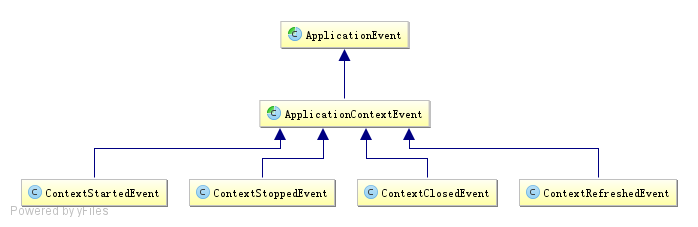
事件说明:
- ContextStartedEvent:ApplicationContext启动后触发的事件(调用start方法)
- ContextStoppedEvent:ApplicationContext停止后触发的事件(调用stop方法)
- ContextClosedEvent:ApplicationContext关闭后触发的事件
- ContextRefreshedEvent:ApplicationContext初始化或刷新完成后触发的事件(容器初始化(如bean的实例化、依赖注入)完成后调用)
使用示例
@Component

public class ApplicationStartUpListener implements ApplicationListener<ContextRefreshedEvent> {

    @Override

    public void onApplicationEvent(ContextRefreshedEvent event) {

        System.out.println("spring context inited");

    }

}
三、事件的执行机制
spring事件的执行机制默认使用单线程同步执行,异步执行可使用@Async注解实现,示例如下(新用户注册):
定义事件
public class RegisterEvent extends ApplicationEvent {

    public RegisterEvent(User user) {

        super(user);

    }

}
定义监听者
// 发生邮件
@Component

public class EmailRegisterListener implements ApplicationListener<RegisterEvent> {

    @Async

    public void onApplicationEvent(final RegisterEvent event) {

        System.out.println(Thread.currentThread().getId() + " **** 注册成功,发送确认邮件给:" + ((User)event.getSource()).getUsername());

    }

}
// 赠送积分

@Component

public class PointRegisterListener implements ApplicationListener<RegisterEvent> {

    @Async

    public void onApplicationEvent(final RegisterEvent event) {

        System.out.println(Thread.currentThread().getId() + " **** 注册成功,赠送积分给:" + ((User)event.getSource()).getUsername());

    }

}
// 赠送大礼包

@Component

public class PresentRegisterListener implements ApplicationListener<RegisterEvent> {

    @Async

    public void onApplicationEvent(final RegisterEvent event) {

        System.out.println(Thread.currentThread().getId() + " **** 注册成功,赠送大礼包给:" + ((User)event.getSource()).getUsername());

    }

}
用户类与业务类
public class User implements Serializable {

    private String username;

    private String password;

    public User(String username, String password) {

        this.username = username;

        this.password = password;

    }

    public String getUsername() {

        return username;

    }

}
@Service

public class RegisterService {

    @Autowired

    private ApplicationContext applicationContext;

    public void register(String username, String password) {

        System.out.println(username + "注册成功!");

        publishRegisterEvent(new User(username, password));

    }

    private void publishRegisterEvent(User user) {

        applicationContext.publishEvent(new RegisterEvent(user));

    }

}
配置
<context:component-scan base-package="com.sishuok"/>

<!-- 任务调度器 -->

<task:scheduler id="scheduler" pool-size="10"/>

<!-- 任务执行器 -->

<task:executor id="executor" pool-size="10"/>

<!--开启注解调度支持 @Async @Scheduled-->

<task:annotation-driven executor="executor" scheduler="scheduler" proxy-target-class="true"/>
测试
@RunWith(SpringJUnit4ClassRunner.class)

@ContextConfiguration(locations={"classpath:spring-config-register.xml"})

public class RegisterServiceIT {

    @Autowired

    private RegisterService registerService;

    @Test

    public void testRegister() {

         registerService.register("long", "123");

    }

}

// 输出:

// long注册成功!

// 15 **** 注册成功,发送确认邮件给:long

// 17 **** 注册成功,赠送积分给:long

// 18 **** 注册成功,赠送大礼包给:long
参考:
Spring进阶之路(2)-ApplicationContext容器以及事件机制
Spring 使用介绍(十一)—— Spring事件的更多相关文章
- [转帖]微服务框架Spring Cloud介绍 Part1: 使用事件和消息队列实现分布式事务
微服务框架Spring Cloud介绍 Part1: 使用事件和消息队列实现分布式事务 http://skaka.me/blog/2016/04/21/springcloud1/ APR 21ST, ...
- 黑马_13 Spring Boot:01.spring boot 介绍&&02.spring boot 入门
13 Spring Boot: 01.spring boot 介绍&&02.spring boot 入门 04.spring boot 配置文件 SpringBoot基础 1.1 原有 ...
- 微服务框架Spring Cloud介绍 Part1: 使用事件和消息队列实现分布式事务
http://skaka.me/blog/2016/04/21/springcloud1/ 不同于单一架构应用(Monolith), 分布式环境下, 进行事务操作将变得困难, 因为分布式环境通常会有多 ...
- 黑马_13 Spring Boot:05.spring boot 整合其他技术
13 Spring Boot: 01.spring boot 介绍&&02.spring boot 入门 04.spring boot 配置文件 05.spring boot 整合其他 ...
- 黑马_13 Spring Boot:04.spring boot 配置文件
13 Spring Boot: 01.spring boot 介绍&&02.spring boot 入门 04.spring boot 配置文件 05.spring boot 整合其他 ...
- [翻译]Spring框架参考文档(V4.3.3)-第二章Spring框架介绍 2.1 2.2 翻译--2.3待继续
英文链接:http://docs.spring.io/spring-framework/docs/current/spring-framework-reference/html/overview.ht ...
- 一、Spring Cloud介绍
springcloud 介绍 研究了一段时间spring boot了准备向spirng cloud进发,公司架构和项目也全面拥抱了Spring Cloud.在使用了一段时间后发现Spring Clou ...
- Spring入门介绍
概述 下载地址:https://repo.spring.io/release/org/springframework/spring/ spring是开源的轻量级框架 spring核心的主要两部分 AO ...
- Spring Cloud第十一篇 | 分布式配置中心高可用
本文是Spring Cloud专栏的第十一篇文章,了解前十篇文章内容有助于更好的理解本文: Spring Cloud第一篇 | Spring Cloud前言及其常用组件介绍概览 Spring Cl ...
随机推荐
- https证书过期问题
这个是以前配置证书的文章,同时更新证书的有效的一篇文章 最近网站的https证书过期了,造成无法对外提供服务,怀疑是当时配置的自动更新没有起作用. 然后去后台更新https证书,却遇到了问题,使用的具 ...
- Dapper简易教程(翻译自Github上StackExchange/Dapper)
本文源自:https://github.com/cnxy/Dapper-zh-cn 本博客作者与Github上作者(cnxy)实为同一个作者.由于笔者翻译水平有限,文本中错误难免,欢迎指正! 本文翻译 ...
- bootstrapValidator表单验证插件
bootstrapValidator——一个很好用的表单验证插件,再也不用手写验证规则啦! bootstrapValidator官方文档:http://bootstrapvalidator.votin ...
- tornado设置cookie并加密
最近看看tornado,遇到了sso的东西,了解下如何设置cookie 1.基本cookie set_cookie 方法在用户的浏览中设置 cookie: get_cookie 方法在用户的浏览中获取 ...
- Python-0010-
题目: 判断101-200之间有多少素数,并输出所有素数. 程序分析: 判断素数的方法:用一个数分别去除2到sqrt(这个数),如果能被整除则表明次数不是素数,反之是素数.用else 可以进一步简化代 ...
- H5 19-序选择器下
19-序选择器下 我是项目 我是项目 我是项目 我是项目 我是项目 我是项目 我是项目 <!DOCTYPE html> <html lang="en"> & ...
- Comet OJ 热身赛(K题)principal(括号匹配问题+stack模拟)
principal 已经提交 已经通过 23.66% Total Submission:131 Total Accepted:31 题目描述 阿尔比恩王国潜伏着代号白鸽队''的一群间谍.在没有任务的时 ...
- 安装pandas时出现环境错误
在安装pandas时出现Could not install packages due to an EnvironmentErrorConsider using the `--user` option ...
- mysql之整合ssm多数据源配置
一,基于SSM框架的多数据源配置 1.创建DynamicDataSourceHolder用于持有当前线程中使用的数据源标识 public class DynamicDataSourceHolder { ...
- 多线程系列之四:Guarded Suspension 模式
一,什么是Guarded Suspension模式如果执行现在的处理会造成问题,就让执行处理的线程等待.这种模式通过让线程等待来保证实例的安全性 二,实现一个简单的线程间通信的例子 一个线程(Clie ...