
SAP S/4 HANA 1709 Fully Activated Appliance
SAP S4HANA 1709 Fully Activated Appliance:简单来说比IDES版本功能更加强大,内置三个集团,分别用于测试不同业务。内置官方的BP内容
安装需要500G SSD 256 G物理内存。
SAP公司从S/4 1610版本以后在官网下载页面已经不提供IDES系统下载,从而改为使用Fully Activated Appliance系统作为DEMO及测试环境,狭义来讲Fully Activated Appliance就是原来的IDES系统,它内部已经预置了Best Practices 数据,通常有四个集团用于测试,并且已配置完成所有Fiori APP、BI、SAP Lumira Designer、SAP Lumira Discovery、IBP、EWM/TM等组件。
S/4HANA 1709 FPS1 Fully-Activated Appliance installation
https://blogs.sap.com/2018/10/07/s4hana-1709-fps1-fully-activated-appliance-installation/comment-page-1/#comment-439133
In this blog we will cover installation of (1) SAP S/4HANA server only as shown in red rectangle above. The installation is based on file restore and is different from the standard installs using SWPM. After installation of S/4HANA server, you can follow same procedure to install (2) SAP NW JAVA/ADS on a separate server.
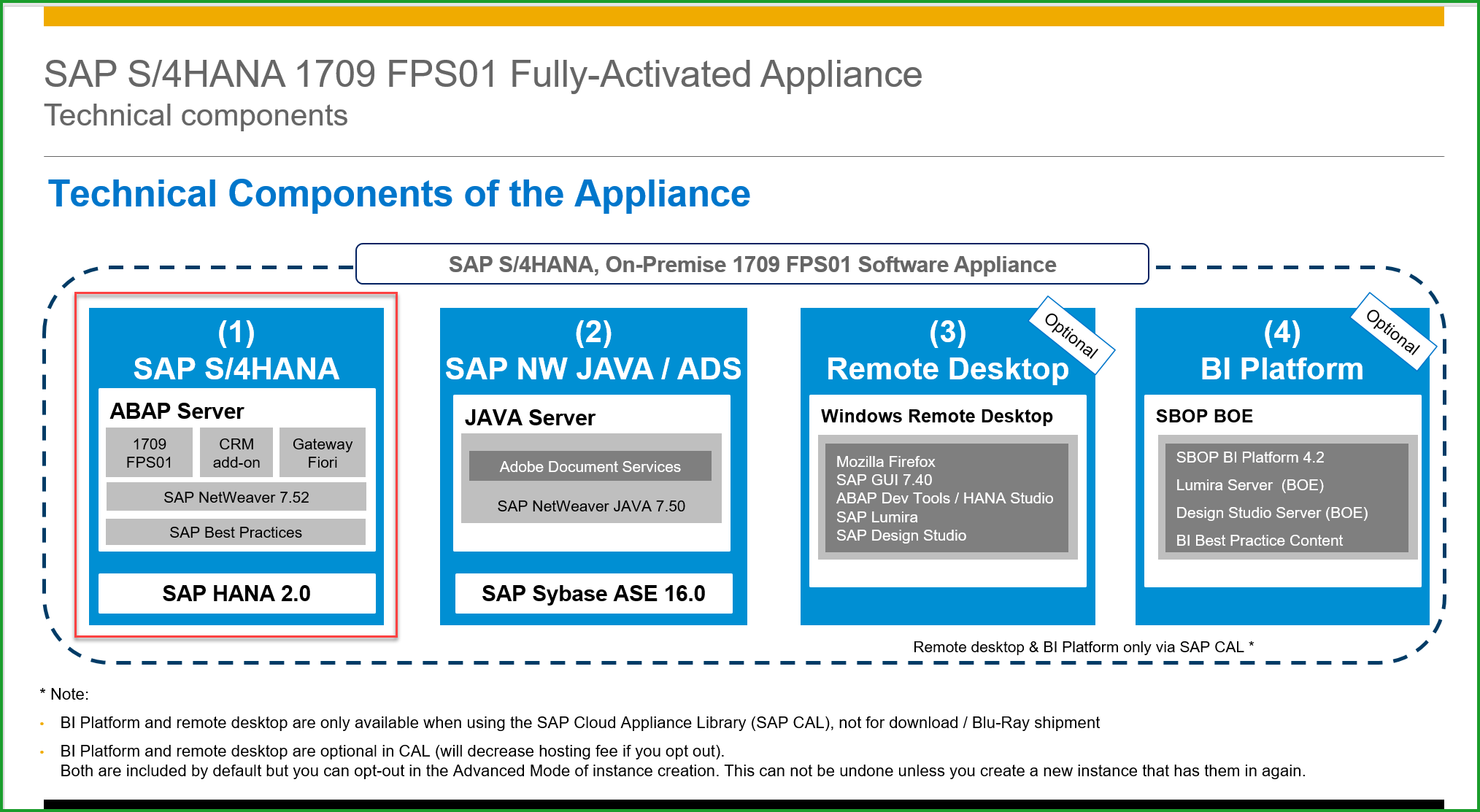
Please find below the main note for ordering the appliance:
2041140 – Order an SAP pre-assembled Best Practices software appliance (as partner or customer)
STEP1: Prepare Linux Server as below for for the appliance. The values in Used column below show the minimum size needed. For /sapmnt space needed is 50GB, /hana/data space – 260GB, /hana/log – 45GB. I have provided for /sapmedia – 120GB temporary separate mount that can be removed late.

The /etc/host file has entries below:

STEP2: Download files from Software Downloads=>Installation and Upgrades=>SAP S/4HANA=>1709=>S/4HANA FULLY-ACTIVATED APPLIANCE=>SAP S/4HANA 1709 FPS01 FA APPL and copy to temp folder. There are 32 files of total 120GB.
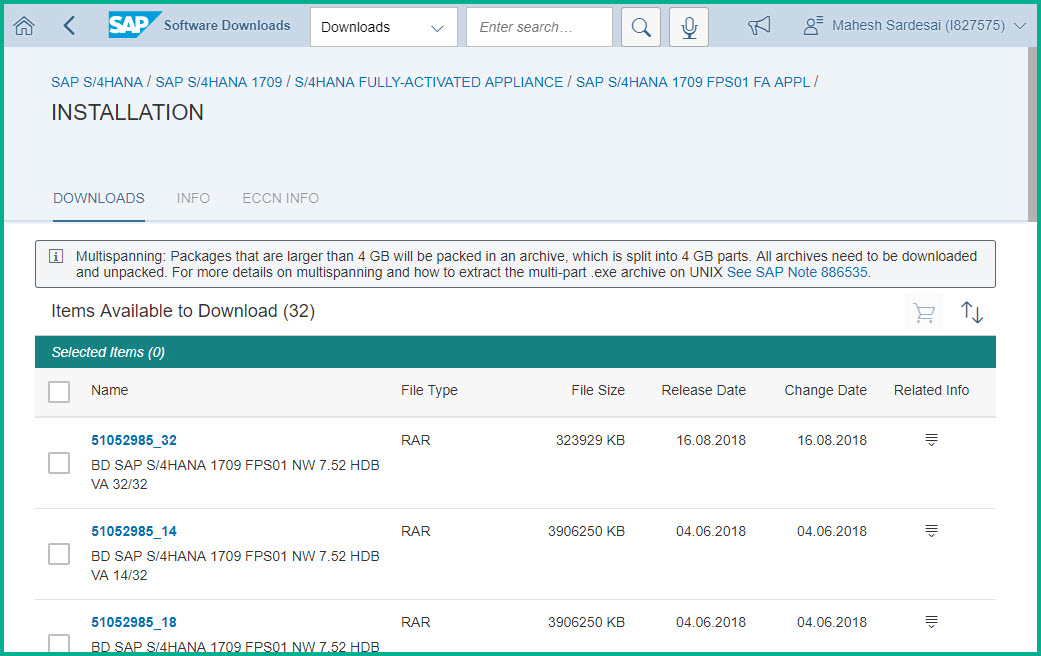
To save the double space needed for rar files and it’s extraction, the files 51052985_part01.exe to 51052985_part32.rar can be downloaded to /hana/data, extracted to /sapmedia and then rar files can be deleted from /hana/data after extraction.
STEP3: Extract files from /media (or /hana/data) to /sapmedia
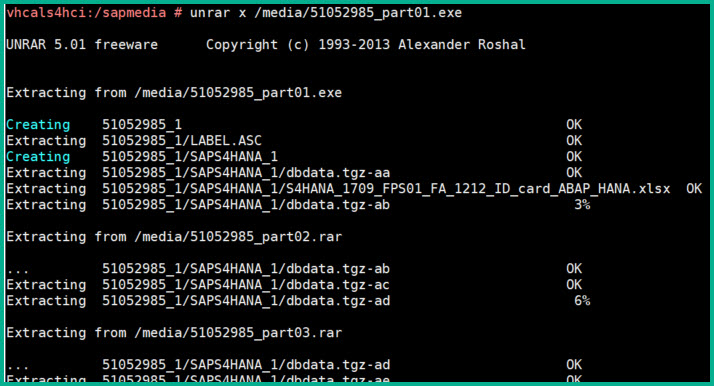
Allow approx 2 hours for extraction.
The entire 120GB is split into 3 parts one part for (1) S/4HANA DB, (2) S/4HANA APP, and (3)ADS server. We will install Standard system with DB and App, (1) and (2) are on same server. Please move all .tgz- files to /sapmedia
sid-hdb-s4h:/sapmnt/S4H/sapmedia # mv 51052985_?/SAPS4HANA_?/.tgz- .
In the next step we will extract the above *.tgz files but please note the directories size is as follows so you can provide ample space:
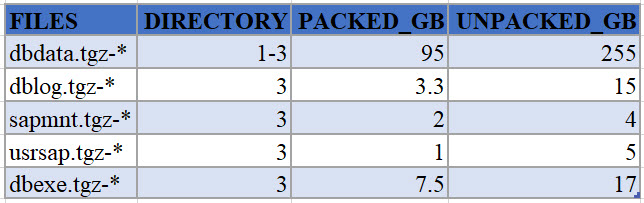
Please use command below to extract the database related archives:
vhcals4hci:/sapmedia# cat dblog.tgz-* | tar -zpxvf - -C /
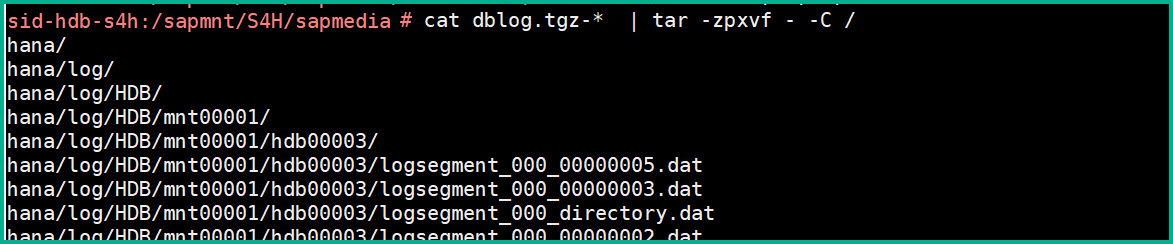
Similarly extract the remaining files:
hcals4hci:/sapmedia# cat dbexe.tgz-* | tar -zpxvf - -C /
vhcals4hci:/sapmedia# cat dbdata.tgz-* | tar -zpxvf - -C /
Below Application related archives may be extracted on a separate app server for distributed installation:
vhcals4hci:/sapmedia# cat sapmnt.tgz-* | tar -zpxvf - -C /
vhcals4hci:/sapmedia# cat usrsap.tgz-* | tar -zpxvf - -C /
STEP4: Download the file below and open the file in Internet Explorer to note passwords:
/sapmnt/S4H/sapmedia/51052985_1/SAPS4HANA_1/SAP_Software_Appliance.xml
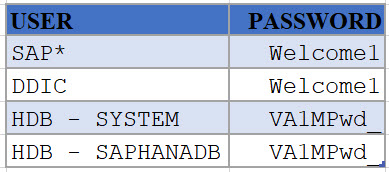
STEP5: Execute database specific steps as below
id-hdb-s4h: #/hana/shared/HDB/hdblcm/hdblcm --action=register_rename_system
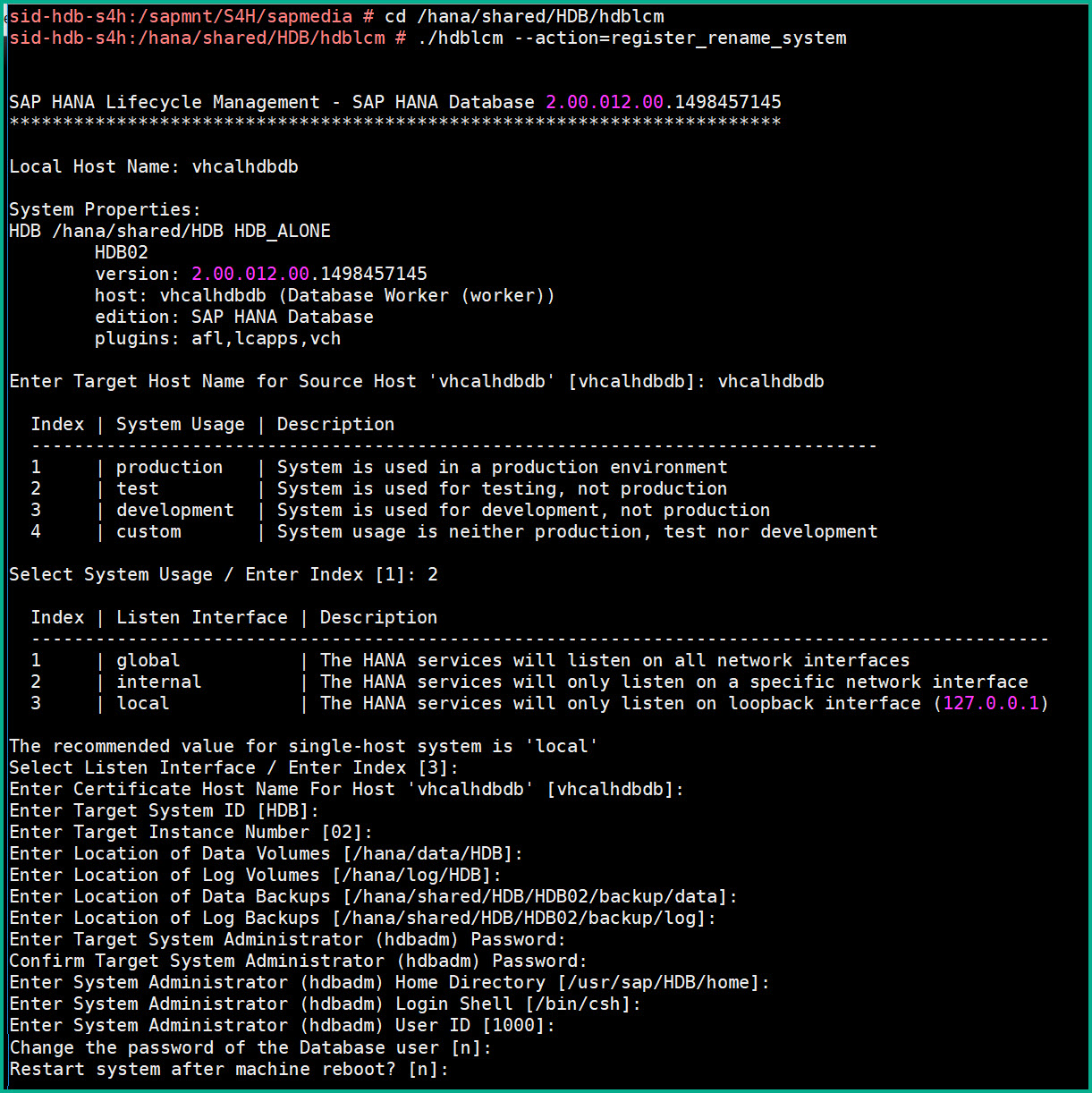
This should bring up the database processes as below
sid-hdb-s4h: #/usr/sap/hostctrl/exe/sapcontrol -nr 02 -function GetProcessList

STEP 6: Download Software Provisioning Manager and copy into /sapmedia folder.
Extract SWPM in folder /install. Use the SAPCAR already available to extract.
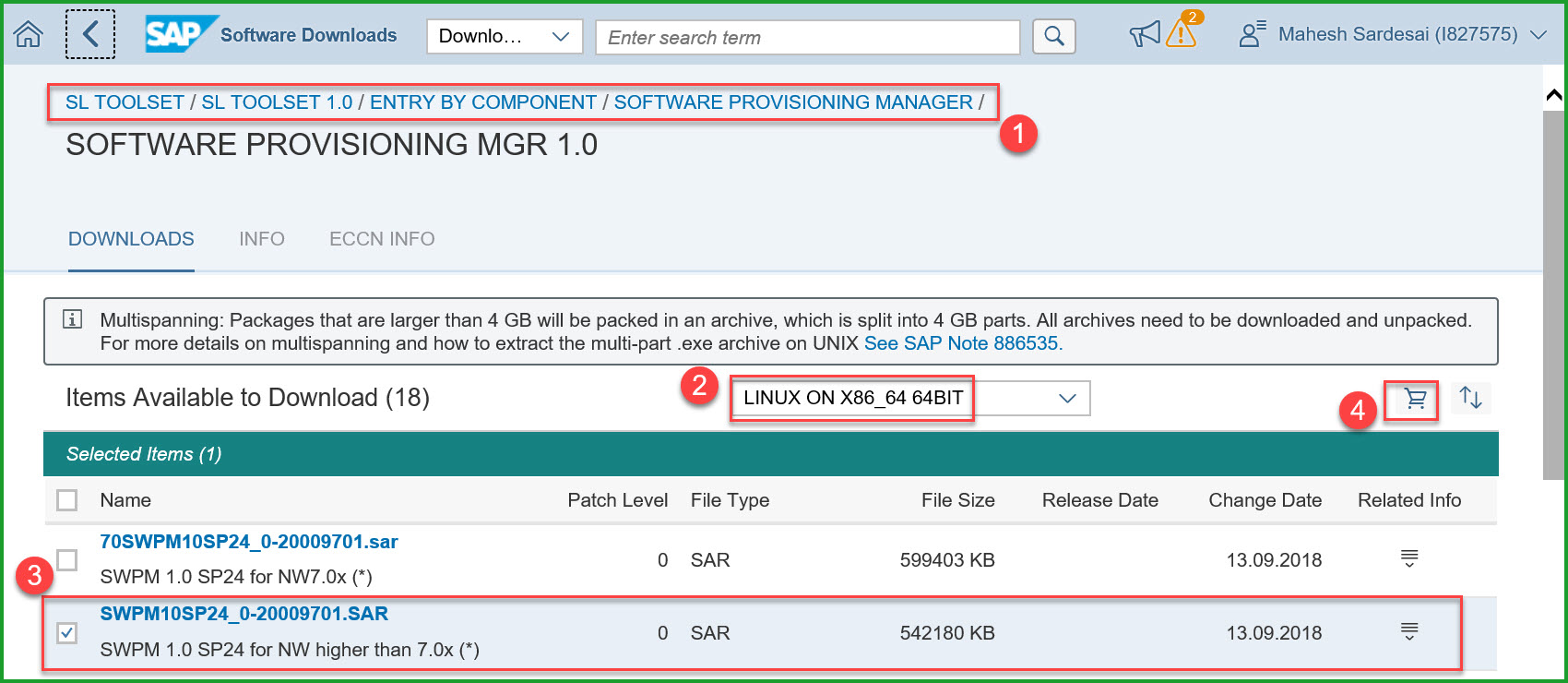
sid-hdb-s4h:/install #/sapmnt/S4H/exe/uc/linuxx86_64/SAPCAR -xvf /sapmedia/SWPM10SP24_0-20009701.SAR
STEP7: Rename instance using sapinst
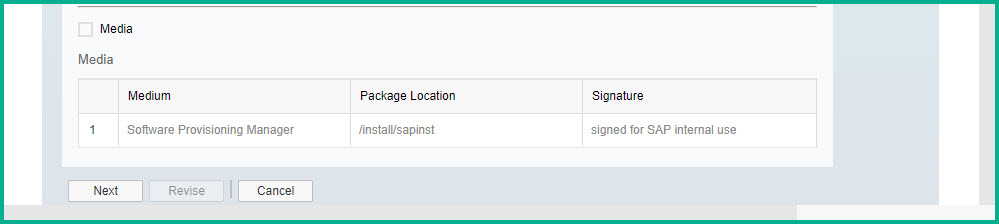
sid-hdb-s4h:/install # ./sapinst SAPINST_USE_HOSTNAME=vhcals4hci SAPINST_ACCEPT_INTERNAL_SIGNATURE=true SAPINST_SLP_MODE=false
Copy below URL into chrome browser to start sapinst rename process:
https://sid-hdb-s4h.dummy.nodomain:4237/sapinst/docs/index.html
In SAPINST select System Rename => Standard System => SAP System Rename
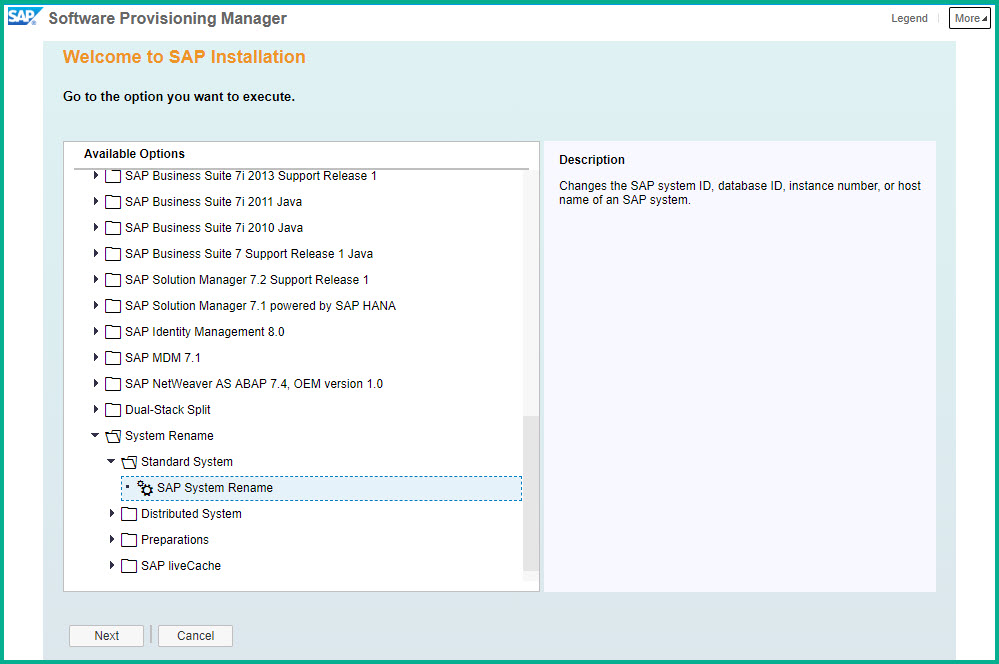
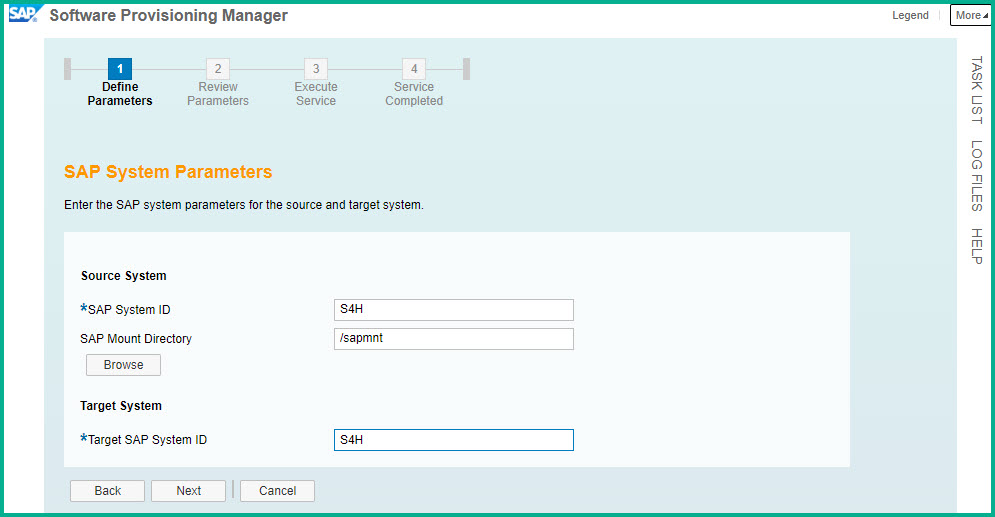
Click Next at Software Integrity screen. On the next screen enter as follows: Instance S4H:
Accept or fix the Prerequisite check results.
Source and Target instance numbers:
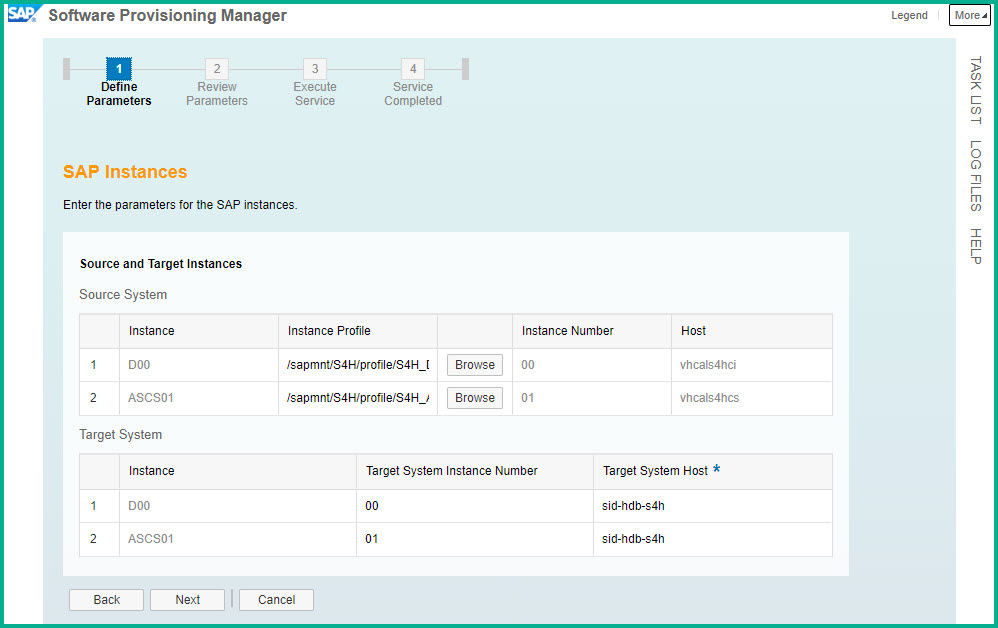

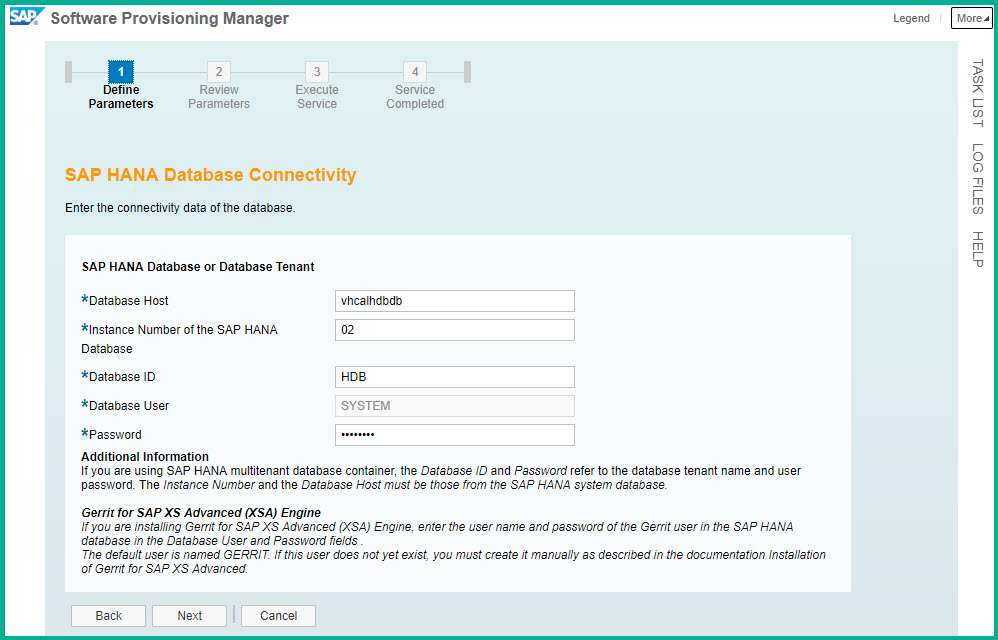
Database details:
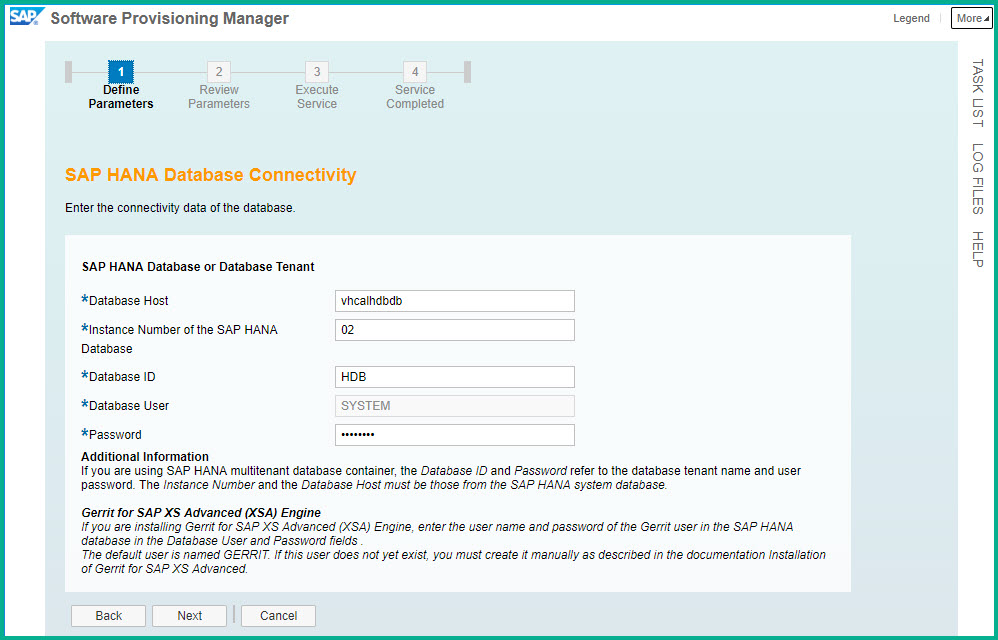
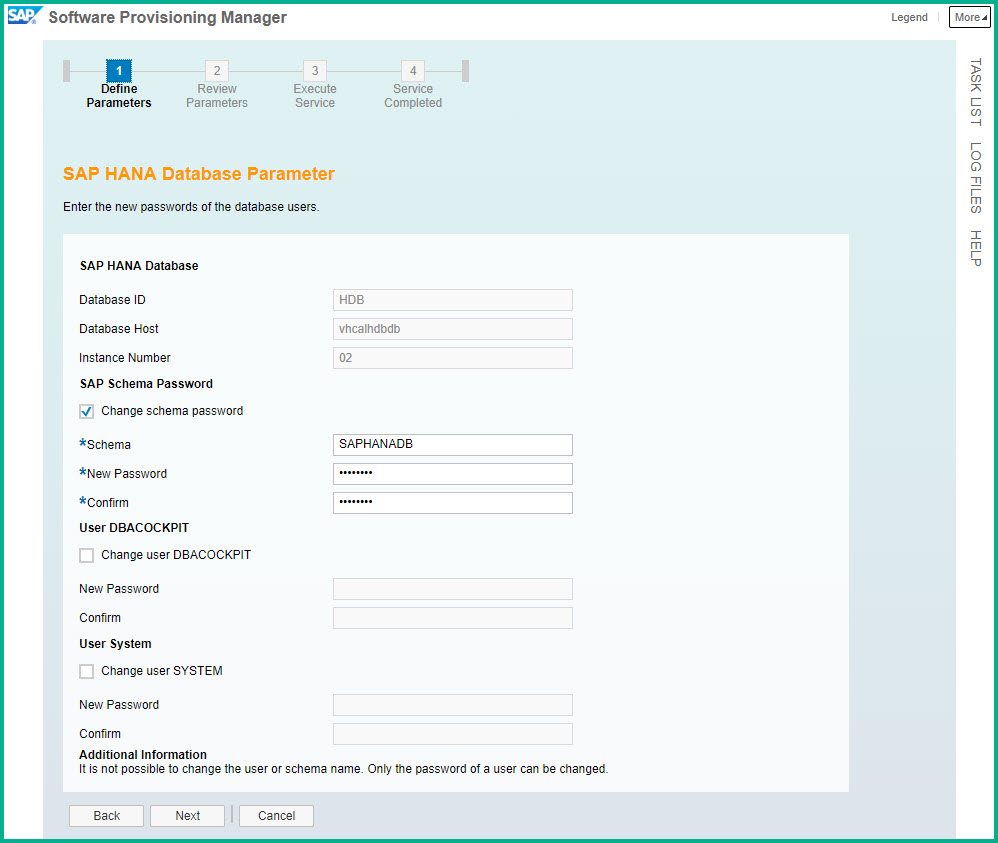
Schema Password:
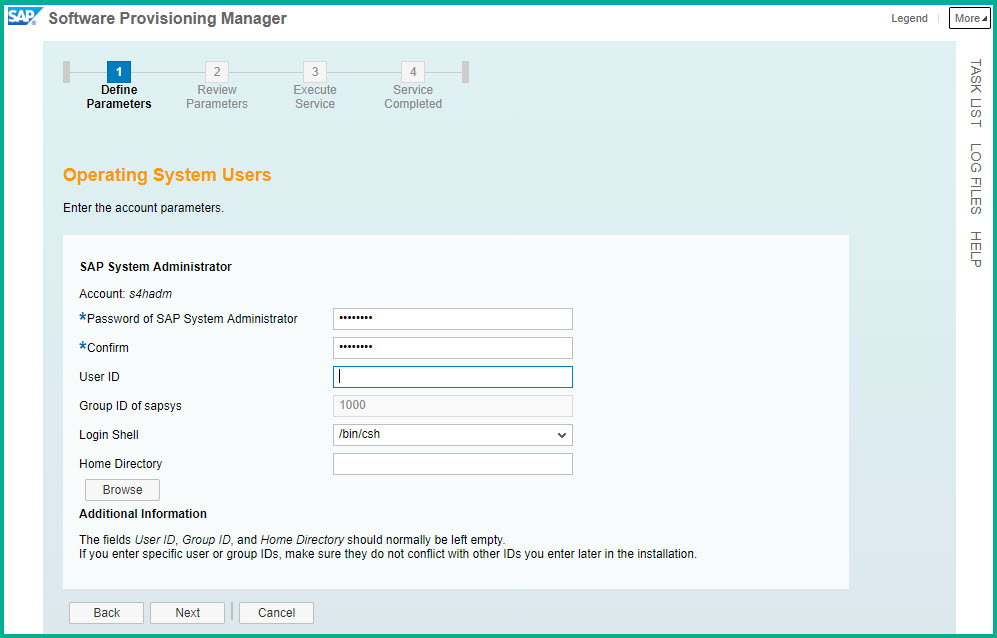
System Administrator password:
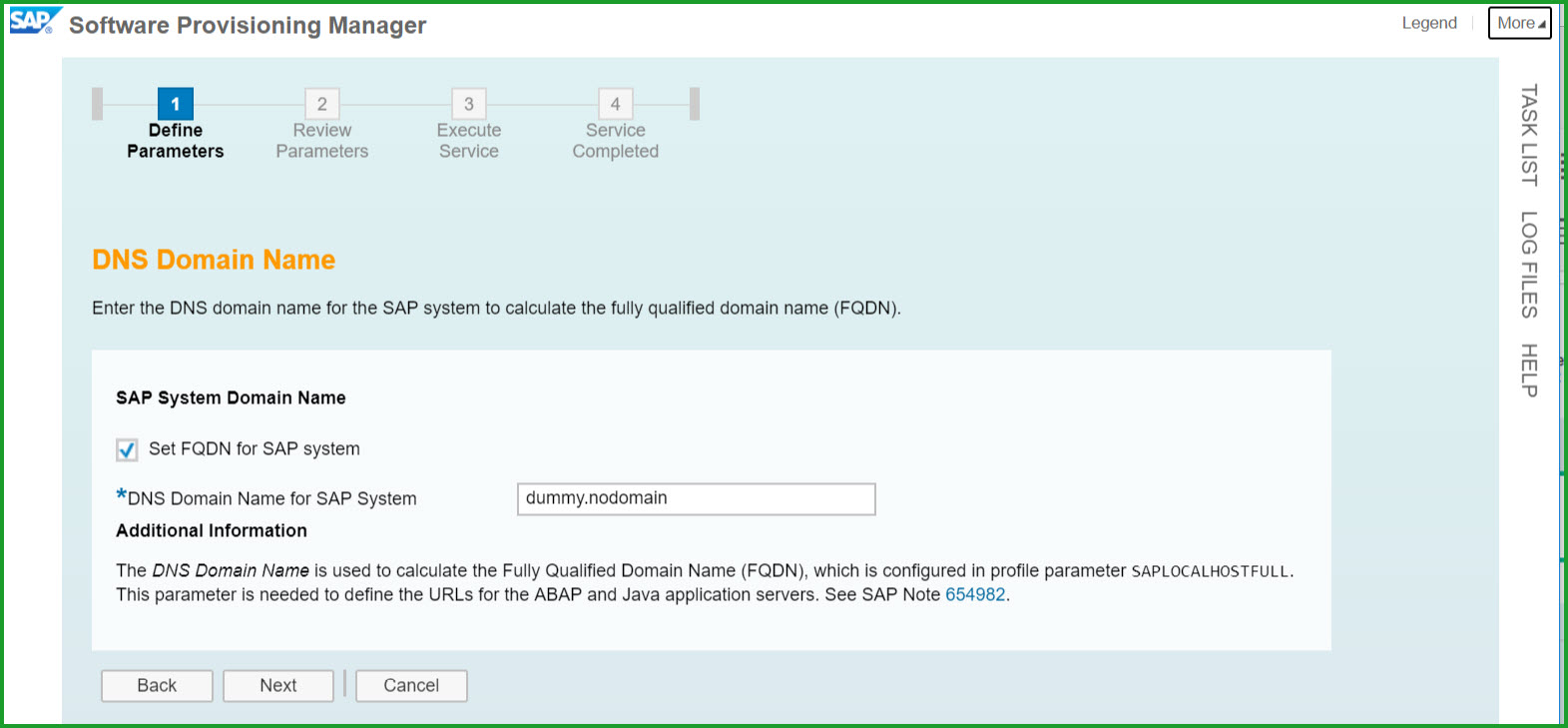
Select default key. Enter DNS Domain Name
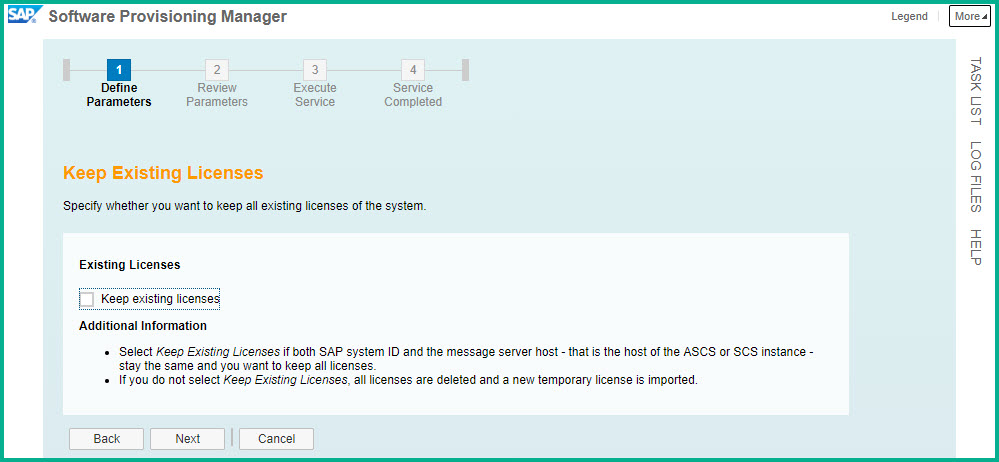
Keep default – Uncheck Existing Licenses
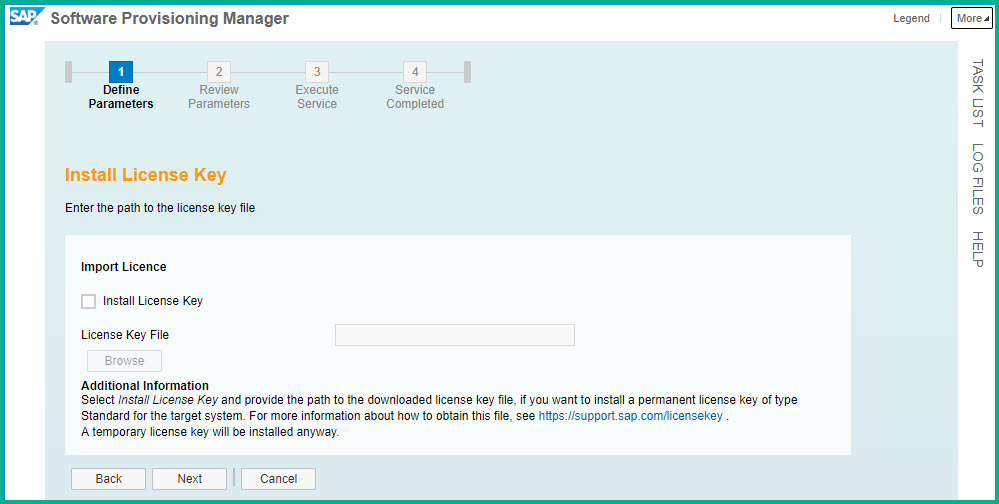
Select License Key file if you have it, otherwise leave unchecked.
Please find below the Parameter Summary screens:
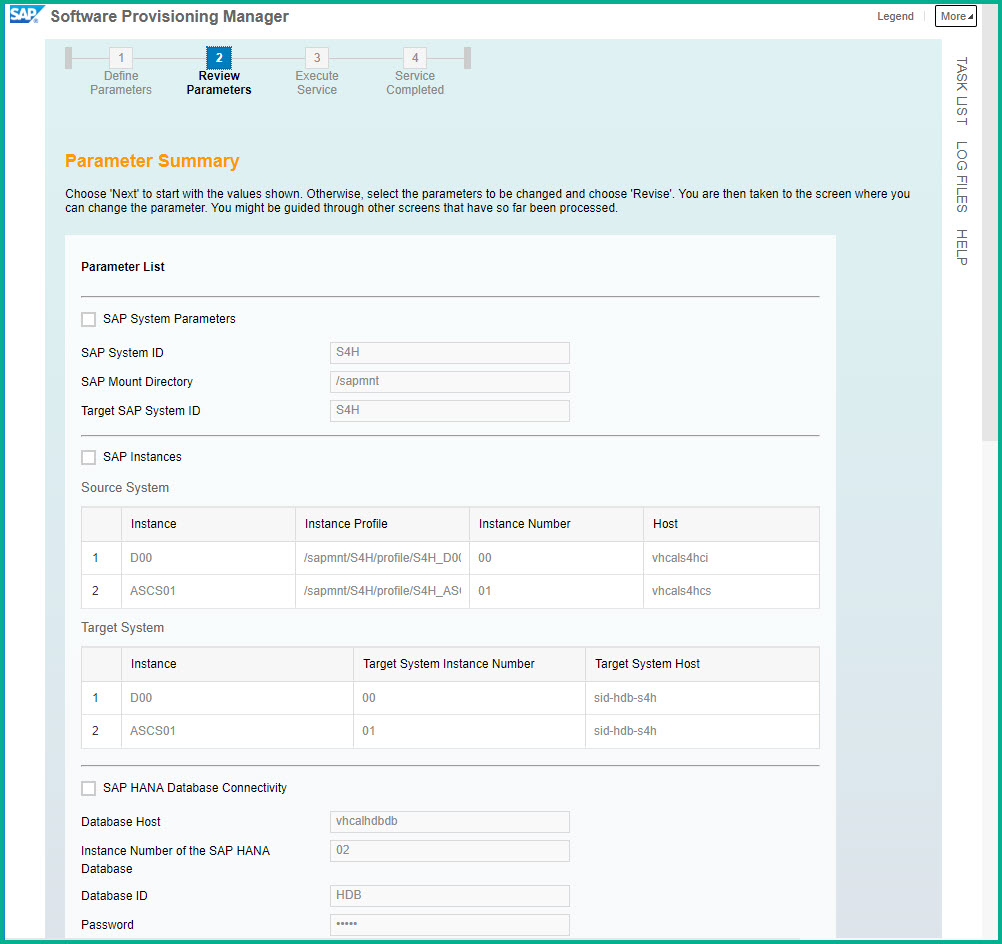
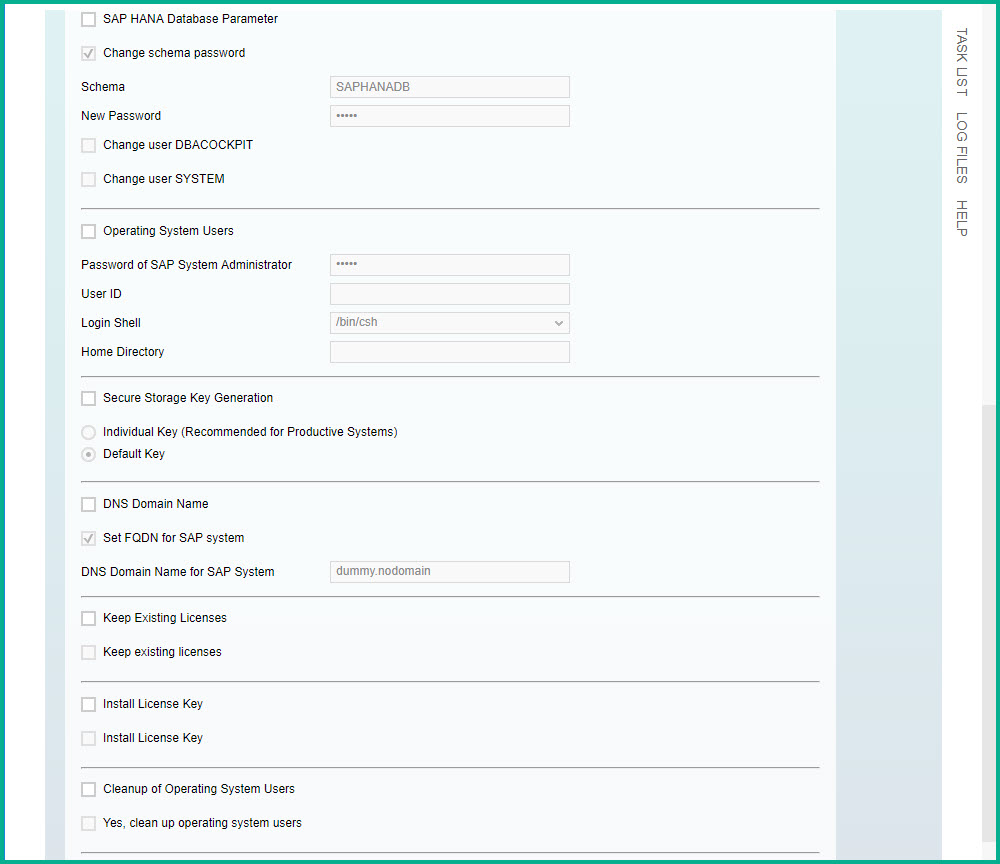
he SWPM rename procedure takes 2 minutes.
You can manually start the instance.
sid-hdb-s4h:/install # su - s4hadm
sid-hdb-s4h:s4hadm 2> startsap r3
After instance is started and confirmed you can delete the sapmedia folder.
Standard users are as follows:
HAN DB – Instance 02 SYSTEM /
JAVA Administrator – Adminitstrator / ;
Java user BPINST/Welcome1
Web Dispatcher access : bpinst/Welcome1
STEP 8: Install software product license key: Technical restrictions may apply if you don’t install the license. Use the link to obtain license key.
HANA DB license key can be installed via HANA Studio (Preferences -> License)
In SAP S/4HANA 1709 the license key is installed via SAP logon tCode SLICENSE
SAPNetweaver 7.5 J2EE license key has to be installed via SAP Netweaver Administrator
If you have any difficulty downloading the media open OSS message using component XX-SER-SAPSMP-SWC. If you have issues with technical deployment open message with component BC-INS-SRN.
SAP S/4 HANA 1709 Fully Activated Appliance的更多相关文章
- 【公众号系列】SAP S/4 HANA 1809请查收
公众号:SAP Technical 本文作者:matinal 原文出处:http://www.cnblogs.com/SAPmatinal/ 原文链接:[公众号系列]SAP S/4 HANA 1809 ...
- <<SAP内存计算——HANA>> 书评
<SAP内存计算——HANA>又是一本在地铁里读完的书,最近阅读量大增,都是托了地铁的福了. 一年多以前就在ITPUB里发过帖子问“SAP HANA归根揭底到底是什么?”,那时通过一些网络 ...
- 「书评」SAP内存计算——HANA
因为工作关系,长期跟SAP打交道,所以去年就对HANA有了一些了解,只是公司目前的应用规模还较小,暂时没有上马HANA的打算,但是提前作一些学习还是很有必要的.正好清华大学出版社最近出版了这本< ...
- [转帖]SAP S/4 HANA与SAP Business Suite/R3(ECC)的区别
SAP S/4 HANA与SAP Business Suite/R3(ECC)的区别 https://blog.csdn.net/zhongguomao/article/details/5351520 ...
- 【公众号系列】SAP S/4 HANA的移动平均价
公众号:SAP Technical 本文作者:matinal 原文出处:http://www.cnblogs.com/SAPmatinal/ 原文链接:[公众号系列]SAP S/4 HANA的移动平均 ...
- SAP S/4 HANA
通常说到SAP,指的都是SAP Business Suite/R3(ECC) 这款产品. 那么SAP S/4 HANA与SAP R3究竟有什么不同呢? 简单地说,S/4 HANA是下一代的R/3和SA ...
- SAP S/4 HANA与SAP Business Suite/R3(ECC)的区别
转自:https://blog.csdn.net/zhongguomao/article/details/53515203 去年SAP推出了新一代商务套件SAP S/4 HANA,无疑是ERP行业创新 ...
- 【MM系列】SAP S/4 HANA的物料编码40位设置
公众号:SAP Technical 本文作者:matinal 原文出处:http://www.cnblogs.com/SAPmatinal/ 原文链接:[MM系列]SAP S/4 HANA的物料编码4 ...
- 【MM系列】SAP S/4 HANA BP创建客户/供应商的一点想法
公众号:SAP Technical 本文作者:matinal 原文出处:http://www.cnblogs.com/SAPmatinal/ 原文链接:[MM系列]SAP S/4 HANA BP创建客 ...
随机推荐
- oracle data type
NUMBER ( precision, scale) precision表示数字中的有效位.如果没有指定precision的话,Oracle将使用38作为精度. scale表示数字小数点右边的位数,s ...
- 文件IO 相关的包:java.io文件——API
文件IO 相关的包:java.io文件——API 1.Java.io.File类的使用(1)两种路径绝对路径:相对于当前路径:当前为 “工程名”(2)File类创建,对象为一个文件/目录,可能存在或不 ...
- C 一维数组 冒泡排序,查最大值
1. 初始化 char a[10] = {'1','2','3','4','5'};//指定数组大小并部分赋初值, 其余部分赋值 '\0' ,ASSIC 是 0 char b[] = {'1','2' ...
- Https网络安全架构设计
一.对称加密 对称密钥加密(Symmetric-key algorithm)又称对称加密.私钥加密.共享密钥加密,是密码学中的一类加密算法.这类算法在加密和解密时使用相同的密钥,或是使用两个可以简单地 ...
- 1、Nexus安装
1.nexus 下载地址: https://sonatype-download.global.ssl.fastly.net/nexus/oss/nexus-2.14.5-02-bundle.tar.g ...
- 深入理解 ORM框架
1.ORM是什么? object Relational mapping 对象关系映射,是一种为了解决面向对象与关系型数据库存在不匹配现象的技术,简单说,orm通过描述对象和数据库之间映射的元数据,将程 ...
- 排产的两种方式(前推式与后拉式)在Optaplanner上的体现
生产计划的约束 在制定生产计划过程中,必然是存在某些制约因素,满足某些需求才能进行的,或是交期保证.或是产能限制.或是关键工序制约.即TOC理论 - 任何系统至少存在着一个制约因素/瓶颈:否则它就可能 ...
- EVM项目管理
详细参照:https://zhuanlan.zhihu.com/p/33925657 报告日实际: 按预算完成 按原始cpi完成 按时完成
- 【rabbitmq】rabbitmq集群环境搭建
安装rabbitmq-server 总共有3台虚拟机,都安装有rabbitmq服务,安装过程可参考: [rabbitmq]Centos7 下安装rabbitmq 创建用户和vhost 说明: 此步骤不 ...
- 51nod1220 约数之和
http://www.51nod.com/onlineJudge/questionCode.html#!problemId=1220 $G(n)=\sum\limits_{i=1}^n\sum\lim ...