
调整LaTeX文档页面的大小
看下面这张图片便一目了然!!!
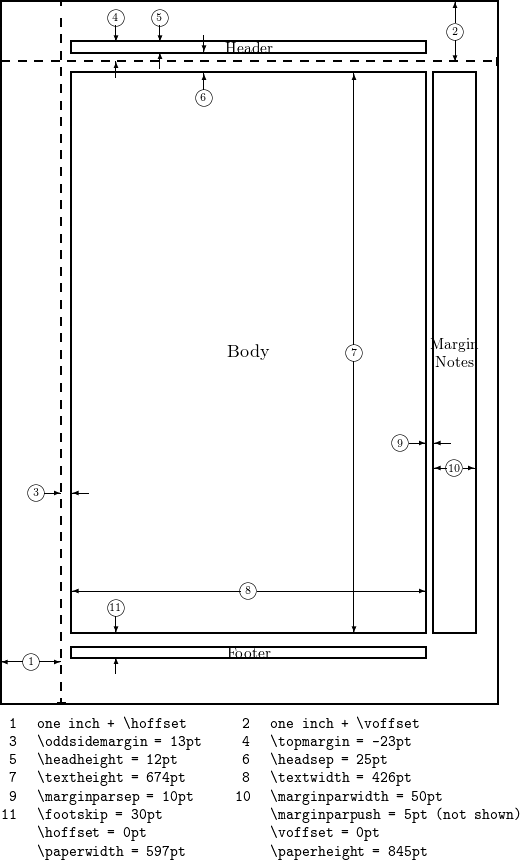
借助 geometry 包,可以很方便地调整页面大小,常用的参数如图所示,这些参数都可以通过LateX支持的单位(mm, cm, pt, in)去重新设置。具体有以下参数:
- textwidth Corresponds to element 8 in the figure.
- textheight Element 7 in the figure.
- total Depends on other parameters, by default defines the dimensions of the Body, but can be combined with the includehead, includefoot, includeheadfoot and includemp commands to change the dimensions of Header, the Body, the Footer and the Margin Notes altogether.
- left, lmargin, inner These three parameters change the length of the left margin. Elements 1 and 3 in the figure, combined.
- right, rmargin, outer These three parameters change the length of the right margin. Elements 9 and 10 in the figure, combined.
- top, tmargin These two parameters represent elements 2 and 6 in the figure, combined.
- bottom, bmargin These two parameters set the distance from the bottom edge of the document to its baseline.
- headheight Height of the header
- footsep Separation between the bottom of the text (baseline) and the top of the footnote. Element 11 in the figure.
- footskip Distance between the baseline of the text and the baseline of the footnote.
- marginparwidth, marginpar Width of the margin notes. Element 10 in the figure.
The paper size can be set to any size you need by means of the command papersize={⟨width⟩,⟨height⟩}.
Let's see an example with some of the aforementioned options:
\usepackage{geometry}

 \geometry{

 a4paper,

 total={170mm,257mm},

 left=20mm,

 top=20mm,

 }
详细参考:ShareLaTeX。
调整LaTeX文档页面的大小的更多相关文章
- 在LaTeX文档中插入图片的几种常用的方法
LaTeX中一般只直接支持插入eps(Encapsulated PostScript)格式的图形文件, 因此在图片插入latex文档之前应先设法得到图片的eps格式的文件. 在LaTeX文档中插入图片 ...
- 怎么给OCR文字识别软件重编文档页面号码
ABBYY FineReader Pro for Mac OCR文字识别软件处理文档时,在FineReader文档中,页面的加载顺序即是页面的导入顺序,完成导入之后,文档的所有页面均会被编号,各编号会 ...
- Httpd服务入门知识-Httpd服务常见配置案例之定义'Main' server的文档页面路径(文档根路径)
Httpd服务入门知识-Httpd服务常见配置案例之定义'Main' server的文档页面路径(文档根路径) 作者:尹正杰 版权声明:原创作品,谢绝转载!否则将追究法律责任. 一.创建测试文件 [ ...
- 从Word到Latex文档
有时,从Word文档复制到Latex文档时会编译报错,这时要检查某些特殊字符.中文输入法下的字符有时无法正确编译,要用相应的英文输入法下的字符替代.拉丁字母.希腊字母应该用转义字符实现.
- Latex 文档格式化
title: "Latex 文档格式化" author: 李龙翔 date: "Nov 22, 2019" subject: "Markdown&qu ...
- C# 设置word文档页面大小
我们知道,在MS word中,默认的页面大小是letter(8.5’’x11’’),除此之外,word还提供了其他一些预定义的页面大小,如Legal (5.4’’x14’’),A3 (11.69’’x ...
- 用atom写LaTeX文档
下载并安装Tex Live: 下载页面 下载并安装atom:下载页面 打开atom File -> Settings -> Install 搜索并安装: language-latex la ...
- 1.1 WEB API 在帮助文档页面进行测试
这篇文章http://www.cnblogs.com/landeanfen/p/5210356.html写得比较详细, 我就挑简单的来说. 首先用这功能要在WEB API创建的帮助文档下面,如果你使用 ...
- LaTeX技巧22:LaTeX文档中的参考文献初级
用 LaTeX 处理文档, 经常就要书写参考文献, 本篇就是介绍如何在 LaTeX 中使用参考文献, 注意这里讲的是LaTeX默认的 thebibliography 环境, 如果要了解 LaTeX 中 ...
随机推荐
- 左侧滚动条js
<script> var left = document.getElementById('main-left'); var right = document.getElementById( ...
- 【转】Java finally语句到底是在return之前还是之后执行?
网上有很多人探讨Java中异常捕获机制try...catch...finally块中的finally语句是不是一定会被执行?很多人都说不是,当然他们的回答是正确的,经过试验,至少有两种情况下final ...
- hibernate框架学习之数据类型
- UVALive 8513 lovers 2017 西安区域赛 B 贪心+multiset
UVALive 8513 有2种人,每个人有自己的权值$A_i$ $B_i$ 当$A_i + B_i >=K$时 两个人可以配对 问最多多少人可以配对 解法 : 把$/{ A_i /}$ 排序 ...
- https openssl http2
2018-3-21 10:27:45 星期三 参考: 对https, http2的解释 总结: 生成自有证书(非第三方证书颁发公司) 我使用的是gitbash工具, 命令为: $ openssl re ...
- JetBrains GoLand 2018 激活码/ 注册码(最新破解方法)
1 前言 本机测试环境如下: Goland版本:2018.1.5 电脑系统:win7 64位 JetbrainsCrack.jar:链接: https://pan.baidu.com/s/1blmN3 ...
- [记录]一个有趣的url请求(nodejs)
1 前言 IDE是webstrom,跟项目编程语言,应该没有多大关系. 2 现象 两个看起来是一样的url,但是一个能访问一个不能访问. 然后,复制url到console中发现了差异,分别是:file ...
- 洛谷P5162 WD与积木 [DP,NTT]
传送门 思路 真是非常套路的一道题-- 考虑\(DP\):设\(f_n\)为\(n\)个积木能搭出的方案数,\(g_n\)为所有方案的高度之和. 容易得到转移方程: \[ \begin{align*} ...
- input file 多张图片上传 获取地址 ——fileReader
//上传图片 $('#files').change(function(e){ var fil = this.files; var m =0; if(fil.length>3){ alert('重 ...
- CentOS6文件系统思维导图