
linux下几个常用软件
Ubuntu 软件包地址
一. 字体
不管是雅黑还是宋体,从windows cp过来后, 直接双击打开并安装
二. Meld 可视的diff和合并工具
Meld是一个可视的diff和合并工具。Meld是Linux软件,用户使用它可以比较2至3个文件并进行编辑,也可以比较2至3个文件夹并同时进行文件对比。

三. RapidSVN

windows 下的svn我们使用subversion,subversion是基于windows资源管理器打开,并显示图标。
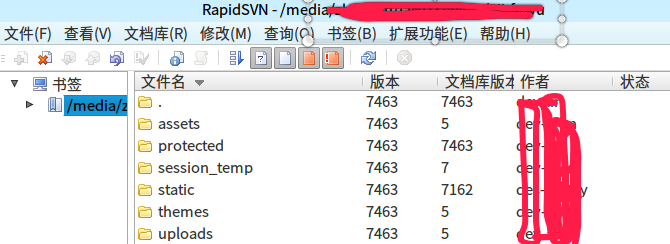
在Linux下我使用RapidSVN,RapidSVN也是图像化用户界面,但相比subversion没有在资源管理器中集成。
四. FTP
不用多介绍FileZilla,免费又好用。
软件库下载

五. SQLLite 查看工具
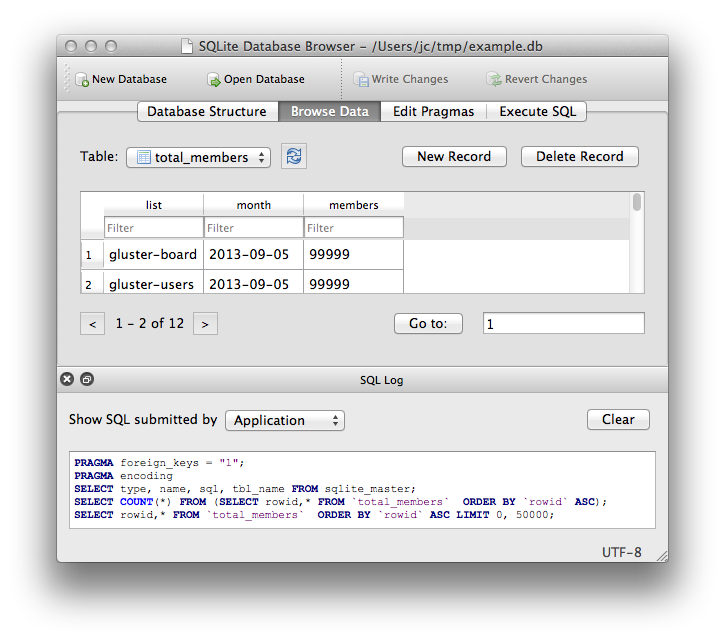
DB Browser for SQLite
六. 下拉式终端tilda
安装:
sudo apt-get install tilda
F12 呼出呼入


七. 远程连接Remmina

Remmina 是一个远程连接软件可以支持多种连接 RDP、SFTP、 SSH、 VNC 等
八.安装Last Release of wine
牛逼的wine大家都知道,可以在linux下执行Windows程序
如果是64位系统,先执行
sudo dpkg --add-architecture i386
因为个别软件需要32的库
然后执行
wget  https://dl.winehq.org/wine-builds/Release.key

sudo  apt-key add Release.key

sudo  apt-add-repository  https://dl.winehq.org/wine-builds/ubuntu/

sudo  apt-get  update
update后执行
sudo apt-get install --install-recommends winehq-stable
参考: https://imcn.me/html/y2019/34840.html
通过
wine –version
就能看到Last Release 版本的wine了
wine-3.0 # --
八.【一】安装deepin-wine-for-Ubuntu
原生自带wine有时有兼容问题,高大上的deepin团队做了更高级的linux的wine兼容移植,兼容性更好。
下载:https://gitee.com/wszqkzqk/deepin-wine-for-ubuntu
容器镜像:http://mirrors.aliyun.com/deepin/pool/non-free/d/
git clone https://gitee.com/wszqkzqk/deepin-wine-for-ubuntu.git

./install.sh
记得使用dpkg 安装,因为用GDebi安装会报错: 错误:依赖关系不满足 deepin-win32-preloader
例如:
sudo dpkg -i deepin.com.qq.im_8..19983deepin23_i386.deb
查看版本:
deepin-wine --version
wine-2.18
九. 屏幕录像
simplescreenrecorder
sudo apt-get install simplescreenrecorder // 最后更新时间2017.4

支持mp4,mkv等多种格式
Peek

下载地址: https://github.com/phw/peek (V1.3.1 2018-08-29)
https://files.cnblogs.com/files/dcb3688/peek-1.3.1-0-x86_64.AppImage.7z (Ubuntu18.04)
或PPA
sudo add-apt-repository ppa:peek-developers/stable

sudo apt update

sudo apt install peek
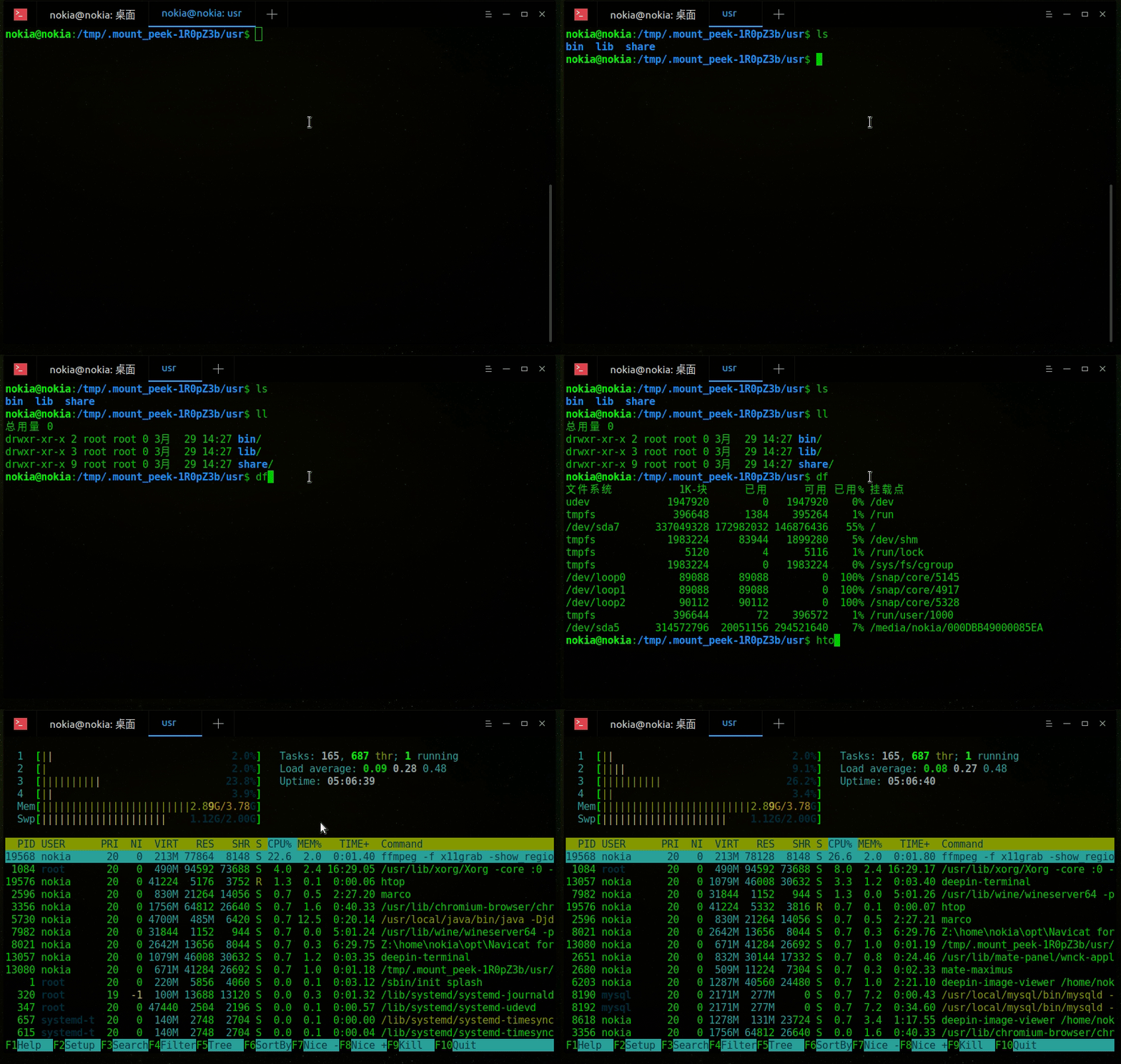
支持GIF,mp4,webM等格式
十.Fiddler抓包
下载mono
sudo apt-get install mono-complete
下载一个最新的版本:
http://fiddler.wikidot.com/mono
启动命令:
mono Fiddler.exe
十一.截图工具
推荐三个软件: Shutter deepin-screenshot flameshot
终端输入 软件+ -h 查看使用帮助
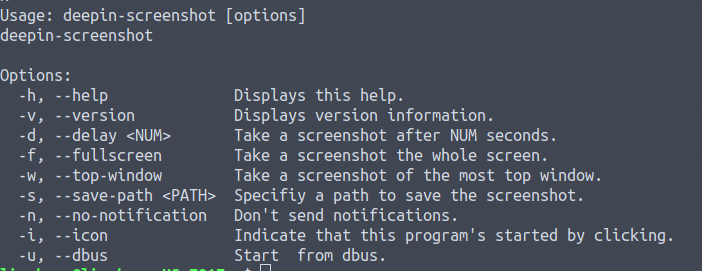
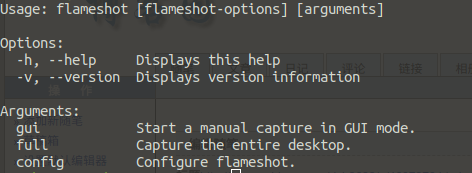
之前一直使用的shutter系统升级ubuntu18.04后一直提示svg失败,目前未找到原因.
flameshot下载地址: https://files.cnblogs.com/files/dcb3688/flameshot_0.5.1-2_amd64.zip
deepin-screenshot下载地址: https://files.cnblogs.com/files/dcb3688/deepin-screenshot_4.0.11-1_amd64.zip
十二.geany 强大的文本编辑器

下载地址:https://www.geany.org/Download/Releases
geany的主题配色
themes下载地址:https://github.com/codebrainz/geany-themes
# 解压安装主题

./install.sh
打开geany-查看-更改配色方案
十三.Flash player

用来玩GameSWF
sudo apt-get install gnash
SWF文件下右击鼠标,选择gnash打开
十四.ISO Master

下载地址: http://littlesvr.ca/isomaster/ (2008年 V1.3.13)
ISO Master 是一个易用的光盘镜像文件(ISO)编辑器,通过它可以从ISO中提取文件、添加文件到ISO、创建可引导的ISO文件等等。
十五.看图工具
推荐深度看图

sudo apt install deepin-image-viewer
deb包下载:
https://files.cnblogs.com/files/dcb3688/deepin-image-viewer_1.2.19-2_amd64.zip
十六.Terminal

deepin-terminal
下载地址:https://packages.ubuntu.com/bionic/amd64/deepin-terminal/download
https://files.cnblogs.com/files/dcb3688/deepin-terminal.7z
十七.Redshift

Redshift 是一个支持Windows/linux 的护眼软件,通过调整色温/亮度/GRB伽马等达到去蓝光延缓眼镜疲劳的作用.
安装:
sudo apt install redshift
配置:
4000K到5500k的色温是比较适合眼睛的,(默认6500k),所以尽力设置在这个色温的区间.配置参考官网: http://jonls.dk/redshift/
创建: ~/.config/redshift.conf
; Global settings for redshift

[redshift]

; Set the day and night screen temperatures

temp-day=

temp-night=

; Enable/Disable a smooth transition between day and night

;  will cause a direct change from day to night screen temperature.

;  will gradually increase or decrease the screen temperature.

transition=

; Set the screen brightness. Default is 1.0.

brightness=0.9

; It is also possible to use different settings for day and night

; since version 1.8.

;brightness-day=0.7

;brightness-night=0.4

; Set the screen gamma (for all colors, or each color channel

; individually)

gamma=0.9

;gamma=0.8:0.7:0.8

; This can also be set individually for day and night since

; version 1.10.

;gamma-day=0.8:0.7:0.8

;gamma-night=0.6

; Set the location-provider: 'geoclue', 'geoclue2', 'manual'

; type 'redshift -l list' to see possible values.

; The location provider settings are in a different section.

location-provider=manual

; Set the adjustment-method: 'randr', 'vidmode'

; type 'redshift -m list' to see all possible values.

; 'randr' is the preferred method, 'vidmode' is an older API.

; but works in some cases when 'randr' does not.

; The adjustment method settings are in a different section.

adjustment-method=randr

; Configuration of the location-provider:

; type 'redshift -l PROVIDER:help' to see the settings.

; ex: 'redshift -l manual:help'

; Keep in mind that longitudes west of Greenwich (e.g. the Americas)

; are negative numbers.

[manual]

lat=

lon=

; Configuration of the adjustment-method

; type 'redshift -m METHOD:help' to see the settings.

; ex: 'redshift -m randr:help'

; In this example, randr is configured to adjust screen .

; Note that the numbering starts from , so this is actually the

; second screen. If this option is not specified, Redshift will try

; to adjust _all_ screens.

[randr]

;screen=
十八.HTTP 协议文件共享服务
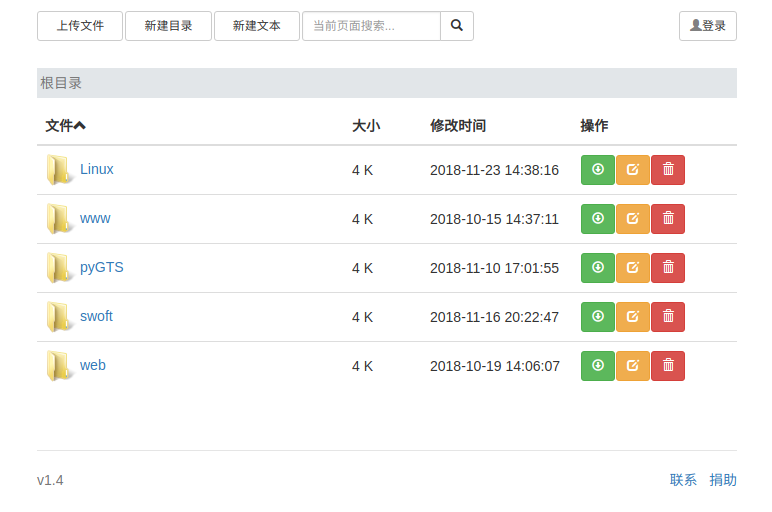
Chfs是一个免费的、支持Windows/Linux、HTTP 协议的文件共享服务器,使用浏览器可以快速访问。与其它常用文件共享方式(如 FTP、飞秋、网盘、自己建站)相比,具有使用简单、适用场景更多的优点,在个人使用以及共享给他人的场景中非常方便快捷 。
官网地址:http://iscute.cn/chfs
下载: https://files.cnblogs.com/files/dcb3688/chfs-linux-amd64-1.4.zip
./chfs --port --path /home/wwwroot/ # chfs --help 更多帮助
十九.局域网端口探测工具Zenmap
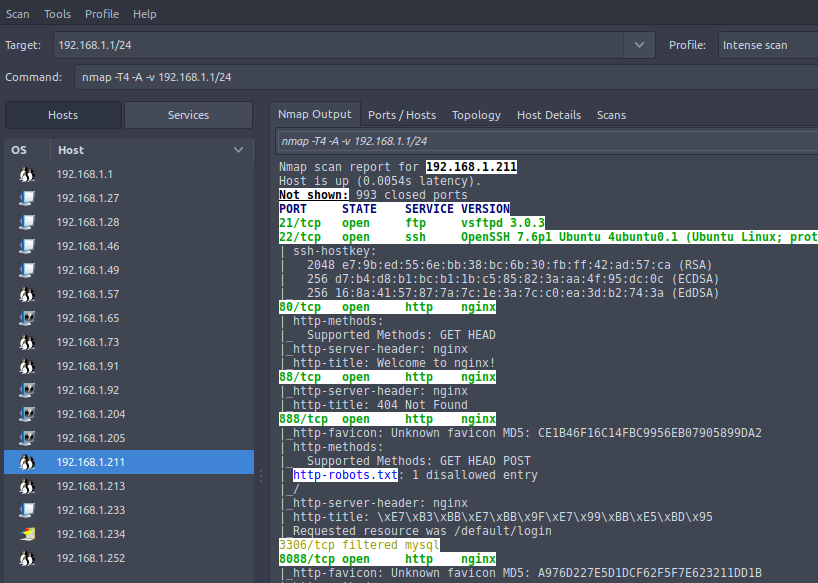
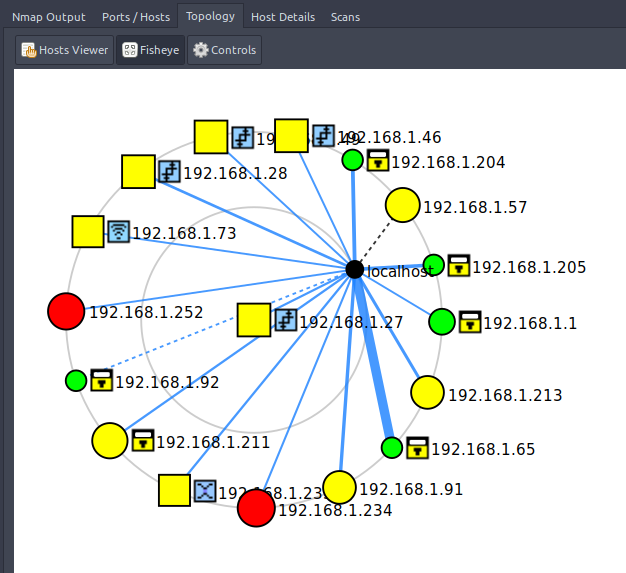
ZenMap是安全扫描工具nmap的一个官方的图形 用户界面,是一个跨平台的开源应用 。
官网:https://nmap.org/ 最新版本:Zenmap 7.70 (2018-05)
安装: 会自动安装nmap
sudo apt install zenmap
记得在Zenmap (as root) 下运行,部分高级功能必须要获取root权限。输入要扫码的局域网网段,例如:
192.168.1.1/
20.epiphany-browser
 一个Very 轻便的浏览器,一般情况安装系统也会自带(通过linuxdeploy安装到手机linux无自带),也可自行下载。
sudo apt install epiphany-browser
linux下几个常用软件的更多相关文章
- windows下修复Linux引导 and linux下几个常用软件
在这里,我选择的是deepinLinux,不用说,高端大气上档次! Linux下引导修复 在win7上安装好了Linux,一不小心Linux系统启动不了 (一不小心的过程,想使用root登录图像界面, ...
- PSPP:顶替SPSS常用功能的优秀软件, Linux 下的经济学用软件
几个替代SPSS的软体Salstat http://salstat.sourceforge.net/PSPP http://www.gnu.org/software/pspp/pspp.htmlR h ...
- linux下安装与删除软件
linux下安装与删除软件 (2005-07-04 11:24:10) 转载▼ 标签: 杂谈 分类: MSN搬家 现在linuxx下的软件大都是rpm,deb.tar.gz和tar.bz2格式.1.r ...
- Linux下mysql的常用操作
Linux下mysql的常用操作: 显示数据库 show databases; 选择数据库 use 数据库名; 显示数据库中的表 show tables; 显示数据表的结构 describe 表名; ...
- Linux下提权常用小命令
有些新手朋友在拿到一个webshell后如果看到服务器是Linux或Unix操作系统的就直接放弃提权,认为Linux或Unix下的提权很难,不是大家能做的,其实Linux下的提权并没有很多人想象的那么 ...
- 在linux下有没有什么软件可以连接windows上的MSSQL SERVER
在linux下有没有什么软件可以连接windows上的MSSQL SERVER GUI的http://dbeaver.jkiss.org/ http://bbs.csdn.net/topics/391 ...
- linux下如何查看某个软件 是否安装??? 安装路径在哪???
<1>.在linux下如何判断是否已经安装某个软件? 我的系统是red hat 我用命令rpm查是否安装了某个软件(例如: matlab 与 fluent ),得到了如下的结果: 我用rp ...
- linux下源码安装软件
在linux下的很多软件都是通过源码包方式发布的,这样做对于最终用户而言,虽然相对于二进制软件包,配置和编译起来繁琐点,但是它的可移植性却好得多,针对不同的体系结构,软件开发者往往仅需发布同一份源码包 ...
- Linux学习笔记:常用软件
Linux系统下常用软件(针对CentOS,其他系统类似) lrzsz 可用于上传和下载,安装 yum -y install lrzsz ,使用 上传 rz 下载 sz mysql 安装 yum -y ...
随机推荐
- Python os.removedirs() 和shutil.rmtree() 用于删除文件夹
概述 os.removedirs() 方法用于递归删除目录.像rmdir(), 如果子文件夹成功删除, removedirs()才尝试它们的父文件夹,直到抛出一个error(它基本上被忽略,因为它一般 ...
- spring3.1 profile 配置不同的环境
<?xml version="1.0" encoding="UTF-8"?><beans xmlns="http://www.spr ...
- 035_lua快速入门
执行下面的脚本用luajit test.lua即可 一.变量及逻辑运算 --number, string, boolean, table, function, thread, userdata, ni ...
- MySQL高可用方案-PXC(Percona XtraDB Cluster)环境部署详解
MySQL高可用方案-PXC(Percona XtraDB Cluster)环境部署详解 Percona XtraDB Cluster简称PXC.Percona Xtradb Cluster的实现是在 ...
- Android获取本机号码及运营商
import android.content.Context; import android.telephony.TelephonyManager; import android.util.Log; ...
- JavaScript 加解密库(crypto-js)
1. 概述 1.1 说明 crypto-js(GitHub)是谷歌开发的一个纯JavaScript的加密算法类库,可以非常方便的在前端进行其所支持的加解密操作.目前crypto-js已支持的算法有:M ...
- oracle存储大文本clob、blob
oracle存储大文本clob.blob 1 package cn.itcast.web.oracle.util; 2 3 import java.sql.Connection; 4 import j ...
- Modbus库开发笔记之一:实现功能的基本设计
Modbus作为开放式的工业通讯协议,在各种工业设备中应用极其广泛.本人也使用Modbus通讯很多年了,或者用现成的,或者针对具体应用开发,一直以来都想要开发一个比较通用的协议栈能在后续的项目中复用, ...
- 修改 sql 提示符信息:
Last login: Thu Dec 8 19:18:08 2016 from 192.168.242.1 [root@localhost ~]# su - oracle [oracle@local ...
- django 中自定义过滤器
多参数过滤器