
Xamarin.Android 制作搜索框
前段时间仿QQ做了一个搜索框样式,个人认为还不错,留在这里给大家做个参考,希望能帮助到有需要的人。
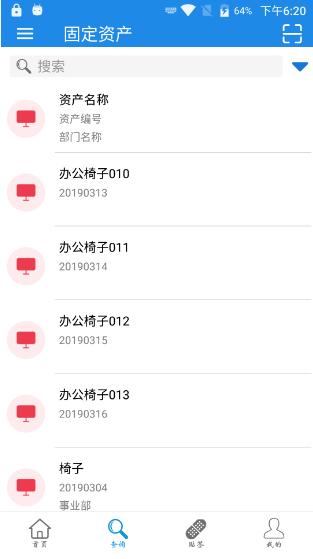
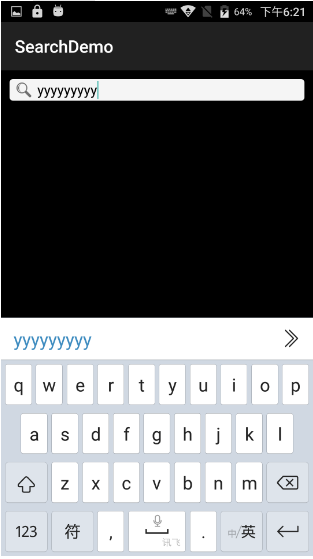
首先上截图(图1:项目中的样式,图2:demo样式):
不多说直接上代码:
Main.axml
<?xml version="1.0" encoding="utf-8"?>

<LinearLayout xmlns:android="http://schemas.android.com/apk/res/android"

    android:orientation="vertical"

    android:layout_width="match_parent"

    android:layout_height="match_parent"

    android:background="#000000">

    <LinearLayout

        android:layout_width="match_parent"

        android:layout_weight="1"

        android:layout_height="match_parent"

        android:orientation="horizontal">

        <RelativeLayout

            android:layout_width="match_parent"

            android:layout_height="25dp"

            android:focusable="true"

            android:focusableInTouchMode="true"

            android:layout_marginTop="10dp"

            android:layout_marginLeft="10dp"

            android:layout_marginRight="10dp"

            android:background="@drawable/search_back">

            <ImageView

                android:layout_width="23dp"

                android:layout_marginTop="2dp"

                android:layout_height="23dp"

                android:layout_marginLeft="5dp"

                android:padding="2dp"

                android:layout_marginBottom="2dp"

                android:src="@drawable/icon_query" />

            <EditText

                android:id="@+id/et_search"

                android:layout_width="match_parent"

                android:layout_height="match_parent"

                android:layout_marginLeft="30dp"

                android:padding="2dp"

                android:background="@null"

                android:hint="搜索"

                android:layout_gravity="center_vertical"

                android:singleLine="true"

                android:textSize="17sp"

                android:textColor="#000000" />

        </RelativeLayout>

    </LinearLayout>

</LinearLayout>
MainActivity.cs
using Android.App;

using Android.Widget;

using Android.OS;

using Android.Views;

using Android.Runtime;

using System;

using Android.Views.InputMethods;

namespace SearchDemo

{

    [Activity(Label = "SearchDemo", MainLauncher = true)]

    public class MainActivity : Activity, View.IOnKeyListener

    {

        EditText et_search;

        protected override void OnCreate(Bundle savedInstanceState)

        {

            base.OnCreate(savedInstanceState);

            // Set our view from the "main" layout resource

            SetContentView(Resource.Layout.Main);

            et_search = (EditText)FindViewById(Resource.Id.et_search);

            et_search.ImeOptions = Android.Views.InputMethods.ImeAction.Search;     //修改键盘按钮

            et_search.SetOnKeyListener(this);

        }

        public bool OnKey(View v, [GeneratedEnum] Keycode keyCode, KeyEvent e)

        {

            if (keyCode == Keycode.Enter || keyCode == Keycode.Search)

            {

                InputMethodManager imm = (InputMethodManager)this.GetSystemService(InputMethodService);

                if (imm != null)

                {

                    imm.HideSoftInputFromWindow(Window.DecorView.WindowToken, );       //隐藏键盘

                }

            }

            Toast.MakeText(this, et_search.Text, ToastLength.Short).Show();

            return false;

        }

    }

}
search_bcak.xml
<shape xmlns:android="http://schemas.android.com/apk/res/android">

  <solid android:color="#F5F5F5" />

  <corners

    android:topLeftRadius="4dp"

    android:topRightRadius="4dp"

    android:bottomRightRadius="4dp"

    android:bottomLeftRadius="4dp" />

  <!--<stroke

     android:width="1dp"

    />-->

</shape>
到这里就结束了,其实现方法很简单,大多数都写了注释,如果哪里有问题可随时联系我~
Xamarin.Android 制作搜索框的更多相关文章
- bootstrap制作搜索框及添加回车搜索事件
下面是开发中用bootstrap制作的一个搜索框,以及给搜索框添加回车搜索事件的一个小案例. bootstrap制作搜索框及添加回车搜索事件 下面是功能实现的代码: <!DOCTYPE html ...
- android浮动搜索框
android浮动搜索框的配置比较繁琐,需要配置好xml文件才能实现onSearchRequest()方法. 1.配置搜索的XML配置文件,新建文件searchable.xml,保存在res/xml ...
- Android 系统搜索框(有浏览记录)
实现Android 系统搜索框(有浏览记录),先看下效果: 一.配置搜索描述文件 要在res中的xml文件加创建sreachable.xml,内容如下: <?xml version=" ...
- Xamarin Android自定义文本框
xamarin android 自定义文本框简单的用法 关键点在于,监听EditText的内容变化,不同于java中文本内容变化去调用EditText.addTextChangedListener(m ...
- xamarin android制作圆角边框
xamarin android制作圆角边框 效果图如下: 关键代码: drawable文件夹新建shape_corner_down.xml <?xml version="1.0&quo ...
- Android 浮动搜索框 searchable 使用(转)。
Android为程序的搜索功能提供了统一的搜索接口,search dialog和search widget,这里介绍search dialog使用.search dialog 只能为于activity ...
- Android actionbar 搜索框
就是实如今顶部这种搜索框. 一.这个搜索框是actionbar上的menu上的一个item.叫SearchView.我们能够先在menu选项里定义好: bmap_menu.xml: <?xml ...
- Android的搜索框SearchView的用法-android学习之旅(三十九)
SearchView简介 SearchView是搜索框组件,他可以让用户搜索文字,然后显示.' 代码示例 这个示例加了衣蛾ListView用于为SearchView增加自动补全的功能. package ...
- (转)Android SearchView 搜索框
如果对这个效果感觉不错, 请往下看. 背景: 天气预报app, 本地数据库存储70个大中城市的基本信息, 根据用户输入的或通过搜索框选取的城市, 点击查询按钮后, 异步请求国家气象局数据, 得到返回的 ...
随机推荐
- Mac 系统搭建ThinkPHP3.2
PHP3.2完整包目录 拷贝两个文件 index.php 和ThinkPHP目录到服务器目录中,我已经设置服务器目录与eclipse工作空间为同一个 创建TestThinkPHP 项目 Eclipse ...
- 配置Tomcat时遇到的问题
今天准备开始JavaWeb的学习,先配置tomcat,前期一切顺利,可当我打开startup.bat,访问localhost:8080时,却显示localhost 拒绝了我们的连接请求. 于是我开始在 ...
- 2019.03.28 bzoj3598: [Scoi2014]方伯伯的商场之旅(带权中位数+数位dp)
传送门 题意咕咕咕自己读吧挺简单的 思路: 由带权中位数的性质可以得到对于每个数放在每个二进制位的代价一定是个单调或者单峰函数,因此我们先把所有的数都挪到第一个位置,然后依次向右枚举峰点(极值点)把能 ...
- windowsSevice程序和topshelf程序创建服务对比
文章原地址:http://www.80iter.com/blog/1451523192435464 Topshelf 创建.net服务整理和安装步骤 windowsService和topshelf服务 ...
- Win7 VS2017编译magnum及例子
magnum是一个开源的图形中间件 Lightweight and modular C++11/C++14 graphics middleware for games and data visuali ...
- abaqus重新划分网格
首先建立了几何体: 装配并划分网格: 下面对单元操作: 删除单元: 单元中删除某条边: 单元 拆分边: 单元 交换对角线: 单元 拆分四边形到三角形: 单元 交换对角线: 单元 合并: 网格 网格 去 ...
- java 幂等性(转)
(转自)http://www.cnblogs.com/weidagang2046/archive/2011/06/04/idempotence.html 理解HTTP幂等性 基于HTTP协议的Web ...
- java跨域问题
public class SimpleCORSFilter implements Filter{ @Override public void destroy() { } @Override publi ...
- aji unorder_map
- BP神经网络 详解模板
%原始数据输入 P=[ - 6.142 - 27.5 5.068 - 31.7 5.196 - 34.1 6.362 - 31.54 6.472 - 30.17 6.578 - 29.53 6.351 ...